Use worktree cards
Worktree cards show every checkout of a workspace’s repositories on this computer: the main folder and each linked worktree. Each card says how it stands in one word, which branch it is on, what changed and what to do next, so you can pick up the right task and tidy up finished ones.
Works in GitTree Free: every local Git feature, with no account needed.
On this page
Before you start
- Repositories saved in a workspace (organize workspaces).
- Worktrees, if you want more than the main checkout (worktrees). Worktree cards are part of the Free plan.
Where to find it
- Tools in the toolbar: Worktree cards.
- Manage Workspaces… → Overview, then Worktree cards.
- The TOOLS section of the left panel: Worktree cards.
| Action | macOS | Windows and Linux |
|---|---|---|
| The command palette, then Manage Workspaces… | ⌘⇧P | Ctrl+Shift+P |
Steps
Open the cards
Choose Tools → Worktree cards. The page opens on Overview with Worktree cards selected; Repository list shows the plain table instead. The workspace’s name, colour, root folder and provider link are in the Settings tab.
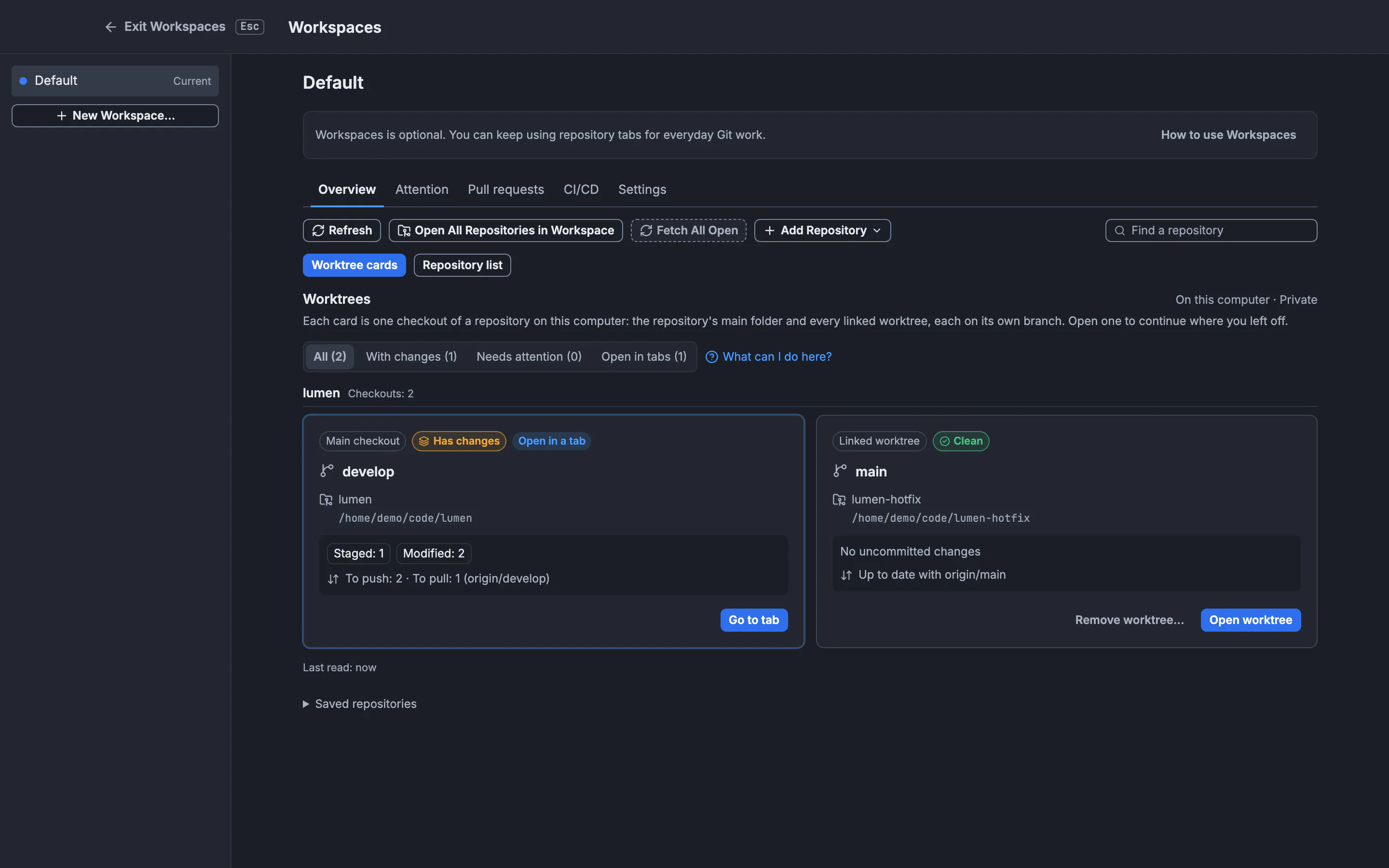
Each card names the branch, the changes and the sync state. Filters sit above the cards.GitTree interface with a demonstration repository. Read a card
Cards are grouped by repository, with Checkouts: and the count, and the main checkout first. A card shows Main checkout or Linked worktree, its status, Open in a tab when a tab shows it, the branch as its title, the folder and path, each kind of change (Staged, Modified, New files, Conflicts) and how it stands against its upstream (To push, To pull).
Find what needs work
Use the filters: All, With changes, Needs attention (conflicts, a missing folder, an unreadable checkout or an upstream that no longer exists) and Open in tabs. Each shows how many cards it holds. The search box narrows by name or branch.
Open, resume or remove
Open worktree opens that exact folder through the usual repository-trust flow; Go to tab brings its open tab forward; Resume worktree also restores where you left off. On a linked worktree, Remove worktree… first shows what would be lost, then removes only that checkout.
Expected result
You see every checkout in one place, which ones need work, and you reach the right one in a click.
What each status means
| Status | Meaning | What to do |
|---|---|---|
| Clean | No uncommitted changes | Nothing; open it to continue |
| Has changes | Staged, modified or new files | Open it to commit or stash |
| Conflicts | A merge, rebase or pick stopped on conflicts | Resolve the conflicts before committing or switching branches |
| Not trusted yet | The repository is in restricted mode, so changes are not read | Open it and decide on trust |
| Folder missing | The checkout’s folder no longer exists | Remove the worktree to clear its record (a main checkout: locate or remove it in the Repository list) |
| Cannot be read | GitTree could not read the checkout | Refresh, or open it to see why |
A status that could not be read is never shown as clean. Changed files count paths, not lines or task progress.
What the cards read
The survey is local: it reads Git’s worktree list and status, and never fetches, starts Nour, runs setup scripts, creates a worktree or shares anything with an organization. Refresh after moving or changing worktrees. If discovery fails or reaches 200 cards, the known cards stay with a partial-results notice.
If something goes wrong
The workspace has no cards
Add repositories to the workspace, or create a worktree from a repository’s WORKTREES section in the left panel, then Refresh.
Remove worktree… is off
Open the worktree’s repository first; removal runs in that repository’s tab. The main checkout is never removed here.
Open worktree is off
Switch to this workspace first, or the folder is missing or its path cannot be opened exactly.
Questions
Are worktree cards a backup?
No. They are rebuilt from Git’s own worktree records every time; deleting a folder or reinstalling GitTree does not restore files.
Do I need Pro?
No. Worktree cards are part of the Free plan. Opening a Nour conversation from a resumed worktree keeps Nour’s Pro requirement.