Draft a changelog from commits
Changelog draft reads the first-parent commits between two points, groups them, suggests a next version and lets you copy Markdown. The note says it is a draft only. Nothing is tagged, released or pushed. You review the messages before you share them.
Works in GitTree Free: every local Git feature, with no account needed.
On this page
Before you start
- Changelog draft is part of the Free plan. Both endpoints must already be commits. The dialog says Choose both committed endpoints until they are.
- Messages you want grouped should follow Conventional Commits (
feat:,fix:,feat!:). Plain messages are counted for review. They are not invented categories.
Where to find it
- A commit’s menu, or a tag’s menu: Changelog draft.
Alt+L, or the command palette.
| Action | macOS | Windows and Linux |
|---|---|---|
| Changelog draft | ⌥L | Alt+L |
| The command palette | ⌘⇧P | Ctrl+Shift+P |
Steps
Open Changelog draft
Select the commit that should end the range, or the tag you are writing notes for, and choose Changelog draft. You can also press
Alt+L. The title is Changelog draft. The note says Draft only. Review commit messages before sharing. Nothing is published.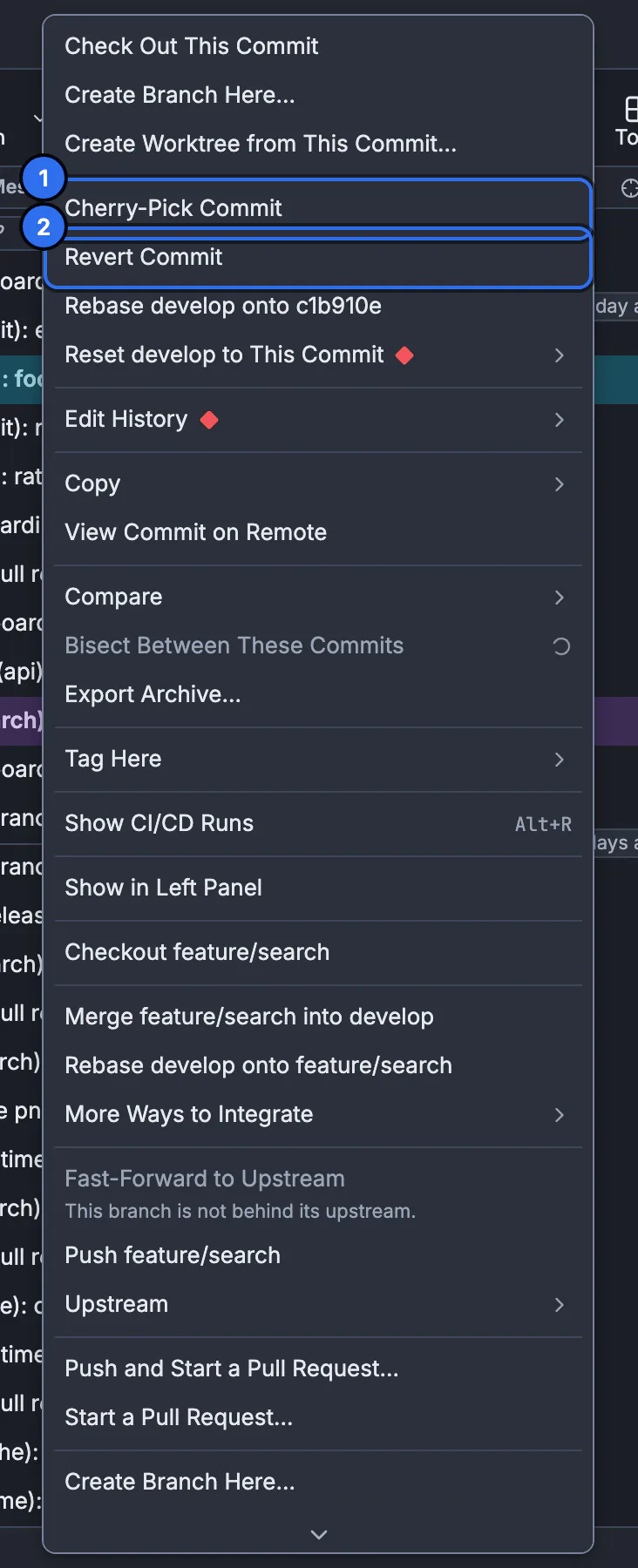
Changelog draft is on this menu, and on a tag’s menu. The still shows the commit menu.GitTree interface with a demonstration repository. Set the range
From (excluded) is the commit or tag you already released. To (included) is the new tip. The scope line says the draft uses first-parent history. Commits that arrived only through a merge are represented by the merge commit, not listed one by one.
Generate the draft
Press Generate draft. Stop asks the history read to finish. The draft appears under Editable Markdown draft, with Suggested version when a version can be proposed, and Baseline tag when a version tag points at the excluded endpoint. Copy Markdown copies it. Markdown copied confirms the copy.
Edit, then decide where it goes
Edit the Markdown in the box. Replace draft with proposal puts the generated text back after you edit. If you change the endpoints, GitTree says the endpoints changed and your edited draft is preserved. Insert draft into release notes is offered when you are writing notes for a release. Closing after edits asks Discard edited draft? Copy first if you need the words.
Expected result
You have Markdown on the clipboard or in the release-notes field. No tag was created and no release was published. Read the groups before you paste them into a release. Plain messages, reverts and merges are called out so you can rewrite them.
How commits are grouped
| Group | What is placed there |
|---|---|
| Breaking changes | Commits marked as breaking, including a ! or a BREAKING CHANGE footer |
| Features | feat commits |
| Fixes | fix commits |
| Performance | perf commits |
| Other | Recognized types that are none of the above, and messages that still need a look |
The counts line is Needs review, with plain messages, reverts, merges and undecodable messages. Those numbers are why a version may be withheld. No commits in this range; no release is proposed means the endpoints exclude every commit.
How the suggested version is chosen
The suggestion starts from a version tag on the excluded endpoint. The dialog explains the reason: breaking changes suggest a major version, or a minor while the major is zero. Features suggest a minor. Other recognized Conventional Commits suggest a patch. You can ignore the suggestion. Choose the next version after review appears when GitTree will not pick one.
git log --first-parent --pretty=format:%s v1.2.0..HEAD
git tag --points-at v1.2.0^{}
The same range in a terminal is git log --first-parent from the excluded commit to the included tip. GitTree does not run git tag for you. Creating the tag is tags. Publishing notes on a host is a separate release action. The tutorial lesson on tags shows how a tag names a commit.
Nothing is published
Copy Markdown only copies text. Insert draft into release notes fills a field. Neither creates a tag, a GitHub release or a push. If copy fails, the dialog says Could not copy. Select and copy the draft text. Your edited draft stays in the box until you replace it or discard it.
If something goes wrong
“Choose both committed endpoints.”
From or To is not a commit yet. Pick two commits, or a tag that points at a commit. A branch name that does not resolve will not generate.
“No version tag points at the excluded endpoint.”
There is nothing to increment. Choose the next version yourself, or tag the excluded commit first and generate again.
“Different version tags point at the excluded endpoint. Choose the baseline version.”
More than one version tag sits on that commit. Pick the baseline you mean. GitTree will not guess which tag is the product version.
“The baseline is a prerelease. Choose the release channel and version.”
A prerelease tag does not imply the next stable number. Choose the channel and the version, then keep the draft.
“Could not copy. Select and copy the draft text.”
The clipboard was refused. Select the Markdown in the box and copy it with the system shortcut. The draft is still there.
Questions
Does Changelog draft create a release?
No. The note says nothing is published. You copy Markdown or insert it into release notes. You tag and publish yourself.
Which commits are included?
First-parent history from the excluded endpoint up to and including the tip. A merged branch’s commits are represented by the merge commit.
Why is there no suggested version?
The dialog withholds one when the baseline tag is missing, ambiguous or a prerelease, when plain messages, reverts, merges or undecodable messages need review, or when a version component cannot be incremented.
Will my edits survive a new range?
Yes until you replace them. The dialog says your edited draft is preserved. Replace draft with proposal overwrites it with the new text.
Do I have to use Conventional Commits?
No. Plain messages are listed under Needs review. The groups and the suggested version are more specific when subjects use feat, fix and the breaking-change marker.