GitTree vs Sublime Merge
The free Sublime Merge alternative, with pull requests and undo built in
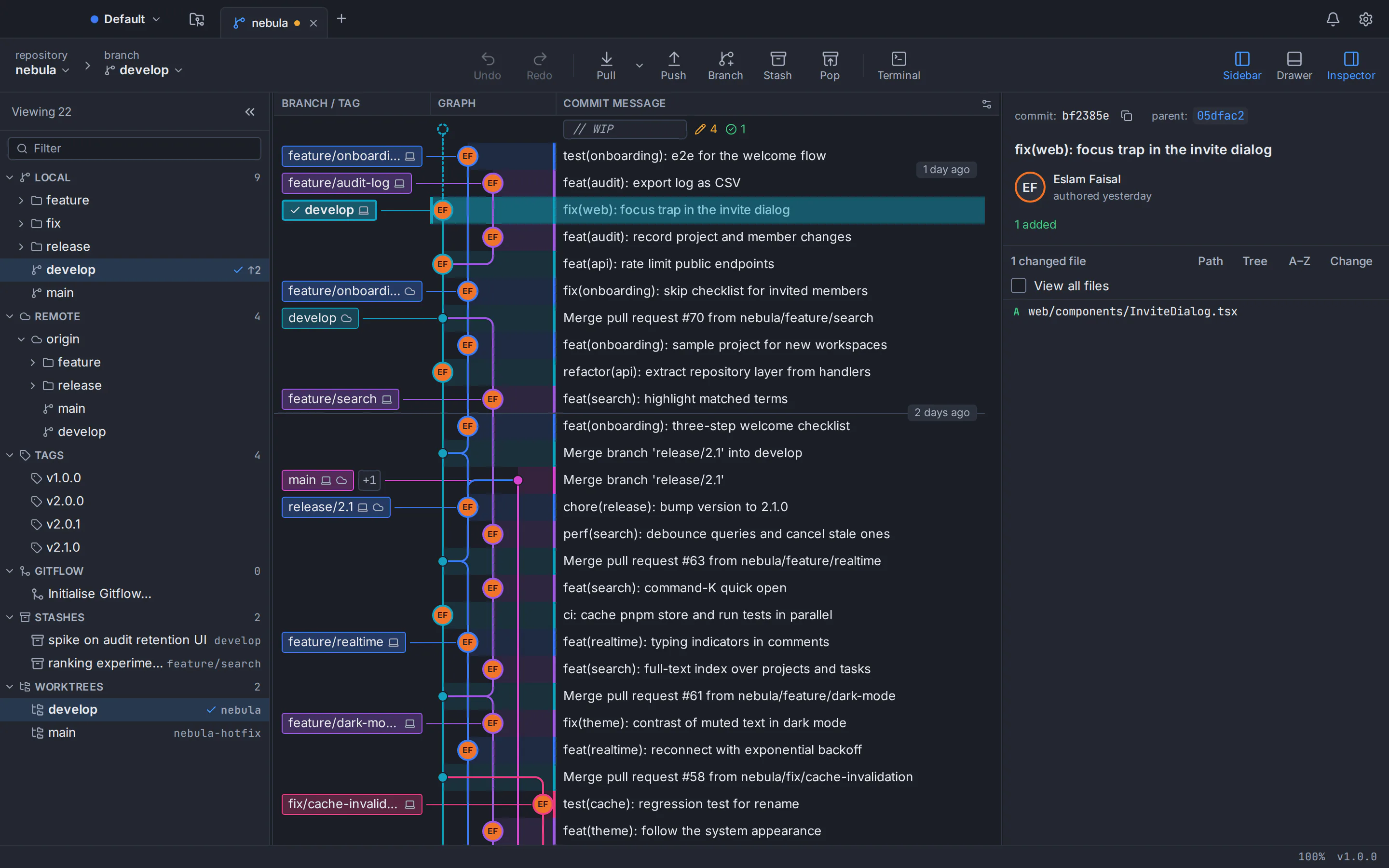
GitTree is a free Sublime Merge alternative: a desktop Git client for macOS, Windows and Linux. Like Sublime Merge, it gives you a fast commit graph, line-by-line staging and a three-way conflict editor. It adds pull requests and CI checks for GitHub, GitLab, Bitbucket and Azure DevOps, a drag-and-drop interactive rebase plan, undo and redo for commits, resets, rebases and other risky steps, and a docked terminal, with no licence to buy today. Below is an honest, sourced comparison with Sublime Merge.
Free for macOS, Windows and Linux. Sign in with a free GitTree account; no licence key, no credit card.
Last checked against Sublime Merge’s official pages:
The short answer
- Price today
- GitTree is $0; Sublime Merge needs a licence for continued use
- Pull requests
- Built into GitTree; not part of Sublime Merge
- Desktop systems
- Both run on macOS, Windows and Linux
- Where Sublime Merge leads
- No account, bundled Git and wider Linux packaging
Why developers look for a Sublime Merge alternative
Sublime Merge is a fast, carefully made Git client from Sublime HQ, the makers of Sublime Text. These are the reasons people most often give for trying something else.
Continued use needs a licence
Sublime Merge can be evaluated for free with no enforced time limit, but its store says a licence must be purchased for continued use: US$99 for a personal licence or US$75 per user per year for a business, as of October 2026. Education discounts are not offered.
Pull requests happen in the browser
Sublime Merge works with GitHub, GitLab and other hosts as plain Git remotes. There is no pull request view in the app; in-app GitHub pull request support has been an open request on its official tracker since 2018.
Reordering commits one step at a time
History is edited from the commit menu: reword, edit, squash, fixup, drop and Move Commit Up or Down. Drag-and-drop reordering and a single rebase plan are still open requests.
No reflog view or docked terminal
There is no reflog view in the app, so finding a lost commit usually means running git reflog on the command line, and Open in Terminal launches a separate terminal window instead of one inside the app.
Branch diffs, file stashes and external tools
Diff between branches is the most-upvoted open request on Sublime Merge’s tracker. Stashing individual files and launching an external diff or merge tool from the app have been open requests since 2018 too.
English only, no AI drafts
The interface is available in English only, and no AI drafting of commit messages or descriptions appears on Sublime Merge’s official pages or changelog.
Why developers choose GitTree
GitTree keeps what people like about a fast Git client and adds the hosting, history and recovery tools around it.
Pull requests without the browser
List, create, review, comment on and merge pull and merge requests, re-run CI checks and follow a dashboard across repositories. GitHub and Bitbucket support is the most tested; GitLab and Azure DevOps support is new.
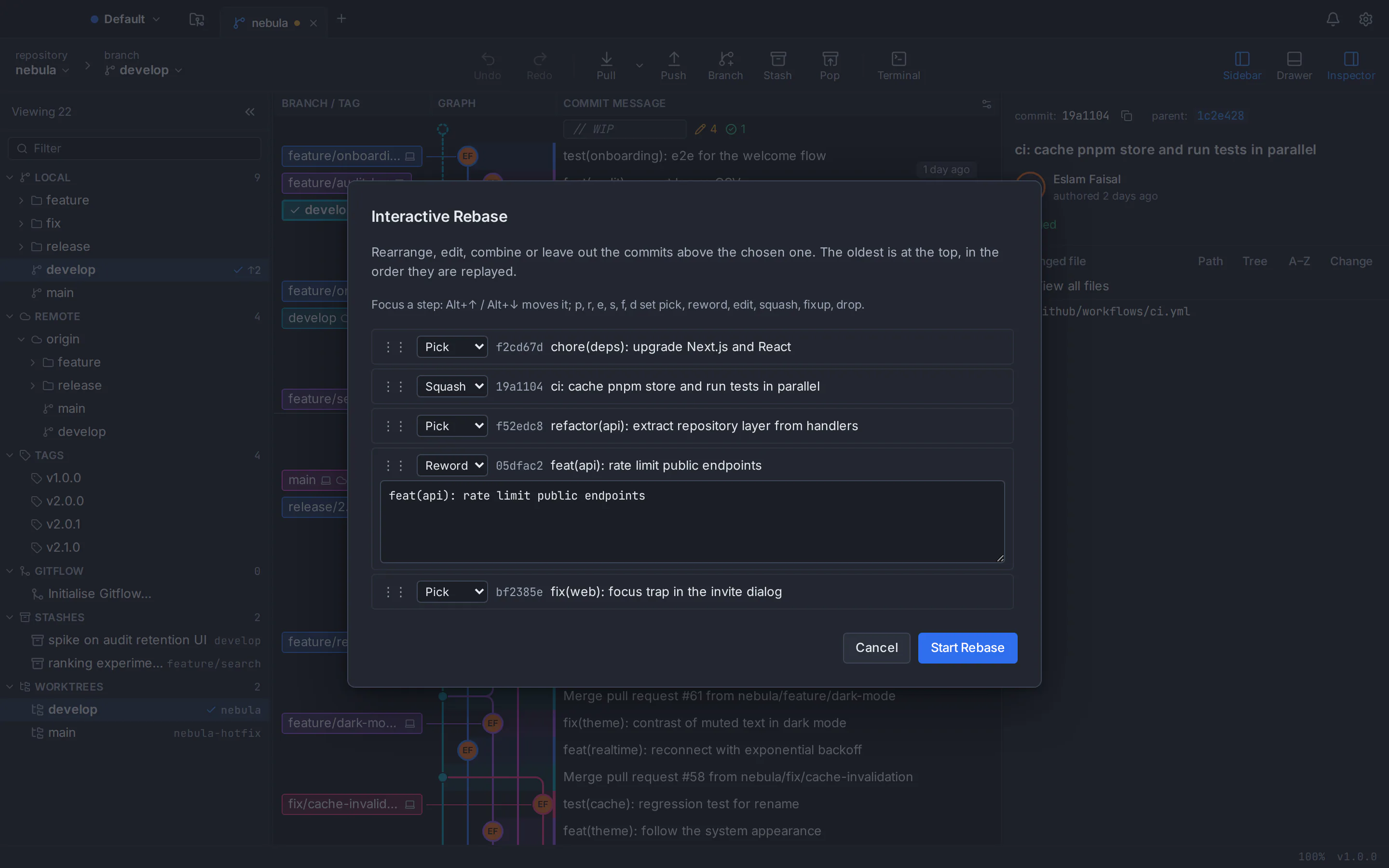
A rebase plan you can drag
Interactive rebase shows the whole plan at once: pick, reword, edit, squash, fixup and drop, reordered by drag or keyboard, with autosquash, autostash and update-refs.
Undo for the risky operations
Undo and redo from the toolbar reverse commits, checkouts, resets, rebases, discards and branch or tag deletes. All 19 kinds of destructive step, force-pushes and stash drops included, are snapshotted first so they stay recoverable, and a reflog view restores older states.
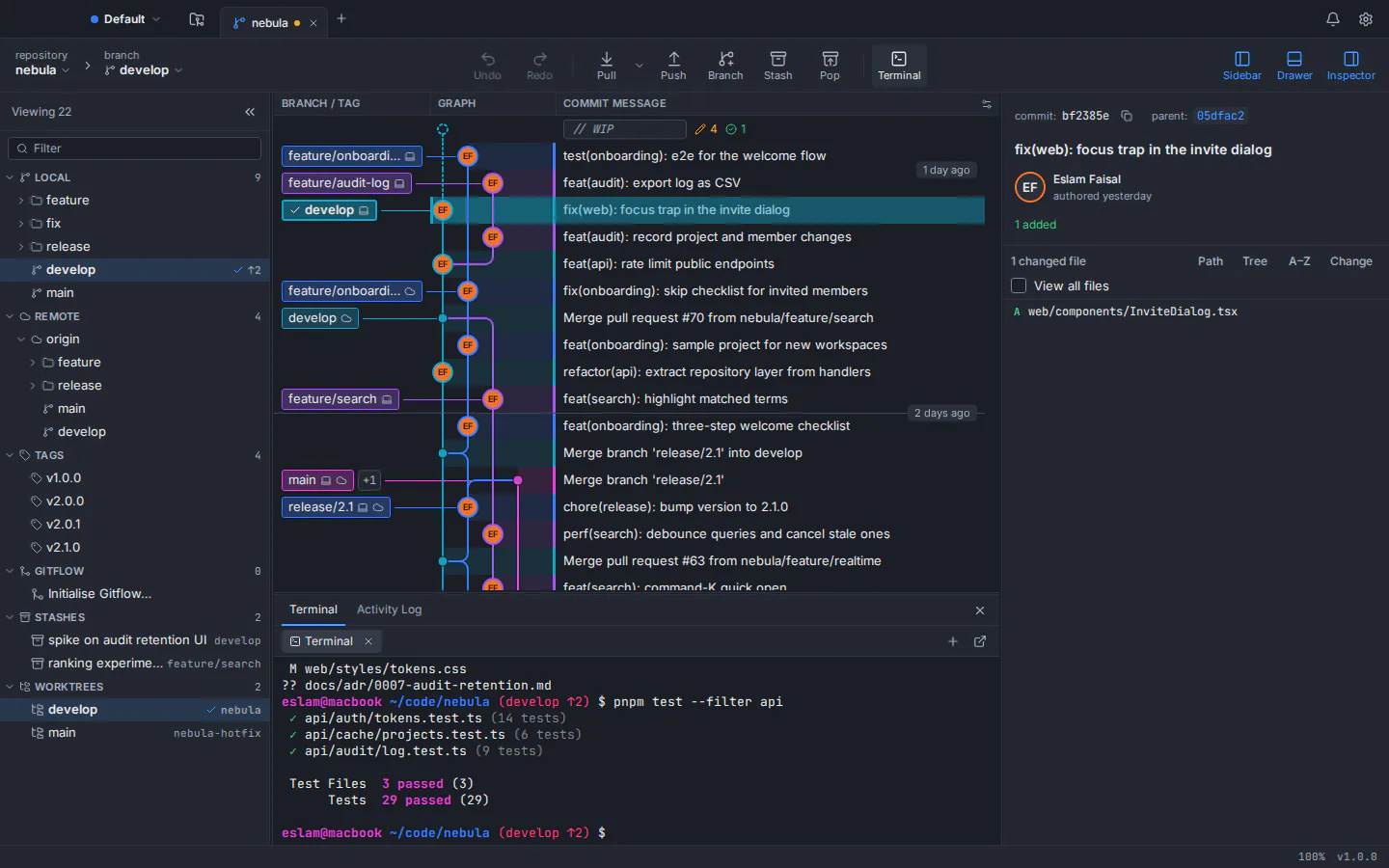
A terminal under the graph
Your own shell docked inside the window, beside a command palette of about 300 commands and keyboard shortcuts you can rebind.
Compare refs, stash lines, open your tools
Compare any two branches, tags or commits, stash only the lines you select, and open Beyond Compare, Meld, KDiff3, P4Merge, VS Code or a JetBrains IDE from the app.
Private by design, AI on your terms
No telemetry, analytics or crash upload, and tokens stay in the system keychain. AI commit messages and pull request descriptions come from your own Claude Code, Codex or Antigravity CLI, only when you click Generate.
GitTree vs Sublime Merge: feature comparison
Both are fast desktop Git clients for macOS, Windows and Linux that run real Git underneath. They differ most in price, hosting integration, history tools and packaging. Products change, so the official sources are linked at the bottom of the page.
- Included
- Partly, or with limits
- Needs a paid licence
- Not available
| Topic | GitTree | Sublime Merge |
|---|---|---|
| Price and access | ||
| Price | GitTreeIncluded: Free today, for individuals and organizations | Sublime MergeNeeds a paid licence: Free evaluation; a licence is required for continued use (as of October 2026: US$99 personal, US$75 per user per year for business) |
| Commercial use | GitTreeIncluded: Included free, private repositories too | Sublime MergeNeeds a paid licence: Businesses need a licence for each person who uses it |
| Account and sign-in | GitTreePartly, or with limits: Free GitTree account; network needed on first launch, then a check at least every 7 days | Sublime MergeIncluded: No account: a licence key unlocks the app |
| Long-term use | GitTreePartly, or with limits: Free today with no paid plan; there is no perpetual licence to own | Sublime MergeIncluded: A personal licence never expires: 3 years of updates, then a paid upgrade for newer versions |
| Desktop systems and installers | ||
| macOS | GitTreeIncluded: One universal app for Apple silicon and Intel, macOS 13 or later, signed and notarized | Sublime MergeIncluded: Native on Apple silicon and Intel, downloaded as a .zip |
| Windows | GitTreePartly, or with limits: 64-bit installer for Windows 10 (22H2) and Windows 11; not code-signed yet, no portable build | Sublime MergeIncluded: 64-bit installer and an official portable version |
| Linux | GitTreePartly, or with limits: .deb and AppImage for x86_64 Ubuntu 22.04+ and Debian 12+; unsigned, verified with SHA-256 checksums | Sublime MergeIncluded: x86_64 builds as .deb, .rpm and Arch packages, 64-bit Arm builds as .deb, GPG-signed, with official package repositories |
| Git itself | GitTreePartly, or with limits: Uses your installed Git 2.39 or newer (Git for Windows on Windows) | Sublime MergeIncluded: Bundled with the app on macOS and Windows; no bundled Git is listed for Linux |
| History, staging and commits | ||
| Visual commit graph | GitTreeIncluded: Colour-coded lanes, labels, search and filters; smooth past 100,000 commits | Sublime MergeIncluded: Coloured graph with branch labels and instant search as you type |
| Hunk and line staging | GitTreeIncluded: Files, hunks or single lines; discard the same way, with undo | Sublime MergeIncluded: Files, hunks or single lines, plus an editor for staged content |
| Interactive rebase | GitTreeIncluded: One plan with pick, reword, edit, squash, fixup and drop; reorder by drag or keyboard | Sublime MergePartly, or with limits: Reword, edit, squash, fixup, drop and move commits up or down from the commit menu; no drag-and-drop plan |
| Undo and recovery | GitTreeIncluded: Toolbar undo and redo for commits, resets, rebases, discards and more; risky steps snapshotted first; a reflog view with restore | Sublime MergePartly, or with limits: A Repository > Undo menu whose scope is not documented; no reflog view |
| Merge conflicts | GitTreeIncluded: Three-way editor with per-hunk and per-line choices, conflict prediction and rerere | Sublime MergeIncluded: Built-in three-column merge tool, also usable as a standalone Git merge tool |
| Signed commits | GitTreeIncluded: GPG, SSH or X.509, with signature badges in the graph | Sublime MergeIncluded: Creates and verifies signed commits and tags, SSH signatures included in verification |
| Diffs and repository workflow | ||
| Compare two branches | GitTreeIncluded: Compare any two branches, tags or commits | Sublime MergePartly, or with limits: Diff any two selected commits; diff between branches is an open request |
| Stash | GitTreeIncluded: Push, apply, pop, rename, branch from a stash, and stash selected lines | Sublime MergePartly, or with limits: Stash with a message, apply, pop and drop; stashing single files is an open request |
| Syntax highlighting and image diffs | GitTreePartly, or with limits: 14 grammars, image diff and Markdown preview | Sublime MergeIncluded: Over 40 languages out of the box, installed third-party syntaxes and image diffs |
| Worktrees, submodules, Git LFS and Git Flow | GitTreeIncluded: All four, from the sidebar and menus | Sublime MergeIncluded: All four, plus reftable and SHA-256 repositories |
| External merge and diff tools | GitTreeIncluded: Opens Beyond Compare, Meld, KDiff3, P4Merge, WinMerge and IDEs from the app | Sublime MergeNot available: Launching an external tool from the app is an open request |
| Productivity and customisation | ||
| Built-in terminal | GitTreeIncluded: Your own shell docked under the graph | Sublime MergePartly, or with limits: Open in Terminal launches your external terminal |
| Command palette and shortcuts | GitTreeIncluded: About 300 commands, rebindable shortcuts and a cheat sheet | Sublime MergeIncluded: Command palette and key bindings |
| Deep customisation and command line | GitTreePartly, or with limits: Custom commands, rebindable shortcuts and imported themes | Sublime MergeIncluded: Menus, palette entries, Git commands, themes and packages in JSON, plus the smerge command-line tool |
| Interface languages | GitTreeIncluded: English and Arabic, with a full right-to-left layout | Sublime MergePartly, or with limits: English only |
| Integrations and AI | ||
| GitHub and Bitbucket pull requests | GitTreeIncluded: List, create, review, comment and merge; CI checks with re-run; a dashboard across repositories | Sublime MergeNot available: Plain Git over HTTPS or SSH; no pull requests in the app |
| GitLab and Azure DevOps | GitTreePartly, or with limits: New support for merge and pull requests on GitLab (gitlab.com and self-managed) and Azure DevOps | Sublime MergeNot available: Plain Git over HTTPS or SSH |
| Issues | GitTreeIncluded: GitHub and GitLab issues inside the app | Sublime MergeNot available: No issue tracker integration |
| AI drafts | GitTreeIncluded: Commit messages and pull request text through your own Claude Code, Codex or Antigravity CLI; no built-in model | Sublime MergeNot available: No AI features |
| Privacy and track record | ||
| Where your code lives | GitTreeIncluded: On your computer; GitTree runs your installed Git | Sublime MergeIncluded: Local repositories stay on your computer |
| Telemetry statement | GitTreeIncluded: Published: no telemetry, analytics or crash upload; tokens in the system keychain | Sublime MergePartly, or with limits: No privacy or telemetry statement found on its official sites as of October 2026 |
| Track record | GitTreePartly, or with limits: New: version 1.2.9, released 4 October 2026, in active development | Sublime MergeIncluded: Public since September 2018, with regular stable builds and a public changelog |
This table compares the current public products, not every setting. An “open request” is a feature request on Sublime Merge’s official issue tracker. GitTree is in active development; check its features page and release notes before moving a critical workflow.
Sublime Merge price vs GitTree
The practical difference: GitTree has no licence to buy today, for personal or business use.
GitTree
$0everything the app does today
- Private, public and local repositories
- Pull requests, interactive rebase, undo and every other feature
- Builds for macOS, Windows and Linux
- Free for individuals and organizations
Sublime Merge
US$99personal licence, as of October 2026
- Free evaluation with no enforced time limit; a licence is required for continued use
- Personal: a one-off purchase with 3 years of updates, for all of your computers
- Business: US$75 per user per year, one seat for each person
- Bundle with Sublime Text: US$168; no education discount
Prices as listed on Sublime HQ’s store and sales FAQ in October 2026; they change over time, so check the official store before you buy. A personal licence keeps working after its 3 years of updates, and newer versions then need a paid upgrade (US$80).
A Sublime Merge alternative for Mac, Windows and Linux
The same GitTree on macOS, Windows and Linux, running the Git 2.39 or newer that you already have installed.
Sublime Merge alternative for Mac
One universal app that runs natively on Apple silicon and Intel Macs with macOS 13 Ventura or later, signed and notarized by Apple.
Sublime Merge alternative for Windows
A 64-bit installer for Windows 10 (22H2) and Windows 11. Install Git for Windows first: GitTree uses it instead of bundling its own Git.
Sublime Merge alternative for Linux
A .deb package or a portable AppImage for 64-bit Ubuntu 22.04+ and Debian 12+. On Ubuntu 22.04 and Linux Mint 21, add the git-core PPA for a newer Git first.
Read the Linux install guide
Which one should you choose?
Both are good tools. Pick the one that matches how you work, then try it on a noncritical repository before you move daily work.
Choose GitTree if…
- You want a capable Git client without buying a licence, including at work
- You review and merge pull requests on GitHub, GitLab, Bitbucket or Azure DevOps
- You rewrite history often and want a drag-and-drop rebase plan, undo and a reflog view
- You want a docked terminal, AI drafts through your own CLI or an Arabic interface
Consider Sublime Merge if…
- You want no account at all, or work on machines that stay offline for weeks
- You want Git bundled with the app instead of installing it yourself
- You need a portable Windows build, 64-bit Arm Linux builds, .rpm or Arch packages, or signed package repositories
- You value deep JSON customisation, the smerge command-line tool or 40+ highlighted languages
- You prefer a perpetual licence from a vendor with a track record since 2018
How to switch from Sublime Merge to GitTree
Nothing has to be exported. Your repositories are standard Git, so both apps can open them side by side while you decide.
Check your Git version
GitTree uses the Git already on your computer instead of bundling one. Run git --version in a terminal; if Git is missing or older than 2.39, install a current version first (Git for Windows on Windows).
Download GitTree
Get the free installer for macOS, Windows or Linux from the download page and install it.
Sign in with a free account
Create a free GitTree account on this website with GitHub, GitLab, Bitbucket or Azure DevOps, then sign in from the app.
Open the repositories you already have
Choose Open and select a repository folder, or scan a folder for repositories. History, branches, remotes, stashes and worktrees live in the repository itself, so there is nothing to import.
Connect your hosting accounts
Optionally connect GitHub, GitLab, Bitbucket or Azure DevOps in Preferences to work with pull requests and CI checks. Every other remote keeps working over HTTPS or SSH.
Bring over your setup and try it
Set your signing key, external merge tool, theme and shortcuts in Preferences, then try a staged commit, an interactive rebase and an undo on a test branch.
Sublime Merge alternative: frequently asked questions
What is the best free Sublime Merge alternative?
If you want an app like Sublime Merge without buying a licence, GitTree is built for that: a free desktop Git client for macOS, Windows and Linux with a fast commit graph, line staging, a three-way conflict editor, interactive rebase, undo and pull requests. Try it on one repository and compare it with your current workflow.
Is Sublime Merge free?
No. Sublime Merge can be downloaded and evaluated for free, and the evaluation has no enforced time limit, but its official store says a licence must be purchased for continued use. As of October 2026 a personal licence costs US$99 and a business licence US$75 per user per year.
How much does a Sublime Merge licence cost?
As of October 2026: US$99 for a personal licence with 3 years of updates (it never expires, and newer versions after that need a US$80 upgrade), US$168 bundled with Sublime Text, or US$75 per user per year for businesses. Education discounts are not offered. Check Sublime HQ’s store for current prices.
Can I use Sublime Merge for free at work?
Only with a licence. A personal licence may be used on every computer where you are the main user, including at work, but businesses and organizations must buy business licences, at least one for each person who uses it. GitTree is free today for individuals and organizations, commercial work and private repositories included.
Does Sublime Merge run on Linux?
Yes. Sublime Merge has official Linux builds for x86_64 and 64-bit Arm, with .deb, .rpm and Arch packages and signed package repositories. GitTree also runs on Linux, as a .deb package or AppImage for x86_64 Ubuntu 22.04+ and Debian 12+, and it is free today.
Is there a free Sublime Merge alternative for Linux?
Yes. GitTree is tested on 64-bit Ubuntu 22.04 or later and Debian 12 or later, installed from a .deb package or a portable AppImage; derivatives with WebKitGTK 4.1, such as Linux Mint 21+, can run it but are untested. It needs Git 2.39 or newer; on Ubuntu 22.04 and Mint 21, add ppa:git-core/ppa first.
Can I open my Sublime Merge repositories in GitTree?
Yes. Both apps work on ordinary Git repositories, so there is nothing to export or import. Open the same folder in GitTree and its branches, remotes, stashes, worktrees and history are already there.
Does Sublime Merge support pull requests?
Not inside the app, as of October 2026. Sublime Merge works with GitHub, GitLab and other hosts as Git remotes, and in-app GitHub pull request support is an open request on its official tracker. GitTree lists, creates, reviews and merges pull requests and shows CI checks for GitHub, GitLab, Bitbucket and Azure DevOps (GitLab and Azure DevOps support is new).
Does GitTree have drag-and-drop interactive rebase?
Yes. GitTree shows the whole rebase plan in one list: pick, reword, edit, squash, fixup and drop, reordered by drag or keyboard, with autosquash, autostash and update-refs. Undo and a reflog view are there if a rebase goes wrong.
Can GitTree undo a reset, a rebase or a deleted branch?
Yes. Undo and redo from the toolbar reverse commits and amends, checkouts, resets, rebases, discards, and branch and tag deletes. GitTree snapshots every destructive step first (19 kinds), and the reflog view restores older states. A force-push cannot be undone in place because it changed the remote, and a dropped stash is not reversed by Undo yet, but both snapshots stay recoverable.
Does Sublime Merge have AI commit messages?
No AI features appear on Sublime Merge’s official pages or changelog as of October 2026. GitTree can draft commit messages and pull request descriptions through your own Claude Code, Codex or Antigravity CLI, only when you click Generate; it has no built-in model and stores no AI key.
Does GitTree upload my code or collect usage data?
No. GitTree has no telemetry, analytics or crash upload, and your repositories stay on your computer. It talks only to your remotes, the accounts you connect, the GitTree account service for sign-in and an update check you can switch off. The optional AI draft sends the staged diff to the CLI you chose, only when you click.
Do I need Git installed to use GitTree?
Yes. GitTree does not bundle Git: it runs the Git installed on your computer, version 2.39 or newer, so every action matches what the command line would do. If Git is missing, the app explains how to install it.
Is GitTree a good Sublime Merge alternative for Mac?
Yes. GitTree is one universal app that runs natively on Apple silicon and Intel with macOS 13 Ventura or later, signed and notarized by Apple, with the same features as on Windows and Linux.
Does GitTree run on Windows?
Yes. GitTree runs on 64-bit Windows 10 (22H2) and Windows 11 with Git for Windows installed. The installer is not code-signed yet, so SmartScreen may warn: check the SHA-256 checksum, then choose More info and Run anyway.
Is Sublime Merge open source?
No. Sublime Merge is proprietary software from Sublime HQ, and its GitHub repository is an issue tracker without source code. GitTree is not open source either: it is free today but closed source, and its public repository hosts releases only.
How this comparison was checked
Sublime Merge’s licence terms and features were reviewed on 5 October 2026 against Sublime HQ’s official pages: the product site, the download page and changelog, the documentation, the store, the sales FAQ, the licence agreement and the official issue tracker for open requests. Prices and features change; the vendor’s current pages are the source of truth.
- Sublime Merge overview
- Sublime Merge download and changelog
- Sublime Merge documentation
- Sublime Merge Linux package repositories
- Sublime Merge store and prices
- Sublime HQ sales FAQ
- Sublime HQ licence agreement
- Sublime Merge official issue tracker
- GitTree features
GitTree is an independent product and is not affiliated with or endorsed by Sublime HQ Pty Ltd, the owner of Sublime Merge. Sublime Merge and Sublime Text are trademarks of their owner.
Compare Git clients
Switching from another Git client?
Honest, sourced comparisons with the Git GUIs developers use most, including what each one does better.
GitKraken alternative
Private repositories, deep undo and AI drafts with your own CLI at no cost, compared row by row with GitKraken Desktop.
Sourcetree alternative
Runs on Linux too, with a built-in conflict editor, undo and in-app pull requests, compared row by row with Sourcetree.
GitHub Desktop alternative
A commit graph, full interactive rebase and an official Linux build, compared row by row with GitHub Desktop.
Fork alternative
A Linux build, no licence to buy, undo and pull requests in the app, compared row by row with Fork.
Tower alternative
No subscription, a Linux build and a line-level conflict editor, compared row by row with Tower.
SmartGit alternative
Free for commercial use with no licence application, plus a docked terminal, undo and AI drafts, compared row by row with SmartGit.
Try the free Sublime Merge alternative on your own repository
Download GitTree, open a repository you already work on and compare the graph, staging, rebase and pull request tools for yourself.