GitTree for Windows
The free Git GUI for Windows 11 and Windows 10
GitTree is a free Git GUI and Git client for 64-bit Windows 11 and Windows 10 (22H2): a small installer of about 7.5 MB that works with the Git for Windows you already use. See your history as a colour-coded commit graph, stage single lines, rebase interactively, resolve conflicts in a three-way editor and undo mistakes, without typing Git commands. Connect GitHub, GitLab, Bitbucket or Azure DevOps, while your repositories stay on your PC and GitTree sends no telemetry.
Free · Windows 11 or Windows 10 (22H2) · 64-bit x64 · installer about 7.5 MB · needs Git for Windows 2.39 or newer
What GitTree does as a Git GUI for Windows
A small installer for 64-bit Windows
Built with Rust and Tauri, GitTree draws its window with Microsoft Edge WebView2, which Windows 11 already includes, so the installer is only about 7.5 MB. On Windows 10 the installer downloads and sets up WebView2 if it is missing.
Runs your Git for Windows
GitTree never bundles its own Git. It runs the Git for Windows you installed from git-scm.com, so every action matches what git does in PowerShell or Git Bash, and it never changes your Git config unless you ask it to.
A Git tree viewer you can read
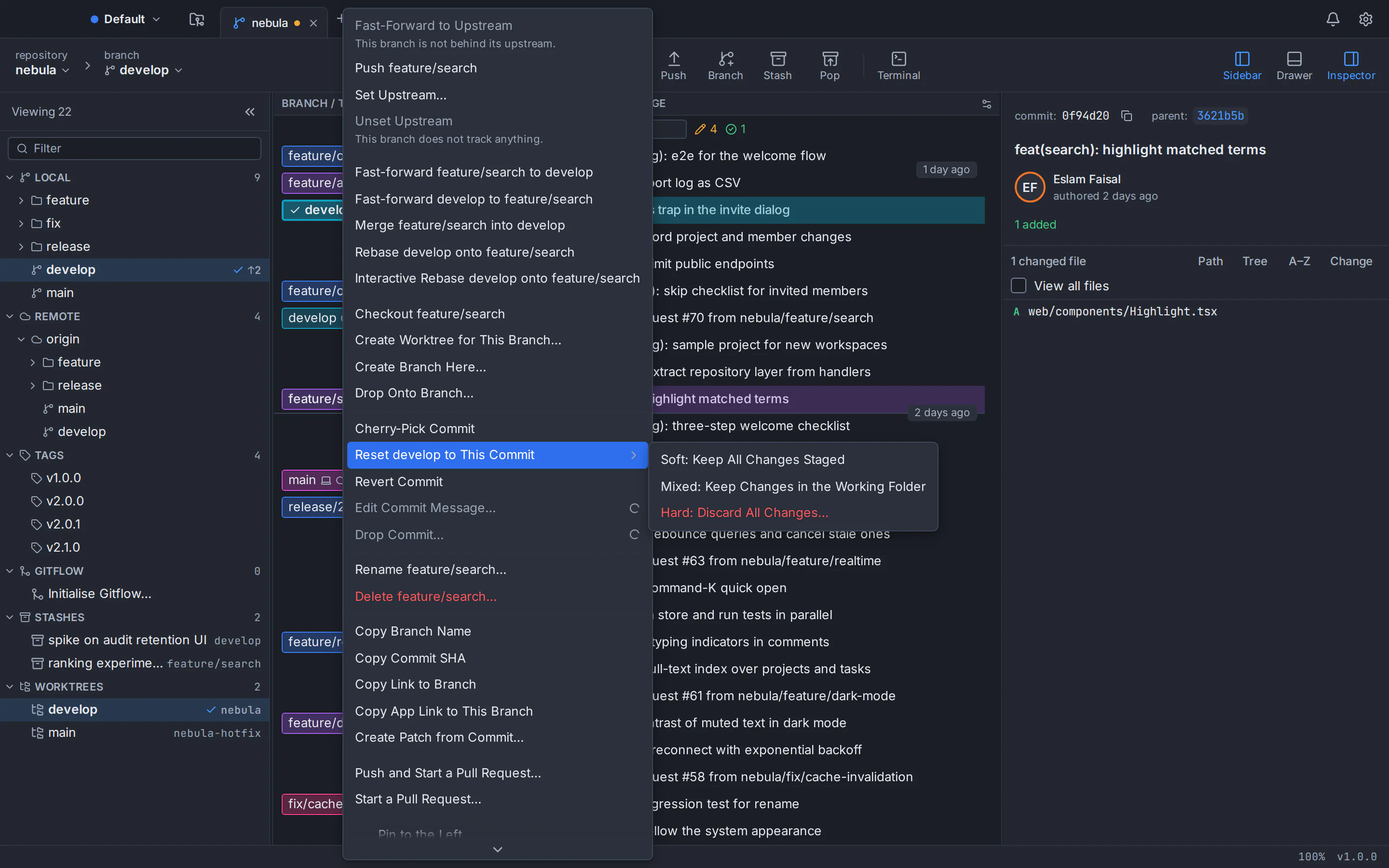
Every branch gets its own colour-coded lane, with branch, tag and remote labels, stashes, and pull request and CI chips on branch tips. Search by message, author, hash, file or changed code.
Stage lines, rebase, undo
Stage a whole file, a hunk or single lines. Reorder, squash and reword commits in an interactive rebase, fix conflicts in a three-way editor, and undo a commit, checkout, reset, rebase or discard from the toolbar: GitTree takes a snapshot before every destructive step.
Built for the keyboard and your tools
Rebindable Ctrl shortcuts, a command palette on Ctrl+Shift+P with about 300 commands, a built-in terminal with your own shell under the graph, and diffs and files that open in VS Code, JetBrains IDEs, WinMerge or Beyond Compare.
Credential Manager, zero telemetry
Tokens and passphrases live only in the Windows Credential Manager, never in files or logs. Your repositories stay on your PC, and there is no telemetry, no analytics and no crash upload.
System requirements for GitTree on Windows
- Windows version
- Windows 11, or Windows 10 version 22H2. Earlier versions of Windows are not supported.
- Processor
- 64-bit x64, with an Intel or AMD processor. There is no build for ARM processors and no 32-bit build.
- Git for Windows 2.39 or newer
- GitTree uses your Git and never bundles one. Install Git for Windows from git-scm.com, or run winget install --id Git.Git -e --source winget, and check the version with git --version.
- Microsoft Edge WebView2
- GitTree draws its interface with WebView2. Windows 11 includes it; on Windows 10 the GitTree installer downloads and sets it up if it is missing, which needs an internet connection.
- Administrator approval
- GitTree installs for all users of the PC, so the installer asks for administrator approval. The installer is about 7.5 MB (version 1.2.9).
- Free account and first sign-in
- A free GitTree account, created on this website with GitHub, GitLab, Bitbucket or Azure DevOps. The first launch needs the internet; after that GitTree works offline for up to 7 days between checks.
How to install GitTree on Windows 11 and 10
Six steps from download to your first open repository, including Git for Windows if your PC doesn’t have it yet.
Install Git for Windows 2.39 or newer
Open PowerShell or Command Prompt and run git --version. If it prints 2.39 or higher, you’re ready. If Git is missing or older, download Git for Windows from git-scm.com and run its installer, or run winget install --id Git.Git -e --source winget. Then open a new window and check git --version again.
Download the GitTree installer
Choose Download for Windows on this page. It fetches Git-Tree_<version>_x64-setup.exe, about 7.5 MB, from the newest stable GitTree release on GitHub: one installer for 64-bit Windows 11 and Windows 10.
Run the installer and approve it
Open the downloaded file. The installer is not code-signed yet, so if SmartScreen says “Windows protected your PC”, check the file’s SHA-256 (see below), then choose More info and Run anyway. GitTree installs for all users, so Windows asks for administrator approval: choose Yes.
Open GitTree from the Start menu
Start GitTree from the Start menu. If Git for Windows is missing or older than 2.39, GitTree says so and shows how to install it; after installing Git, restart GitTree.
Sign in with your free GitTree account
Choose Sign in or Create account. Your browser opens gittree.app, where you sign in with GitHub, GitLab, Bitbucket or Azure DevOps and confirm. When the browser asks to open GitTree, allow it. If it doesn’t hand you back, choose Manually enter authentication code in GitTree and paste the one-time code the website shows.
Open your first repository
On the GitTree start page, choose Open for a folder on your PC, Clone to copy a repository from a URL or a connected account, or Init to start a new one. Scan for Repositories finds the ones you already have in a folder.
Verify the Windows installer with its SHA-256 checksum
Every GitTree release on GitHub publishes SHA256SUMS.txt with the SHA-256 checksum of each installer. Run this command in PowerShell and compare the hash it prints with the line for the same file name in SHA256SUMS.txt; if you saved the installer somewhere other than Downloads, change the path. Get-FileHash prints the hash in capital letters and SHA256SUMS.txt uses lower case: it is the same checksum. Because the installer is not code-signed yet, do this before you choose Run anyway. The checksum catches a corrupt or incomplete download, not a tampered release, so download only from this website or GitHub.
Get-FileHash $env:USERPROFILE\Downloads\Git-Tree*.exe -Algorithm SHA256Troubleshooting GitTree on Windows
“Windows protected your PC”
Microsoft Defender SmartScreen may show this for the GitTree installer because it is not code-signed yet. Make sure the file came from gittree.app or GitTree’s GitHub Releases page, compare its SHA-256 with SHA256SUMS.txt, then choose More info and Run anyway. If there is no Run anyway button, a policy on your PC blocks unrecognized apps; ask your IT administrator.
Smart App Control blocked the installer
On Windows 11 with Smart App Control turned on, Windows may block the GitTree installer outright, because Smart App Control blocks unsigned apps it does not recognize. Microsoft offers no exception for a single app. Turning Smart App Control off in the Windows Security app lowers that protection for every app, so it is a decision for you or your IT administrator.
GitTree says Git was not found
GitTree uses the Git on your PC and never installs one. Install Git for Windows from git-scm.com, or run winget install --id Git.Git -e --source winget, then restart GitTree. If Git lives in an unusual folder, choose Locate Git… and pick its git.exe, or set Preferences → General → Git executable.
“This Git is too old”
GitTree needs Git 2.39 or newer, and the screen names the Git it found and its version. Run the newest Git for Windows installer from git-scm.com, or winget upgrade --id Git.Git -e --source winget, then choose Check again. To use a different Git, set Preferences → General → Git executable.
The browser doesn’t return to GitTree after you sign in
When your browser asks whether it may open GitTree, allow it. If nothing happens, choose Manually enter authentication code in GitTree and paste the one-time code the website shows. Enter it only in the app that started the sign-in.
A remote asks for your password every time
Connect the account in Preferences → Integrations, or generate an SSH key there and upload it to GitHub, GitLab or Bitbucket; GitTree keeps the token or passphrase in the Windows Credential Manager. GitTree leaves your Git config alone, so a credential helper you already use keeps answering.
GitTree for Windows: questions and answers
Is there a free Git GUI for Windows?
Yes. GitTree is a free Git GUI and Git client for 64-bit Windows 11 and Windows 10 (22H2). It shows your repository as a commit graph and lets you stage single lines, commit, branch, merge, rebase, stash and push without typing Git commands. It is free today for individuals and organizations, private repositories included, and you sign in with a free GitTree account.
Does GitTree work on Windows 11 and Windows 10?
Yes, on 64-bit (x64) Windows 11 and on Windows 10 version 22H2. The same installer covers both. Earlier versions of Windows are not supported.
Do I need Git for Windows to use GitTree?
Yes. GitTree runs the Git installed on your PC and never bundles its own, so every action matches what git would do on the command line. Install Git for Windows 2.39 or newer from git-scm.com, or run winget install --id Git.Git -e --source winget, then check it with git --version in PowerShell or Command Prompt. If GitTree was already open, restart it.
How do I install GitTree on Windows?
Install Git for Windows first. Then download Git-Tree_<version>_x64-setup.exe from this page, open it and approve the administrator prompt; if SmartScreen warns you, check the file’s SHA-256 and choose More info, then Run anyway. Open GitTree from the Start menu and sign in with your free GitTree account in the browser.
Why does Windows SmartScreen warn about the GitTree installer?
The Windows installer is not code-signed yet, so SmartScreen may show “Windows protected your PC”, especially for a new release. Download it only from this website or the Releases page of GitTree’s public GitHub repository, compare its SHA-256 with SHA256SUMS.txt, then choose More info and Run anyway. With Smart App Control turned on, Windows 11 may block the installer without offering that choice.
Does GitTree run on Windows on ARM or on 32-bit Windows?
There is no build for ARM processors and no 32-bit build. The installer is made for 64-bit x64 PCs with Intel or AMD processors, and GitTree is not tested on Windows on ARM devices.
Can I install GitTree without administrator rights?
No. GitTree installs for every user of the PC, so the installer asks for administrator approval. There is no portable build and no MSI package; on a managed work PC, ask your IT administrator to install it.
Doesn’t Git for Windows already include a Git GUI?
It does: according to gitforwindows.org, Git for Windows comes with Git BASH and Git GUI, a graphical version of most Git commands. GitTree is a separate app that runs on the same Git and adds a colour-coded commit graph, line staging, interactive rebase by drag and drop, a three-way conflict editor, undo for risky operations, and pull requests for GitHub, GitLab, Bitbucket and Azure DevOps. You can keep using both.
Does GitTree work with GitHub, GitLab, Bitbucket and Azure DevOps?
Yes. Any Git remote works over HTTPS or SSH. You can also connect GitHub (including GitHub Enterprise Server), GitLab (gitlab.com and self-managed), Bitbucket Cloud, Bitbucket Data Center and Azure DevOps to clone repositories and work with pull requests and CI checks. Support for GitLab, Azure DevOps, GitHub Enterprise Server and Bitbucket Data Center is new.
Where does GitTree keep my tokens and passwords on Windows?
Only in the Windows Credential Manager, never in files, logs or URLs. That covers the tokens of the hosting accounts you connect and your passphrases. Disconnect an account in Preferences → Integrations to remove its token from the Credential Manager.
Is GitTree free for commercial use and private repositories?
Yes. GitTree is free today for individuals and organizations, private repositories included, and there is no paid plan. It is free to use but not open source: its source code is private, and its public GitHub repository hosts the releases.
Does GitTree work offline?
Mostly. The first launch needs the internet so you can sign in; after that GitTree works offline for up to 7 days between checks. Your repositories are on your PC, so commits, branches, diffs and history need no connection, while fetch, pull and push need your remote.
How do I uninstall GitTree from Windows?
Open Settings → Apps → Installed apps (Apps & features on Windows 10), find GitTree and choose Uninstall. To remove its settings and caches too, delete the com.eslamfaisal.opengittree folders in %APPDATA% and %LOCALAPPDATA%. Disconnect your hosting accounts in Preferences → Integrations first if you want their tokens removed from the Credential Manager.
Compare Git clients
Switching from another Git client?
Honest, sourced comparisons with the Git GUIs developers use most, including what each one does better.
GitKraken alternative
Private repositories, deep undo and AI drafts with your own CLI at no cost, compared row by row with GitKraken Desktop.
Sourcetree alternative
Runs on Linux too, with a built-in conflict editor, undo and in-app pull requests, compared row by row with Sourcetree.
GitHub Desktop alternative
A commit graph, full interactive rebase and an official Linux build, compared row by row with GitHub Desktop.
Fork alternative
A Linux build, no licence to buy, undo and pull requests in the app, compared row by row with Fork.
Tower alternative
No subscription, a Linux build and a line-level conflict editor, compared row by row with Tower.
SmartGit alternative
Free for commercial use with no licence application, plus a docked terminal, undo and AI drafts, compared row by row with SmartGit.
Sublime Merge alternative
No licence to buy, plus pull requests, a drag-and-drop rebase plan and undo, compared row by row with Sublime Merge.
More about GitTree
The download page for macOS, Windows and Linux, every GitTree feature, and the install guide for Ubuntu and Debian.