Git GUI for macOS, Windows and Linux
See your whole repository. Change it with confidence.
Git Tree turns your history into a clear, interactive commit graph and puts every everyday Git action one click away — staging, commits, branches, merges, rebases and pushes. Sign in once with GitHub; your repositories never leave your computer, and there is no telemetry.
Free · macOS 13+ (Apple silicon and Intel) · Windows 10 and 11 · Linux: Ubuntu 22.04+ and Debian 12+
Ready in a minute
Sign in once with a free Git Tree account, then open any repository.
Stays on your computer
Your code never leaves your machine. Only your account lives online.
Zero telemetry
Nothing is tracked. The only network traffic is what you start.
Your own Git
Every command runs through the Git you already have installed.
- commits scroll smoothly in the graph
- 100K+
- bytes of telemetry, ever
- 0
- feature areas, from staging to pull requests
- 12
- platforms: macOS, Windows and Linux
- 3
Built for how you really work
Every Git workflow, in one clear window
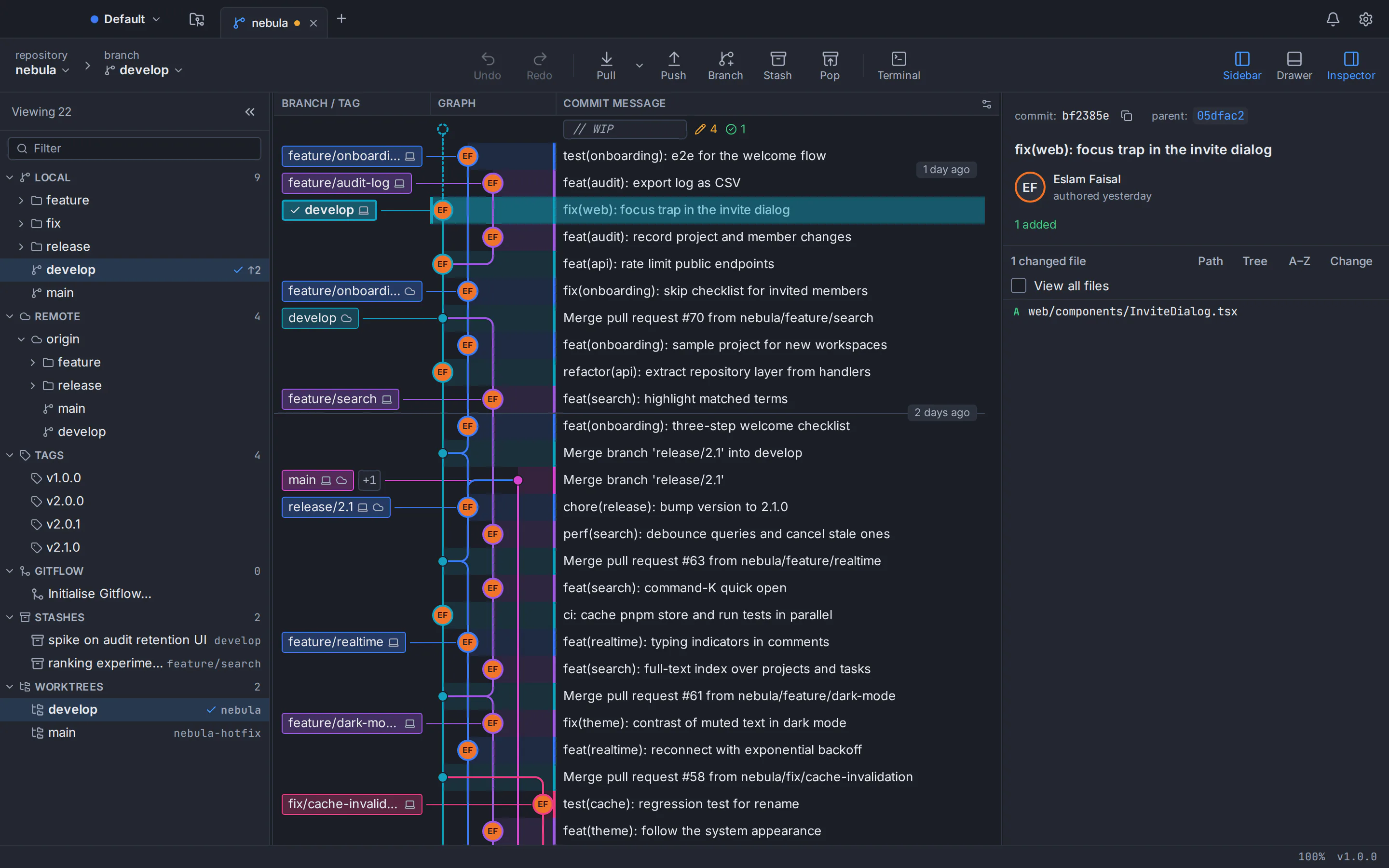
Repository tabs, a reference sidebar, the commit graph and a details panel — the layout experienced developers expect, with nothing hidden behind menus.
A commit graph you can actually read
Every branch gets its own colour-coded lane, so merges, releases and feature work read at a glance — even in repositories with years of history.
- Smooth scrolling well past 100,000 commits
- Branch, remote and tag labels right on the graph
- Avatars and relative dates for every commit
Every command, one click away
The Git you know, made visible
- $gitcommit-m "feat: ship it"
- $gitrebase-i HEAD~4
- $gitcherry-picka3f9c1e
- $gitstashpush -u
- $gitmerge--no-ff feature/graph
- $gitworktreeadd ../hotfix main
- $gitpush--force-with-lease
- $gitbisectstart
- $gitblamesrc/app.ts
- $gitreset--soft HEAD~1
- $gitreflog
- $gitlfstrack "*.psd"
Diff, blame and history
Understand every change before it ships
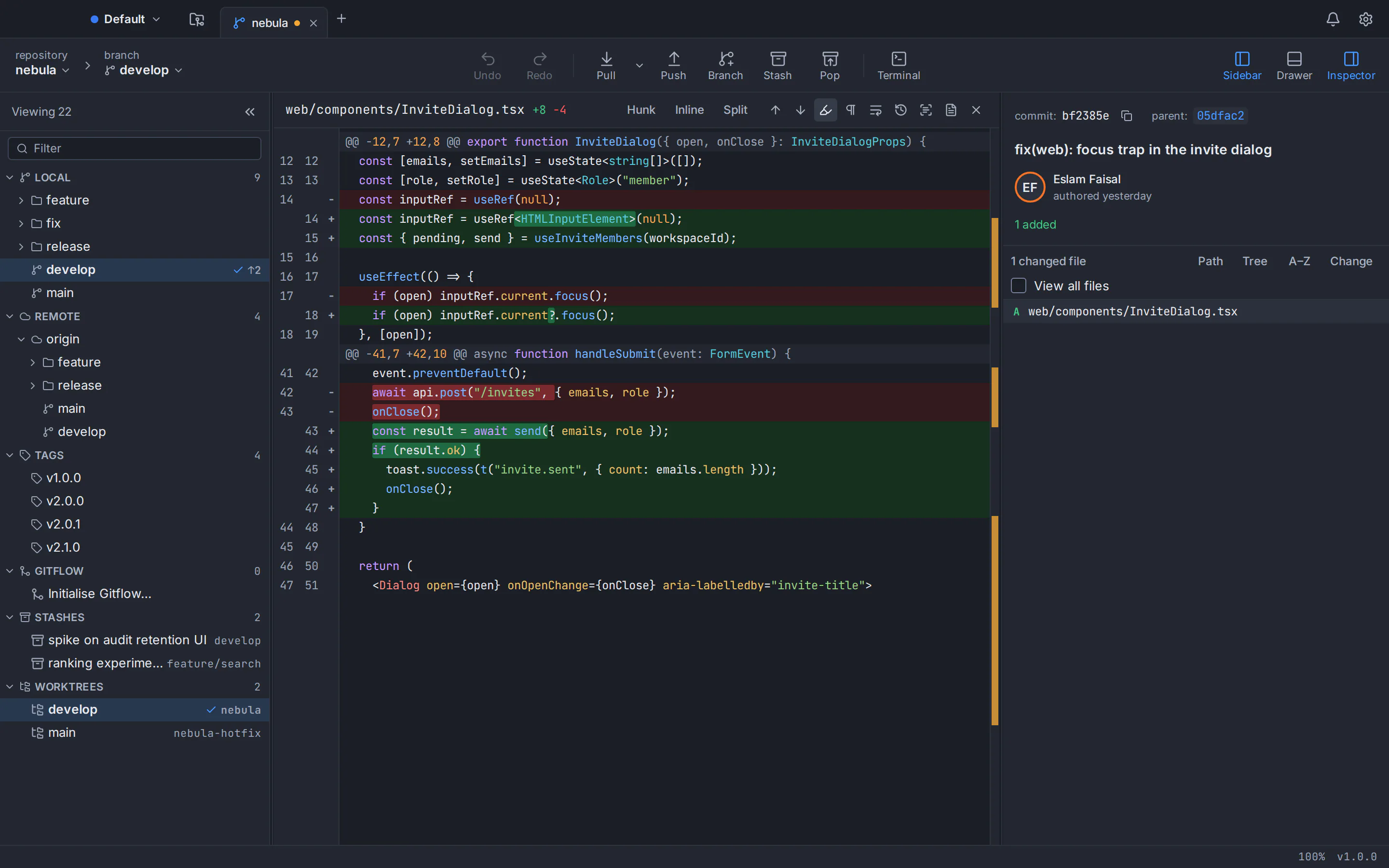
Read a commit’s changes as a split or inline diff with syntax highlighting for dozens of languages. Follow a file through renames, see who changed each line and compare any two revisions.
- Split and inline diff views
- Blame and file history that follow renames
- Compare branches, tags or any two commits
Commit with care
Write better commits, faster
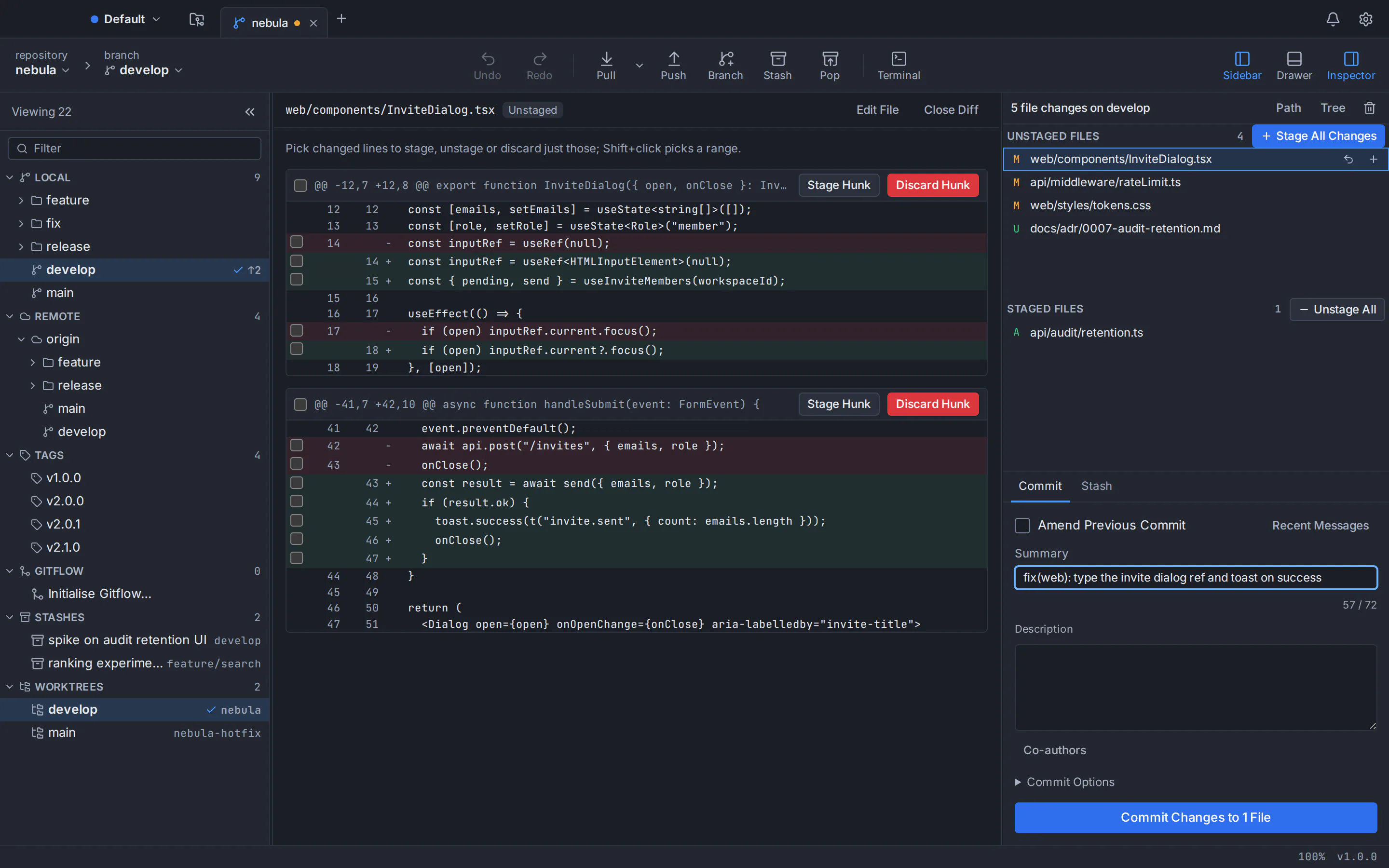
A focused commit panel shows what is staged, counts your summary against the 72-character convention and remembers recent messages. Amend the last commit or add co-authors with one click.
- Live summary length check
- Recent messages and commit templates
- Amend, co-authors and signed commits
Terminal included
The command line is always one click away
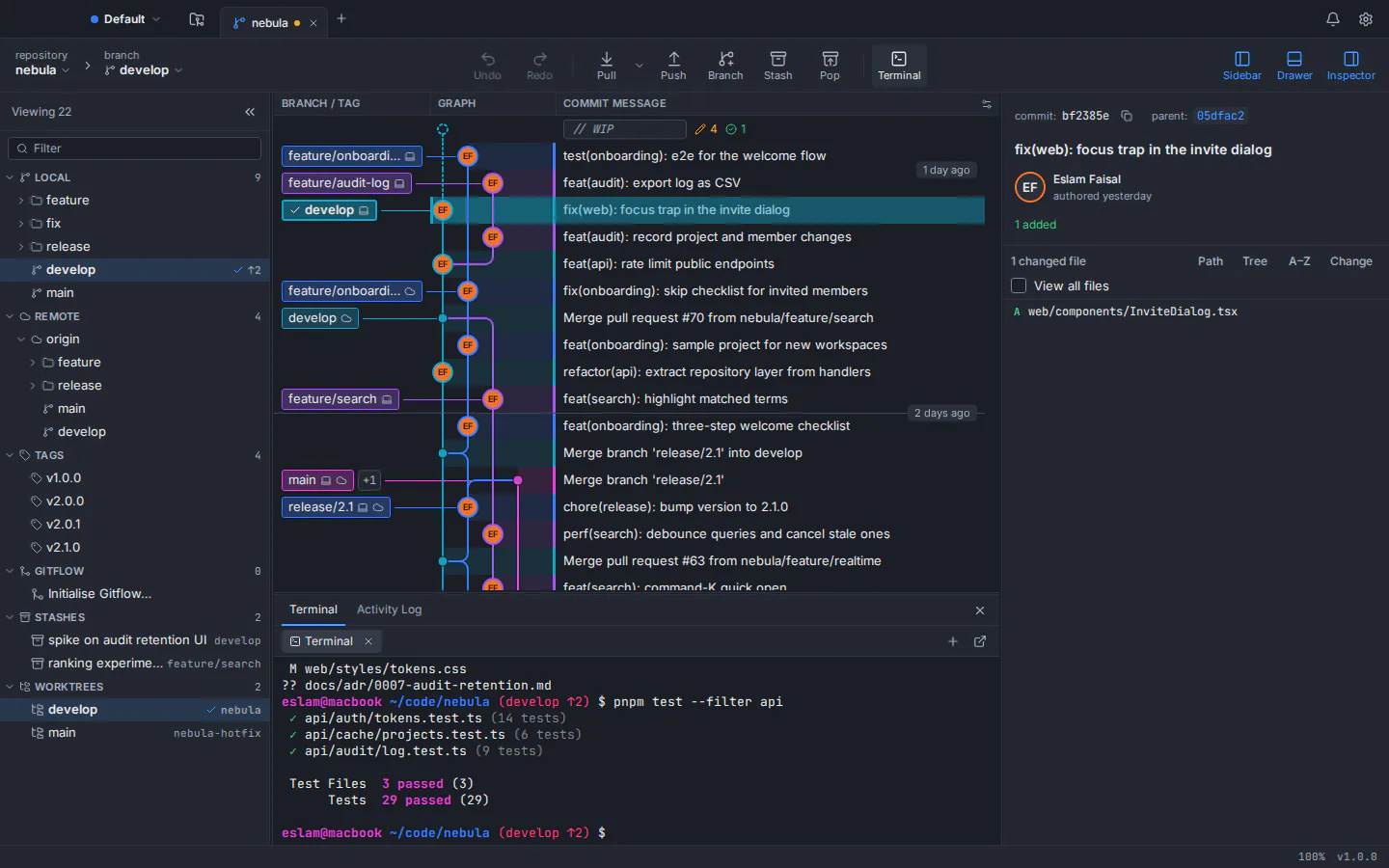
Open a terminal docked under the graph, already in your repository. Run tests or scripts, then watch the graph update as soon as Git changes.
- Terminal opens at the repository root
- Your own shell and profile
- Graph refreshes when the repository changes
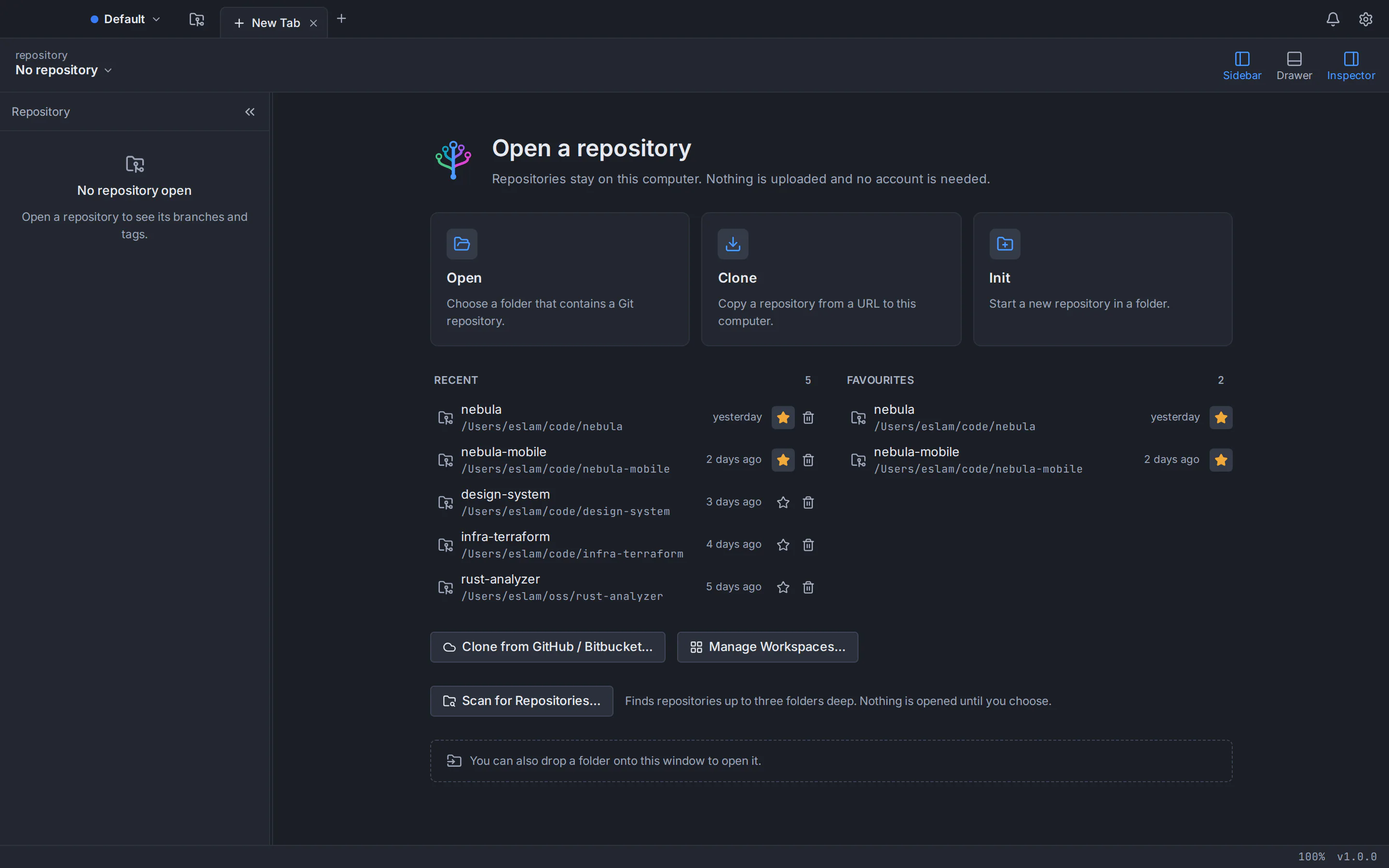
Open, clone, init
Every repository, one tab away
Open local repositories, clone over HTTPS or SSH, or start a new one. Tabs, favourites and workspaces keep all your projects close, and your session comes back exactly as you left it.
- Shallow, sparse and blobless clones
- Favourites, recent repositories and workspaces
- Scan folders to find existing repositories
Safe by design
You can’t lose work by clicking the wrong button
Git is powerful, and powerful tools deserve safety rails. Git Tree snapshots your work before anything destructive and lets you undo it.
Undo and redo
Reset, discard, delete and rebase can be reversed from the toolbar.
Snapshots first
Destructive actions save a recoverable copy before they run.
Safer force-push
Force-push uses --force-with-lease, so it never overwrites work you haven’t seen.
Cancel by default
Dangerous dialogs focus Cancel and say exactly what will happen.
Complete toolkit
Everything you need, from the first commit to the release tag
Git Tree covers the commands developers use every day, plus the advanced ones you reach for when something needs fixing.
Commit graph
See the shape of your history and act on it directly.
Colour-coded branch lanes · Fast on huge repositories · Labels on the graph · Search and filter · Work in progress row
Staging and commits
Build precise commits without leaving the app.
File, hunk and line staging · Discard with a safety net · Commit, amend and co-authors · Message checks · Signed commits · .gitignore editor
Diff, blame and history
Understand what changed, when and why.
Split and inline diffs · Blame · File history · Compare anything · Image diffs
Branches and tags
Create, switch and tidy branches in seconds.
Create, rename and delete · Checkout with protection · Tags · Upstream tracking · Git Flow
Merge, rebase and conflicts
Combine work with a clear view of the outcome.
Merge and fast-forward · Rebase · Cherry-pick and revert · Reset · Conflict resolution tool · Conflict prediction
Rewrite history and undo
Polish commits before they are shared, and reverse mistakes.
Interactive rebase · Quick edits · Undo and redo · Reflog · Bisect
Stash, worktrees, submodules and LFS
Juggle parallel work without losing track.
Stash · Worktrees · Submodules · Git LFS · Patches
Remotes and sync
Fetch, pull and push with full visibility.
Fetch, pull and push · Safe force-push · Multiple remotes · Shallow history
GitHub and Bitbucket
Your hosting accounts, inside your Git client.
Connect accounts · Browse and clone · Pull requests · Publish
Speed and productivity
Built for people who live in their Git client.
Command palette · Rebindable shortcuts · Built-in terminal · Tabs and workspaces · Custom commands
Preferences and customisation
Make Git Tree fit the way you work.
Searchable preferences · Themes · SSH and signing · External tools · Profiles
Privacy and security
Local-first by principle, not by setting.
Your code stays local · Zero telemetry · Secrets in the keychain · Untrusted repositories · Your config stays yours
Native on every platform
Made for macOS, Windows and Linux
A small, fast desktop app built with Rust. It respects each platform’s window controls, shortcuts, keychain and file system.
macOS
macOS 13 Ventura or later
One universal app for Apple silicon (M1–M4) and Intel Macs.
Download for macOSUniversal .dmgWindows
Windows 10 (22H2) or Windows 11, 64-bit
A native Windows app with custom window chrome and Snap Layouts.
Download for Windowsx64 installer (.exe)Linux
Ubuntu 22.04 or later, Debian 12 or later, 64-bit
For Ubuntu and Debian: a .deb package that apt installs for you, or a portable AppImage. It uses your desktop’s own window title bar.
Download for Linux.deb package (x86_64)Other formats: AppImage (portable)
Frequently asked questions
Straight answers about Git Tree, privacy and platforms.
What is Git Tree?
Git Tree is a free desktop Git client (a Git GUI) for macOS, Windows and Linux. It shows your repository as an interactive commit graph and lets you stage, commit, branch, merge, rebase, stash and push without typing Git commands.
Is Git Tree free?
Yes. Git Tree is free to download and use. There is no subscription and no trial; you sign in with your GitHub account.
Do I need an account to use Git Tree?
Yes, a free one. Git Tree asks you to sign in once with a Git Tree account, which you create on this website with GitHub. Connecting GitHub or Bitbucket accounts in the app, for your remote repositories and pull requests, is a separate and optional step.
Does Git Tree collect any data?
No. Git Tree has no telemetry, and your code never leaves your computer. With default settings the app only talks to the remotes you fetch from or push to, the accounts you connect, the Git Tree account service for sign-in and an update check you can switch off. The privacy page lists what your account stores.
Which operating systems are supported?
macOS 13 Ventura or later on Apple silicon and Intel Macs (one universal app), 64-bit Windows 10 (22H2) and Windows 11, and 64-bit Linux: Ubuntu 22.04 LTS or later and Debian 12 or later, plus derivatives that ship WebKitGTK 4.1, such as Linux Mint 21+ and Pop!_OS 22.04+ (only Ubuntu and Debian are tested).
Do I need Git installed?
Yes. Git Tree uses the Git you already have (version 2.39 or newer), so everything it does matches what the command line would do. If Git is missing, the app explains how to install it.
Does it work with GitHub and Bitbucket?
Yes. Git Tree works with any Git remote over HTTPS or SSH. You can also connect GitHub and Bitbucket Cloud accounts to browse and clone repositories and to list, create and review pull requests.
Can I undo a mistake?
Yes. Destructive operations such as reset, discard, branch deletion and rebase save a recoverable snapshot first, and the toolbar’s Undo and Redo buttons reverse them.
Give your repositories the tool they deserve
Download Git Tree for free on macOS, Windows or Linux and open your first repository in seconds.