See what needs you in Attention
Attention lists work on this computer that is blocked or waiting: a missing checkout, conflicts, unfinished changes, a Nour session that needs you, and provider items such as a CI failure or a push held for review. It does not fetch, start Nour or change files. Hide for 1 hour and Dismiss 7 days only hide a row.
Works in GitTree Free: every local Git feature, with no account needed.
On this page
Before you start
- Attention is part of the Free plan for items GitTree already knows on this computer. Refreshing pipelines and pull requests needs GitTree Pro, which everyone has at no cost right now.
- The repositories are saved in a workspace. Attention reads those checkouts. It does not scan the whole disk.
Where to find it
- Workspaces, then Attention. The same window’s Overview is the worktree cards.
- Tools in the toolbar, when Workspaces is one of the tools it lists.
- The command palette: search for Attention.
| Action | macOS | Windows and Linux |
|---|---|---|
| The command palette | ⌘⇧P | Ctrl+Shift+P |
Steps
Open Workspaces
Open a saved repository, then open Workspaces. Overview shows each checkout as a card with its branch and changed-file count. The count is the number Git reports, not a measure of progress. Worktree cards explains Resume.
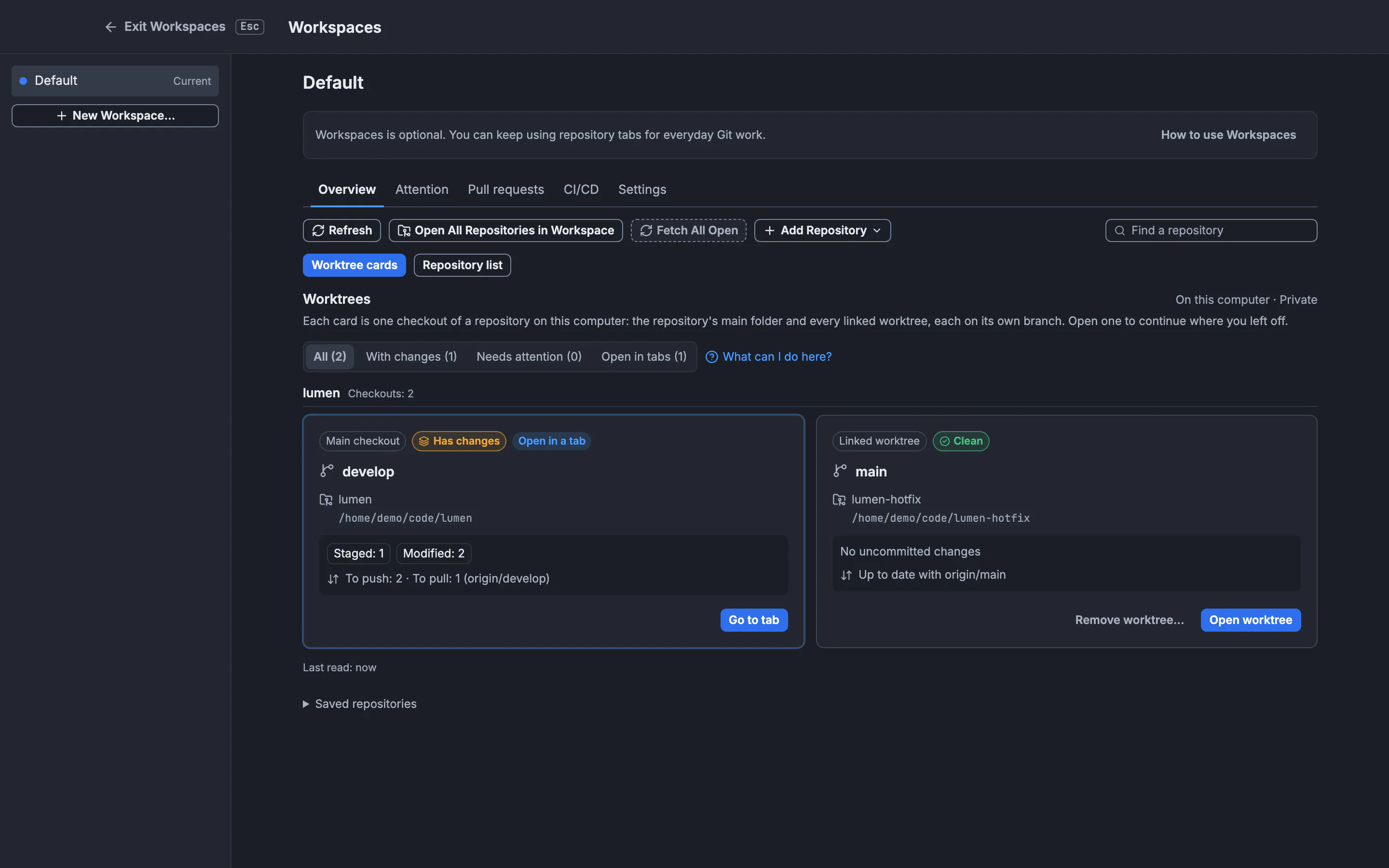
Attention is the next view in this window. This still is Overview, the cards Attention sits beside.GitTree interface with a demonstration repository. Open Attention
Switch to Attention. The page says it is private on this device. Provider rows, such as a CI failure, show data that was already fetched. Refresh those in Pipelines. Opening the page does not fetch and does not start a chat.
Read one row
Each row names its kind: Missing checkout, Conflicts, Unfinished changes, Waiting for you, Interrupted session, Failed session, Approval required, CI failure or Push held for review. Open the row’s repository or checkout before you change anything. A conflict is still resolved in the working tree (resolve conflicts).
Hide a row you will handle later
Hide for 1 hour hides that item for an hour. The hint says hiding does not schedule a reminder. Dismiss 7 days hides it for seven days, or until the source changes. Show hidden items brings hidden rows back. Dismissal does not fix the checkout, the session or the pipeline.
Expected result
You can see which checkouts on this computer are blocked or waiting, and you can open the one you choose. Hidden rows stay hidden only for the time you picked, or until their source changes. Nothing was fetched, committed or pushed by opening the list.
What each kind means
| Kind | What GitTree already knows | Where you act |
|---|---|---|
| Missing checkout | A saved worktree folder is not there | Recreate the checkout, or open the repository again |
| Conflicts | The working tree has conflicts | The conflict editor in that checkout |
| Unfinished changes | Files are still changed | The commit box in that checkout |
| Waiting for you | A Nour session is waiting | That checkout’s Nour chat |
| Interrupted session | A session stopped part way | The same chat, after you read what ran |
| Failed session | A session ended in failure | The same chat |
| Approval required | A previously fetched item needs approval | Pipelines, after a refresh |
| CI failure | A previously fetched run failed | The run, then a refresh in Pipelines |
| Push held for review | A push is held until you review it | Ship Preview for that push |
The empty state is No known items need attention. Unfetched data has not been checked. An empty list means GitTree has no known item. It does not mean every remote pipeline is green.
What stays on this computer
The heading says Private on this device. Local rows come from the checkouts and sessions on this computer. Provider rows reuse data already fetched. Refresh in Pipelines asks the provider again. That refresh is a Pro action. Attention itself does not upload the list.
Hide and dismiss
Hide for 1 hour and Dismiss 7 days change only the list. They do not resolve conflicts, close a session, rerun CI or push. Dismissal lasts seven days or until the source changes, which is the same rule stated at the top of the page. There is no reminder when the hour ends.
Work that is only on another computer never appears here. Open that computer’s GitTree, or fetch, if you need its state. For the Git command that creates the extra checkouts, see worktrees and the lesson path on GitTree Learn.
If something goes wrong
“Local workspace data could not be refreshed.”
The checkouts could not be read just now. Your repositories are still on disk. Open the repository from Open, then return to Attention.
“Session history is unavailable. Other known items remain visible.”
Nour session rows may be missing. Conflict, change and checkout rows can still be there. Open the chat from the checkout if you need that session.
A CI failure is still listed after you fixed the workflow.
The row is previously fetched data. Refresh in Pipelines. Attention does not ask the provider when you open it.
The list is empty while you know a pipeline failed.
Unfetched data has not been checked. Connect the account and refresh Pipelines. A failure on a repository that is not in this workspace is not listed.
Questions
Does Attention run Git or start Nour?
No. Opening Workspaces does not start Nour, run setup scripts or fetch. You open a checkout or a chat yourself when you want to act.
Is Attention on the Free plan?
Local items are part of the Free plan, with no account needed. Provider items such as CI and approvals use data from Pipelines, part of GitTree Pro, which everyone has at no cost right now. Plans are on the Pricing page.
Will a hidden item come back?
Hide for 1 hour ends after an hour and does not schedule a reminder. Dismiss 7 days lasts seven days or until the source changes. Show hidden items lists them sooner.
Can my team see this list?
No. It is private on this device. Sharing a Team report is a separate action in Repo Insights, and only an owner or admin can upload one.
Where do I resume the file I had open?
That control is Resume worktree on the card in Overview, not on the Attention row. It reopens the file and the Nour chat saved for that checkout.