Rename and delete branches
Right-click a branch label for Rename and Delete. Deleting a local branch saves its last commit under refs/ogt/trash first, so Undo brings it back; deleting on the remote is a separate, clearly named choice.
Works in GitTree Free: every local Git feature, once you are signed in.
On this page
Before you start
- To delete a branch, check out another one first: GitTree does not delete the branch you are on.
Where to find it
- Right-click a branch label in the graph or the branch in the left panel: Rename … and Delete ….
- For a branch that is also on the remote: Delete … and origin/…, or Delete Branch from Remote… on the remote branch.
| Action | macOS | Windows and Linux |
|---|---|---|
| Undo a deletion | ⌘Z | Ctrl+Z |
Steps
Open the branch’s menu
Right-click the branch label. The menu names the branch in each action, such as Rename feature/search… and Delete feature/search….
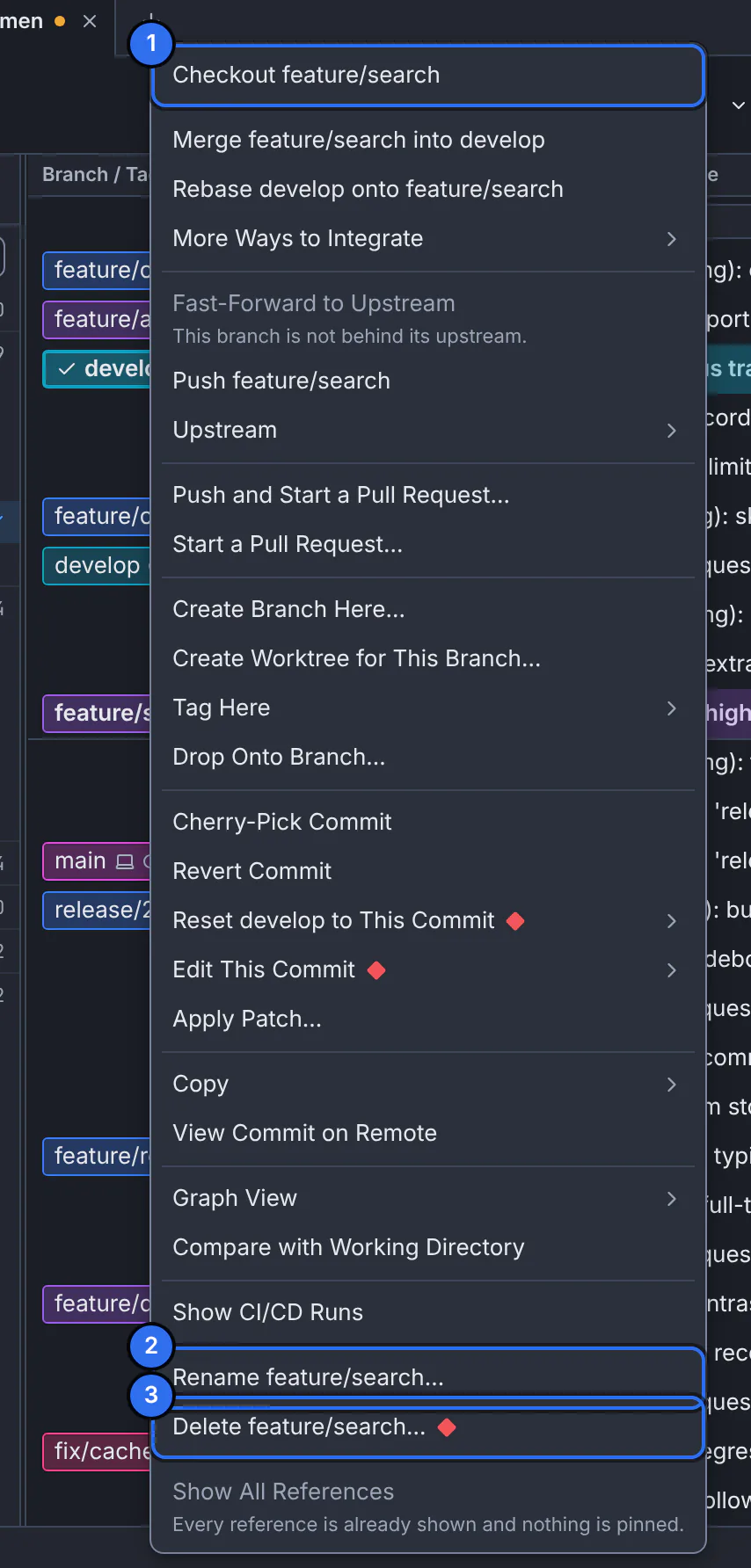
1 switch to the branch, 2 rename it, 3 delete it.GitTree interface with a demonstration repository. Rename it
Choose Rename …, type the new name and press Rename. Its upstream setting moves with it; the branch on the remote keeps its old name until you push the renamed one.
Or delete it
Choose Delete …. GitTree says what is removed and that the last commit is saved under
refs/ogt/trash. Cancel is the default; press Delete feature/search to confirm.
Expected result
The label is renamed or gone from the graph; the message names the recovery ref of a deleted branch.
Deleting the branch on the remote
Delete … and origin/… deletes the local branch, keeping its last commit, then deletes the branch on the remote, confirmed with Delete Both. Delete Branch from Remote… on a remote label deletes only the remote one.
Bring a deleted branch back
Press Undo in the toolbar right after the deletion. Later, its last commit is still in the recovery ref the message named; and if you had worked on the branch, View Reflog… in the command palette lists that commit, where Restore as Branch turns it back into a branch.
If something goes wrong
“Check out another branch first.”
You are on the branch you want to delete. Switch to another branch, such as main, and delete it from there.
Questions
Does deleting a branch delete its commits?
Not right away. Commits that are on other branches stay where they are, and GitTree keeps the deleted branch’s last commit under refs/ogt/trash until you remove old recovery snapshots.