Merge branches
Merging brings the commits of another branch into the branch you are on, like git merge. Right-click the other branch and choose Merge … into …: GitTree checks for conflicts first and lets you choose how the merge is recorded.
Works in GitTree Free: every local Git feature, once you are signed in.
On this page
Before you start
- Check out the branch that should receive the commits, such as
develop(create and switch branches).
Where to find it
- Right-click a branch label: Merge feature/search into develop.
- Drag one branch label onto another, then choose the merge.
- More options: More Ways to Integrate in the same menu.
| Action | macOS | Windows and Linux |
|---|---|---|
| Undo a merge | ⌘Z | Ctrl+Z |
Steps
Choose the branch to merge
Right-click the label of the branch that holds the new work and choose Merge … into …, with your current branch as the second name.
Read the preview
The dialog says what it brings in and checks for conflicts: Merges without conflicts. or which files will stop with a conflict.
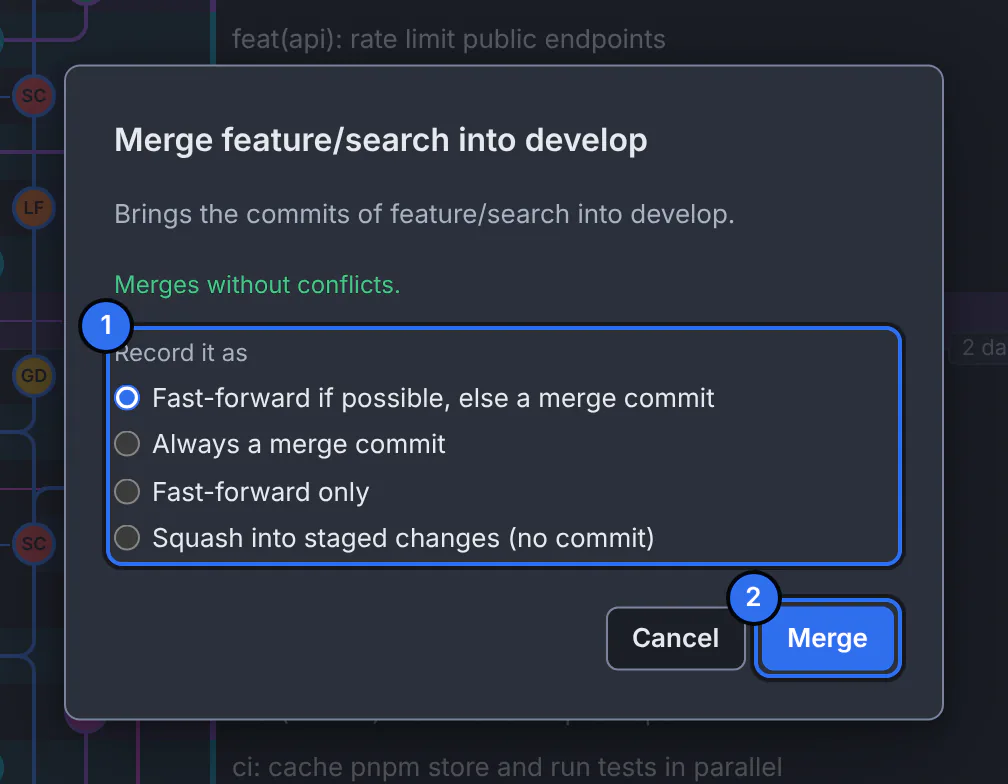
1 how the merge is recorded, 2 the button that merges.GitTree interface with a demonstration repository. Choose how it is recorded
Under Record it as, pick one of the options in the table below. The first one suits most merges.
Merge
Press Merge. Cancel is the default, so nothing happens until you choose.
Expected result
Your branch now contains the other branch’s commits: either moved forward to them, or joined with a merge commit that has two parents.
Ways to record a merge
| Option | What you get |
|---|---|
| Fast-forward if possible, else a merge commit | If your branch has nothing new, it simply moves forward; otherwise a merge commit joins the two. |
| Always a merge commit | A merge commit even when a fast-forward was possible (--no-ff), so the branch stays visible in the history. |
| Fast-forward only | Only moves forward; refuses if the branches have diverged. |
| Squash into staged changes (no commit) | All the changes, staged as one; you write the commit yourself. |
If something goes wrong
The merge stopped with conflicts
The banner says Merging … into … with the number of conflicts. Select Resolve and settle each file, then Continue, or Abort… to go back (resolve merge conflicts).
Questions
Merge or rebase?
Merging keeps history exactly as it happened, with a merge commit. Rebasing replays your commits on top of the other branch for a straight line, but rewrites them (rebase). On shared branches, merging is the safer choice.