Create your first commit
A commit saves a snapshot of the changes you staged, with a message that says why. In GitTree you stage a file in the changes panel, type a summary and press Commit: the new commit appears at the top of the graph.
Works in GitTree Free: every local Git feature, once you are signed in.
On this page
Before you start
- A repository is open in GitTree (open a repository, or create one).
- You have changed, added or deleted at least one file in its folder, with any editor.
- Git knows who you are: the first time a commit needs your name and e-mail, GitTree shows Set up your Git identity, and you choose to save them for this repository, every repository or a GitTree profile.
Where to find it
- The
// WIProw at the top of the commit graph opens the Working Changes panel, where you stage and commit. - The commit form is at the bottom of that panel: Summary, the description and the commit button.
| Action | macOS | Windows and Linux |
|---|---|---|
| Commit | ⌘Enter | Ctrl+Enter |
| Stage the selected files | S | S |
Steps
Open your changes
Select the
// WIProw at the top of the graph. Unstaged Files lists everything you changed since the last commit.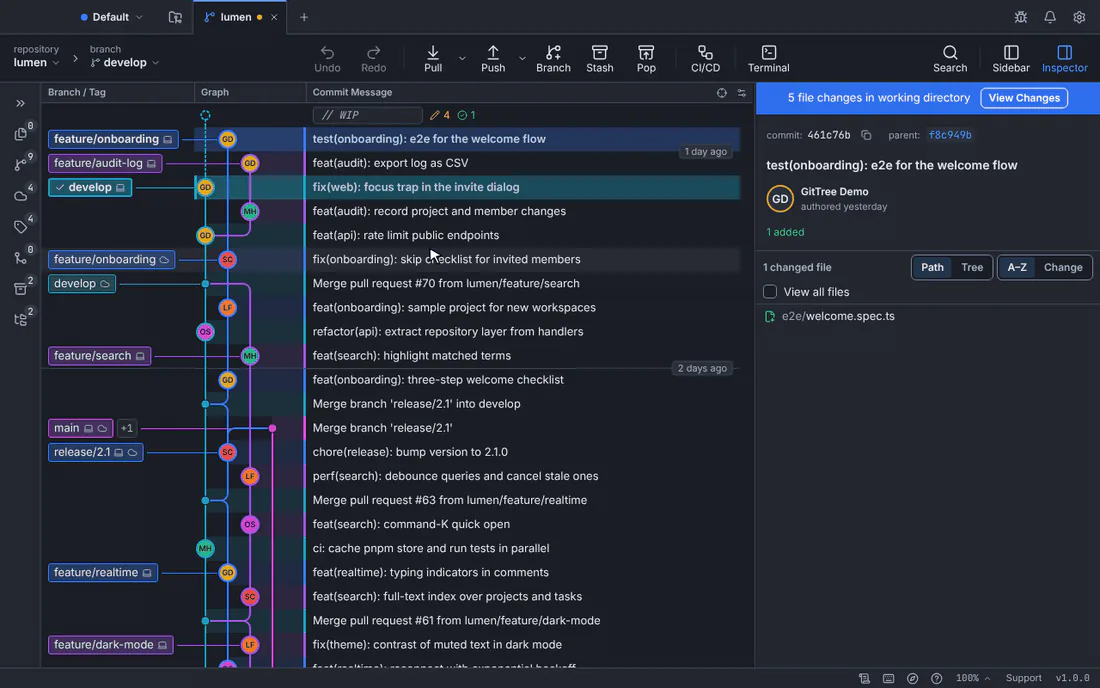
One file is staged, the summary is typed and the commit is made, all in the changes panel.GitTree interface with a demonstration repository. Stage what belongs in this commit
Hover a file and choose Stage File, or Stage All Changes to take everything. Only staged changes go into the commit; you can also stage single lines.
Write the summary
Type a short summary in Summary: what the commit does, such as
fix(web): focus the invite field. The counter shows its length; keep it under 72 characters so other tools do not cut it off. Add details below it if they help.Commit
Press the commit button, named after how many files it commits, or press Ctrl+Enter (⌘Enter on a Mac).
Expected result
The new commit is the top row of the graph, on your current branch, with your name. The changes panel says The working folder is clean. when nothing is left to commit.
The commit exists only on your computer until you push it: see fetch, pull and push.
Writing a useful message
- Say what changes and why, not which files: the files are already in the commit.
- Start with a verb in the imperative: “Add”, “Fix”, “Remove”.
- Keep the summary on one line; put longer explanations in the description.
If something goes wrong
The commit button says Stage Changes to Commit
Nothing is staged. Stage a file first, or press the button to stage everything and then commit.
The commit button stays disabled
The summary is empty. Type at least a short summary.
I committed the wrong thing
If you have not pushed yet, amend the commit, or choose Undo in the toolbar to take the commit back while keeping your changes (Undo and Redo).
Questions
Does committing upload my code?
No. A commit is saved in the repository on your computer. Only a push sends commits to a remote such as GitHub.
Do I need GitTree Pro to commit?
No. Committing, branching, merging and every other local Git feature are on the Free plan, once you are signed in to GitTree.