GitTree for Mac
The free Git GUI for Mac, native on Apple silicon and Intel
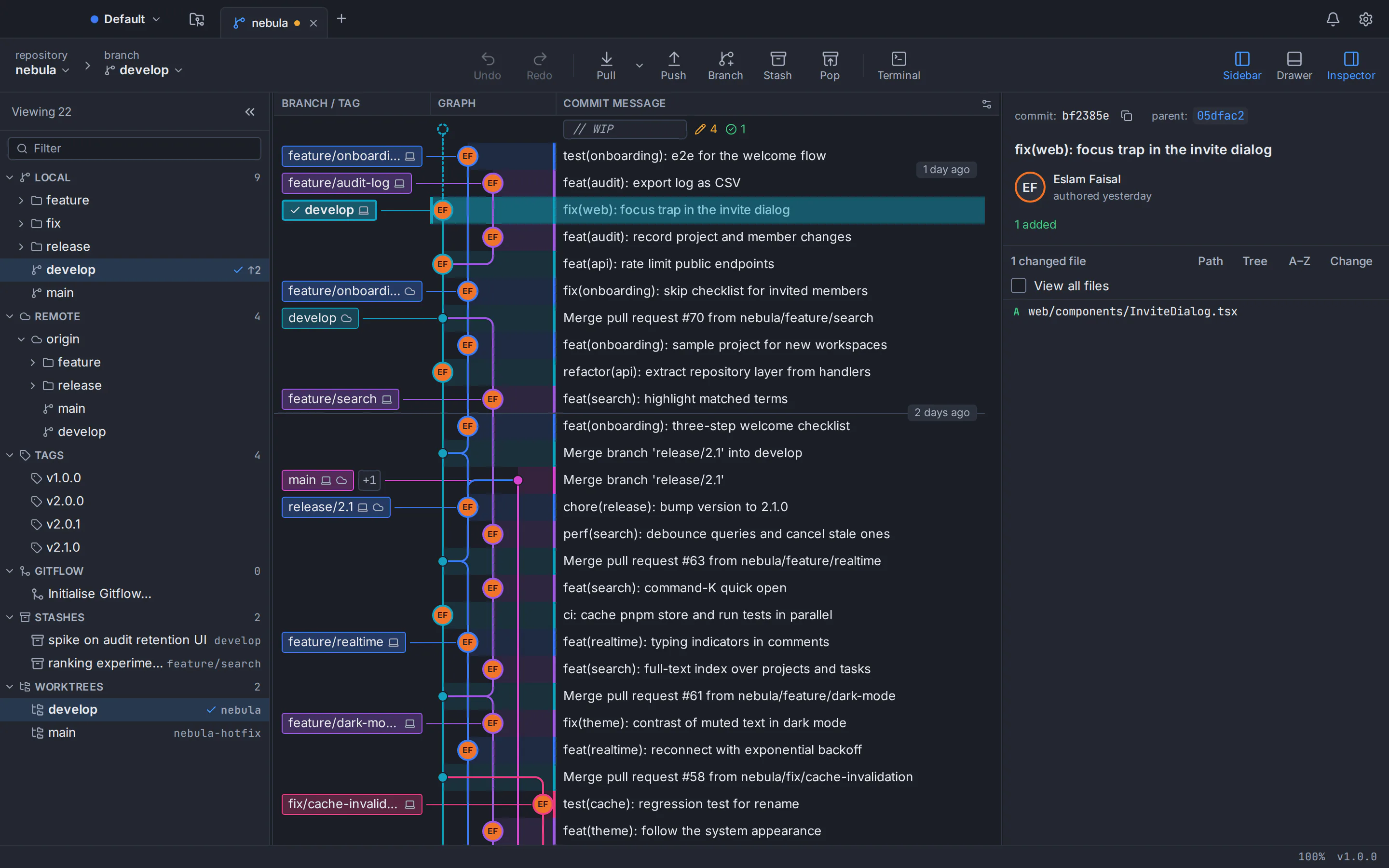
GitTree is a free Git GUI for Mac: a Git client for macOS 13 Ventura and later that ships as one universal app, runs natively on Apple silicon and Intel Macs, and is signed with an Apple Developer ID and notarized by Apple. See your history as a commit graph, stage single lines, rebase interactively and undo mistakes, using your own Git (2.39 or newer). Your repositories stay on your computer and there is no telemetry.
Free · macOS 13 Ventura or later · Apple silicon and Intel · universal .dmg, about 21 MB
What GitTree does as a Git GUI for Mac
One app for Apple silicon and Intel
A single universal download runs natively on Apple silicon (M1 and later) and on Intel Macs. Built with Rust and Tauri, GitTree uses the web view that comes with macOS, which keeps the .dmg at about 21 MB.
Developer ID signed, notarized by Apple
The current release is signed with an Apple Developer ID and notarized by Apple, so macOS opens it after the usual one-time confirmation, with no security settings to change.
A Git tree viewer you can read
Every branch gets its own colour-coded lane, with branch, tag and remote labels, stashes, and pull request and CI chips on branch tips. Search by message, author, hash, file or changed code.
Stage lines, rebase, undo
Stage a whole file, a hunk or single lines. Reorder, squash and reword commits in an interactive rebase, and undo commits, resets and rebases from the toolbar: GitTree takes a snapshot first.
Built for the keyboard
Rebindable ⌘ shortcuts, a command palette on ⌘⇧P with about 300 commands, and a built-in terminal that runs your own shell right under the graph.
Your Git, your Keychain, your code
GitTree runs the Git you already use, so every action matches the command line. Tokens and passphrases live only in your macOS Keychain, and there is no telemetry.
System requirements for GitTree on macOS
- macOS version
- macOS 13 Ventura or later. GitTree does not run on macOS 12 Monterey or older.
- Processor
- Apple silicon (M1 and later) or Intel. One universal app runs natively on both, so every Mac uses the same download.
- Git 2.39 or newer
- GitTree uses your Git and never bundles one. Get it with the Xcode Command Line Tools (xcode-select --install) or Homebrew (brew install git), and check the version with git --version.
- Free account and first sign-in
- A free GitTree account, created on this website with GitHub, GitLab, Bitbucket or Azure DevOps. The first launch needs the internet; after that GitTree works offline for up to 7 days between checks.
- Download size
- One universal .dmg of about 21 MB (20.7 MB for version 1.2.9), from this website or the Releases page of GitTree’s public GitHub repository.
How to install GitTree on a Mac
Six steps from download to your first open repository, including Git if your Mac doesn’t have it yet.
Make sure Git 2.39 or newer is installed
Open Terminal and run git --version. If it prints 2.39 or higher, you’re ready. If Git is missing, macOS offers to install the Xcode Command Line Tools, which include Git (or run xcode-select --install); if it is older, install a current Git with Homebrew: brew install git.
Download the universal .dmg
Choose Download for Mac on this page. It downloads the universal .dmg of the newest stable GitTree release from GitHub, named Git-Tree_<version>_universal.dmg (or Git-Tree-macOS.dmg): one file for Apple silicon and Intel Macs.
Drag GitTree to Applications
Open the downloaded .dmg and drag GitTree onto the Applications folder. Then eject the disk image; you can delete the .dmg afterwards.
Open GitTree
Start GitTree from Applications or Spotlight. Because it is signed and notarized, macOS only asks once whether you want to open an app downloaded from the internet: choose Open.
Sign in with your free GitTree account
Choose Sign in or Create account. Your browser opens gittree.app, where you sign in with GitHub, GitLab, Bitbucket or Azure DevOps and confirm; the browser then hands you back to GitTree. If it doesn’t, choose Manually enter authentication code in GitTree and paste the one-time code the website shows.
Open your first repository
On the GitTree start page, choose Open for a folder on your Mac, Clone to copy a repository from a URL or a connected account, or Init to start a new one. Scan for Repositories finds the ones you already have in a folder.
Verify your download
Every GitTree release on GitHub publishes SHA256SUMS.txt with the SHA-256 checksum of each installer. Run this command in Terminal and compare the sum it prints with the line for the same file name in SHA256SUMS.txt; if you saved the .dmg somewhere other than Downloads, change the path. The checksum catches a corrupt or incomplete download, while macOS checks the Apple signature and notarization when you open the app.
shasum -a 256 ~/Downloads/Git-Tree*.dmgTroubleshooting GitTree on macOS
GitTree says it needs Git
GitTree uses the Git on your Mac and never installs one. Install the Xcode Command Line Tools with xcode-select --install, or Git with Homebrew (brew install git), then choose Check again. GitTree reads the PATH of your login shell, so a Git from Homebrew, MacPorts or Nix is found even when you open it from the Dock; for a Git anywhere else, choose Locate Git… and pick it.
“This Git is too old”
GitTree needs Git 2.39 or newer, and the screen names the Git it found and its version. Install a current Git with Homebrew (brew install git) or update the Command Line Tools in Software Update, then choose Check again: GitTree skips a Git that is too old and uses a newer one it finds. To pick one yourself, set Preferences → General → Git executable.
macOS says GitTree can’t be opened or “is damaged”
The current release is signed and notarized, so after the one-time confirmation it opens normally. These messages come from an older release that was not notarized, or from a copy that is incomplete or did not come from gittree.app or GitHub. Move that copy to the Bin, download the current .dmg from this page, check its SHA-256 and install it again.
The browser doesn’t return to GitTree after you sign in
Choose Manually enter authentication code in GitTree and paste the one-time code the website shows. Enter it only in the app that started the sign-in. If your browser asks whether it may open GitTree, allow it.
A remote asks for your password every time
Connect the account in Preferences → Integrations, or generate an SSH key there and upload it to GitHub, GitLab or Bitbucket. GitTree keeps the token or passphrase in your macOS Keychain.
GitTree for Mac: questions and answers
Is there a free Git GUI for Mac?
Yes. GitTree is a free Git GUI and Git client for macOS 13 Ventura or later, on Apple silicon and Intel. It shows your repository as a commit graph and lets you stage single lines, commit, branch, merge, rebase, stash and push without typing Git commands. It is free today for individuals and organizations, private repositories included, and you sign in with a free GitTree account.
Does GitTree run natively on Apple silicon Macs (M1, M2, M3, M4 and later)?
Yes. GitTree ships as one universal Git app for Mac, so the same download runs natively on Apple silicon and on Intel Macs, without Rosetta.
Which macOS versions does GitTree support?
macOS 13 Ventura or later, on Apple silicon (M1 and later) and Intel. It does not run on macOS 12 Monterey or older.
Is Git already installed on a Mac?
Not ready to use. A fresh Mac has only a placeholder: typing git in Terminal offers to install the Xcode Command Line Tools, which include Git. Run xcode-select --install, or install Git with Homebrew (brew install git), and check it with git --version; GitTree needs 2.39 or newer. GitTree itself never sets off that install prompt.
How do I install GitTree on a Mac?
Download the universal .dmg from this page, open it and drag GitTree onto the Applications folder. Open GitTree from Applications or Spotlight, confirm once that you want to open an app downloaded from the internet, and sign in with your free GitTree account in the browser. Make sure Git 2.39 or newer is installed first (xcode-select --install or brew install git).
Is the GitTree Mac app signed and notarized by Apple?
Yes. The current release (version 1.2.9 as of October 2026) is signed with an Apple Developer ID and notarized by Apple, as its release notes on GitHub state, so Gatekeeper opens it after the standard confirmation for apps downloaded from the internet. You don’t need to Control-click it or change a security setting.
Is GitTree on the Mac App Store?
No. GitTree for Mac comes as a .dmg from this website or from the Releases page of GitTree’s public GitHub repository. Install it only from those two places, and compare the SHA-256 checksum if you want to be sure the file is complete.
Does GitTree work with GitHub, GitLab, Bitbucket and Azure DevOps?
Yes. Any Git remote works over HTTPS or SSH. You can also connect GitHub (including GitHub Enterprise Server), GitLab (gitlab.com and self-managed), Bitbucket Cloud, Bitbucket Data Center and Azure DevOps to clone repositories and work with pull requests and CI checks. Support for GitLab, Azure DevOps, GitHub Enterprise Server and Bitbucket Data Center is new.
Where does GitTree keep my tokens and passwords on macOS?
Only in your macOS Keychain, never in files, logs or URLs. That covers the tokens of the hosting accounts you connect and your passphrases. Disconnect an account in Preferences → Integrations to remove its token from the Keychain.
Can I use GitTree for work and for private repositories?
Yes. GitTree is free today for individuals and organizations, private repositories included, and no paid plan exists. Your repositories stay on your Mac and there is no telemetry.
Can GitTree write commit messages with AI on a Mac?
Yes, if you use Claude Code, Codex or the Antigravity CLI. GitTree can draft a commit message, and a pull request title and description, through the AI coding CLI you have installed. GitTree has no AI model of its own, stores no AI key and sends nothing until you click Generate; the staged diff then goes to the CLI you chose.
How do I uninstall GitTree from a Mac?
Quit GitTree and move it from Applications to the Bin. To remove its settings, caches and logs too, delete the com.eslamfaisal.opengittree folders in ~/Library/Application Support, ~/Library/Caches and ~/Library/Logs. Disconnect your hosting accounts in Preferences → Integrations first if you want their tokens removed from the Keychain.
Compare Git clients
Switching from another Git client?
Honest, sourced comparisons with the Git GUIs developers use most, including what each one does better.
GitKraken alternative
Private repositories, deep undo and AI drafts with your own CLI at no cost, compared row by row with GitKraken Desktop.
Sourcetree alternative
Runs on Linux too, with a built-in conflict editor, undo and in-app pull requests, compared row by row with Sourcetree.
GitHub Desktop alternative
A commit graph, full interactive rebase and an official Linux build, compared row by row with GitHub Desktop.
Fork alternative
A Linux build, no licence to buy, undo and pull requests in the app, compared row by row with Fork.
Tower alternative
No subscription, a Linux build and a line-level conflict editor, compared row by row with Tower.
SmartGit alternative
Free for commercial use with no licence application, plus a docked terminal, undo and AI drafts, compared row by row with SmartGit.
Sublime Merge alternative
No licence to buy, plus pull requests, a drag-and-drop rebase plan and undo, compared row by row with Sublime Merge.
Keep exploring
Every GitTree feature, how it compares with other Git clients for Mac, and the downloads for Windows and Linux.