Nour, the AI Git assistant
An AI assistant inside your Git client, running the agent you already use
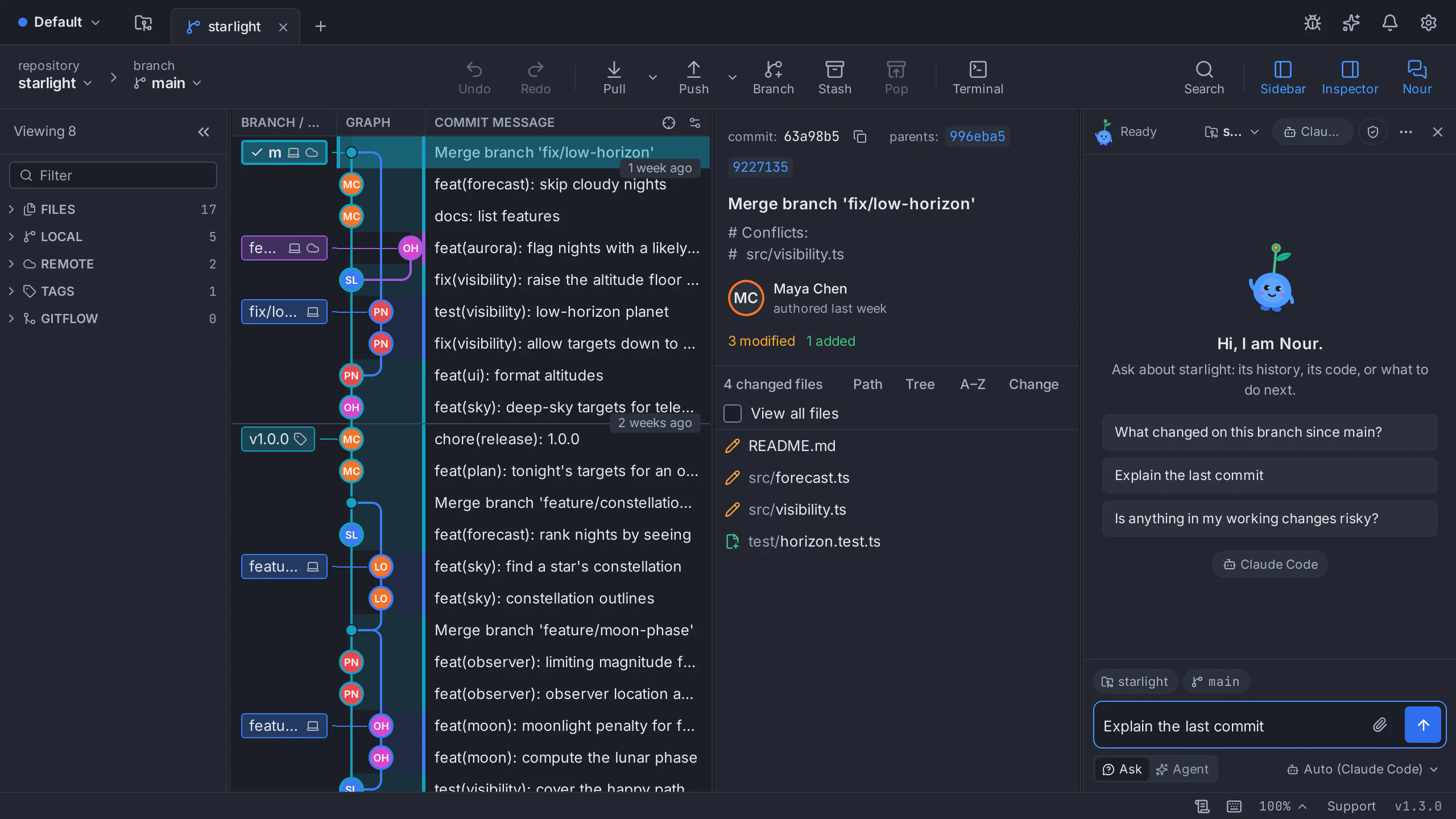
Nour sits next to the commit graph in GitTree. Ask it what changed, why a merge conflicts or what a commit did, and let it stage, commit or create a branch when you allow it. It runs your own coding-agent CLI, such as Claude Code, Codex or Gemini CLI, on macOS, Windows and Linux.
- Knows the repository and branch you are on
- Saves a snapshot before every turn that may change files
- No AI key stored by GitTree, no credits to buy
Works with the coding-agent CLI you already use
GitTree has no AI model of its own. Nour runs an agent CLI that is installed and signed in on your computer, with your own subscription, and you pick which one answers. Choose a model for each agent, or leave it on the agent’s default.
- Claude Code
- Codex
- Gemini CLI
- Antigravity
- Qwen Code
- OpenCode
- Kimi CLI
- Cursor Agent
You can also add a custom agent. If the chosen agent cannot answer, for example because it is signed out or out of usage, another installed agent may answer instead and Nour tells you why.
What the AI Git assistant does in GitTree
Answers questions about your repository
Nour always knows the repository and checked-out branch of the chat. Mention a file, folder, branch, commit or pull request with @ and ask about it in plain language.
Explains changes before you commit
Ask what your uncommitted changes do, what a commit changed, or what is on this branch since main, and get an answer that names the files it read.
Drafts commit messages and pull requests
The commit box drafts a message from your staged changes, and the pull request dialog drafts the title and description from your branch’s commits. You edit the draft; nothing is committed or opened until you press the button.
Helps with merge conflicts
Open the three-way conflict editor and ask Nour about the conflict: what each side changed and which result keeps both intentions. You decide what goes into the file.
Explains failed CI runs
Explain Failure on a failed pipeline run opens Nour with the question. Nour reads the failing step’s log only after you approve, every time.
Acts in the app when you let it
In Agent mode Nour can open views, stage, commit, fetch, push and more through GitTree’s own commands. Each action is a look, a change you can undo, or a risky step that always waits for your click.
Questions developers ask Nour
Type them in the Nour panel as you would to a teammate who has read the repository.
- What changed on this branch since main?
- Explain the last commit in plain language.
- Why does this file conflict with feature/search?
- Which of my uncommitted changes belong in one commit?
- Why did the CI build fail, and what should I try?
- Create a branch for this fix and stage the test file.
Set up the AI assistant in four steps
Install an agent CLI
Install a coding-agent CLI such as Claude Code, Codex or Gemini CLI, and sign in to it once in a terminal.
Turn on Nour
In GitTree, open Preferences › Nour (AI), keep Offer Nour, the AI assistant on, and choose the agent for new chats, or let GitTree use the first one installed.
Open Nour and ask
Press Nour in the toolbar. The panel shows the repository and branch it is told about. Ask in Ask mode, where Nour only looks and answers.
Switch to Agent when you want help acting
In Agent mode Nour can change things within what you allow in Preferences, and asks for your approval before risky steps.
Privacy, approvals and undo
Your agent, your terms
What you ask goes only to the agent CLI you chose, under its provider’s policy, the same way it works in your terminal. GitTree never stores an API key or calls a model itself.
A snapshot before every turn
Before a turn that may change files, Nour saves a snapshot of the work tree. Changes from this turn lists what changed, and Undo this turn puts the work tree back. A snapshot does not cover pushes or files outside the repository.
Approvals you can see
Risky actions always wait on an approval card, an unanswered approval is refused, and limits stop a reply that tries to do too much.
Stop at any time
Stop ends the current reply, Nour stops an agent that prints nothing for too long, and every chat is kept per repository in Chat history.
Nour is part of GitTree Pro
Every Git feature is on the Free plan, including private repositories and commercial use. Nour, AI drafting of commit messages and pull requests, and the hosting integrations come with GitTree Pro, which you can start with a free trial. Your agent’s own subscription is separate.
See Free and ProGuides for the AI features
- Set up Nour with your own agent
- Ask Nour about files, branches and commits
- Review what Nour does in Agent mode
- Draft commit messages and pull requests
- Ask Nour why a CI run failed
- Snapshots, privacy and undo for AI changes
- AI commit messages with Claude Code and Codex
- Git worktrees for parallel AI agents
- Every AI feature in the feature list
AI Git assistant questions
What is an AI Git assistant?
An AI Git assistant answers questions about a repository and helps with Git work: explaining commits and conflicts, drafting commit messages, and carrying out steps such as staging or creating a branch. In GitTree that assistant is Nour, which runs a coding agent you already have.
Which AI models and agents does Nour support?
Nour runs coding-agent CLIs installed on your computer: Claude Code, Codex, Gemini CLI, Antigravity, Qwen Code, OpenCode, Kimi CLI and Cursor Agent, or a custom agent you add. The model is the one that agent uses, or the one you pick for it in Preferences.
Do I need an API key or AI credits from GitTree?
No. GitTree sells no AI credits and stores no API key. Nour uses the agent CLI you are already signed in to, under your own subscription with that provider.
Can the AI change or delete my work?
Only in Agent mode and only within what you allow. Risky steps wait for your approval, destructive Git steps are saved first, and Undo this turn puts the work tree back to the snapshot taken before the turn. Pushes are not covered by a snapshot.
Does Nour send my code to GitTree?
No. Your messages and the files the agent reads go to the agent CLI you chose, under that provider’s terms. GitTree has no AI service of its own and collects no usage telemetry.
Is the AI Git assistant free?
Nour is part of GitTree Pro, which you can try with a free trial. Every Git feature, private repositories included, stays on the Free plan. See the Pricing page for the current plans.
Does it work on macOS, Windows and Linux?
Yes. Nour works in GitTree on macOS, Windows and Linux, wherever the agent CLI you chose runs.
Try Nour in your own repository
Download GitTree for macOS, Windows or Linux, sign in, and open Nour from the toolbar. Your repositories stay on your computer.