GitTree vs Lazygit
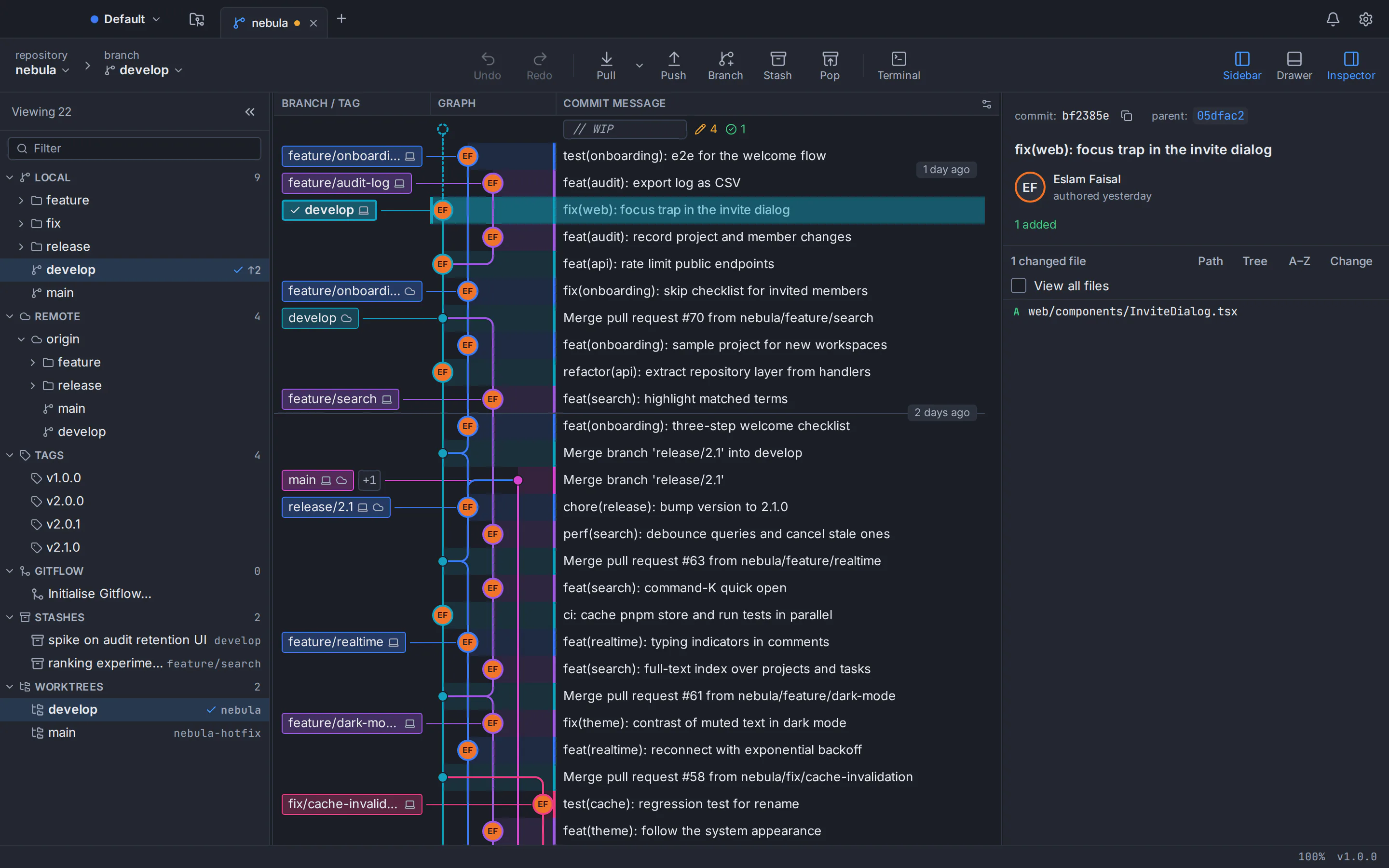
The Lazygit alternative in a full desktop window
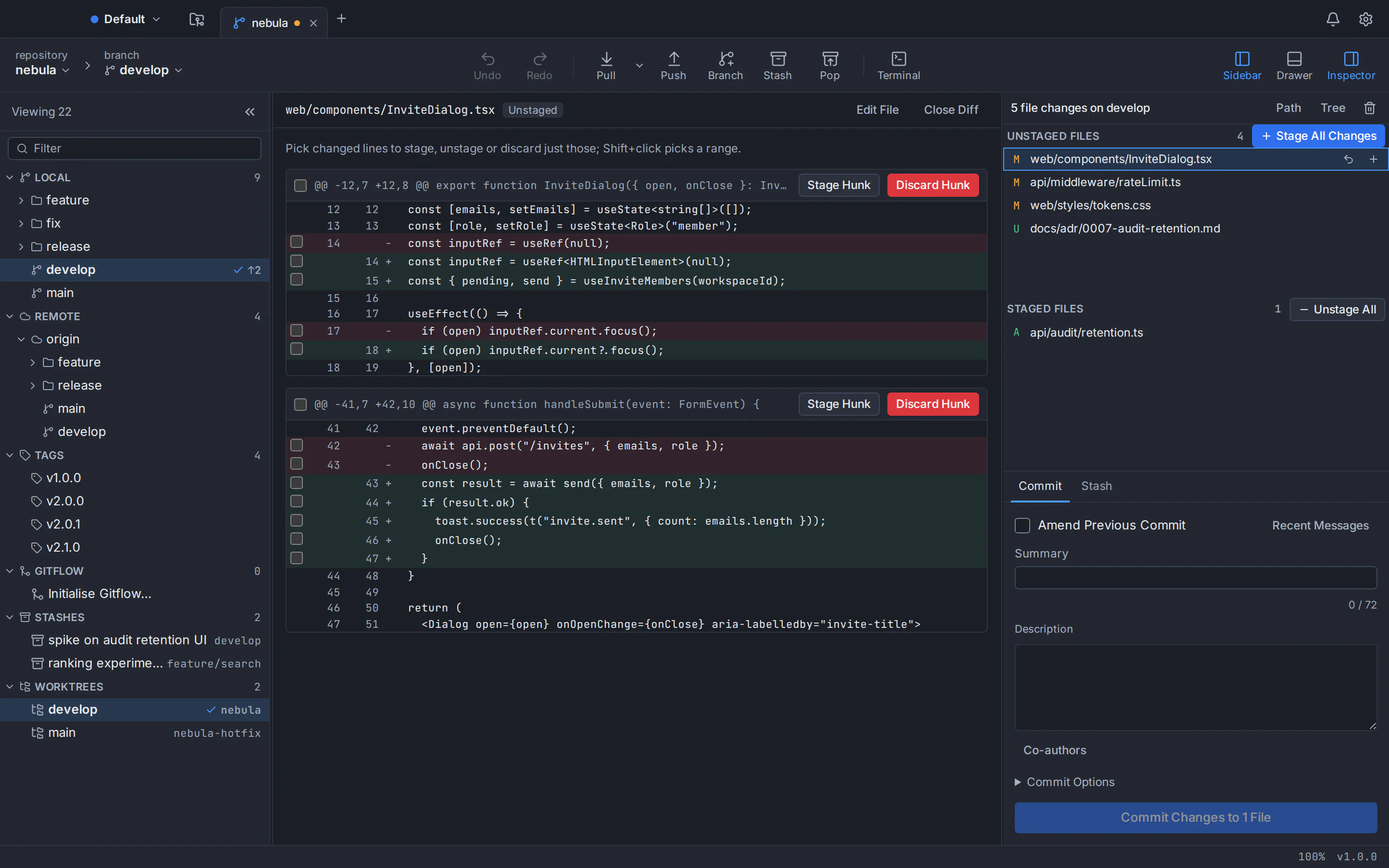
GitTree is a Lazygit alternative: a desktop Git client for macOS, Windows and Linux. Lazygit is a fast terminal UI that you drive with single keys. GitTree puts the same everyday Git work in its own window, with an interactive commit graph, line-by-line staging, a three-way conflict editor, undo for risky steps and, with Pro, pull requests and CI/CD. Below is an honest, sourced comparison with Lazygit, plus a note on GitUI.
For macOS, Windows and Linux. Free plan with a GitTree account; no credit card.
Last checked against Lazygit’s official pages:
The short answer
- Interface
- GitTree is a desktop window; Lazygit is a terminal UI you drive from the keyboard
- Merge conflicts
- GitTree has a three-way editor with per-line choices; Lazygit picks one hunk or both in its merging panel
- Pull requests
- GitTree Pro works with them on GitHub, GitLab, Bitbucket and Azure DevOps; Lazygit marks GitHub pull requests and opens them in the browser
- Where Lazygit leads
- Open source under MIT, small binaries for many systems and package managers, and custom commands
Why developers look for a Lazygit alternative
Lazygit describes itself as a simple terminal UI for git commands, and many developers love its speed. These are the most common reasons people look for something else.
You want a window, not a terminal
Lazygit runs inside your terminal and works through keys: 0 focuses a diff, space stages, i starts an interactive rebase. If you prefer to see the graph, staging and branches side by side in a window, that is a different way of working.
Conflicts are picked hunk by hunk
Its merging panel lets you pick one side’s hunk or both hunks for each conflict. Editing a resolution line by line means opening the file in your editor.
Undo covers commits and branches
Its README says undo uses the reflog, so it cannot undo changes to the working tree or the stash.
Pull requests open in the browser
Lazygit marks branches that have a GitHub pull request, through the gh tool, and opens them in the browser. Reviews, comments and merges stay on the website.
The graph needs a larger screen mode
Its README says the commit graph is shown when you view commits in an enlarged window, which you reach by cycling screen modes.
No Arabic interface
Lazygit is translated into Japanese, Korean, Dutch, Polish, Portuguese, Russian and Chinese, with no Arabic translation as of October 2026.
Why developers choose GitTree
GitTree keeps the speed of a keyboard-friendly tool and adds a full window, recovery tools and hosting integration around your repository.
The whole repository in one window
An interactive commit graph with colour-coded branch lanes, labels, search and filters, beside staging, branches and commit details. It stays smooth past 100,000 commits.
Keyboard first, mouse when you want it
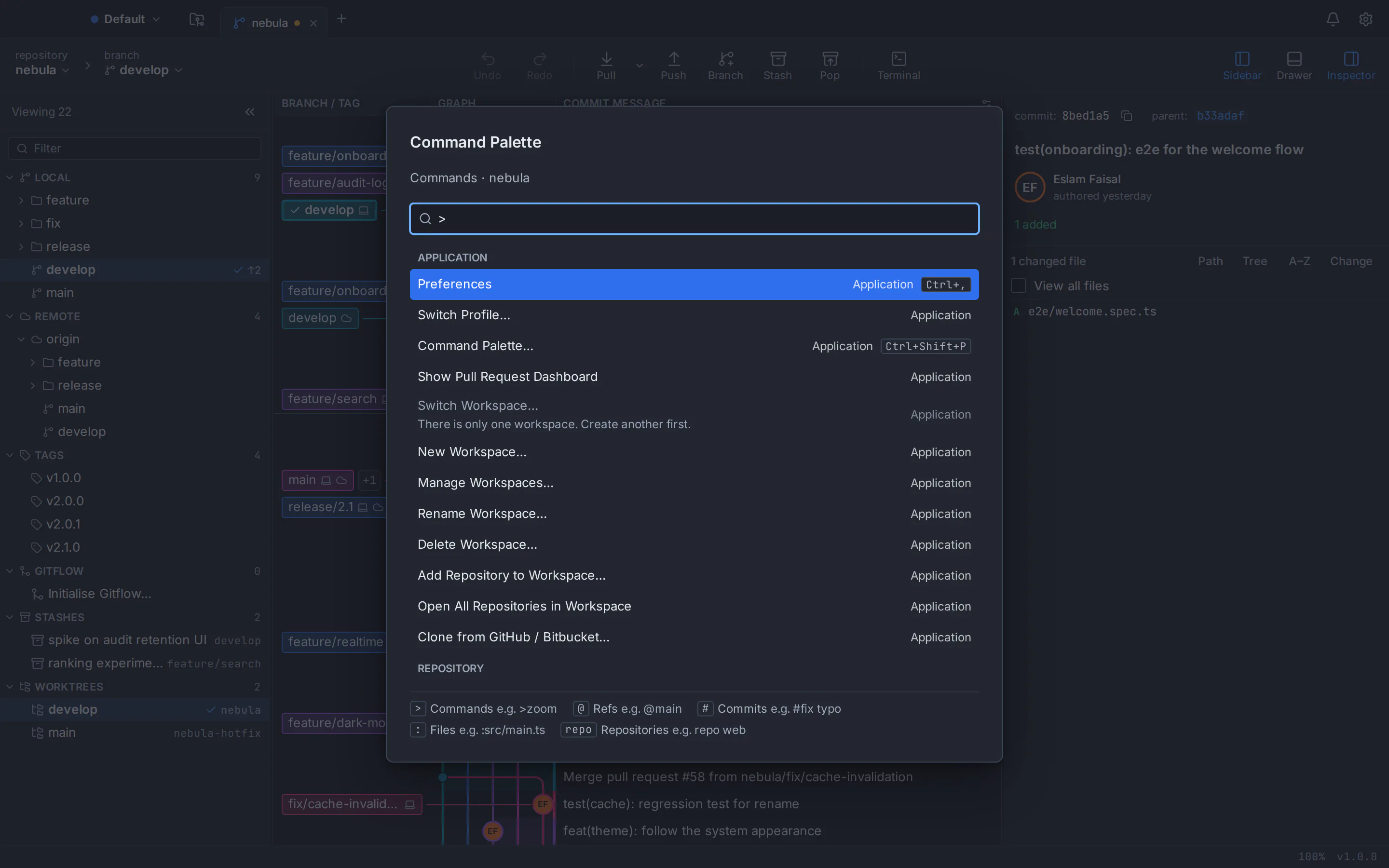
A command palette lists every command with its shortcut, shortcuts can be rebound, and a built-in terminal sits in the same window.
Stage and merge exactly what you mean
Stage files, hunks or single lines, and resolve conflicts in a three-way editor with per-hunk and per-line choices, after a warning before a merge would conflict.
Undo for the risky operations
Undo and redo from the toolbar reverse commits, checkouts, resets, rebases, discards and branch or tag deletes, and risky steps are snapshotted first so they stay recoverable.
Pull requests and CI/CD with Pro
With GitTree Pro, list, create, review, comment on and merge pull requests on GitHub, GitLab, Bitbucket and Azure DevOps, and follow CI/CD runs and live logs, without leaving the app.
English and Arabic
The whole app is available in English and Arabic, with a full right-to-left layout.
GitTree vs Lazygit: feature comparison
Both run real Git underneath and work on the same repositories. They differ most in where you use them, how conflicts and undo work, their licence and hosting integration. Products change, so the official sources are linked at the bottom of the page.
- Included
- Partly, or with limits
- Needs a paid plan
- Not available
| Topic | GitTree | Lazygit |
|---|---|---|
| Price and access | ||
| Price | GitTreeIncluded: Free plan for every Git feature; Pro adds hosting integrations, AI drafting and Nour, with a free trial | LazygitIncluded: Free and open source under the MIT licence |
| Commercial use | GitTreeIncluded: Included on the Free plan, private repositories too | LazygitIncluded: Allowed by the MIT licence |
| Account and sign-in | GitTreePartly, or with limits: A GitTree account to sign in; the Free plan covers every Git feature | LazygitIncluded: No account |
| Source code | GitTreeNot available: Closed source; the public repository hosts installers and release notes | LazygitIncluded: Open source on GitHub |
| Desktop systems and setup | ||
| macOS | GitTreeIncluded: One universal app for Apple silicon and Intel, macOS 13 or later, signed and notarized | LazygitIncluded: Binaries for Apple silicon and Intel, macOS 10.12 or later; Homebrew and MacPorts |
| Windows | GitTreePartly, or with limits: 64-bit for Windows 10 (22H2) and Windows 11; Microsoft Store edition signed by Microsoft, direct EXE unsigned | LazygitIncluded: x86_64, ARM64 and 32-bit binaries; winget, Scoop and Chocolatey |
| Linux | GitTreePartly, or with limits: .deb and AppImage for x86_64 Ubuntu 22.04+ and Debian 12+; unsigned, verified with SHA-256 checksums | LazygitIncluded: x86_64, ARM and 32-bit binaries, plus packages for Debian, Ubuntu, Arch, Fedora, NixOS and more |
| Download size | GitTreeIncluded: About 27 MB on macOS, 10 MB on Windows and 15 MB (.deb) on Linux; Git not included | LazygitIncluded: Archives of about 6.6 to 7.6 MB (7.6 MB on 64-bit Windows): a single terminal binary |
| Where it runs | GitTreeIncluded: Its own desktop window with a built-in terminal | LazygitPartly, or with limits: Inside a terminal; nothing to show without one |
| How you work | ||
| Staging | GitTreeIncluded: Stage files, hunks or single lines from the diff | LazygitIncluded: Stage hunks or single lines, and ranges of lines, from the diff |
| History | GitTreeIncluded: Interactive commit graph with colour-coded lanes, search and filters; smooth past 100,000 commits | LazygitPartly, or with limits: A commit graph in the enlarged screen mode, coloured by author |
| Interactive rebase | GitTreeIncluded: Reorder, squash, reword and drop commits in a rebase editor | LazygitIncluded: Squash, fixup, drop, edit and move commits, also as one-off actions |
| Merge conflicts | GitTreeIncluded: Three-way editor with per-hunk and per-line choices, and a warning before a merge would conflict | LazygitPartly, or with limits: Pick one hunk or both hunks for each conflict in its merging panel |
| Undo | GitTreeIncluded: Undo and redo for commits, checkouts, resets, rebases, discards and deletes, with snapshots before risky steps | LazygitPartly, or with limits: Undo and redo through the reflog: commits and branches, not the working tree or stash |
| Cherry-pick, bisect and worktrees | GitTreeIncluded: Cherry-pick from the graph, bisect, and worktrees | LazygitIncluded: Cherry-pick by copy and paste, bisect, and worktrees |
| Customising | GitTreeIncluded: Command palette, rebindable shortcuts and a built-in terminal | LazygitIncluded: A flexible custom command system |
| Integrations, AI and languages | ||
| Pull requests | GitTreeNeeds a paid plan: With Pro: list, create, review, comment on and merge pull requests on GitHub, GitLab, Bitbucket and Azure DevOps | LazygitPartly, or with limits: Marks branches with a GitHub pull request, through the gh tool, and opens them in the browser |
| CI/CD | GitTreeNeeds a paid plan: With Pro: CI/CD runs, jobs and live logs, with re-run | LazygitNot available: No CI/CD view in its README |
| AI drafts | GitTreeNeeds a paid plan: With Pro: commit messages and pull request text through your own agent CLI, such as Claude Code or Codex | LazygitNot available: No AI features in its README |
| Interface languages | GitTreeIncluded: English and Arabic, with a full right-to-left layout | LazygitPartly, or with limits: English and eight other languages; no Arabic as of October 2026 |
| Track record | GitTreePartly, or with limits: New: first released in September 2026, in active development | LazygitIncluded: Developed since 2018; release 0.66.2 on 16 October 2026 |
This table compares the current public products, not every setting. Lazygit facts come from its GitHub repository as checked on the date above. GitTree is in active development; check its features page and release notes before moving a critical workflow.
Lazygit price vs GitTree
Both are free for Git work. Lazygit is open source under the MIT licence; GitTree’s Free plan covers every Git feature, and GitTree Pro adds the hosting integrations, AI drafting and Nour, the AI assistant.
GitTree
FreeFree plan · Pro with a free trial
- Every local Git feature, private repositories and commercial use
- Builds for macOS, Windows and Linux
- Pro adds pull requests, CI/CD, AI drafting and Nour, the AI assistant
- Plans and prices on the Pricing page
Lazygit
Freeopen source, MIT licence
- Free for anyone, commercial use included
- Source code on GitHub
- Builds for macOS, Windows and Linux
- Sponsors support its maintenance
Lazygit’s licence terms are as stated in its repository in October 2026. GitTree’s Free plan needs no credit card; the Pricing page compares Free and Pro.
A Lazygit alternative for Mac, Windows and Linux
The same GitTree on macOS, Windows and Linux, running the Git 2.39 or newer that you already have installed.
Lazygit alternative for Mac
One universal app that runs natively on Apple silicon and Intel Macs with macOS 13 Ventura or later, signed and notarized by Apple.
Lazygit alternative for Windows
A 64-bit app for Windows 10 (22H2) and Windows 11 that uses your Git for Windows. Get it from the Microsoft Store, signed by Microsoft, or as a direct EXE, which is unsigned, so SmartScreen may ask you to confirm.
Lazygit alternative for Linux
A .deb package or a portable AppImage for 64-bit Ubuntu 22.04+ and Debian 12+. On Ubuntu 22.04 and Linux Mint 21, add the git-core PPA for a newer Git first.
Read the Linux install guide
Which one should you choose?
Both are good tools, and many developers use a terminal UI and a desktop client side by side. Pick the one that matches how you work, then try it on a noncritical repository before you move daily work.
Choose GitTree if…
- You want the graph, staging and branches in one window, with the mouse when it helps
- You want a three-way conflict editor and undo for resets, rebases and discards
- You review pull requests and CI/CD on GitHub, GitLab, Bitbucket or Azure DevOps, with GitTree Pro
- You want AI drafts through your own coding agent, or an Arabic interface
Consider Lazygit if…
- You live in the terminal, over SSH or inside your editor
- You want an open-source tool under the MIT licence with no account
- You need builds for ARM, 32-bit or FreeBSD, or a package manager install
- You want to script your own commands into the interface
How to switch from Lazygit to GitTree
Nothing has to be exported. Your repositories are standard Git, so Lazygit can stay in your terminal while you try GitTree on the same folders.
Check your Git version
GitTree runs the Git installed on your computer, version 2.39 or newer. Run git --version, and update Git if it is older.
Download GitTree
Get the installer for macOS, Windows or Linux from the download page and install it.
Sign in
Sign in with a GitTree account, created on this website with your email or with GitHub, GitLab, Bitbucket or Azure DevOps. The Free plan covers every Git feature; start a Pro trial when you want the hosting integrations or Nour.
Open the repositories you already have
Choose Open and select a repository folder, or scan a folder for repositories. Branches, remotes, stashes and history live in the repository itself, so there is nothing to import.
Learn the palette
Open the command palette to find any command and its shortcut, and rebind the shortcuts you miss from Lazygit.
Try it side by side
Make a staged commit, resolve a test conflict and try an undo on a test branch. Lazygit keeps working in your terminal on the same repositories while you decide.
Lazygit alternative: frequently asked questions
Is there a GUI like Lazygit?
Yes. GitTree covers the same everyday work, staging single lines, interactive rebase, cherry-pick, bisect and worktrees, in a desktop window with a commit graph and a three-way conflict editor, on macOS, Windows and Linux.
Is Lazygit free?
Yes. Lazygit is open source under the MIT licence, which allows commercial use, and is supported by sponsors. GitTree’s Free plan covers every Git feature; the Pricing page shows Pro.
Can Lazygit resolve merge conflicts?
Partly. Its merging panel lets you pick one hunk or both hunks for each conflict. GitTree resolves conflicts in a three-way editor with a choice for each hunk and each line, and warns before a merge would conflict.
Can Lazygit undo a reset or a discard?
Its README says undo uses the reflog, which covers commits and branches, so it cannot undo changes to the working tree or the stash. GitTree snapshots risky steps first, so resets, rebases and discards stay recoverable.
Does Lazygit work with pull requests?
It marks branches that have a GitHub pull request, through the gh tool, and opens them in the browser. With GitTree Pro you list, create, review, comment on and merge pull requests on GitHub, GitLab, Bitbucket and Azure DevOps inside the app.
What about GitUI?
GitUI is another open-source terminal UI, written in Rust under the MIT licence. Its README lists staging of files, hunks and lines, stashing, and push and fetch, and names interactive rebase and a branch graph in its log as goals before version 1.0, as of October 2026.
Can I keep Lazygit and use GitTree on the same repositories?
Yes. Both work on ordinary Git repositories, so there is nothing to export or import. Keep Lazygit in your terminal and GitTree in its window while you decide.
Does GitTree have keyboard shortcuts?
Yes. Every command is in the command palette with its shortcut, shortcuts can be rebound, and a built-in terminal sits in the same window.
Is GitTree open source?
No. GitTree is closed source, and its public repository hosts installers and release notes. Lazygit is open source under the MIT licence, which is one reason to choose it.
Does GitTree have an Arabic interface?
Yes. The whole app is available in English and Arabic, with a full right-to-left layout. Lazygit’s translations cover eight languages besides English, none of them Arabic, as of October 2026.
Do I need Git installed to use GitTree?
Yes. GitTree runs the Git installed on your computer, version 2.39 or newer, so every action matches what the command line would do.
Does GitTree upload my code or collect usage data?
No. GitTree sends no usage telemetry, and your repositories stay on your computer. It talks to your remotes, the hosting accounts you connect, the GitTree account service you sign in with, and an update check you can switch off.
How this comparison was checked
Lazygit’s licence, features, platforms and languages were reviewed on 29 October 2026 against its official GitHub repository: the README, the licence, the keybindings reference, the translations folder and the releases. GitUI facts come from its README. Features change; the projects’ current pages are the source of truth.
- Lazygit README: features and installation
- Lazygit keybindings, merging panel included
- Lazygit translations
- Lazygit licence (MIT)
- Lazygit releases
- GitUI README
- GitTree features
GitTree is an independent product and is not affiliated with or endorsed by the Lazygit or GitUI projects or their contributors. Lazygit and GitUI are the names of their respective projects.
Compare Git clients
Switching from another Git client?
Honest, sourced comparisons with the Git GUIs developers use most, including what each one does better.
GitKraken alternative
Private repositories, deep undo and AI drafts with your own CLI, compared row by row with GitKraken Desktop.
Sourcetree alternative
Runs on Linux too, with a built-in conflict editor, undo and in-app pull requests, compared row by row with Sourcetree.
GitHub Desktop alternative
A commit graph, full interactive rebase and an official Linux build, compared row by row with GitHub Desktop.
Fork alternative
A Linux build, no licence to buy, undo and pull requests in the app, compared row by row with Fork.
Tower alternative
A Linux build, undo and a line-level conflict editor, compared row by row with Tower.
SmartGit alternative
Commercial use with no licence application, plus a docked terminal, undo and AI drafts, compared row by row with SmartGit.
Sublime Merge alternative
No licence to buy for Git work, plus pull requests, a drag-and-drop rebase plan and undo, compared row by row with Sublime Merge.
TortoiseGit alternative
The same Git on macOS, Windows and Linux in one window, compared row by row with TortoiseGit’s Explorer menus.
GitButler alternative
Normal Git branches, a full commit graph and a three-way conflict editor, compared row by row with GitButler’s parallel branches.
Try the Lazygit alternative on your own repository
Download GitTree, open a repository you already work on and compare the graph, staging, conflict and undo tools for yourself.