A practical GitKraken Desktop alternative
A GitKraken alternative for the Git work you do every day
Git Tree is a free, local-first desktop Git client. Explore commits in a visual graph, stage precise changes and manage branches without moving your repository into another service. Here is an honest look at how it compares with GitKraken Desktop.
Available for macOS, Windows and Linux. A free Git Tree account is required to sign in.
Why developers consider Git Tree
A focused Git client can be enough when your priority is understanding history and making careful changes.
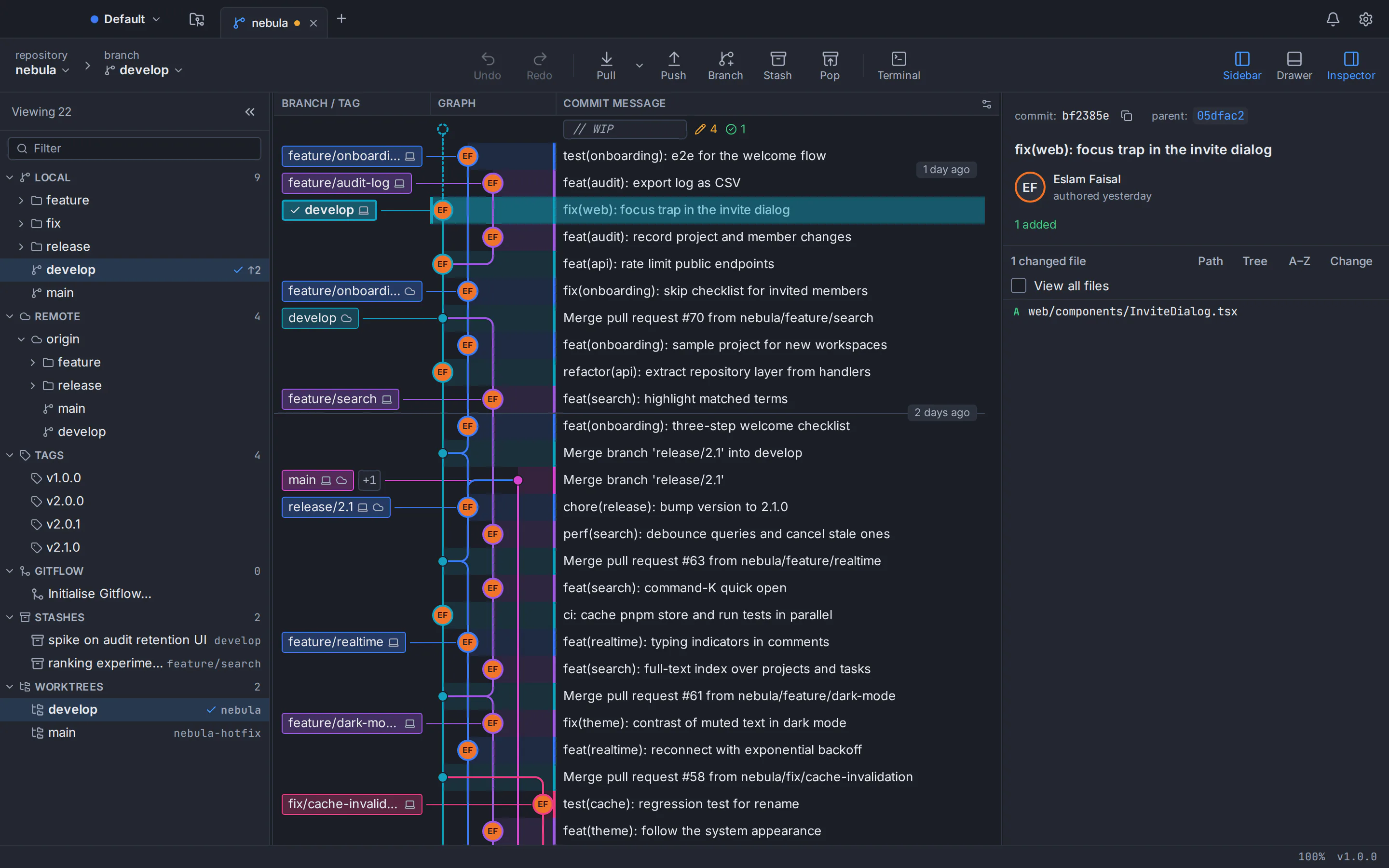
See the full story of a branch
Follow commits, merges, tags and remote references in a color-coded graph. Open a commit to inspect its changes without losing your place.
Commit only what you intend
Stage an entire file, one hunk or selected lines. Review inline or side-by-side diffs before you write the commit message.
Keep repository work local
Git Tree runs Git through your installed Git executable. Your repository remains on your computer; the optional hosting actions use the accounts you connect.
Work across desktop platforms
Use the same visual workflow on macOS, Windows and Linux. Linux downloads currently target Ubuntu and Debian, with a .deb and AppImage.
Navigate the difficult operations
Merge, rebase, cherry-pick, revert, reset and resolve conflicts from the graph. Undo and redo help you inspect supported operations.
Stay in your Git rhythm
Open a terminal, use the command palette, switch worktrees and manage stashes without leaving the repository view.
Git Tree vs GitKraken Desktop
Both are visual desktop Git clients. The difference is in their product scope and access model; features and plans can change, so review the linked official sources below.
Swipe sideways to see every column.
| What matters | Git Tree | GitKraken Desktop |
|---|---|---|
| Desktop systems | macOS, Windows and Linux (Ubuntu and Debian builds) | macOS, Windows and Linux |
| Visual commit history | Interactive commit graph with branch and tag labels | Visual commit graph |
| Precise staging and diffs | File, hunk and line staging; inline and split diffs | Diff view and staging tools |
| Local and public repositories | Included in the free app | Included in the free Community plan |
| Private remote repositories | Included in the free app | Paid plan after the trial |
| Built-in AI and agent sessions | No built-in AI or agent orchestration advertised | AI and agent workflows are offered; availability depends on plan |
| Git hosting integrations | GitHub and Bitbucket workflows; check current feature coverage | Broad integrations; some require higher plans |
| Account and code location | Free account for sign-in; repository operations run locally | Account and plan; local repositories remain local |
This table compares the current public products, not feature parity. Git Tree is in active development. Check its feature page and release notes before changing a critical workflow.
Which tool fits your workflow?
Choose based on the operations you need today, then test both tools with a noncritical repository before moving daily work.
Choose Git Tree when…
You want a free visual Git workflow for public or private repositories, detailed staging, a readable graph and local operations across macOS, Windows and Linux.
Consider GitKraken Desktop when…
Your team needs its broader integrations, built-in AI, agent session tools or enterprise controls, and the appropriate subscription fits your workflow.
From download to your first commit
Your existing Git repository and remote stay where they are. Start with one repository and verify the actions you use most.
1. Download and sign in
Install the build for your system, then sign in with a free Git Tree account.
2. Open your repository
Open an existing local repository or clone a remote. Git Tree uses the Git already installed on your machine.
3. Read the graph and changes
Inspect branches and commits, review file history and compare changes before editing history.
4. Stage, commit and sync
Stage the files, hunks or lines you intend, commit, then fetch, pull or push with your configured remote.
GitKraken alternative: frequently asked questions
Is Git Tree free for private repositories?
Yes. Git Tree is currently a free desktop app for local, public and private Git repositories. It requires a free account for sign-in.
Does GitKraken Desktop have a free plan?
Yes. GitKraken Desktop has a free Community plan for local and public repositories. Its official pages place private remote access in paid plans after a trial.
Can I open a repository I used in GitKraken?
Yes. Both clients work with Git repositories. Open the same local repository in Git Tree, then review its branch and remote configuration before performing a sync operation.
Does Git Tree support macOS, Windows and Linux?
Yes. Git Tree offers builds for macOS, Windows and Linux. Linux builds for Ubuntu and Debian come as a .deb package or AppImage. Check the download page for current requirements.
Does Git Tree include GitKraken AI or agent sessions?
No. Git Tree does not advertise built-in AI or agent orchestration. If those are essential, review GitKraken Desktop’s current plan and feature documentation.
Will switching move my code to Git Tree servers?
No. Git Tree performs repository operations locally through your installed Git. Your account is used for sign-in, and remote operations still connect to the Git host you configure.
How this comparison was checked
GitKraken plan and feature descriptions were reviewed on 2 October 2026. Pricing and capabilities can change; the provider’s current pages are the source of truth.
Git Tree is an independent product and is not affiliated with or endorsed by GitKraken. GitKraken is a trademark of its respective owner.
See if Git Tree works for your repository
Download the free app, open an existing repository and compare the graph, staging and branch workflows for yourself.