Git Tree for Linux
The free Git GUI for Ubuntu, Debian and Linux
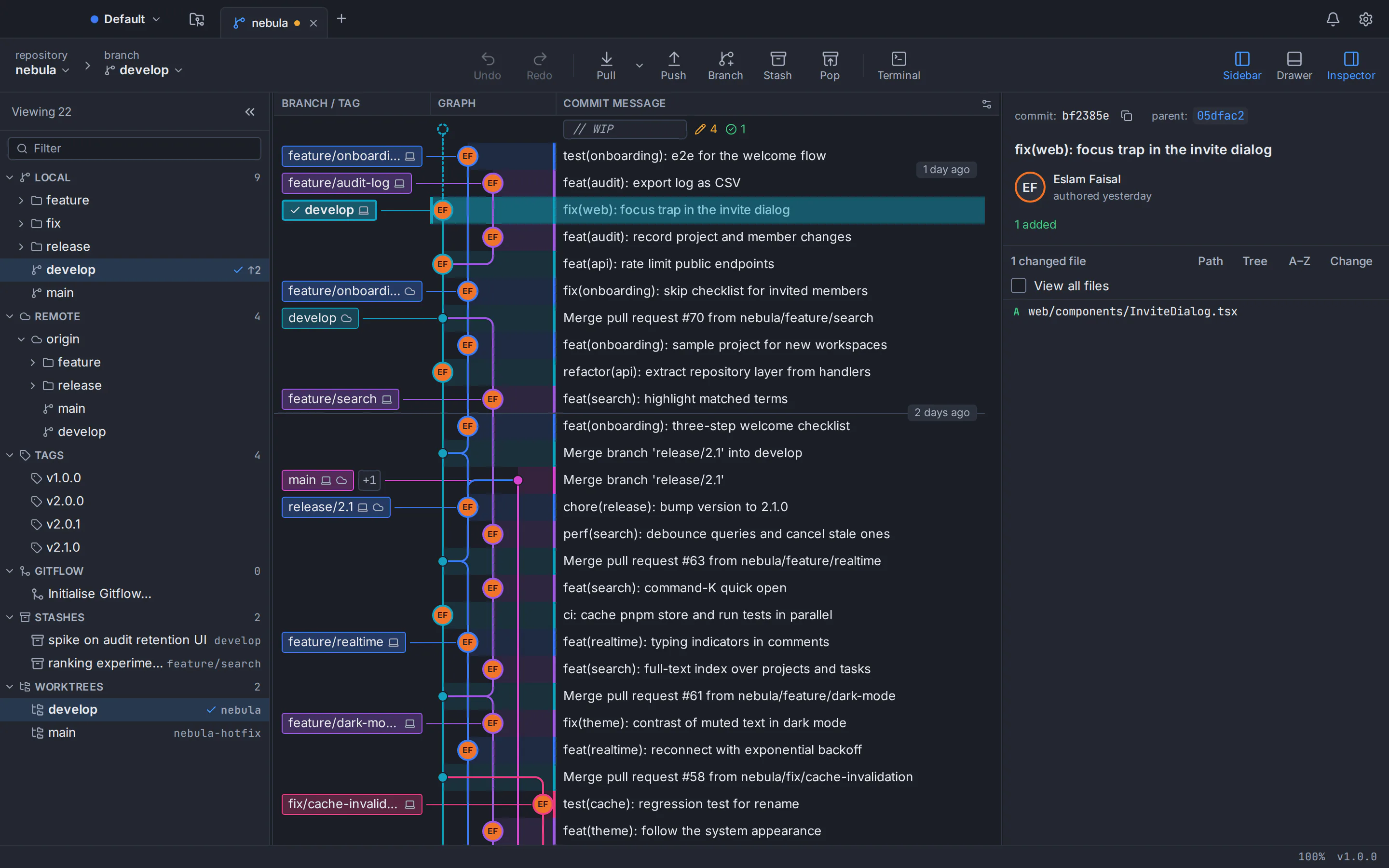
Git Tree is a free, local-first Git client for 64-bit Linux, tested on Ubuntu and Debian. See your history as a commit graph, stage single lines and rebase with undo, while your code stays on your computer and nothing is tracked.
64-bit (x86_64) only. The .deb package is recommended; the AppImage is portable and installs nothing.
What you get on Linux
A commit graph you can read
Every branch gets its own colour-coded lane, and the graph stays smooth past 100,000 commits.
Stage single lines
Stage a whole file, a hunk or individual lines, with the diff right next to you.
Merge and rebase with undo
Merge, rebase, cherry-pick and reset from the graph. Destructive actions save a snapshot first and can be undone.
GitHub and Bitbucket
Connect GitHub and Bitbucket accounts to browse, clone and work with pull requests. You sign in to Git Tree through this website with GitHub.
Local-first, zero telemetry
Your repositories stay on your computer and nothing is tracked.
Made for your desktop
Git Tree uses your desktop’s own window title bar, and keeps your tokens in the system keyring.
Requirements for Git Tree on Linux
- Architecture
- 64-bit x86_64 only.
- Distributions
- Ubuntu 22.04 LTS and 24.04 LTS or later, and Debian 12 or later. Derivatives that ship WebKitGTK 4.1, such as Linux Mint 21+ and Pop!_OS 22.04+, can run it too; only Ubuntu and Debian are tested.
- Git
- Git 2.39 or newer. Ubuntu 24.04 and Debian 12 already have it. Ubuntu 22.04 and Linux Mint 21 ship Git 2.34, so add the git-core PPA first (step 1 below).
- Keyring and prompts
- A Secret Service for your tokens and passphrases (GNOME Keyring, which Ubuntu includes, or KeePassXC), and zenity or kdialog for password prompts.
Ubuntu, Debian and other distributions
Git GUI for Ubuntu 22.04 LTS and 24.04 LTS
Install the .deb with apt and Git Tree appears in your applications menu. Ubuntu 24.04 already has a Git that is new enough. On Ubuntu 22.04, add the git-core PPA first: it ships Git 2.34 and Git Tree needs 2.39. Ubuntu includes GNOME Keyring, which keeps your tokens.
Git GUI for Debian 12 and later
Debian 12 ships Git 2.39, so Git needs nothing extra. Install the .deb with apt. Git Tree keeps your tokens in a Secret Service, so if your desktop does not run one, install GNOME Keyring or turn on KeePassXC’s Secret Service integration.
Linux Mint, Pop!_OS and other derivatives
Derivatives that ship WebKitGTK 4.1, such as Linux Mint 21+ and Pop!_OS 22.04+, can run the same .deb; only Ubuntu and Debian are tested. Linux Mint 21 ships Git 2.34, so add the git-core PPA first.
Install the .deb package on Ubuntu or Debian
The .deb is the recommended download: apt installs Git Tree together with Git, WebKitGTK and GTK, and can remove it again.
- 1
Ubuntu 22.04 and Linux Mint 21: get a newer Git first
They ship Git 2.34, and Git Tree needs Git 2.39 or newer, so run these three commands once. Ubuntu 24.04 and Debian 12 already have a Git that is new enough.
sudo add-apt-repository ppa:git-core/ppa sudo apt update sudo apt install git - 2
Download the .deb
Use the button at the top of this page. It fetches the newest release from GitHub.
- 3
Install it with apt
Run this in the folder you saved the file in, with the file name you saved (for example Git-Tree_<version>_amd64.deb). apt installs Git, WebKitGTK and GTK as dependencies.
sudo apt install ./Git-Tree-Linux.deb - 4
Start Git Tree
Open it from your applications menu, or run gittree in a terminal. When you sign in, the browser hands you back to the app on its own, because the package handles opengittree:// links.
gittree
Run the portable AppImage
The AppImage installs nothing and needs no root. Git 2.39 or newer is still required (see the Git step above).
- 1
Download the AppImage
Use the AppImage button at the top of this page, and keep the file in a folder only you can write to.
- 2
Make it executable and run it
Use the file name you saved.
chmod +x Git-Tree-Linux.AppImage && ./Git-Tree-Linux.AppImage - 3
If it does not start
A missing FUSE is the usual reason. Install fuse3 and run it again.
sudo apt install fuse3 - 4
Sign in with the one-time code
The AppImage registers nothing with your system, so after you sign in the browser cannot hand you back to the app. Copy the one-time code the website shows, choose “Enter code” in Git Tree and paste it.
Uninstall Git Tree
.deb package
Remove the package with apt.
sudo apt remove git-treeAppImage
Delete the file. It registered nothing with your system.
Verify your download
Every release on GitHub has a SHA256SUMS.txt file. Download it next to the installer, run this command in that folder, and compare each sum it prints with the line for the same file name in SHA256SUMS.txt.
sha256sum Git-Tree*The Linux installers are not signed. The checksum catches a corrupt download, not a compromised release.
GitHub ReleasesPasswords, tokens and your system keyring
Secret Service
Git Tree keeps tokens, passwords and passphrases only in the system keyring, through the freedesktop Secret Service. Ubuntu includes GNOME Keyring, and KeePassXC works through its Secret Service integration. The .deb recommends GNOME Keyring.
Password prompts
When Git needs a password or an SSH passphrase, Git Tree asks with zenity or kdialog. The .deb recommends one of them; with the AppImage, install one yourself if you have neither.
Native window
Git Tree uses your desktop’s own window title bar, so moving, resizing and snapping work the way they do in your other apps.
Git Tree on Linux: questions and answers
Is there a free Git GUI for Ubuntu and Debian?
Yes. Git Tree is a free Git GUI and Git client for 64-bit Ubuntu and Debian, as a .deb package or a portable AppImage. It shows your repository as a commit graph, stages single lines, merges and rebases with undo, and works with GitHub and Bitbucket.
Which Ubuntu and Debian versions does Git Tree support?
Ubuntu 22.04 LTS and 24.04 LTS or later, and Debian 12 or later, on 64-bit (x86_64) systems. Only Ubuntu and Debian are tested.
How do I install Git Tree on Ubuntu?
Download the .deb from this page and run sudo apt install ./Git-Tree-Linux.deb in the folder you saved it in (use the file name you saved). apt installs Git, WebKitGTK and GTK as dependencies and adds a menu entry. On Ubuntu 22.04, add the git-core PPA first (sudo add-apt-repository ppa:git-core/ppa, then sudo apt update and sudo apt install git), because Git Tree needs Git 2.39 or newer and Ubuntu 22.04 ships Git 2.34.
How do I install Git Tree on Debian?
Download the .deb and install it with sudo apt install ./Git-Tree-Linux.deb (use the file name you saved). Debian 12 already ships Git 2.39, which is new enough. Start Git Tree from the menu or with the command gittree. Tokens are kept in a Secret Service such as GNOME Keyring or KeePassXC, so make sure your desktop runs one.
Does Git Tree work on Linux Mint and Pop!_OS?
It can run on derivatives that ship WebKitGTK 4.1, such as Linux Mint 21+ and Pop!_OS 22.04+, but only Ubuntu and Debian are tested. Linux Mint 21 ships Git 2.34, so add the git-core PPA first.
Why does the AppImage not start?
The usual reason is that FUSE is missing. Install it with sudo apt install fuse3 and run the AppImage again. Keep the file in a folder only you can write to.
How do I sign in when I use the AppImage?
The AppImage registers nothing with your system, so after you sign in on the website the browser cannot hand you back to the app. Copy the one-time code the website shows and paste it into Git Tree. The .deb handles opengittree:// links, so with it the browser returns to the app on its own.
Where does Git Tree store my tokens and passwords on Linux?
Only in the system keyring, through the freedesktop Secret Service: GNOME Keyring, which Ubuntu includes, or KeePassXC with its Secret Service integration. Password and passphrase prompts use zenity or kdialog.
How do I uninstall Git Tree on Ubuntu or Debian?
If you installed the .deb, run sudo apt remove git-tree. If you use the AppImage, delete the file.
Does Git Tree send my code or usage data anywhere?
No. Your repositories stay on your computer and there is no telemetry. If Git Tree crashes, the app offers a button that opens a crash-report form on the public repository after you have read the report; nothing is sent automatically.
Keep exploring
Everything Git Tree can do, the downloads for the other platforms, and what your account stores.