GitTree vs Tower
The free Tower alternative, with no subscription and a Linux version
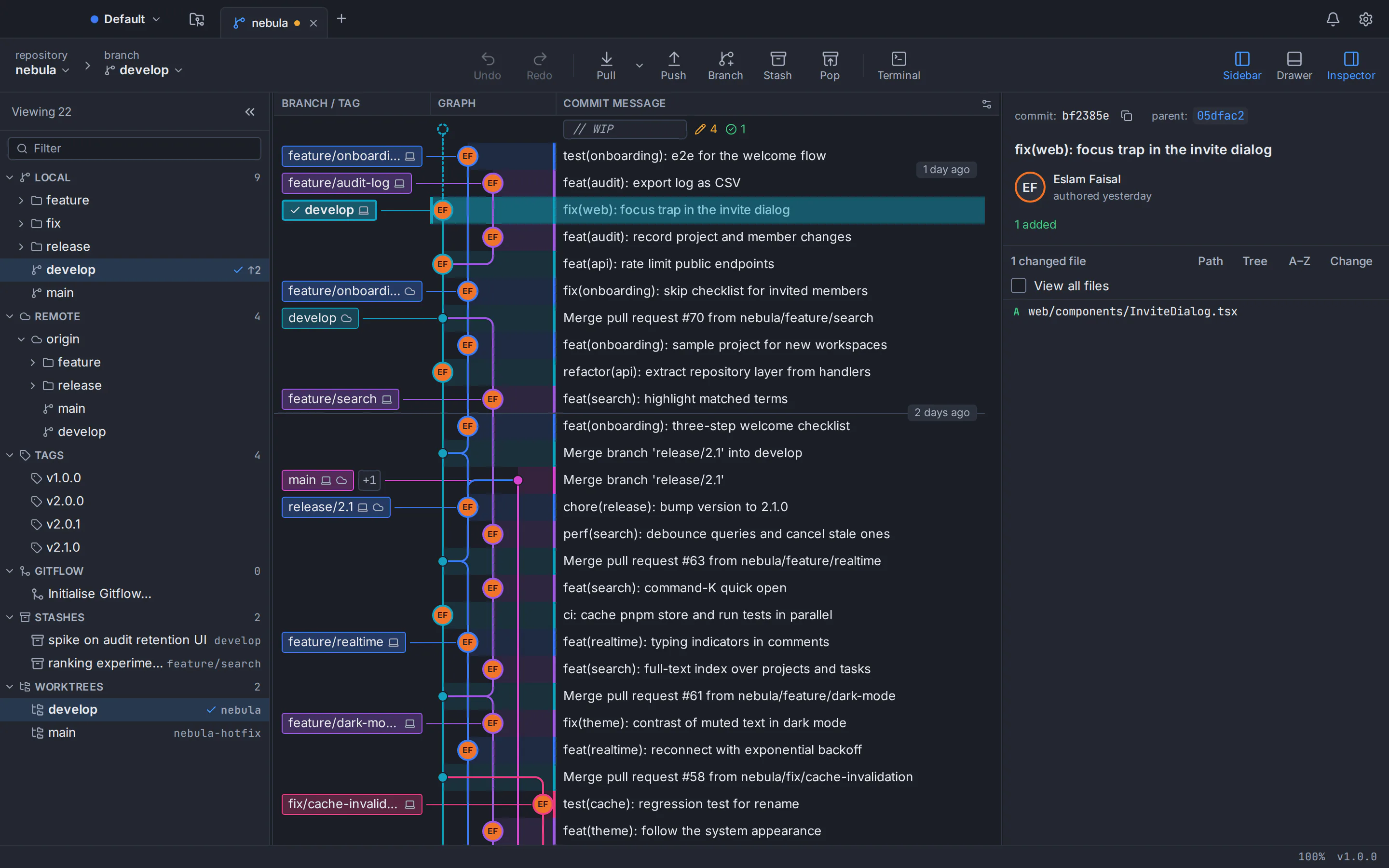
GitTree is a free desktop Git client for macOS, Windows and Linux, and a practical Tower alternative if you don’t want a subscription. Tower, which many people search for as Git Tower or Tower Git, is a paid client; GitTree gives you a fast commit graph, line-by-line staging, interactive rebase, undo, a three-way conflict editor and a docked terminal at no cost today. Below is an honest, sourced comparison with Tower, including the places where Tower is ahead.
Free for macOS, Windows and Linux. Sign in with a free GitTree account; no licence key, no trial clock, no credit card.
Last checked against Tower’s official pages:
The short answer
- Price today
- GitTree is $0; Tower costs US$69 to US$149 per user per year
- Linux
- GitTree ships a .deb and an AppImage; Tower has no Linux build
- Conflicts and terminal
- A line-level three-way editor and a docked terminal are built into GitTree
- Where Tower leads
- No account, bundled Git, team features and a track record since 2010
Why developers look for a Tower alternative
Tower is a mature, native Git client that has been around since 2010. These are the reasons people most often give for trying something else.
There is no free plan
Tower’s pricing page answers the question “Why isn’t there a free plan?” directly: you get a 30-day trial of the Pro edition, then you need a subscription. Free licences are offered only to students, teachers, educational institutions and non-profits, on application.
A yearly subscription for every seat
As of October 2026, Tower costs US$69 (Basic), US$129 (Pro) or US$149 (Enterprise) per user per year, billed annually. There is no perpetual licence: according to its licence agreement, access ends when the paid-up period ends.
No Linux version
Tower’s official pages offer it for macOS and Windows only, with no Linux build. Developers on Ubuntu, Debian or Linux Mint, and teams that mix operating systems, need a different client.
Self-hosted servers need Pro
The Basic plan connects to GitHub.com, GitLab.com, Bitbucket.org and Azure DevOps. GitHub Enterprise, Bitbucket Server, self-managed GitLab and Azure DevOps Server need the Pro plan.
Line-level conflicts go to another app
Tower’s Conflict Wizard resolves a whole file by declaring one version correct. To combine both sides line by line, it opens an external merge tool that you configure, such as Araxis Merge or Beyond Compare.
AI commits on one platform, no docked terminal
Tower’s AI Commits write commit messages through your Claude Code or Codex CLI on macOS only, according to its product overview. No embedded terminal is documented: Open in Terminal launches a separate terminal app.
Why developers choose GitTree
GitTree covers the Git work you do every day, makes the risky parts safer and keeps the whole app free today.
Free today, at home and at work
Every feature, private repositories and commercial use included, for individuals and organizations. No trial that runs out, no licence key and no credit card.
One client on every desktop
GitTree runs on macOS, Windows and Linux: one universal app for Apple silicon and Intel, a 64-bit Windows installer, and a .deb or AppImage for Ubuntu 22.04+ and Debian 12+.
Resolve conflicts line by line, in the app
A full-window three-way editor (current, incoming, output) with per-hunk and per-line choices, rerere, and a warning before a merge when branches would conflict.
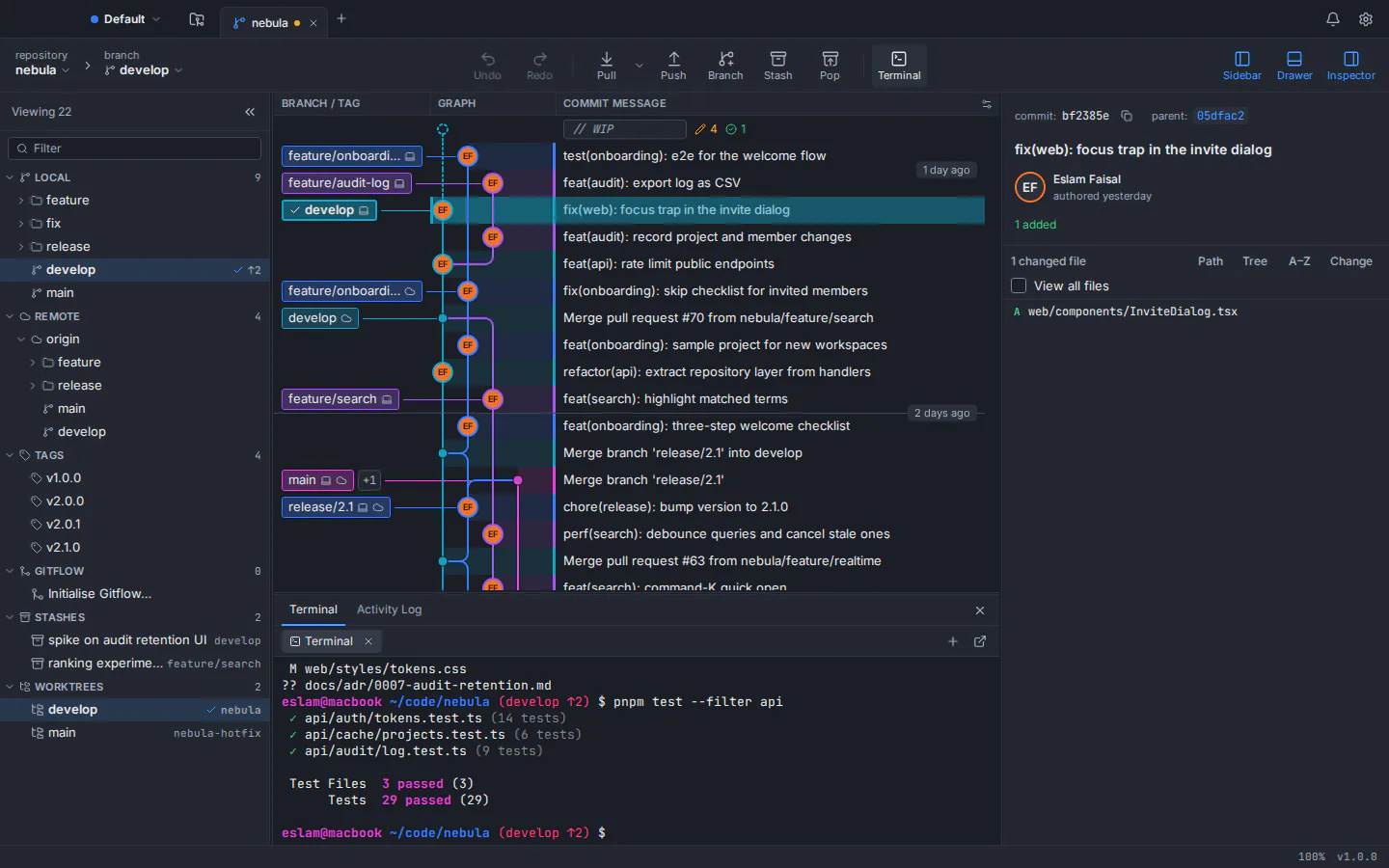
A terminal under the graph
Your own shell docked inside the window, beside a command palette of about 300 commands and keyboard shortcuts you can rebind.
AI drafts on every platform
Draft commit messages and pull request titles and descriptions with your own Claude Code, Codex or Antigravity CLI, on macOS, Windows and Linux, only when you click Generate. No AI credits, and GitTree stores no AI key.
Private by design, in English or Arabic
No telemetry, analytics or crash upload, and tokens stay in the system keychain. The whole interface is available in English and in Arabic with a full right-to-left layout.
GitTree vs Tower: feature comparison
Both are desktop Git clients with a commit graph, line staging, interactive rebase and undo. They differ most in price, platforms, conflict handling and team features. Products change, so the official sources are linked below the page.
- Included
- Partly, or with limits
- Needs a paid plan
- Not available
| Topic | GitTree | Tower |
|---|---|---|
| Price and access | ||
| Price | GitTreeIncluded: Free today, for individuals and organizations | TowerNeeds a paid plan: US$69 Basic, US$129 Pro or US$149 Enterprise per user per year, billed annually (October 2026) |
| Free plan or trial | GitTreeIncluded: No trial needed: every feature is free | TowerPartly, or with limits: No free plan; a 30-day Pro trial without a credit card. Free for students, teachers and non-profits on application |
| Commercial use | GitTreeIncluded: Included free, private repositories too | TowerNeeds a paid plan: A paid licence for each user |
| Licence model | GitTreePartly, or with limits: Nothing to buy today; there is no perpetual licence to own either | TowerNeeds a paid plan: Subscription only: access ends when the paid period ends. One licence covers both of its desktop versions |
| Account and sign-in | GitTreePartly, or with limits: Free GitTree account; network needed on first launch, then a check at least every 7 days | TowerIncluded: No user account: a licence key and email activate the app (online activation; offline licences through support) |
| Desktop systems and installers | ||
| macOS | GitTreeIncluded: One universal app for Apple silicon and Intel, macOS 13 Ventura or later, signed and notarized | TowerIncluded: Apple silicon and Intel; current versions need macOS 14 or later |
| Windows | GitTreePartly, or with limits: 64-bit (x64) installer for Windows 10 (22H2) and Windows 11; not code-signed yet, no MSI | TowerIncluded: Windows 10 or newer on x64 and Arm, as an installer or MSI packages |
| Linux | GitTreeIncluded: .deb and AppImage for x86_64 Ubuntu 22.04+ and Debian 12+, verified with SHA-256 checksums | TowerNot available: No official Linux build |
| Git itself | GitTreePartly, or with limits: Uses your installed Git 2.39 or newer, so the installers stay small (7.5 MB on Windows) | TowerIncluded: Bundles Git and Git LFS: no Git installation required (downloads of about 86 MB) |
| History, staging and commits | ||
| Visual commit graph | GitTreeIncluded: Colour-coded lanes, labels, PR and CI chips; smooth past 100,000 commits | TowerIncluded: History with a configurable tree graph and fork-point display |
| History search | GitTreeIncluded: Message, author or hash, plus author:, file: and change: (pickaxe) filters | TowerIncluded: Message, author, committer or file |
| Hunk and line staging | GitTreeIncluded: Files, hunks or single lines; discard the same way, with undo | TowerIncluded: Files, parts of files or single lines; discard down to single lines |
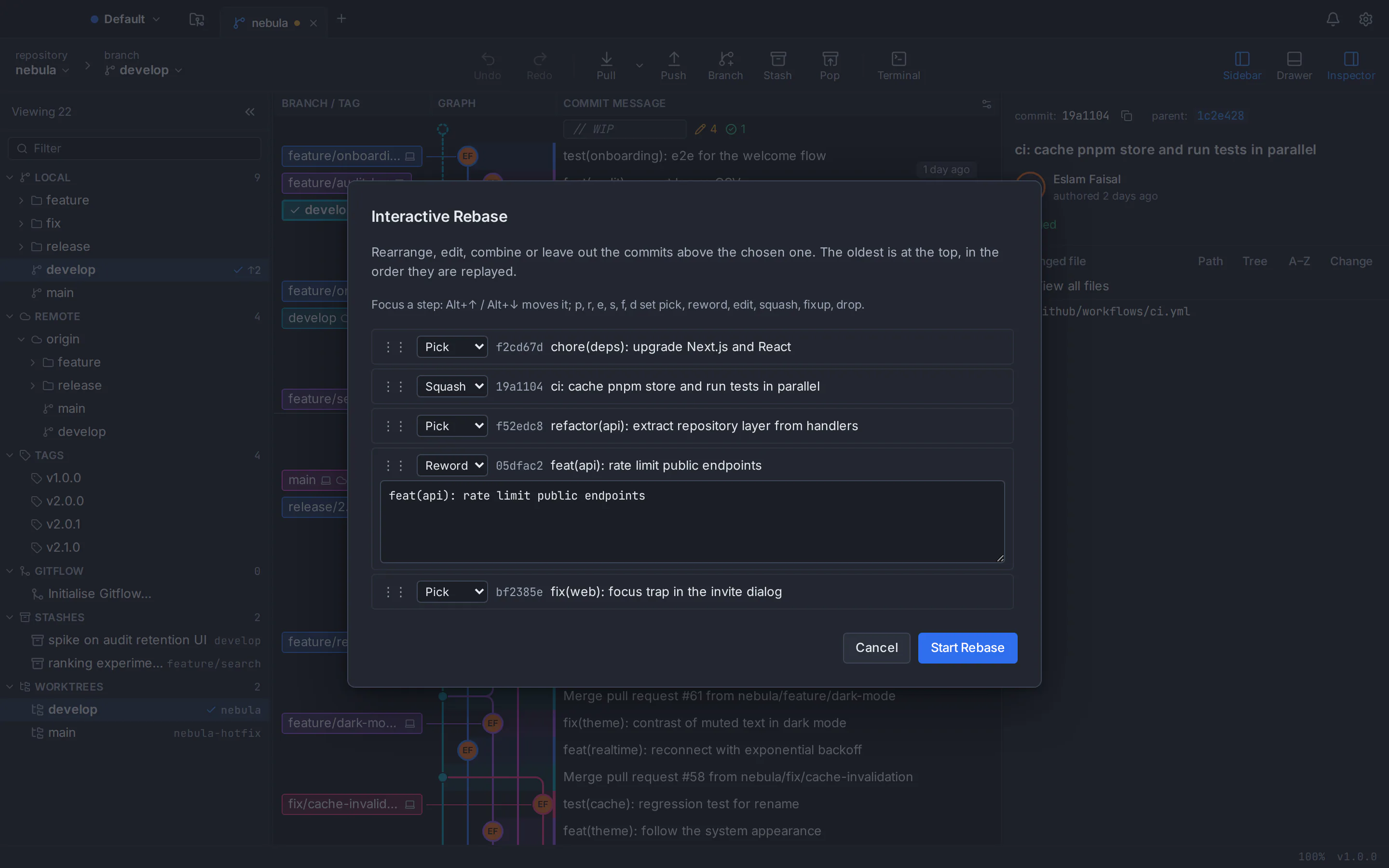
| Interactive rebase | GitTreeIncluded: One plan with pick, reword, edit, squash, fixup and drop; reorder by drag or keyboard; autosquash | TowerIncluded: Drag to reorder or squash; fixup, edit, reword and drop from the menu; autosquash |
| Undo and recovery | GitTreeIncluded: Undo and redo for commits, resets, rebases, discards and branch changes, plus a reflog view | TowerIncluded: Cmd/Ctrl+Z for commits, merges, rebases, discards, branches and stashes, plus reflog recovery |
| Merge conflicts | GitTreeIncluded: Built-in three-way editor with per-hunk and per-line choices, rerere and conflict prediction | TowerPartly, or with limits: Conflict Wizard resolves a whole file with one version; line-by-line merging opens an external merge tool |
| Signed commits | GitTreeIncluded: GPG, SSH or X.509, with signature badges in the graph | TowerIncluded: SSH and GPG keys to sign and verify commits and tags |
| Repository workflow | ||
| Stash | GitTreeIncluded: Push, apply, pop, rename, branch from a stash, and stash selected lines | TowerIncluded: Save, apply parts of a stash, partial stash and Snapshots |
| Worktrees, submodules and Git LFS | GitTreeIncluded: All three, including Git LFS tracking, pulls and file locks | TowerIncluded: All three, with Git LFS built in |
| Git Flow and custom workflows | GitTreePartly, or with limits: Git Flow (feature, release, hotfix); no custom workflow rules | TowerIncluded: git-flow plus Custom Workflows; the advanced rules need Pro |
| Stacked branches and branch cleanup | GitTreeNot available: Not offered | TowerNeeds a paid plan: Stacked branches, the Graphite workflow, automatic branch management and PR-based merge detection on Pro |
| Subversion remotes | GitTreeNot available: Git only | TowerIncluded: git-svn support |
| Diffs and productivity | ||
| Built-in terminal | GitTreeIncluded: Your own shell docked under the graph | TowerPartly, or with limits: No embedded terminal documented; Open in Terminal launches your terminal app, plus the gittower command-line tool |
| Command palette and shortcuts | GitTreeIncluded: About 300 commands, rebindable shortcuts and a cheat sheet | TowerIncluded: Quick Actions to check out branches, find commits and open file history |
| Syntax highlighting and image diffs | GitTreePartly, or with limits: 14 grammars; image diff side by side, swipe or onion skin; Markdown preview | TowerIncluded: About 200 languages and image diffs, HEIC included |
| Multiple windows | GitTreeNot available: One window with repository tabs and workspaces | TowerIncluded: Several windows side by side |
| Interface languages | GitTreeIncluded: English and Arabic, with a full right-to-left layout | TowerPartly, or with limits: No interface translations are documented on its official pages |
| Hosting and pull requests | ||
| GitHub and Bitbucket pull requests | GitTreeIncluded: List, create, review, comment and merge; CI checks with re-run; a dashboard across repositories | TowerIncluded: Create, merge, comment on, close, search and check out pull requests |
| GitLab and Azure DevOps | GitTreePartly, or with limits: New support for merge and pull requests on gitlab.com and Azure DevOps | TowerIncluded: Included from the Basic plan |
| Self-hosted Git servers | GitTreePartly, or with limits: New support, included free: GitHub Enterprise Server, self-managed GitLab and Bitbucket Data Center | TowerNeeds a paid plan: Pro plan for GitHub Enterprise, Bitbucket Server, self-managed GitLab and Azure DevOps Server |
| Other hosting services | GitTreePartly, or with limits: Any remote over HTTPS or SSH, without a dedicated integration (no Gitea integration) | TowerIncluded: Beanstalk, Assembla, Planio, CodeBase, GitSwarm and Perforce, plus Gitea (cloud and self-hosted) in the Windows app |
| Issues | GitTreeIncluded: GitHub and GitLab issues inside the app | TowerPartly, or with limits: On Mac, clickable issue references in commit messages for the main hosts and custom trackers |
| AI and teams | ||
| AI drafts | GitTreeIncluded: Commit messages and pull request text through your own Claude Code, Codex or Antigravity CLI, on every platform; no built-in model | TowerPartly, or with limits: AI Commits through your Claude Code or Codex CLI, on macOS only per its product overview |
| Single sign-on and team admin | GitTreeNot available: Not offered; no in-app team features | TowerNeeds a paid plan: Team management from Pro; SAML single sign-on on Enterprise |
| Managed deployment | GitTreeNot available: Per-machine installer only; no MSI or admin controls | TowerIncluded: MSI packages; advanced deployment and activation on Enterprise |
| Privacy and track record | ||
| Where your code lives | GitTreeIncluded: On your computer; GitTree runs your installed Git | TowerIncluded: Local repositories stay on your computer |
| Telemetry | GitTreeIncluded: No telemetry, analytics or crash upload; tokens in the system keychain | TowerPartly, or with limits: Opt-in crash reports and, on macOS, opt-in analytics; activation and update checks send a machine identifier, per its privacy policy |
| Track record | GitTreePartly, or with limits: New: version 1.2.9, released 4 October 2026, in active development | TowerIncluded: Since 2010, used by over 100,000 people according to Tower, with frequent releases |
This table compares the current public products, not every setting. Tower’s prices and features come from its official pages as of October 2026; “not documented” means we found no mention of it there. GitTree is in active development; check its features page before moving a critical workflow.
Tower pricing vs GitTree
The practical difference: GitTree has no subscription today, for personal or business use.
GitTree
$0everything the app does today
- Private, public and local repositories, commercial use included
- Conflict editor, terminal, AI drafts and every other feature
- Self-hosted GitHub Enterprise, GitLab and Bitbucket Data Center support (new)
- Builds for macOS, Windows and Linux
Tower
US$69–149per user per year, billed annually, as of October 2026
- Basic, US$69: cloud GitHub, GitLab, Bitbucket and Azure DevOps
- Pro, US$129: stacked branches, Graphite, advanced workflows and self-hosted servers
- Enterprise, US$149: SAML single sign-on, advanced team management and priority support
- No free plan: a 30-day Pro trial, then a subscription; free for students, teachers and non-profits
Prices as listed on Tower’s pricing page in October 2026, per user and billed annually; they change over time, so check the official page before you buy. Tower offers a 30-day money-back guarantee and a 10% discount from 10 Pro seats, and access ends when a subscription lapses.
A Tower alternative for Mac, Windows and Linux
The same GitTree on macOS, Windows and Linux, running the Git 2.39 or newer that you already have installed. Because Tower has no Linux build, GitTree is also an option for mixed teams.
Tower alternative for Mac
One universal app that runs natively on Apple silicon and Intel Macs with macOS 13 Ventura or later, signed and notarized by Apple. Current Tower versions need macOS 14.
Tower alternative for Windows
A 64-bit installer for Windows 10 (22H2) and Windows 11. Install Git for Windows first: GitTree uses it instead of bundling its own Git.
Tower alternative for Linux
Tower has no Linux build. GitTree offers a .deb package or a portable AppImage for 64-bit Ubuntu 22.04+ and Debian 12+; on Ubuntu 22.04 and Linux Mint 21, add the git-core PPA for a newer Git first.
Read the Linux install guide
Which one should you choose?
Both are capable tools. Pick the one that matches how you and your team work, then try it on a noncritical repository before you move daily work.
Choose GitTree if…
- You want a capable Git client without a subscription, including for commercial work
- Your team mixes macOS, Windows and Linux, or you work on Linux yourself
- You want to resolve conflicts line by line in the app and keep a terminal docked under the graph
- You connect self-hosted GitHub Enterprise, GitLab or Bitbucket Data Center (new in GitTree) without a paid plan
- You want AI drafts through your own CLI on any desktop, an Arabic interface or no telemetry at all
Consider Tower if…
- You want no user account: a licence key and email activate Tower
- You want Git bundled with the app, native Arm builds for Windows or MSI packages for managed deployment
- You rely on stacked branches, the Graphite workflow, custom workflows or automatic branch cleanup
- Your company needs SAML single sign-on, team administration, invoicing or priority support
- You use Gitea (in the Windows app) or Subversion remotes, want several windows side by side, or use the gittower command-line tool
- You value a track record since 2010, paid support and a money-back guarantee, or qualify for a free education or non-profit licence
How to switch from Tower to GitTree
Switching takes about ten minutes. Your repositories are standard Git, so both apps can open them side by side while you decide, even during a Tower trial.
Check your Git version
Tower bundles its own Git; GitTree uses the Git already on your computer. Run git --version in a terminal; if Git is missing or older than 2.39, install a current version first (Git for Windows on Windows).
Download GitTree
Get the free installer for macOS, Windows or Linux from the download page and install it.
Sign in with a free account
Create a free GitTree account on this website with GitHub, GitLab, Bitbucket or Azure DevOps, then sign in from the app.
Open the repositories you already have
Choose Open and select a repository folder, or scan a folder for repositories. History, branches, remotes, stashes and worktrees live in the repository itself, so there is nothing to import.
Connect your hosting accounts
Optionally connect GitHub, GitLab, Bitbucket or Azure DevOps in Preferences to work with pull requests and CI checks, self-hosted servers included. Every other remote keeps working over HTTPS or SSH.
Bring over your setup and try it
Set your signing key, external merge tool, theme, shortcuts and profiles in Preferences, then try a staged commit, an interactive rebase, a conflict and an undo on a test branch.
Tower alternative: frequently asked questions
What is the best free Tower alternative?
If you want a polished Git client like Tower without a subscription, GitTree is built for that: a free desktop app for macOS, Windows and Linux with a commit graph, line staging, interactive rebase, undo, a three-way conflict editor and a docked terminal. Try it on one repository and compare it with your current workflow.
Is Tower free?
No. As of October 2026 Tower has no free plan. You can try the Pro edition free for 30 days without a credit card; after that you need a subscription. Enrolled students, teachers, educational institutions and non-profit organizations can apply for a free licence.
How much does Tower cost?
As of October 2026, per user per year and billed annually: US$69 for Basic, US$129 for Pro and US$149 for Enterprise. One licence covers both its macOS and Windows versions; there is no Linux version. Tower offers a 30-day money-back guarantee. Check Tower’s pricing page for current prices.
Does Tower run on Linux?
No. Tower’s official pages list macOS and Windows only, and there is no official Linux build. GitTree runs natively on Linux, as a .deb package or an AppImage, and is free today.
Is there a Tower alternative for Ubuntu and Debian?
Yes. GitTree runs on 64-bit Ubuntu 22.04 or later and Debian 12 or later, installed from a .deb package or a portable AppImage. Derivatives such as Linux Mint 21+ can run it too, but they are not tested. It needs Git 2.39 or newer; on Ubuntu 22.04 and Mint 21, add ppa:git-core/ppa first.
Can I open my Tower repositories in GitTree?
Yes. Both apps work on ordinary Git repositories, so there is nothing to export or import. Open the same folder in GitTree and its branches, remotes, stashes, worktrees and history are already there.
What happens when my Tower trial ends?
Tower’s licence agreement says that when the trial lapses, all or part of the app’s functionality is disabled automatically; to keep using it you need a paid subscription. Your repositories are standard Git and are not affected, so you can keep working on them in GitTree.
Can I use GitTree for commercial work?
Yes. GitTree is free today for individuals and organizations, commercial work and private repositories included, with no trial and no credit card. Tower requires a paid licence for commercial use.
Can GitTree resolve merge conflicts line by line?
Yes. GitTree has a full-window three-way editor (current, incoming, output) where you choose per hunk or per line, plus rerere and conflict prediction before a merge. Tower’s Conflict Wizard resolves a whole file with one version and opens an external merge tool for line-by-line merging.
Does GitTree write AI commit messages on Windows and Linux?
Yes. GitTree drafts commit messages and pull request titles and descriptions through your own Claude Code, Codex or Antigravity CLI on all three platforms, only when you click Generate. It has no built-in model and stores no AI key. According to Tower’s product overview, its AI Commits are available on macOS only.
Does GitTree work with self-hosted GitHub Enterprise, GitLab or Bitbucket?
Yes. GitHub Enterprise Server, self-managed GitLab and Bitbucket Data Center have new support in GitTree, included free. Tower supports self-hosted services on its Pro plan (US$129 per user per year as of October 2026). Any other remote works in GitTree over HTTPS or SSH.
Do I need an account to use GitTree?
Yes. You sign in once with a free GitTree account, created on this website with GitHub, GitLab, Bitbucket or Azure DevOps. The first launch needs the network; after that GitTree keeps running without a connection for up to 7 days between checks. Tower needs no user account, but it does need online activation with a licence key.
Do I need Git installed to use GitTree?
Yes. GitTree does not bundle Git: it runs the Git installed on your computer, version 2.39 or newer, so every action matches what the command line would do. Tower bundles Git and Git LFS, so it needs no separate installation.
Does GitTree upload my code or collect usage data?
No. GitTree has no telemetry, analytics or crash upload, and your repositories stay on your computer. It talks only to your remotes, the accounts you connect, the GitTree account service for sign-in and an update check you can switch off. The optional AI draft sends the staged diff to the CLI you chose, only when you click.
Is GitTree a good Tower alternative for Mac?
Yes. GitTree is one universal app that runs natively on Apple silicon and Intel with macOS 13 Ventura or later, signed and notarized by Apple. Current Tower versions require macOS 14, so GitTree also suits Macs that stay on Ventura.
Does GitTree run on Windows?
Yes. GitTree runs on 64-bit Windows 10 (22H2) and Windows 11 with Git for Windows installed. The installer is not code-signed yet, so SmartScreen may warn: check the SHA-256 checksum, then choose More info and Run anyway. If you need Arm builds or MSI packages, Tower offers them.
Is Tower open source?
No. Tower is proprietary, closed-source software under a commercial licence agreement. GitTree is not open source either: it is free today but closed source, and its public repository hosts releases only.
How this comparison was checked
Tower’s plans, platforms and features were reviewed on 6 October 2026 against its official pages: the product site, the pricing and Pro pages, the feature list, the help guides, the AI product overview, the release notes, the licence agreement and the privacy policy. Prices and features change; the vendor’s current pages are the source of truth.
- Tower overview
- Tower pricing and plans
- Tower Pro features
- Tower: all features and requirements
- Tower remote services
- Tower undo
- Tower help: merge conflicts
- Tower help: licence and account
- Tower AI product overview
- Tower release notes
- Tower licence agreement
- Tower privacy policy
- GitTree features
GitTree is an independent product and is not affiliated with or endorsed by the owner of Tower. Tower is a trademark of its owner.
Compare Git clients
Switching from another Git client?
Honest, sourced comparisons with the Git GUIs developers use most, including what each one does better.
GitKraken alternative
Private repositories, deep undo and AI drafts with your own CLI at no cost, compared row by row with GitKraken Desktop.
Sourcetree alternative
Runs on Linux too, with a built-in conflict editor, undo and in-app pull requests, compared row by row with Sourcetree.
GitHub Desktop alternative
A commit graph, full interactive rebase and an official Linux build, compared row by row with GitHub Desktop.
Fork alternative
A Linux build, no licence to buy, undo and pull requests in the app, compared row by row with Fork.
SmartGit alternative
Free for commercial use with no licence application, plus a docked terminal, undo and AI drafts, compared row by row with SmartGit.
Sublime Merge alternative
No licence to buy, plus pull requests, a drag-and-drop rebase plan and undo, compared row by row with Sublime Merge.
Try the free Tower alternative on your own repository
Download GitTree, open a repository you already work on and compare the graph, staging, conflict and history tools for yourself.