GitTree vs GitButler
The GitButler alternative that keeps plain Git branches
GitTree is a GitButler alternative: a desktop Git client for macOS, Windows and Linux that works on your normal Git branches. GitButler applies several branches at once on its own workspace branch. GitTree keeps the branch model Git and every other tool already understand, with an interactive commit graph, line-by-line staging, a three-way conflict editor and undo for risky steps. Below is an honest, sourced comparison with GitButler.
For macOS, Windows and Linux. Free plan with a GitTree account; no credit card.
Last checked against GitButler’s official pages:
The short answer
- Branches
- GitTree works on normal Git branches; GitButler applies several branches at once on its gitbutler/workspace branch
- Merge conflicts
- GitTree has a three-way editor; GitButler keeps rebasing and marks commits as conflicted, to fix one at a time
- Pull requests
- GitTree Pro covers GitHub, GitLab, Bitbucket and Azure DevOps; GitButler lists GitHub, GitLab and Bitbucket
- Where GitButler leads
- Parallel and stacked branches in one folder, the “but” command line, and source code you can read
Why developers look for a GitButler alternative
GitButler is a Git client built with Tauri and Rust, with a desktop app and a command line called “but”. It reimagines branching around parallel branches. These are the most common reasons people look for something else.
You want plain Git branches
GitButler’s docs say it works on a special gitbutler/workspace branch, and that switching branches with git switch makes it pause until you return to its way of working.
Conflicts are fixed commit by commit
When an update conflicts, GitButler keeps rebasing and stores conflicted commits. You then open each one in an edit mode with the conflict markers and save it.
Linux support is narrow
Its LINUX.md names the deb package on Ubuntu 22.04 and 24.04 as the official way; the rpm and AppImage are experimental, and other packages are community-maintained.
Still before version 1.0
Its latest release on GitHub is 0.23.1, published on 28 October 2026, alongside daily nightly builds.
Pull requests on three hosts
Its README lists GitHub, GitLab and Bitbucket for pull requests and CI statuses. Azure DevOps is not among them.
AI goes through its servers by default
Its default AI option sends diffs to OpenAI through GitButler’s servers and needs a GitButler login. You can switch to your own OpenAI or Anthropic key, Ollama or LM Studio.
Why developers choose GitTree
GitTree keeps Git’s own model and puts the whole repository in one window, with history, recovery and hosting tools around it.
Normal branches, nothing hidden
GitTree checks out, merges and rebases the same branches the command line sees, so git switch, your editor and CI scripts keep working exactly as before.
The whole repository in one window
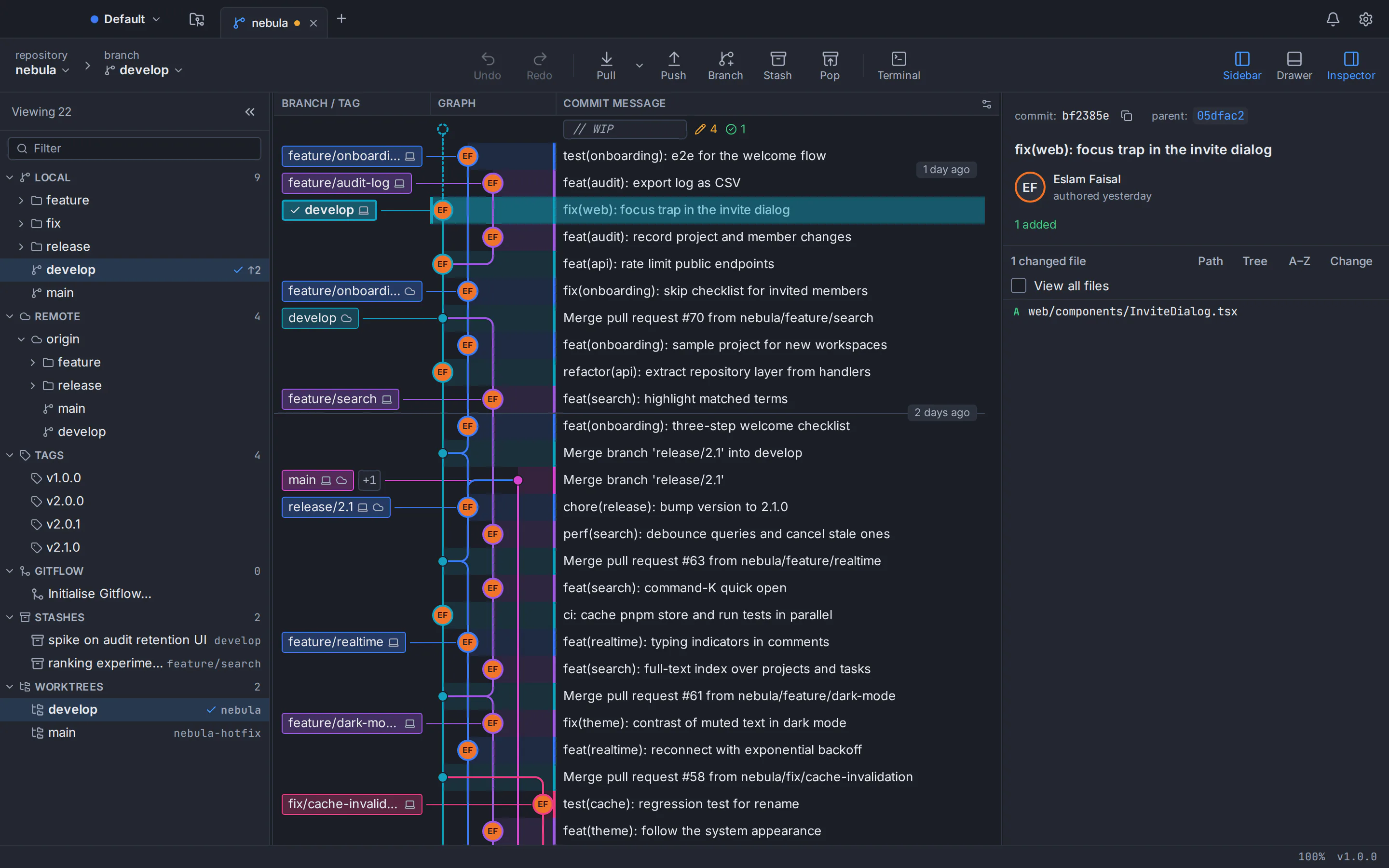
An interactive commit graph with colour-coded branch lanes, labels, search and filters, beside staging, branches and commit details. It stays smooth past 100,000 commits.
Stage and merge exactly what you mean
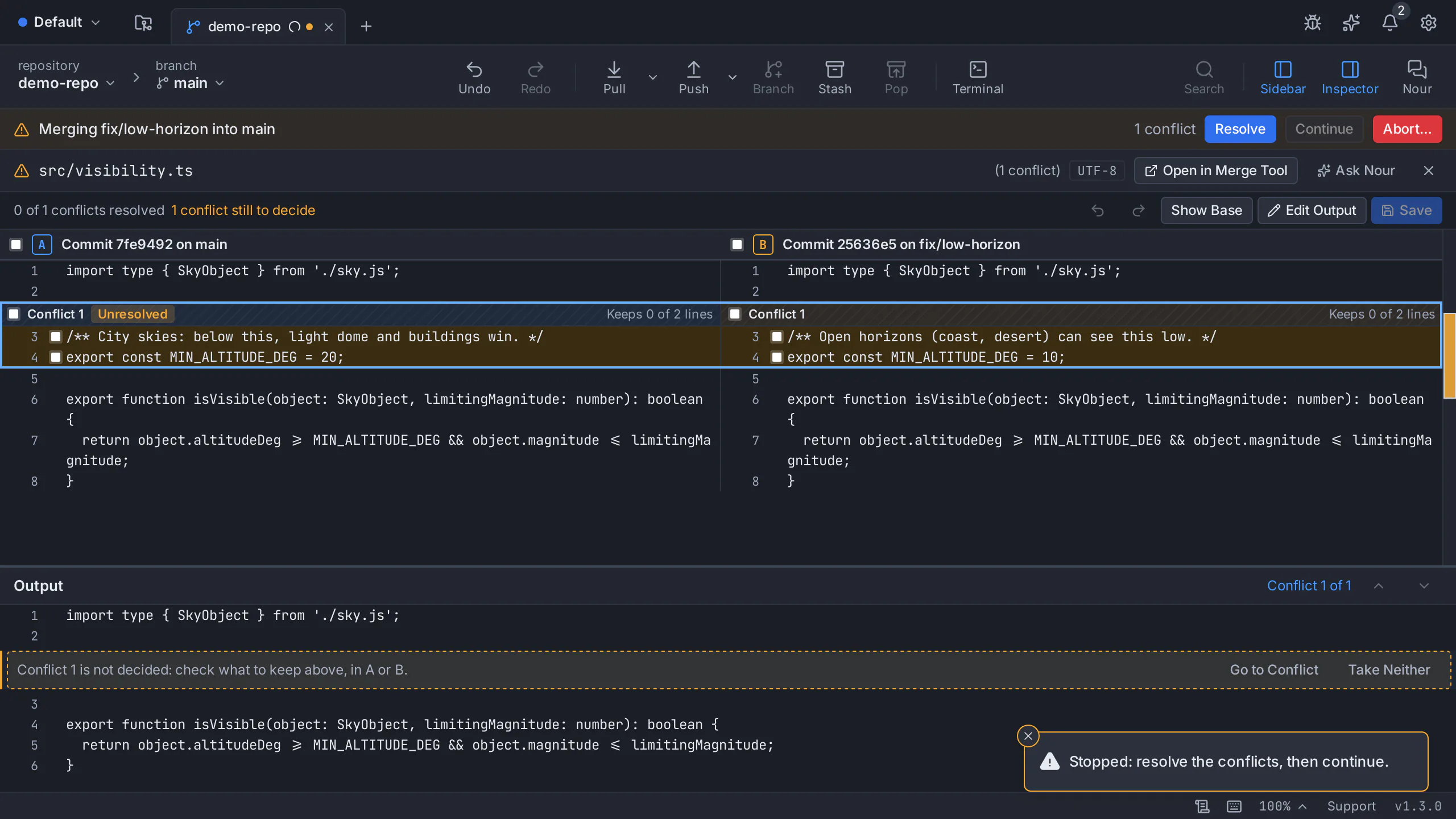
Stage files, hunks or single lines, and resolve conflicts in a three-way editor with per-hunk and per-line choices, after a warning before a merge would conflict.
Undo for the risky operations
Undo and redo from the toolbar reverse commits, checkouts, resets, rebases, discards and branch or tag deletes, and risky steps are snapshotted first so they stay recoverable.
Pull requests and CI/CD with Pro
With GitTree Pro, list, create, review, comment on and merge pull requests on GitHub, GitLab, Bitbucket and Azure DevOps, and follow CI/CD runs and live logs, without leaving the app.
Your own coding agent, no AI key stored
With Pro, GitTree drafts commit messages and pull request text through the coding-agent CLI you already use, such as Claude Code or Codex. GitTree stores no AI key and sells no credits.
GitTree vs GitButler: feature comparison
Both run on your own Git and work with the same remotes. They differ most in how they handle branches, conflicts, licensing and hosting integration. Products change, so the official sources are linked at the bottom of the page.
- Included
- Partly, or with limits
- Needs a paid plan
- Not available
| Topic | GitTree | GitButler |
|---|---|---|
| Price and access | ||
| Price | GitTreeIncluded: Free plan for every Git feature; Pro adds hosting integrations, AI drafting and Nour, with a free trial | GitButlerPartly, or with limits: No price in its docs as of October 2026; its pricing page did not load |
| Account and sign-in | GitTreePartly, or with limits: A GitTree account to sign in; the Free plan covers every Git feature | GitButlerIncluded: Optional: a GitButler login only for AI through GitButler’s servers |
| Source code | GitTreeNot available: Closed source; the public repository hosts installers and release notes | GitButlerIncluded: Fair Source (FSL-1.1-MIT): readable source that bars competing products and becomes MIT after two years |
| Desktop systems and setup | ||
| macOS | GitTreeIncluded: One universal app for Apple silicon and Intel, macOS 13 or later, signed and notarized | GitButlerIncluded: dmg builds for Apple silicon (arm64) and Intel (x86_64) |
| Windows | GitTreePartly, or with limits: 64-bit for Windows 10 (22H2) and Windows 11; Microsoft Store edition signed by Microsoft, direct EXE unsigned | GitButlerIncluded: x86_64 msi installer |
| Linux | GitTreePartly, or with limits: .deb and AppImage for x86_64 Ubuntu 22.04+ and Debian 12+; unsigned, verified with SHA-256 checksums | GitButlerPartly, or with limits: deb tested on Ubuntu 22.04 and 24.04; experimental rpm and AppImage; community Flatpak, AUR and Nix packages |
| Git itself | GitTreePartly, or with limits: Uses your installed Git 2.39 or newer (Git for Windows on Windows) | GitButlerIncluded: Uses your system Git and its existing authentication settings |
| How you work | ||
| Branch model | GitTreeIncluded: Normal Git branches: check out, merge and rebase as on the command line | GitButlerPartly, or with limits: A gitbutler/workspace merge commit; git switch makes GitButler pause until you return |
| Several branches at once | GitTreePartly, or with limits: One checked-out branch per folder; worktrees give each branch its own folder | GitButlerIncluded: Parallel branches applied together in one folder, each in its own lane |
| Stacked branches | GitTreePartly, or with limits: Rebase dependent branches yourself, with interactive rebase | GitButlerIncluded: Stacked branches that restack when you edit a commit below them |
| Staging | GitTreeIncluded: Stage files, hunks or single lines from the diff | GitButlerIncluded: Each branch lane has its own staging area; drag changes between lanes |
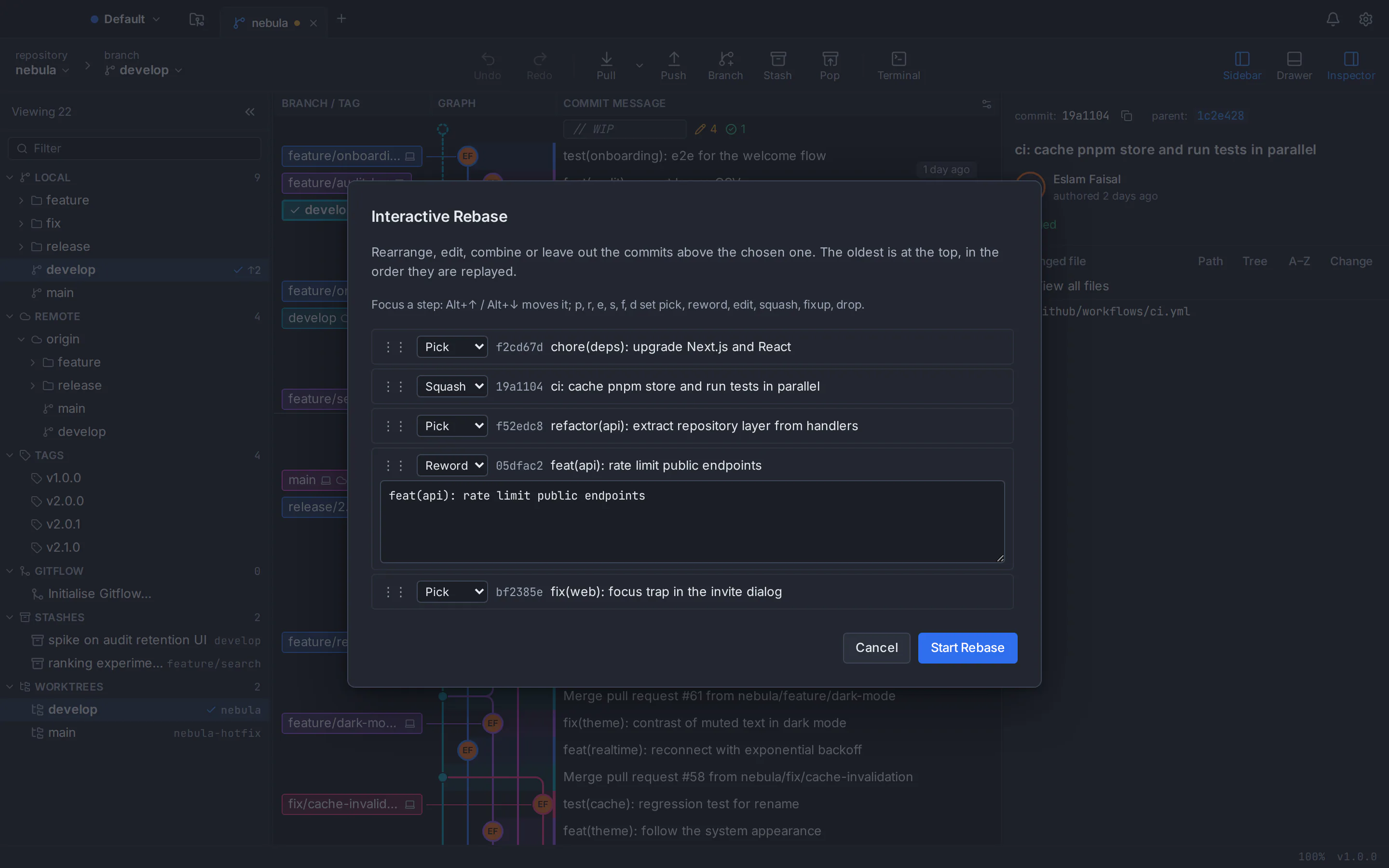
| Editing commits | GitTreeIncluded: Interactive rebase to reorder, squash, reword and drop commits | GitButlerIncluded: Drag and drop to squash, split, move, amend and reword commits |
| Merge conflicts | GitTreeIncluded: Three-way editor with per-hunk and per-line choices, and a warning before a merge would conflict | GitButlerIncluded: Warns before updating; rebases keep going and conflicted commits are fixed one at a time in an edit mode |
| Undo | GitTreeIncluded: Undo and redo for commits, checkouts, resets, rebases, discards and deletes, with snapshots before risky steps | GitButlerIncluded: An operations history with a snapshot before each major action; revert to any entry |
| Command line | GitTreeNot available: No command-line tool of its own; a built-in terminal in the app | GitButlerIncluded: The “but” CLI and a terminal UI on the same engine as the desktop app |
| Integrations and AI | ||
| Pull requests | GitTreeNeeds a paid plan: With Pro: list, create, review, comment on and merge pull requests on GitHub, GitLab, Bitbucket and Azure DevOps | GitButlerIncluded: Open and update pull requests on GitHub, GitLab and Bitbucket |
| CI/CD | GitTreeNeeds a paid plan: With Pro: CI/CD runs, jobs and live logs, with re-run | GitButlerPartly, or with limits: CI statuses from the connected host |
| AI drafts | GitTreeNeeds a paid plan: With Pro: commit messages and pull request text through your own agent CLI, such as Claude Code or Codex | GitButlerIncluded: Commit messages, branch names and pull request descriptions, through GitButler’s servers or your own OpenAI, Anthropic, Ollama or LM Studio setup |
| Interface languages | GitTreeIncluded: English and Arabic, with a full right-to-left layout | GitButlerPartly, or with limits: English only: its repository has no interface translations as of October 2026 |
| Track record | GitTreePartly, or with limits: New: first released in September 2026, in active development | GitButlerPartly, or with limits: Before version 1.0: release 0.23.1 on 28 October 2026, plus nightly builds |
This table compares the current public products, not every setting. GitButler facts come from docs.gitbutler.com and its GitHub repository as checked on the date above; gitbutler.com itself did not load that day. GitTree is in active development; check its features page and release notes before moving a critical workflow.
GitButler price vs GitTree
GitTree’s Free plan covers every Git feature, and GitTree Pro adds the hosting integrations, AI drafting and Nour, the AI assistant. GitButler’s docs list no price; its licence is Fair Source.
GitTree
FreeFree plan · Pro with a free trial
- Every local Git feature, private repositories and commercial use
- Builds for macOS, Windows and Linux
- Pro adds pull requests, CI/CD, AI drafting and Nour, the AI assistant
- Plans and prices on the Pricing page
GitButler
No price listedin its docs as of October 2026; Fair Source licence (FSL-1.1-MIT)
- Source code readable on GitHub
- The licence bars building a competing product; each version becomes MIT after two years
- AI through GitButler’s servers needs a GitButler login
- Builds for macOS, Windows and Linux
GitButler’s licence terms are as stated in its repository in October 2026; check gitbutler.com for current prices. GitTree’s Free plan needs no credit card; the Pricing page compares Free and Pro.
A GitButler alternative for Mac, Windows and Linux
The same GitTree on macOS, Windows and Linux, running the Git 2.39 or newer that you already have installed.
GitButler alternative for Mac
One universal app that runs natively on Apple silicon and Intel Macs with macOS 13 Ventura or later, signed and notarized by Apple.
GitButler alternative for Windows
A 64-bit app for Windows 10 (22H2) and Windows 11 that uses your Git for Windows. Get it from the Microsoft Store, signed by Microsoft, or as a direct EXE, which is unsigned, so SmartScreen may ask you to confirm.
GitButler alternative for Linux
A .deb package or a portable AppImage for 64-bit Ubuntu 22.04+ and Debian 12+. On Ubuntu 22.04 and Linux Mint 21, add the git-core PPA for a newer Git first.
Read the Linux install guide
Which one should you choose?
Both are good tools with different ideas about branches. Pick the one that matches how you work, then try it on a noncritical repository before you move daily work.
Choose GitTree if…
- You want normal Git branches that every other tool understands
- You want a full commit graph and a three-way conflict editor
- You review pull requests and CI/CD on GitHub, GitLab, Bitbucket or Azure DevOps, with GitTree Pro
- You want AI drafts through your own coding agent, or an Arabic interface
Consider GitButler if…
- You want several branches applied in one folder at the same time
- You work with stacked branches and pull requests
- You want a command line and terminal UI beside the desktop app
- You want source code you can read, under a licence that becomes MIT
How to switch from GitButler to GitTree
Your commits are ordinary Git objects. Push the branches you have applied in GitButler, return the repository to a normal branch, and GitTree opens it as it is.
Push your GitButler branches
Commit and push each branch you have applied in GitButler, so every one exists as a normal branch on your remote before you change how the folder is used.
Return to a normal branch
Check out your main branch, for example with git switch main. GitButler’s docs say that after you switch away from gitbutler/workspace, GitButler has to be set up again for that repository.
Download GitTree
Get the installer for macOS, Windows or Linux from the download page and install it. GitTree needs Git 2.39 or newer: check it with git --version.
Sign in
Sign in with a GitTree account, created on this website with your email or with GitHub, GitLab, Bitbucket or Azure DevOps. The Free plan covers every Git feature; start a Pro trial when you want the hosting integrations or Nour.
Open the repository
Choose Open and select the repository folder. Your branches, remotes, stashes and history live in the repository itself, so there is nothing to import.
Use worktrees for parallel work
Where you used several applied branches, add a worktree per branch in GitTree, so each branch has its own folder and stays a normal Git branch.
GitButler alternative: frequently asked questions
What is the best GitButler alternative for Linux?
GitTree runs on 64-bit Ubuntu 22.04 or later and Debian 12 or later, as a .deb package or a portable AppImage, with a commit graph, line staging, a three-way conflict editor and undo. GitButler’s official Linux package is a deb tested on Ubuntu 22.04 and 24.04.
Is GitButler free?
Its documentation lists no price as of October 2026, and its pricing page did not load when this page was checked. GitButler is Fair Source software under FSL-1.1-MIT. GitTree’s Free plan covers every Git feature; the Pricing page shows Pro.
Is GitButler open source?
GitButler calls itself Fair Source software. Its FSL-1.1-MIT licence lets you read and use the source but bars building a competing product, and each version becomes MIT after two years. GitTree is closed source.
What are GitButler’s virtual branches?
GitButler calls them parallel branches: several branches applied in one working folder at once, each shown as a lane with its own staging area. Git sees the combination as one merge commit on a branch called gitbutler/workspace.
Does GitTree have parallel or virtual branches?
No. GitTree works with normal Git branches, one checked out per folder. For parallel work, add a worktree per branch: each gets its own folder, and every branch stays a normal Git branch.
Can I use plain Git commands next to GitButler?
Mostly for reading. GitButler’s docs say commands that touch the index, HEAD or branches may behave unexpectedly, and that git switch makes GitButler pause until you return. GitTree uses your normal branches, so Git commands work alongside it.
How does GitTree handle merge conflicts compared with GitButler?
GitTree warns before a merge would conflict and resolves conflicts in a three-way editor with a choice for each hunk and each line. GitButler keeps rebasing, marks conflicted commits, and lets you fix each one in an edit mode with conflict markers.
Does GitButler support GitLab and Bitbucket?
Yes. Its README lists GitHub, GitLab and Bitbucket for opening and updating pull requests and reading CI statuses. GitTree Pro covers those three and Azure DevOps, with reviews, merges and CI/CD logs in the app.
Which AI does GitButler use?
By default, OpenAI through GitButler’s servers, which needs a GitButler login. You can use your own OpenAI or Anthropic key, or Ollama or LM Studio locally. GitTree Pro runs the coding-agent CLI you already use and stores no AI key.
Can I try GitTree on a repository I use with GitButler?
Yes, after you push your GitButler branches and switch the folder back to a normal branch, or on a fresh clone of the repository. GitButler’s docs say it must be set up again after the folder leaves gitbutler/workspace.
Do I need Git installed to use GitTree?
Yes. GitTree runs the Git installed on your computer, version 2.39 or newer, so every action matches what the command line would do. GitButler also uses your system Git.
Does GitTree upload my code or collect usage data?
No. GitTree sends no usage telemetry, and your repositories stay on your computer. It talks to your remotes, the hosting accounts you connect, the GitTree account service you sign in with, and an update check you can switch off.
How this comparison was checked
GitButler’s features, platforms and licence were reviewed on 29 October 2026 against its documentation at docs.gitbutler.com and its public GitHub repository. gitbutler.com itself answered with a server error that day. Features change; the project’s current pages are the source of truth.
- GitButler desktop overview and target branch
- GitButler parallel branches
- The gitbutler/workspace branch
- GitButler rebasing and conflicts
- GitButler operations history
- GitButler AI assistance
- GitButler releases and platforms
- GitButler Linux support (LINUX.md)
- GitButler licence (FSL-1.1-MIT)
- GitButler README and releases
- GitTree features
GitTree is an independent product and is not affiliated with or endorsed by GitButler Inc. GitButler is a name of its owner.
Compare Git clients
Switching from another Git client?
Honest, sourced comparisons with the Git GUIs developers use most, including what each one does better.
GitKraken alternative
Private repositories, deep undo and AI drafts with your own CLI, compared row by row with GitKraken Desktop.
Sourcetree alternative
Runs on Linux too, with a built-in conflict editor, undo and in-app pull requests, compared row by row with Sourcetree.
GitHub Desktop alternative
A commit graph, full interactive rebase and an official Linux build, compared row by row with GitHub Desktop.
Fork alternative
A Linux build, no licence to buy, undo and pull requests in the app, compared row by row with Fork.
Tower alternative
A Linux build, undo and a line-level conflict editor, compared row by row with Tower.
SmartGit alternative
Commercial use with no licence application, plus a docked terminal, undo and AI drafts, compared row by row with SmartGit.
Sublime Merge alternative
No licence to buy for Git work, plus pull requests, a drag-and-drop rebase plan and undo, compared row by row with Sublime Merge.
TortoiseGit alternative
The same Git on macOS, Windows and Linux in one window, compared row by row with TortoiseGit’s Explorer menus.
Lazygit alternative
The same everyday Git in a desktop window with a commit graph and a three-way conflict editor, compared row by row with Lazygit.
Try the GitButler alternative on your own repository
Download GitTree, open a repository you already work on and compare the graph, staging, conflict and undo tools for yourself.