GitTree vs Sourcetree
The free Sourcetree alternative that also runs on Linux
GitTree is a free Sourcetree alternative: a desktop Git client for macOS, Windows and Linux. If you like Sourcetree’s visual way of working but need it on Ubuntu or Debian, or want a built-in conflict editor, undo and pull requests inside the app, GitTree covers that. Below is an honest, sourced comparison with Sourcetree, including the places where Sourcetree is still the better pick.
Free for macOS, Windows and Linux. Sign in with a free GitTree account; no credit card, no trial. Uses your installed Git 2.39 or newer.
Last checked against Sourcetree’s official pages:
The short answer
- Linux
- GitTree ships a .deb and an AppImage; Sourcetree has no Linux version
- Price today
- Both are free, and neither is open source
- Merge conflicts
- GitTree has a built-in three-way editor; Sourcetree uses Mine, Theirs or an external tool
- Getting started
- Sourcetree comes with Git and needs an account only on Windows; GitTree uses your Git 2.39+ and a free account
Why developers look for a Sourcetree alternative
Sourcetree is a mature, free Git client from Atlassian, with maintenance releases every one to three months. These are the reasons people most often give for trying something else.
There is no Linux version
Sourcetree is made for macOS and Windows only, with no Linux version. A request for a Linux desktop app with 437 votes on Atlassian’s tracker was closed unresolved, and a newer one is marked “Future Consideration”, so developers on Ubuntu or Debian need another client.
Slow on large repositories, some users report
Reports on Atlassian’s public issue tracker describe Sourcetree for Windows as very slow, most recently a December 2025 report of version 3.4.27 hanging on large repositories with many branches, which Atlassian marks “In Progress”. These are user reports, not official statements, but speed is a common reason to look around.
Registration on Windows
Sourcetree for Windows asks each user to register on first launch with an Atlassian account or a Bitbucket Server or Data Center instance. GitTree needs a free account too, but you create it with the GitHub, GitLab, Bitbucket or Azure DevOps account you already use.
Conflicts need an external tool
Sourcetree resolves a conflicted file with “Resolve Using Mine” or “Theirs”, or hands it to an external merge tool that you install and configure. Its official material describes no built-in three-way editor.
Pull requests open in the browser
Sourcetree’s “Create Pull Request” opens your hosting site in a browser. Listing, reviewing, commenting on and merging pull requests all happen outside the app.
Missing everyday Git tools
Sourcetree has no worktree management, no general undo, no reflog view, no built-in terminal and no AI commit messages. The requests for them on Atlassian’s tracker are closed or still “Gathering Interest”.
Why developers choose GitTree
GitTree keeps the visual, click-to-commit way of working that Sourcetree users know, and adds the tools they most often ask for.
The same app on every desktop
One GitTree, with the same version and features on macOS, Windows and Linux, so a mixed team learns one tool. Linux gets a .deb package and a portable AppImage.
A built-in three-way conflict editor
Current, incoming and output side by side, with choices per hunk or per line, rerere, and a warning before a merge that would conflict. Your external merge tool still works.
Undo for the risky operations
Undo and redo from the toolbar for a commit or amend, checkout, reset, rebase, discard and branch or tag deletion. All 19 kinds of destructive step, force-push included, are snapshotted first so they stay recoverable, and a reflog view restores lost commits.
Pull requests without leaving the app
List, create, review, comment on and merge pull requests, re-run CI checks and follow a dashboard across repositories: GitHub and Bitbucket, with newer support for GitLab and Azure DevOps.
Worktrees, a terminal and a command palette
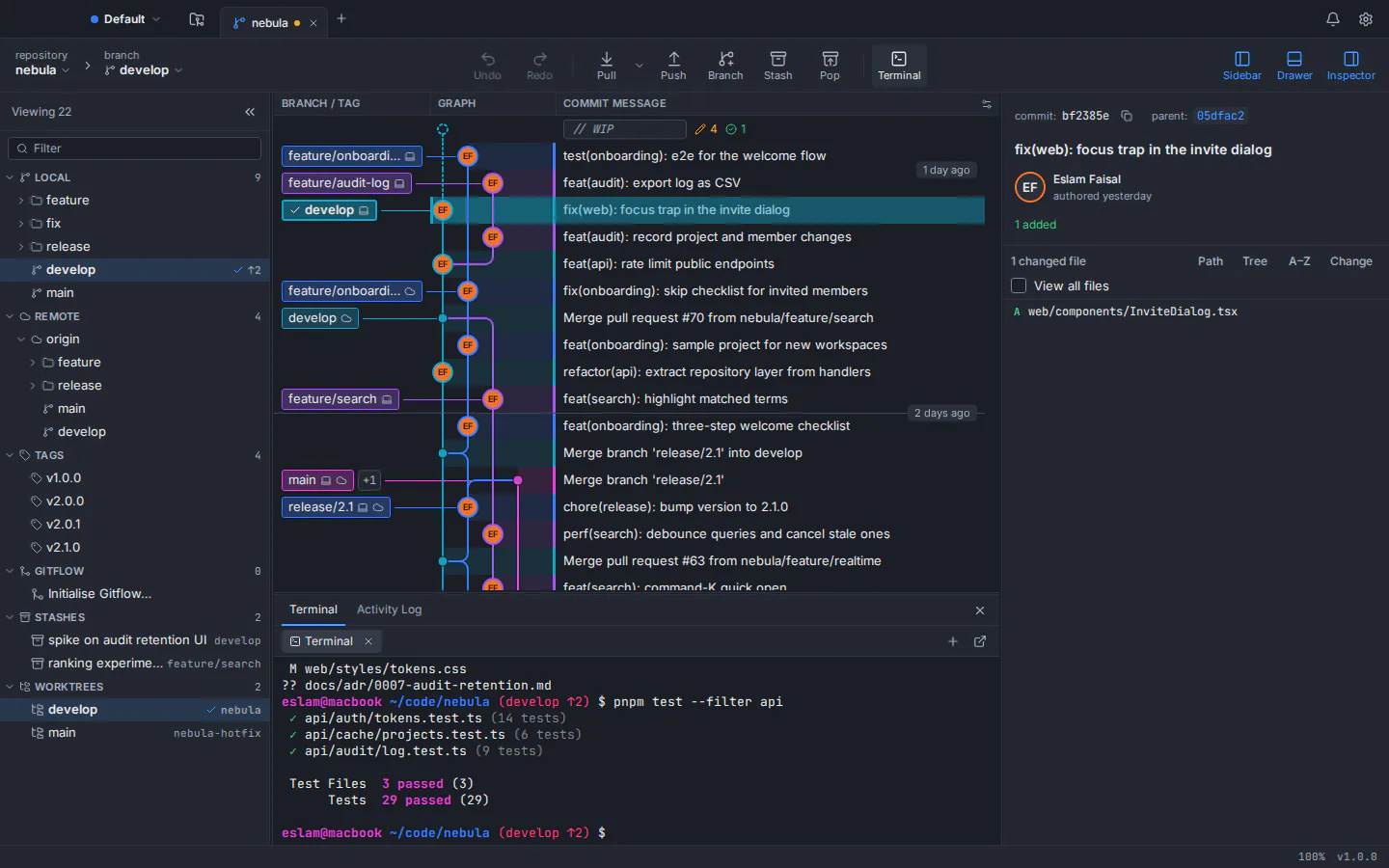
Manage worktrees from the app, use the built-in terminal docked under the graph, and reach about 300 commands from the palette with Ctrl/⌘+Shift+P.
Private by design, AI only when you ask
No telemetry, analytics or crash upload, and tokens stay in your system keychain. Optional AI drafts of commit messages and pull request descriptions run through your own Claude Code, Codex or Antigravity CLI, only when you click Generate.
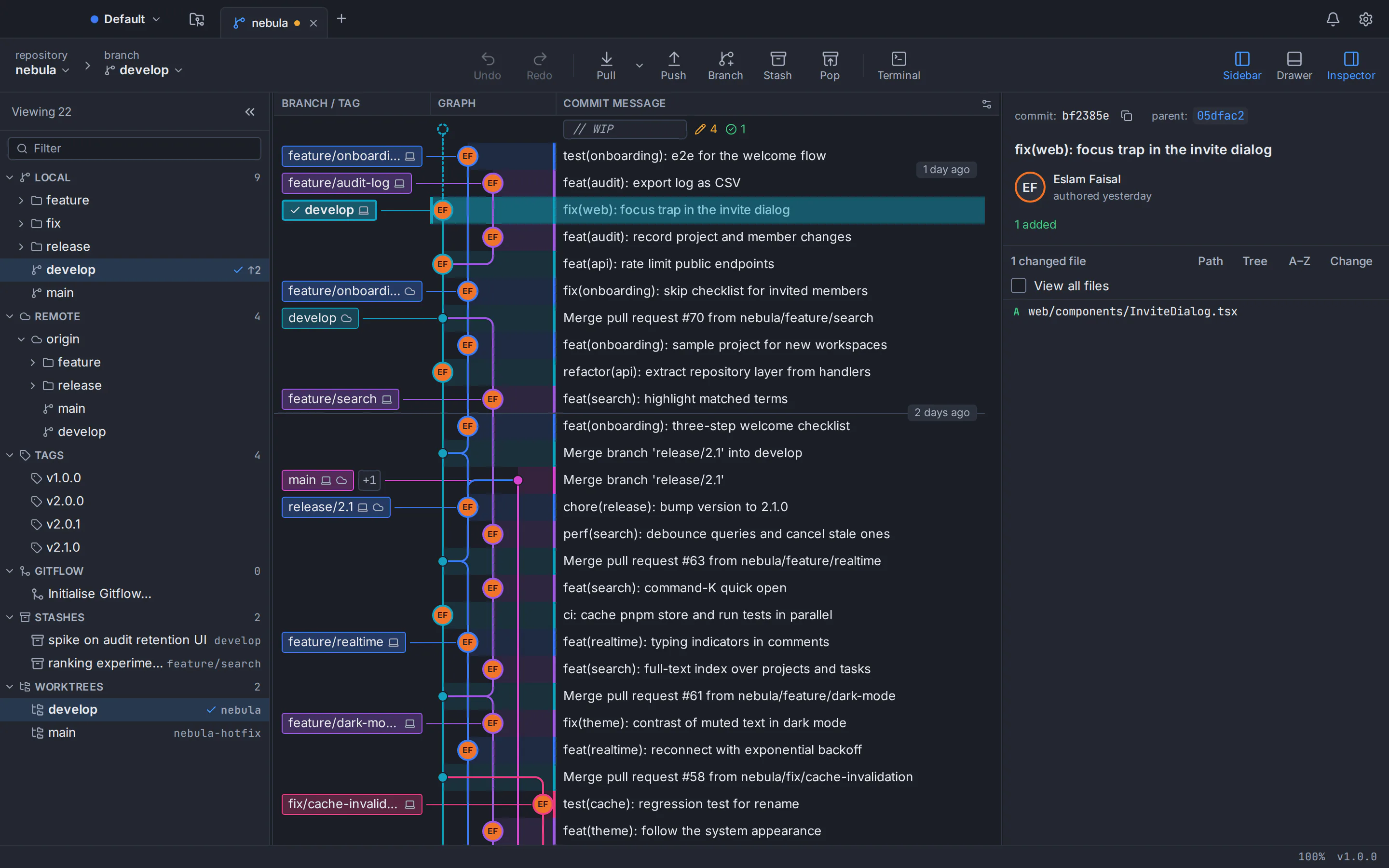
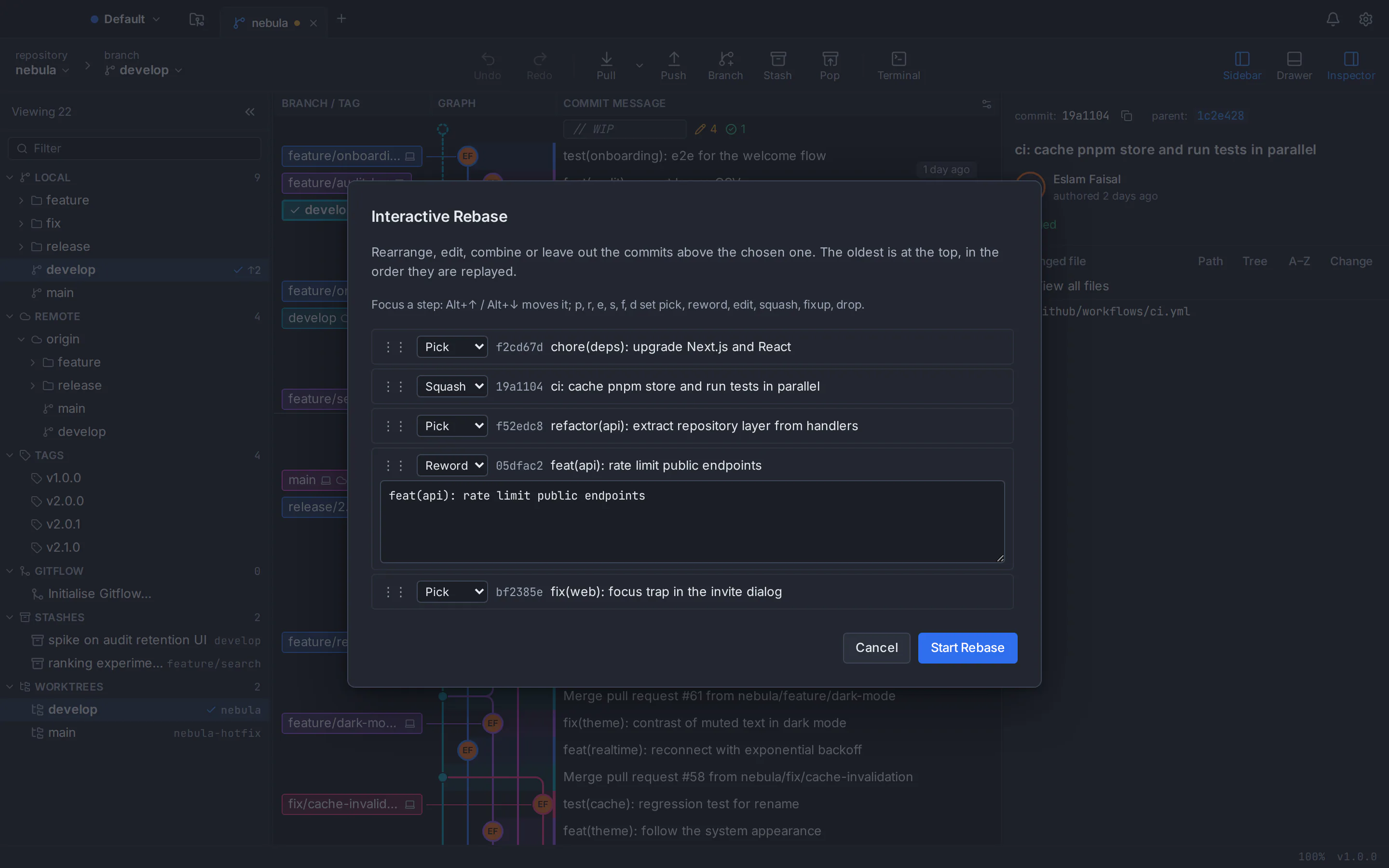
GitTree vs Sourcetree: feature comparison
Both are free, visual desktop Git clients. They differ most in platform support, conflict handling, history safety and pull request work, while Sourcetree is ahead on maturity, bundled Git, Mercurial and enterprise deployment. The official sources are linked at the end of the page.
- Included
- Partly, or with limits
- Needs a paid plan
- Not available
| Topic | GitTree | Sourcetree |
|---|---|---|
| Price, licence and account | ||
| Price | GitTreeIncluded: Free today, for individuals and organizations, private repositories included | SourcetreeIncluded: Free, with no paid tier, seats or trial (as of October 2026) |
| Source code | GitTreeNot available: Closed source; the public repository hosts releases only | SourcetreeNot available: Closed source (proprietary freeware) |
| Account to start | GitTreePartly, or with limits: A free GitTree account, created with GitHub, GitLab, Bitbucket or Azure DevOps; online at first launch and at least every 7 days | SourcetreePartly, or with limits: Mac: none needed since 4.0. Windows: register with an Atlassian account or Bitbucket Data Center. Linux: no app. |
| Desktop systems and installers | ||
| macOS | GitTreeIncluded: One universal app for Apple silicon and Intel, macOS 13 Ventura or later, notarized by Apple | SourcetreeIncluded: Native on Apple silicon and Intel, macOS 10.15 or later |
| Windows | GitTreePartly, or with limits: 64-bit Windows 10 (22H2) and Windows 11; installer not code-signed yet, so SmartScreen may warn | SourcetreeIncluded: Signed installer that can fetch embedded Git; needs .NET Framework 4.8 |
| Linux | GitTreeIncluded: .deb and AppImage for Ubuntu 22.04+ and Debian 12+ (x86_64) | SourcetreeNot available: No official Linux version |
| Same app on every system | GitTreeIncluded: One version with the same features everywhere | SourcetreePartly, or with limits: Two separate apps, Mac 4.2.19 and Windows 3.4.32, with different features; none for Linux |
| Download size | GitTreeIncluded: About 20.7 MB on macOS, 7.5 MB on Windows and 11.3 MB (.deb) on Linux; Git not included | SourcetreeIncluded: 67.9 MB on Mac with Git included, and 24.1 MB on Windows, which can fetch an embedded Git; no Linux download |
| Managed deployment | GitTreeNot available: Per-machine installer only; no MSI and no admin controls | SourcetreeIncluded: Free Windows Enterprise MSI with silent install and centrally managed updates |
| Windows on Arm | GitTreeNot available: No native build | SourcetreeNot available: No native build |
| Git setup | ||
| Git itself | GitTreePartly, or with limits: Uses your installed Git 2.39 or newer; Git is not bundled | SourcetreeIncluded: Bundles Git and Git LFS, or uses the system Git |
| Mercurial | GitTreeNot available: Git only | SourcetreeIncluded: Git and Mercurial |
| Git LFS, submodules and Git Flow | GitTreeIncluded: All three, including LFS locks and Git Flow feature, release and hotfix branches | SourcetreeIncluded: All three, with Git Flow out of the box |
| History, staging and commits | ||
| Visual commit graph | GitTreeIncluded: Colour-coded lanes, labels, search by author, file or change; smooth past 100,000 commits | SourcetreeIncluded: Detailed branching diagrams and local commit search |
| Stage files, hunks and lines | GitTreeIncluded: Stage or discard files, hunks or single lines, with undo for discards | SourcetreeIncluded: Stage and discard by file, hunk or line |
| Interactive rebase | GitTreeIncluded: Pick, reword, edit, squash, fixup (incl. fixup -C) and drop; autosquash, autostash and update-refs | SourcetreePartly, or with limits: Squash, reword, edit, delete and reorder; fixup and autosquash are not in Atlassian’s guide |
| Undo and redo | GitTreeIncluded: Toolbar undo and redo for commit, checkout, reset, rebase, discard and more; all 19 kinds of destructive step are snapshotted first | SourcetreeNot available: No general undo of Git operations |
| Reflog | GitTreeIncluded: Reflog view with restore | SourcetreeNot available: No reflog view |
| Blame and file history | GitTreeIncluded: Blame that follows renames, and file history | SourcetreeIncluded: Annotate and Log Selected |
| Diff and merge conflicts | ||
| Conflict editor | GitTreeIncluded: Three-way editor (current, incoming, output) with per-hunk and per-line choices, plus external tools | SourcetreePartly, or with limits: Resolve Using Mine or Theirs per file, or an external merge tool |
| Conflict prediction and rerere | GitTreeIncluded: Warns before a merge that would conflict; rerere support | SourcetreeNot available: Not described in Sourcetree’s official material |
| Diff views | GitTreeIncluded: Hunk, inline and split views, word diff and ignore whitespace | SourcetreePartly, or with limits: Hunk-based unified diff; side by side needs an external diff tool |
| Image diff | GitTreeIncluded: Side by side, swipe and onion skin | SourcetreePartly, or with limits: Before and after previews in the Mac app |
| Repository workflow | ||
| Stash | GitTreeIncluded: Push, apply, pop, rename, branch from a stash, or stash selected lines | SourcetreeIncluded: Stash, including only selected or staged files in the Windows app |
| Worktrees | GitTreeIncluded: Add, remove, move, lock, prune and repair | SourcetreeNot available: No worktree management |
| Built-in terminal | GitTreeIncluded: Docked under the graph, running your own shell | SourcetreeNot available: Opens your external terminal instead |
| Command palette and shortcuts | GitTreeIncluded: About 300 commands with Ctrl/⌘+Shift+P, rebindable shortcuts and custom commands | SourcetreePartly, or with limits: No palette in the official material; Custom Actions with shortcuts |
| Hosting, pull requests and AI | ||
| Hosting accounts | GitTreeIncluded: GitHub and Bitbucket, with newer support for GitLab, Azure DevOps, GitHub Enterprise Server and Bitbucket Data Center | SourcetreeIncluded: Bitbucket Cloud and Data Center, GitHub and GitHub Enterprise, GitLab and Azure DevOps |
| Pull requests | GitTreeIncluded: List, create, review, comment on and merge in the app, with CI checks and a dashboard | SourcetreePartly, or with limits: “Create Pull Request” opens the browser; no in-app review or merge |
| Issue trackers | GitTreePartly, or with limits: GitHub and GitLab issues; no Jira integration | SourcetreePartly, or with limits: Jira issue keys become links in commits; no issue browsing |
| AI commit messages | GitTreePartly, or with limits: Optional drafts through your own Claude Code, Codex or Antigravity CLI; no built-in model or credits | SourcetreeNot available: None; the requests are “Gathering Interest” |
| Interface and privacy | ||
| Interface languages | GitTreePartly, or with limits: English and Arabic, with a full right-to-left layout | SourcetreeIncluded: About a dozen languages; Arabic is not listed |
| Themes | GitTreeIncluded: Dark, light, two high-contrast themes and imported themes | SourcetreeIncluded: Light and dark themes |
| Telemetry | GitTreeIncluded: No telemetry, analytics or crash upload on any system | SourcetreePartly, or with limits: Mac: analytics removed in 4.0. Windows: not documented. Linux: no app. |
This table compares the current public products, not every setting. Sourcetree’s Mac and Windows apps differ in places, and there is no Linux app; where they differ, the cell says so. GitTree is in active development; check its features page before moving a critical workflow.
Sourcetree pricing vs GitTree
Price is not what separates these two: as of October 2026 both are free. The differences are in what you get and where it runs.
GitTree
$0everything the app does today
- Private, public and local repositories
- Conflict editor, undo, worktrees, pull requests and every other feature
- Builds for macOS, Windows and Linux
- Free for individuals and organizations, with a free account to sign in
Sourcetree
$0free, as of October 2026
- No paid tier, seats or trial
- A free Windows Enterprise MSI for managed installs
- An embedded Git and Git LFS, so Git need not be installed first
- Apps for macOS and Windows only, no Linux version
Atlassian publishes no pricing page for Sourcetree; its official site says “Download Sourcetree for free”. If GitTree adds paid team plans, they will be announced in your account before anything changes.
A Sourcetree alternative for Mac, Windows and Linux
The same GitTree on macOS, Windows and Linux, running the Git 2.39 or newer that you already have installed. Linux is where Sourcetree has no version at all.
Sourcetree alternative for Mac
One universal app, about 20.7 MB, that runs natively on Apple silicon and Intel Macs with macOS 13 Ventura or later. It is signed with an Apple Developer ID and notarized by Apple.
Sourcetree alternative for Windows
A 7.5 MB installer for 64-bit Windows 10 (22H2) and Windows 11. Install Git for Windows first; the installer is not code-signed yet, so SmartScreen may ask you to confirm.
Sourcetree alternative for Linux
What Sourcetree does not offer: a .deb package or a portable AppImage for 64-bit Ubuntu 22.04+ and Debian 12+. Derivatives such as Linux Mint 21+ can run it too, though only Ubuntu and Debian are tested. On Ubuntu 22.04 and Linux Mint 21, add the git-core PPA for a newer Git first.
Read the Linux install guide
Which one should you choose?
Both are free, so choose by the systems you use and the work you do, then try the other one on a noncritical repository first.
Choose GitTree if…
- Your team mixes macOS, Windows and Linux, or you work on Linux alone
- You want a built-in conflict editor, undo and a reflog view
- You review and merge pull requests and would rather do it in the app
- You use worktrees, a terminal or a command palette every day
- You want AI drafts from the coding CLI you already use, and no telemetry
- You want a Git GUI in Arabic with a right-to-left layout
Consider Sourcetree if…
- You still work with Mercurial repositories as well as Git
- You need Git bundled, on a machine where you cannot install it
- You use a Mac and want no account at all
- You deploy to many Windows PCs and need a free MSI with silent install
- Your team relies on Jira issue links or Bitbucket Data Center
- You are on macOS 10.15 to 12, which GitTree does not support
How to switch from Sourcetree to GitTree
Switching takes about ten minutes. Your repositories are standard Git, so Sourcetree and GitTree can open the same folders side by side while you decide.
Check your Git version
Sourcetree can use its own embedded Git, while GitTree uses the Git installed on your system. Run git --version and install or upgrade to Git 2.39 or newer: Git for Windows on Windows, the git-core PPA on Ubuntu 22.04.
Download GitTree
Get the free installer for macOS, Windows or Linux from the download page and install it.
Sign in with a free account
Create a free GitTree account on this website with GitHub, GitLab, Bitbucket or Azure DevOps, then sign in from the app. No Atlassian account is involved.
Open your Sourcetree repositories
Choose Open and select each repository folder, or scan a parent folder to add them all. History, branches, remotes and stashes live in the repository itself, so there is nothing to import.
Bring over your tools and accounts
Connect your hosting accounts in Preferences, then set your signing key, external diff and merge tools, theme and shortcuts. Sourcetree Custom Actions can become GitTree custom commands.
Try it on a test branch
Create a branch, stage a few lines, commit and push, then try an interactive rebase, resolve a conflict and press undo before you move daily work.
Sourcetree alternative: frequently asked questions
What is the best free Sourcetree alternative?
If you want a free visual Git client like Sourcetree that runs on macOS, Windows and Linux, GitTree is built for that: a desktop app with a commit graph, line staging, a built-in conflict editor, undo and pull requests in the app. Try it on one repository next to Sourcetree and compare.
Is there a Sourcetree for Linux?
No. Atlassian makes Sourcetree for macOS and Windows only, with no Linux version: the long-standing request for a Linux app on its tracker (437 votes) was closed unresolved, and a newer one is marked “Future Consideration”. GitTree is a free alternative that runs natively on Ubuntu 22.04+ and Debian 12+, as a .deb package or a portable AppImage; derivatives such as Linux Mint 21+ can run it too, untested.
Can I install Sourcetree on Ubuntu?
Not officially: Atlassian publishes no Sourcetree package for Ubuntu or Debian. GitTree installs on Ubuntu with apt from its .deb file. On Ubuntu 22.04, add the git-core PPA first, because the system Git (2.34) is older than the 2.39 that GitTree needs.
Which Git GUI is most like Sourcetree?
GitTree works the way Sourcetree users expect: a commit graph, a staging area for files, hunks and lines, and branches, tags, remotes and stashes one click away. It adds a built-in conflict editor, undo, worktrees and pull requests in the app, and it runs on Linux as well.
Is Sourcetree free?
Yes. As of October 2026 Sourcetree is free to download and use, with no paid tier, seats or trial, and the Sourcetree for Windows Enterprise MSI is free too. It is proprietary software from Atlassian, not open source.
Is Sourcetree free for commercial use?
Sourcetree’s official pages show no paid tier and no commercial-use restriction as of October 2026; it is installed under Atlassian’s terms, which your organization should review. GitTree is also free today for individuals and organizations, company and private repositories included.
Is GitTree really free?
Yes. Everything GitTree does today is free for private, public and local repositories, for individuals and organizations, with no trial and no credit card. It is not open source: the code is private and the public repository hosts releases only. Sourcetree is closed source too.
Can I open my Sourcetree repositories in GitTree?
Yes. Both apps work on ordinary Git repositories, so there is nothing to export or import. Open the same folder in GitTree and its branches, remotes, stashes and history are already there. Mercurial repositories are the exception, because GitTree supports Git only.
Do I need an account for Sourcetree or for GitTree?
On a Mac, Sourcetree has not needed an account since version 4.0. Sourcetree for Windows asks each user to register on first launch with an Atlassian account or a Bitbucket Server or Data Center instance, and there is no Linux version. GitTree needs a free GitTree account on every system, created with GitHub, GitLab, Bitbucket or Azure DevOps, and goes online at least every 7 days.
Is GitTree a good Sourcetree alternative for Mac with Apple silicon?
Yes. GitTree is one universal app that runs natively on Apple silicon (M1 to M4) and Intel Macs with macOS 13 Ventura or later, signed with an Apple Developer ID and notarized by Apple. Sourcetree also runs natively on Apple silicon and supports older systems back to macOS 10.15.
Is GitTree a good Sourcetree alternative for Windows?
Yes, on 64-bit Windows 10 (22H2) and Windows 11. GitTree uses Git for Windows, which you install first, and its installer is not code-signed yet, so SmartScreen may ask you to confirm. Sourcetree for Windows comes with an embedded Git and a signed installer, but asks each user to register on first launch.
Why is Sourcetree slow, and is GitTree faster?
Users on Atlassian’s issue tracker report Sourcetree for Windows being slow on large repositories with many branches; these are user reports, and the latest, about version 3.4.27, is marked “In Progress”. GitTree’s commit graph stays smooth past 100,000 commits in tests on Linux. Speed depends on your repository, so try both on yours.
Does GitTree have a built-in merge conflict tool?
Yes. A full-window three-way editor shows current, incoming and output, with choices per hunk or per line, and GitTree warns you before a merge that would conflict. Sourcetree resolves a file with Mine or Theirs, or opens an external merge tool; GitTree can open external tools too.
Can I review and merge pull requests in GitTree?
Yes. GitTree lists, creates, reviews, comments on and merges pull requests (merge, squash or rebase), shows CI checks with re-run and has a dashboard across repositories, for GitHub and Bitbucket, with newer support for GitLab and Azure DevOps. In Sourcetree, “Create Pull Request” opens the browser.
Does Sourcetree or GitTree write AI commit messages?
Sourcetree has no AI features; the requests on Atlassian’s tracker are still “Gathering Interest”. GitTree can draft a commit message or a pull request description through your own Claude Code, Codex or Antigravity CLI, only when you click Generate. GitTree stores no AI key and sends nothing itself.
Does GitTree upload my code or collect usage data?
No. GitTree has no telemetry, analytics or crash upload, and your repositories stay on your computer. The app talks only to your remotes, the accounts you connect, the GitTree account service for sign-in and an update check you can switch off. The one optional exception: when you click Generate, an AI draft passes your staged diff to the AI coding CLI you chose.
Do I need Git installed to use GitTree?
Yes. Unlike Sourcetree, which can bundle Git, GitTree runs the Git installed on your computer, version 2.39 or newer, so every action matches what the command line would do. If Git is missing, the app explains how to install it.
How this comparison was checked
Sourcetree’s features, systems and price were reviewed on 6 October 2026 against Atlassian’s official pages: the Sourcetree website, the release notes for Sourcetree 4.2.19 and 3.4.32, Atlassian’s support articles and its public issue tracker. Performance points are user reports from that tracker. Products change; the vendor’s current pages are the source of truth.
- Sourcetree website
- Sourcetree for Windows Enterprise
- Sourcetree download archive
- Release notes: Sourcetree 4.2.19 (Mac)
- Release notes: Sourcetree 3.4.32 (Windows)
- Sourcetree registration and MSI installation
- Sourcetree Linux desktop request (closed)
- Sourcetree Linux app request
- Sourcetree for Windows performance report
- Interactive rebase in Sourcetree
- GitTree features
GitTree is an independent product and is not affiliated with or endorsed by Atlassian, the owner of Sourcetree. Sourcetree is a trademark of its owner.
Compare Git clients
Switching from another Git client?
Honest, sourced comparisons with the Git GUIs developers use most, including what each one does better.
GitKraken alternative
Private repositories, deep undo and AI drafts with your own CLI at no cost, compared row by row with GitKraken Desktop.
GitHub Desktop alternative
A commit graph, full interactive rebase and an official Linux build, compared row by row with GitHub Desktop.
Fork alternative
A Linux build, no licence to buy, undo and pull requests in the app, compared row by row with Fork.
Tower alternative
No subscription, a Linux build and a line-level conflict editor, compared row by row with Tower.
SmartGit alternative
Free for commercial use with no licence application, plus a docked terminal, undo and AI drafts, compared row by row with SmartGit.
Sublime Merge alternative
No licence to buy, plus pull requests, a drag-and-drop rebase plan and undo, compared row by row with Sublime Merge.
Try the free Sourcetree alternative on your own repository
Download GitTree, open a repository you already use in Sourcetree and compare the graph, the conflict editor and undo for yourself, on macOS, Windows or Linux.