Git on Linux
Sourcetree for Linux: is there one, and what to use on Ubuntu instead
There is no official Sourcetree for Linux. Here is what Atlassian’s own pages say, why Wine is a poor workaround, and how to get a free, native Git GUI running on Ubuntu or Debian in a few minutes.
Disclosure: GitTree’s maker wrote this article, so we have a stake in GitTree. We describe every product, ours included, from its official pages and our own use, and say where another tool is the better fit.
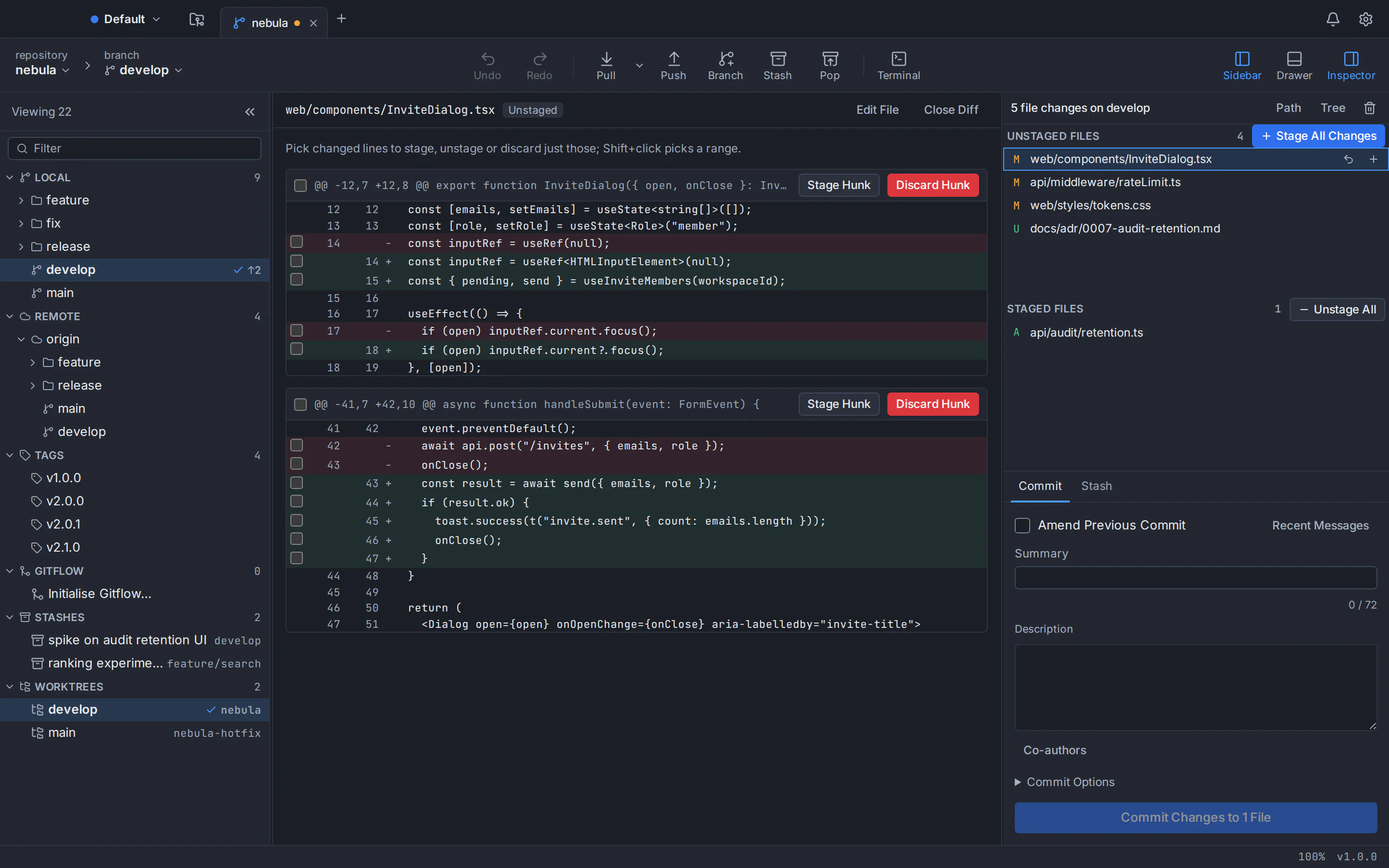
No, there is no official Sourcetree for Linux, and none has been announced. Atlassian’s download page offers no .deb, no .rpm and no other Linux package, and the main request for a Linux desktop app on its issue tracker is closed. If you searched for Sourcetree on Ubuntu, the practical answer is a Git client built for Linux. Our pick, with an obvious bias, is GitTree: a free Git GUI with a native .deb for Ubuntu and Debian and the commit graph, hunk staging and interactive rebase that Sourcetree users rely on.
A note before we start: GitTree’s maker wrote this post, so weigh our recommendation accordingly. Every claim about Sourcetree comes from Atlassian’s own pages, plus one report on Wine’s bug tracker, all listed in the sources at the end.
Is there a Sourcetree for Linux? What Atlassian’s own pages say
Sourcetree is very much alive on macOS and Windows, with maintenance releases every one to three months, but Atlassian has never published a Linux version. The evidence, as of October 2026:
- The website. sourcetreeapp.com offers downloads for Mac and Windows only and does not mention Linux anywhere on the page.
- The download archive. Every build listed is for Mac, Windows or Windows Enterprise (an MSI for managed deployment). There is no Linux file in any format.
- The issue tracker. The request “SourceTree linux desktop” (SRCTREE-2991), opened in 2015, collected 437 votes and was closed unresolved. A newer one (SRCTREE-8143) is marked Future Consideration, which Atlassian’s tracker describes as a possible longer-term roadmap candidate that is not in development.
| Platform | Latest version | Package |
|---|---|---|
| Mac | 4.2.19, released 30 July 2026 | ZIP containing the app (67.9 MB) |
| Windows | 3.4.32, released 28 August 2026 | EXE installer (24.1 MB) |
| Windows Enterprise | 3.4.32 | MSI for silent, managed installs |
| Linux | None | No official build of any kind |
Running Sourcetree on Ubuntu with Wine: why it is a poor option
Wine lets Linux run many Windows programs, and some people report getting Sourcetree to start with it. For daily work, though, you are stacking layers that nobody tests together:
- Nobody supports it. Atlassian builds Sourcetree for Mac and Windows, not for Linux or Wine. Any release can change what works, and the fix is yours to find.
- It is a .NET Framework app. Sourcetree for Windows has needed .NET Framework 4.8 since version 3.4.8, and under Wine such apps can need Microsoft components added with winetricks. In a 2019 report on Wine’s bug tracker (bug 47314), the Sourcetree 3.1.3 installer still crashed after the reporter had added .NET 4.7.2 that way, until they also installed a Direct3D component (d3dcompiler_47).
- Registration crosses two worlds. Atlassian’s documentation says each user registers Sourcetree for Windows on first launch, through a Bitbucket Server instance in the default browser or through the Atlassian account service. In the same Wine report, that step relied on a local web address and Internet Explorer settings inside Wine: one more hand-off between a Windows program and your Linux desktop.
- Two Gits on one machine. Under Wine, Sourcetree runs its embedded Windows Git (2.51.0 since version 3.4.25) or another Windows Git, with its own configuration, SSH keys and credentials, apart from the
gitin your terminal. Windows builds of Git can also treat line endings, symlinks and the executable bit differently. - It never feels native. Fonts, display scaling, file dialogs, stored passwords and opening links all pass through a translation layer.
Wine will do for a quick look at a repository. For daily work, a native client is less effort than keeping that stack alive after every update.
What about a Windows virtual machine?
A Windows virtual machine runs Sourcetree the way Atlassian intends, so it is the supported route on a Linux computer. The price is a Windows licence, gigabytes of disk and memory, and repositories inside the VM or behind a shared folder. Worth it if you need other Windows-only tools; heavy for a Git GUI alone.
The best Sourcetree alternatives on Linux
Most Sourcetree users want the same handful of things: a readable commit graph, staging by hunk or line, interactive rebase without editing a todo file, a sane way through merge conflicts, and an app that installs like any other Ubuntu program. Here are the options, starting with ours.
GitTree
Best for: Sourcetree users on Ubuntu and Debian who want the same graph-and-staging workflow in a native app.
GitTree is a free desktop Git client for macOS, Windows and Linux. On Linux it ships as a .deb for Ubuntu 22.04+ and Debian 12+ and as a portable AppImage. It runs on top of the Git you already have, so every action matches the command line.
Strengths
- A native .deb installed with apt, plus a portable AppImage
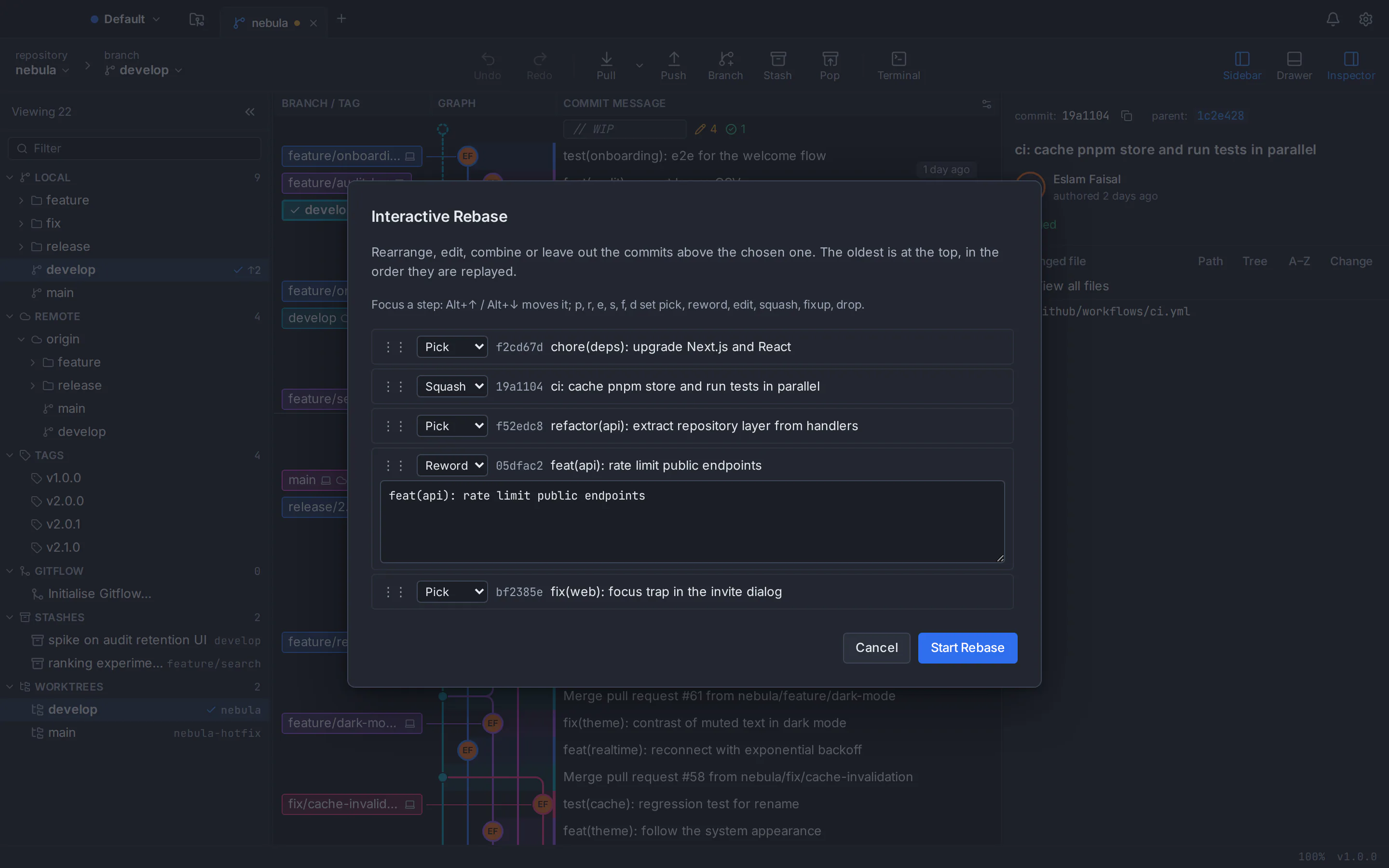
- The Sourcetree essentials: commit graph, staging by file, hunk or line, interactive rebase, Git Flow, Git LFS and submodules
- Extras on top: a three-way conflict editor, undo and redo, worktrees, a built-in terminal and pull requests inside the app
- The same app and version on macOS, Windows and Linux
- No telemetry; your tokens stay in the system keyring
Watch out for
- Needs a free GitTree account; the first launch needs the network, then it works offline for up to 7 days between checks
- Needs Git 2.39 or newer installed instead of bundling it (Ubuntu 22.04 and Linux Mint 21 need the git-core PPA first)
- Git only, no Mercurial
- Closed source, and new (version 1.2.9) next to Sourcetree’s long track record
- Linux builds are 64-bit x86_64 only and unsigned, so you verify them with SHA256SUMS.txt
- Platforms
- macOS: available
- Windows: available
- Linux: available
- Price
- Free today, private repositories included (no paid plan)
Git’s own tools: gitk and git gui
Git comes with two small graphical tools written in Tcl/Tk: gitk, a history browser, and git gui, which focuses on making commits (staging, amending, branching, local merges, fetching and pushing). They look dated, but they cost nothing and are in the Ubuntu and Debian archives:
sudo apt install gitk git-guiRun gitk --all inside a repository to see every branch, or git gui to stage and commit. Neither offers interactive rebase or pull requests, so they suit occasional use better than a full Sourcetree replacement.
Other clients, your editor and the command line
A few commercial Git clients do ship Linux builds; our best Git GUI for Linux round-up compares them, and GitHub Desktop for Linux answers the same question for GitHub’s app. Your code editor’s Git panel handles quick commits, and plain git is always there; Git GUI vs command line shows where each wins.
Moving from Sourcetree: what carries over and what changes
If you used Sourcetree at work on a Mac or a Windows PC and now sit at a Linux machine, most of your habits transfer. The table maps the main ones; our full Sourcetree comparison goes further, feature by feature.
| Task | Sourcetree | GitTree |
|---|---|---|
| Commit graph | Branching diagram, with a compact history option | Colour-coded branch lanes; search by message, author, hash or file; hide, solo or pin branches |
| Staging | Stage or discard by file, hunk or line | Stage or discard by file, hunk or line; discards can be undone; stash selected lines |
| Interactive rebase | Squash, reword, edit, delete, drag to reorder | Pick, reword, edit, squash, fixup (including fixup -C), drop; reorder by drag or keyboard; autosquash, autostash, update-refs |
| Merge conflicts | Resolve a file with Mine or Theirs, or open an external merge tool | Built-in three-way editor with per-hunk and per-line choices, or your external merge tool |
| Undoing mistakes | No undo button; a request to undo the last commit is still open | Undo and redo for commits, checkouts, resets, rebases and more; reflog view with restore |
| Pull requests | “Create Pull Request” opens your browser | List, create, review, comment on and merge them in the app, with CI checks |
| Terminal | Opens an external terminal | Built-in terminal under the graph, running your shell |
| Git Flow, Git LFS, submodules | Yes | Yes |
| Version control systems | Git and Mercurial | Git only |
| Git itself | Bundles Git and Git LFS | Uses your installed Git 2.39 or newer |
| Price | Free (as of October 2026) | Free today, private repositories included |
Where Sourcetree is still ahead
- Maturity. More than a decade of releases, backed by Atlassian. GitTree is new, at version 1.2.9.
- Bundled Git. Sourcetree ships its own Git and Git LFS, so it works on a clean machine.
- Mercurial. Sourcetree handles Mercurial repositories too; GitTree is Git only.
- No account on the Mac version. GitTree needs a free account on every platform.
- Languages. About a dozen interface languages; GitTree has two, English and Arabic, with a full right-to-left interface.
- Atlassian integration. Jira issue keys in commit messages become links, and Bitbucket Data Center accounts are first-class.
On macOS and Windows, those points can tip the balance toward Sourcetree. On Linux they are moot, because it does not run there.
How to install GitTree on Ubuntu or Debian and open your existing repositories
Check your Git version
Run
git --versionin a terminal. GitTree needs Git 2.39 or newer, which Ubuntu 24.04 and Debian 12 already ship. Ubuntu 22.04 and Linux Mint 21 have 2.34, so there you first runsudo add-apt-repository ppa:git-core/ppa, thensudo apt updateandsudo apt install git.Download the .deb package
Get the Linux .deb (about 11 MB, for 64-bit x86_64 systems) from the GitTree download page. Each release also publishes SHA256SUMS.txt, so you can check the file with
sha256sum.Install it with apt
In the folder you saved it to, run
sudo apt install ./Git-Tree-Linux.deb, using the file name you saved (for exampleGit-Tree_<version>_amd64.deb). apt installs GitTree together with Git, WebKitGTK and GTK and adds it to your applications menu.Start GitTree and sign in
Open GitTree from the menu or run
gittree, then sign in once with a free GitTree account, created on gittree.app with GitHub, GitLab, Bitbucket or Azure DevOps. The .deb handlesopengittree://links, so the browser hands you back to the app on its own.Open your existing repositories
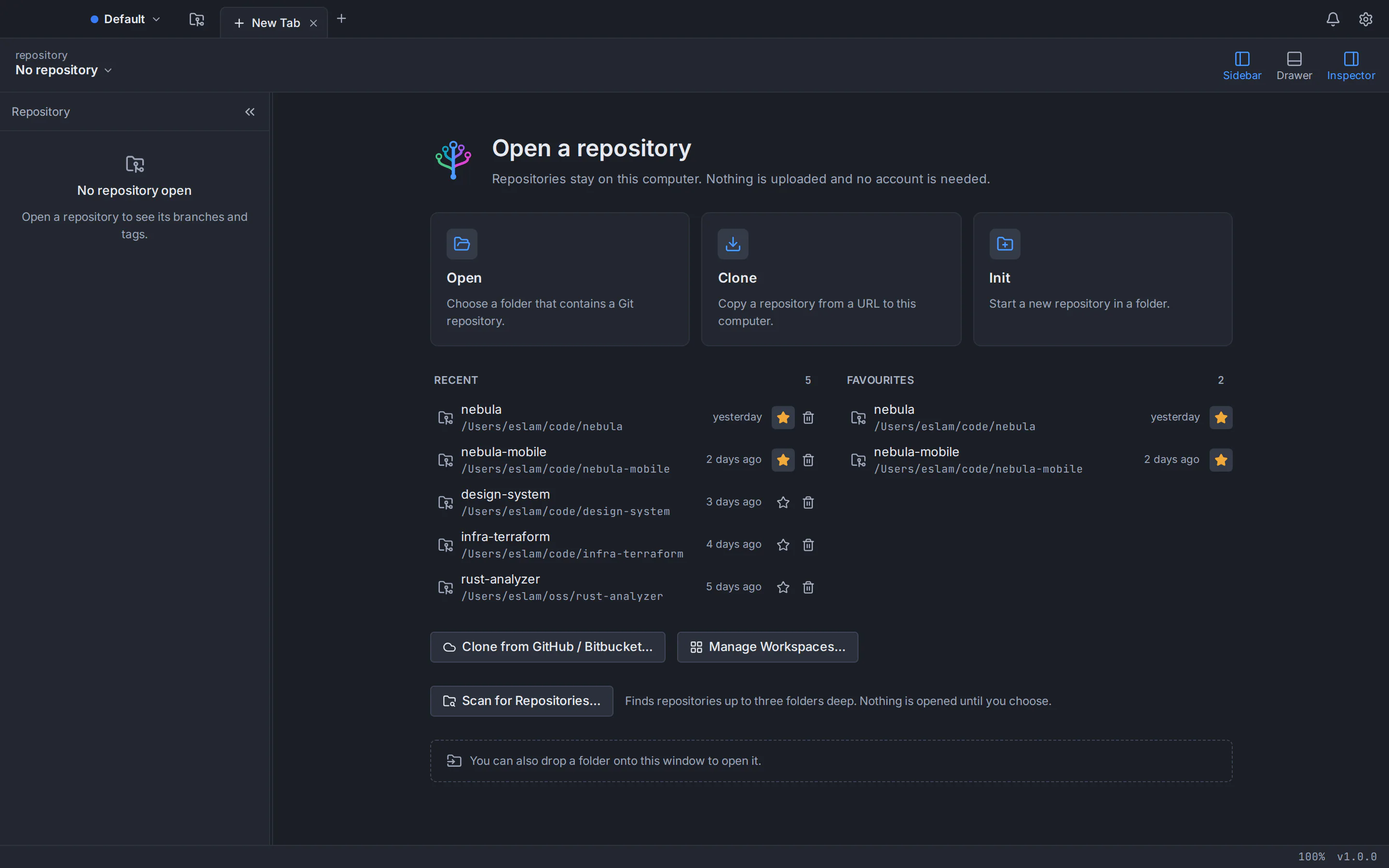
Choose Open on the start page and pick a repository folder, or let GitTree scan a folder such as
~/projects. Repositories are ordinary Git folders, so nothing needs importing: branches, tags, stashes and history appear as they are.Connect your hosting account
To clone, publish and work with pull requests, connect GitHub, GitLab, Bitbucket or Azure DevOps. GitHub and Bitbucket are the most mature integrations; GitLab and Azure DevOps support is new. Any other remote works over HTTPS or SSH.
On Ubuntu 24.04 or Debian 12, the whole install fits in four commands (in the third, use the file name you saved):
git --version
cd ~/Downloads
sudo apt install ./Git-Tree-Linux.deb
gittree
Prefer not to install anything system-wide? The portable AppImage runs without root; the GitTree for Linux guide covers it, along with the system keyring and uninstalling. If your Git is too old, our guide to upgrading Git on Ubuntu 22.04 walks through the PPA in detail.
Bring your Sourcetree setup with you
Sourcetree keeps very little that Git does not already store, so moving is mostly about your surroundings:
- Repositories. Clone them again or copy the folders over; history, branches, tags and stashes live inside each repository.
- Identity. Your name, e-mail and aliases live in
~/.gitconfig, which any app reads. GitTree profiles keep work and personal identities apart without editing it. - SSH keys. Copy your keys from
~/.ssh, or generate a new key in GitTree, test it and upload it to GitHub, GitLab or Bitbucket. - Merge tools. GitTree can launch Meld, KDiff3 or P4Merge, though its built-in three-way editor may make them unnecessary; our guide on how to resolve Git merge conflicts shows both ways.
- Custom actions. They map to GitTree’s custom commands, and the command palette (
Ctrl+Shift+P) reaches about 300 commands. - Git Flow. Feature, release and hotfix branches work as before.
GitTree is free today, private repositories included, and the same app runs on Mac, Windows and Linux. Browse the GitTree features, see how interactive rebase works in a Git GUI, get help on the support page, or pick any installer from the download page.
Frequently asked questions
Is there a Sourcetree version for Linux?
No. Atlassian builds Sourcetree for macOS and Windows only, with no Linux version and no .deb or .rpm package. The best-known request for one, SRCTREE-2991 on Atlassian’s issue tracker, collected 437 votes and was closed unresolved; a newer request, SRCTREE-8143, is marked Future Consideration and is not in development.
Can I run Sourcetree on Ubuntu with Wine?
Some people get the Windows version to start under Wine, but it is unsupported and fragile: a .NET Framework 4.8 app that asks you to register on first launch and runs a Windows Git apart from your Linux Git, keys and settings. Any update can break the setup, so a native client is more reliable.
Will Atlassian ever release Sourcetree for Linux?
Atlassian has not announced one. The original 2015 request is closed, and the newer SRCTREE-8143 is marked Future Consideration: a possible longer-term candidate, not in development. Sourcetree still gets maintenance releases on macOS and Windows, so it is not abandoned; Atlassian is simply not working on a Linux build.
What is the best Sourcetree alternative for Ubuntu?
We make GitTree, so we are biased, but it is built for this case: a free Git GUI with a .deb for Ubuntu 22.04+ and Debian 12+, a commit graph, staging by hunk or line, interactive rebase, a three-way conflict editor and undo. For simple browsing and commits, Git’s own gitk and git gui are free in the Ubuntu archive.
Is GitTree free like Sourcetree?
Yes. GitTree is free today for individuals and organizations, private repositories included, with no paid plan, and like Sourcetree it is closed source. The difference is the account: GitTree needs a free account on every platform and goes online at least every 7 days, while Sourcetree asks for registration only in its Windows version.
Does GitTree support Mercurial like Sourcetree does?
No. GitTree works with Git only, while Sourcetree supports both Git and Mercurial. For Mercurial projects, Sourcetree on a Mac or Windows machine, or Mercurial’s own tools, remain the options; on Linux, GitTree covers Git repositories on GitHub, GitLab, Bitbucket, Azure DevOps or any server you reach over HTTPS or SSH.
Do I need to install Git before GitTree on Linux?
GitTree uses the Git on your system instead of bundling its own, and it needs version 2.39 or newer. Installing the .deb with apt pulls in Git automatically. Ubuntu 24.04 and Debian 12 already ship a new enough version; on Ubuntu 22.04 and Linux Mint 21, add the git-core PPA first, because their Git 2.34 is too old.
Sources
Claims about other products were checked against their official pages on October 6, 2026. Prices and features change; the vendors’ pages are the source of truth.
- Sourcetree: official website
- Sourcetree: download archives
- Sourcetree for Windows Enterprise
- Atlassian Jira: SRCTREE-2991 “SourceTree linux desktop”
- Atlassian Jira: SRCTREE-8143 “SourceTree Linux App”
- Sourcetree for Mac release notes (4.2.19)
- Sourcetree for Windows release notes (3.4.32)
- Atlassian Support: Sourcetree Enterprise and MSI installation
- Atlassian: Install Sourcetree (Get started with Sourcetree)
- Atlassian blog: interactive rebase in Sourcetree
- Atlassian blog: Jira integration and external project links in Sourcetree
- Atlassian Jira: SRCTREEWIN-3515 “Undo most recent commit”
- Atlassian Jira: SRCTREEWIN-7654 “Add pull request feature to SourceTree”
- Atlassian Jira: SRCTREE-1284 “Embedded Terminal”
- WineHQ Bugzilla: bug 47314, SourceTree fails to install using builtin d3dcompiler_47
- Git documentation: gitk
- Git documentation: git gui
- Ubuntu Packages: gitk in Ubuntu 24.04 (noble)
All product names are trademarks of their respective owners. GitTree is independent and not affiliated with or endorsed by any of them.