GitTree vs GitHub Desktop
A free GitHub Desktop alternative with a commit graph, on Linux too
GitTree is a free GitHub Desktop alternative: a desktop Git client for macOS, Windows and Linux. If you like GitHub Desktop’s clear, simple way of working but need a Git GUI on Ubuntu or Debian, want to see your branches as a graph, or have outgrown its history tools, GitTree adds interactive rebase, a three-way conflict editor, blame, several stashes and pull requests for Bitbucket, plus newer support for GitLab and Azure DevOps. Below is an honest, sourced comparison with GitHub Desktop, which is free and open source, including the places where it is still the better pick.
Free for macOS, Windows and Linux. Sign in with a free GitTree account; no credit card, no trial. Uses your installed Git 2.39 or newer.
Last checked against GitHub Desktop’s official pages:
The short answer
- Linux
- GitTree ships a .deb and an AppImage; GitHub Desktop has no official Linux build
- History tools
- GitTree has a commit graph and full interactive rebase; GitHub Desktop shows a linear list
- Price today
- Both are free; GitHub Desktop is also open source, GitTree is closed source
- Getting started
- GitHub Desktop bundles Git and needs no account; GitTree uses your Git 2.39+ and a free account
Why developers look for a GitHub Desktop alternative
GitHub Desktop is a free, open-source Git client from GitHub, with frequent releases and a public beta. Its own design notes say that when it has to choose, it puts beginners ahead of advanced Git workflows. These are the reasons people most often give for trying something else.
There is no official Linux build
Official GitHub Desktop builds cover macOS and 64-bit Windows, with no Linux version. The request for one has been open on its repository since 2017 with more than 3,000 thumbs-up, and the team says it has “no immediate plans”. Unofficial community builds exist, but as of October 2026 the newest is based on 3.4.13 from February 2025, while the official app is at 3.6.6.
No commit graph
The History tab is a linear list of the commits on the selected branch. There is no branch graph or tree view that shows where branches split and merge, and the request for a history graph is still open.
Limited history editing
You can reorder, squash and cherry-pick commits by drag and drop, and amend or undo the last commit. You cannot reword an older commit, fixup, drop or stop to edit, and in June 2026 the maintainers decided against a generic interactive-rebase interface.
No built-in conflict editor
A conflicted file is resolved by taking our or their version, by opening it in your editor or, since version 3.6, by letting Copilot propose a resolution. There is no three-way editor where you choose hunks or lines yourself.
Built around GitHub
Pull requests, checks and notifications work with GitHub.com and GitHub Enterprise. GitLab, Bitbucket and Azure DevOps work only as plain Git remotes, creating a pull request opens the browser, and GitHub’s docs say you cannot comment on a pull request from the app.
Everyday tools that are missing
No blame or file history, one stash at a time, no GPG or SSH signing setup, no built-in terminal or command palette, one GitHub.com account at a time and an English-only interface. Several of these are long-open requests on its repository.
Why developers choose GitTree
GitTree keeps the clear, visual way of working that GitHub Desktop users like, and adds the history, conflict and hosting tools they ask for.
The same app on Linux too
One GitTree, with the same features on macOS, Windows and Linux, so a mixed team learns one tool. Linux gets an official .deb package and a portable AppImage for Ubuntu 22.04+ and Debian 12+.
A real commit graph
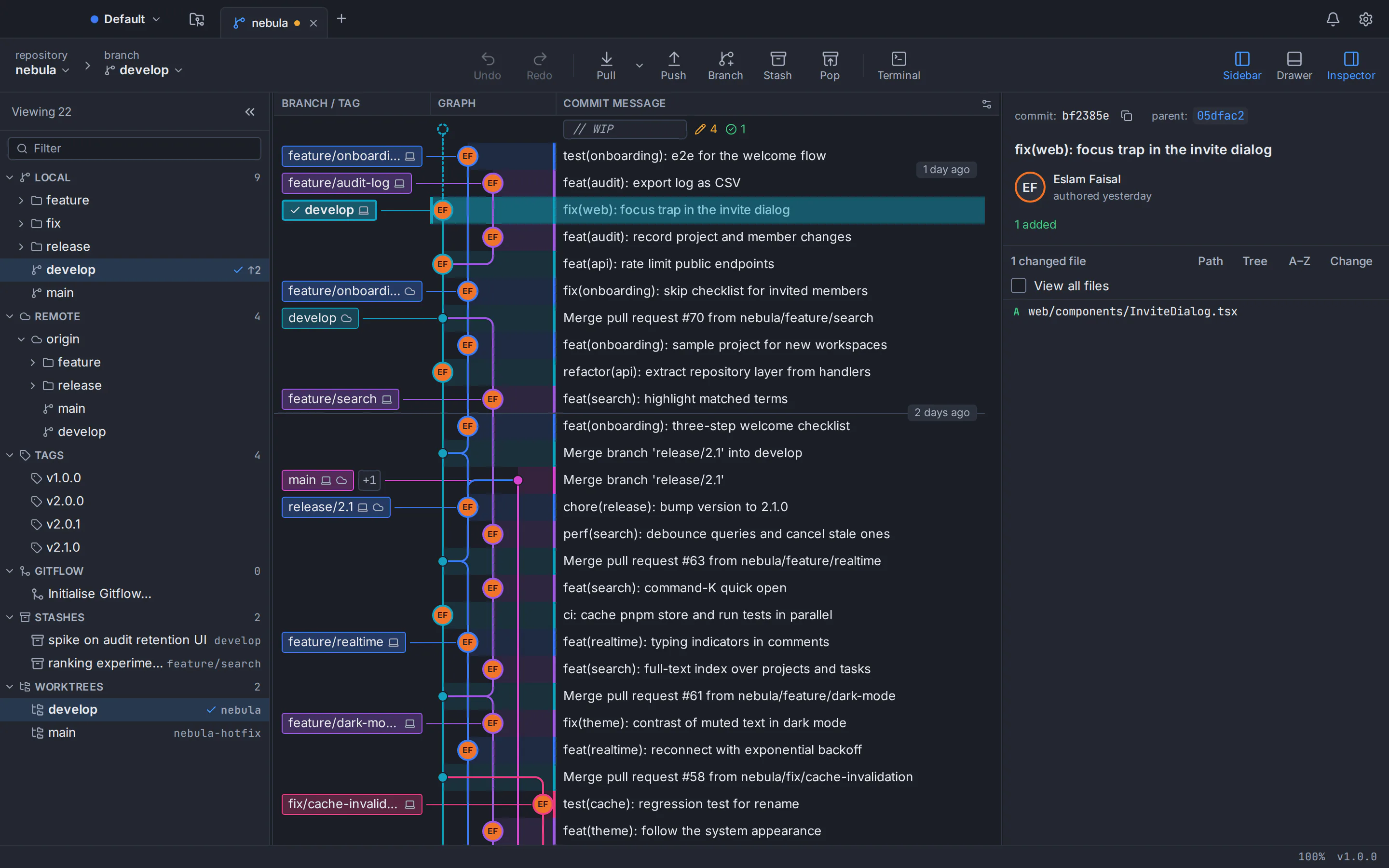
Colour-coded branch lanes, branch and tag labels, search by message, author, hash, file or change, hide, solo or pin branches, and pull request and CI chips on branch tips. Smooth past 100,000 commits.
Full interactive rebase, with undo
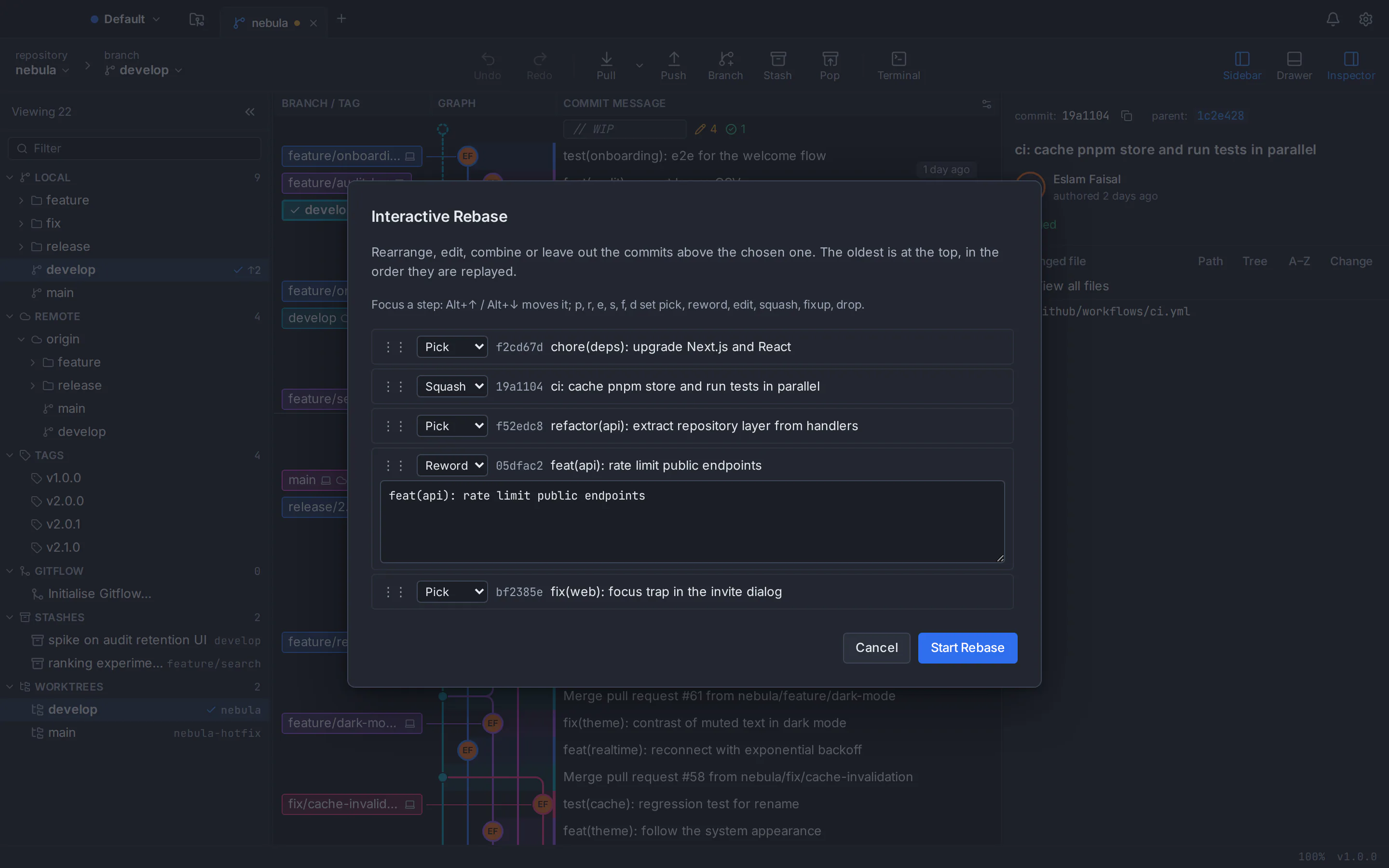
Pick, reword, edit, squash, fixup and drop, reorder by drag or keyboard, with autosquash and update-refs. Every destructive step is snapshotted first, undo and redo sit in the toolbar, and a reflog view restores lost commits.
A three-way conflict editor
Current, incoming and output side by side, with choices per hunk or per line, rerere, and conflict prediction before you merge. Your external merge tool still works.
Pull requests beyond GitHub
Create, review, comment on and merge pull requests in the app, re-run CI checks and follow a dashboard across repositories: GitHub and Bitbucket, plus newer support for GitLab and Azure DevOps.
Private by design, AI on your terms
No telemetry, analytics or crash upload. Optional AI drafts of commit messages and pull request descriptions run through your own Claude Code, Codex or Antigravity CLI, with no AI credits and no key stored by GitTree.
GitTree vs GitHub Desktop: feature comparison
Both are free, visual desktop Git clients. They differ most in Linux support, history tools, conflict handling and hosting services, while GitHub Desktop is ahead on openness, maturity, bundled Git, deep GitHub integration and Windows deployment. The official sources are linked at the end of the page.
- Included
- Partly, or with limits
- Needs a paid plan
- Not available
| Topic | GitTree | GitHub Desktop |
|---|---|---|
| Price, licence and account | ||
| Price | GitTreeIncluded: Free today, for individuals and organizations, private repositories included | GitHub DesktopIncluded: Free, with no paid plan, seats or trial (as of October 2026) |
| Source code | GitTreeNot available: Closed source; the public repository hosts releases only | GitHub DesktopIncluded: Open source under the MIT licence, developed in public since 2016 |
| Account to start | GitTreePartly, or with limits: A free GitTree account, created with GitHub, GitLab, Bitbucket or Azure DevOps; needs the network at first launch, then works offline for up to 7 days between checks | GitHub DesktopIncluded: Optional: skip sign-in for local work; GitHub features need a GitHub.com or GitHub Enterprise account |
| Commercial use | GitTreeIncluded: Free for company and private repositories | GitHub DesktopIncluded: Allowed under the MIT licence and GitHub’s Open Source Applications Terms |
| Desktop systems and installers | ||
| macOS | GitTreeIncluded: One universal app for Apple silicon and Intel, macOS 13 Ventura or later, notarized by Apple | GitHub DesktopIncluded: Separate Apple silicon and Intel downloads, macOS 12 or later; the beta has dropped macOS 12 |
| Windows | GitTreePartly, or with limits: 64-bit Windows 10 (22H2) and Windows 11; per-machine installer, not code-signed yet, so SmartScreen may warn | GitHub DesktopIncluded: 64-bit Windows 10 or later; per-user installer that needs no admin rights |
| Linux | GitTreeIncluded: .deb and AppImage for Ubuntu 22.04+ and Debian 12+ (x86_64) | GitHub DesktopNot available: No official build; unofficial community builds only, the newest based on 3.4.13 (February 2025) |
| Same app on every system | GitTreeIncluded: One version with the same features everywhere | GitHub DesktopPartly, or with limits: The same app on its two systems; no official version for Linux |
| Managed deployment | GitTreeNot available: Per-machine installer only; no MSI and no admin controls | GitHub DesktopIncluded: Machine-wide MSI for Group Policy deployment |
| Windows on Arm | GitTreeNot available: No native build | GitHub DesktopPartly, or with limits: Native builds on the beta channel only |
| Git setup | ||
| Git itself | GitTreePartly, or with limits: Uses your installed Git 2.39 or newer; Git is not bundled | GitHub DesktopIncluded: Bundles Git and Git LFS; install Git separately to use it on the command line |
| Git LFS | GitTreeIncluded: Track, pull, prune and lock files from the app | GitHub DesktopPartly, or with limits: Bundled and works with LFS files; tracking is set up on the command line |
| Submodules | GitTreeIncluded: Manage submodules from the app | GitHub DesktopPartly, or with limits: Shown in diffs and updated after operations; no management in its documentation |
| Git Flow and bisect | GitTreeIncluded: Git Flow feature, release and hotfix branches, and bisect | GitHub DesktopNot available: Neither is in its documentation |
| History, staging and commits | ||
| Visual commit graph | GitTreeIncluded: Colour-coded lanes, labels, search by author, file or change; smooth past 100,000 commits | GitHub DesktopNot available: Linear commit list for the selected branch; no graph or tree view |
| Stage files, hunks and lines | GitTreeIncluded: Stage or discard files, hunks or single lines, with undo for discards | GitHub DesktopIncluded: Commit selected lines or hunks; discarded changes go to the Trash |
| Interactive rebase | GitTreeIncluded: Pick, reword, edit, squash, fixup and drop; autosquash, autostash and update-refs | GitHub DesktopPartly, or with limits: Drag to reorder, squash or cherry-pick, and amend the last commit; no reword of older commits, fixup, drop or edit |
| Undo and redo | GitTreeIncluded: Undo and redo for commit, amend, checkout, reset, rebase, discard and more | GitHub DesktopPartly, or with limits: Undo the last unpushed commit, or a squash, reorder or cherry-pick for 15 seconds; no redo |
| Reflog | GitTreeIncluded: Reflog view with restore | GitHub DesktopNot available: No reflog view in its documentation |
| Blame and file history | GitTreeIncluded: Blame that follows renames, and the history of any file | GitHub DesktopNot available: No blame or single-file history view |
| Signed commits | GitTreeIncluded: Set up GPG, SSH or X.509 signing in the app, with badges in the graph | GitHub DesktopPartly, or with limits: A Signed-off-by trailer option; no GPG or SSH signing setup in the app |
| Diff and merge conflicts | ||
| Conflict editor | GitTreeIncluded: Three-way editor (current, incoming, output) with per-hunk and per-line choices, plus external tools | GitHub DesktopPartly, or with limits: Use our or their version per file, or open the file in your editor |
| AI conflict resolution | GitTreeNot available: Not offered | GitHub DesktopIncluded: Copilot proposes resolutions (since 3.6.0); needs Copilot access, which has a free tier |
| Diff views | GitTreeIncluded: Hunk, inline and split views, word diff, ignore whitespace, Markdown preview, compare any two refs | GitHub DesktopIncluded: Unified or split view, hide whitespace, expand context and syntax highlighting |
| Image diff | GitTreeIncluded: Side by side, swipe and onion skin | GitHub DesktopIncluded: 2-up, swipe, onion skin and difference modes |
| External diff and merge tools | GitTreeIncluded: Opens tools such as Beyond Compare, Meld, KDiff3, P4Merge and WinMerge | GitHub DesktopNot available: Opening an external diff tool is not supported |
| Repository workflow | ||
| Stash | GitTreeIncluded: Several stashes; apply, pop, rename, branch from a stash or stash selected lines | GitHub DesktopPartly, or with limits: One stash at a time, always of all changes |
| Worktrees | GitTreeIncluded: Add, remove, move, lock, prune and repair | GitHub DesktopIncluded: Create, switch, rename and delete (since 3.6.0) |
| Built-in terminal | GitTreeIncluded: Docked under the graph, running your own shell | GitHub DesktopNot available: Opens your external terminal instead |
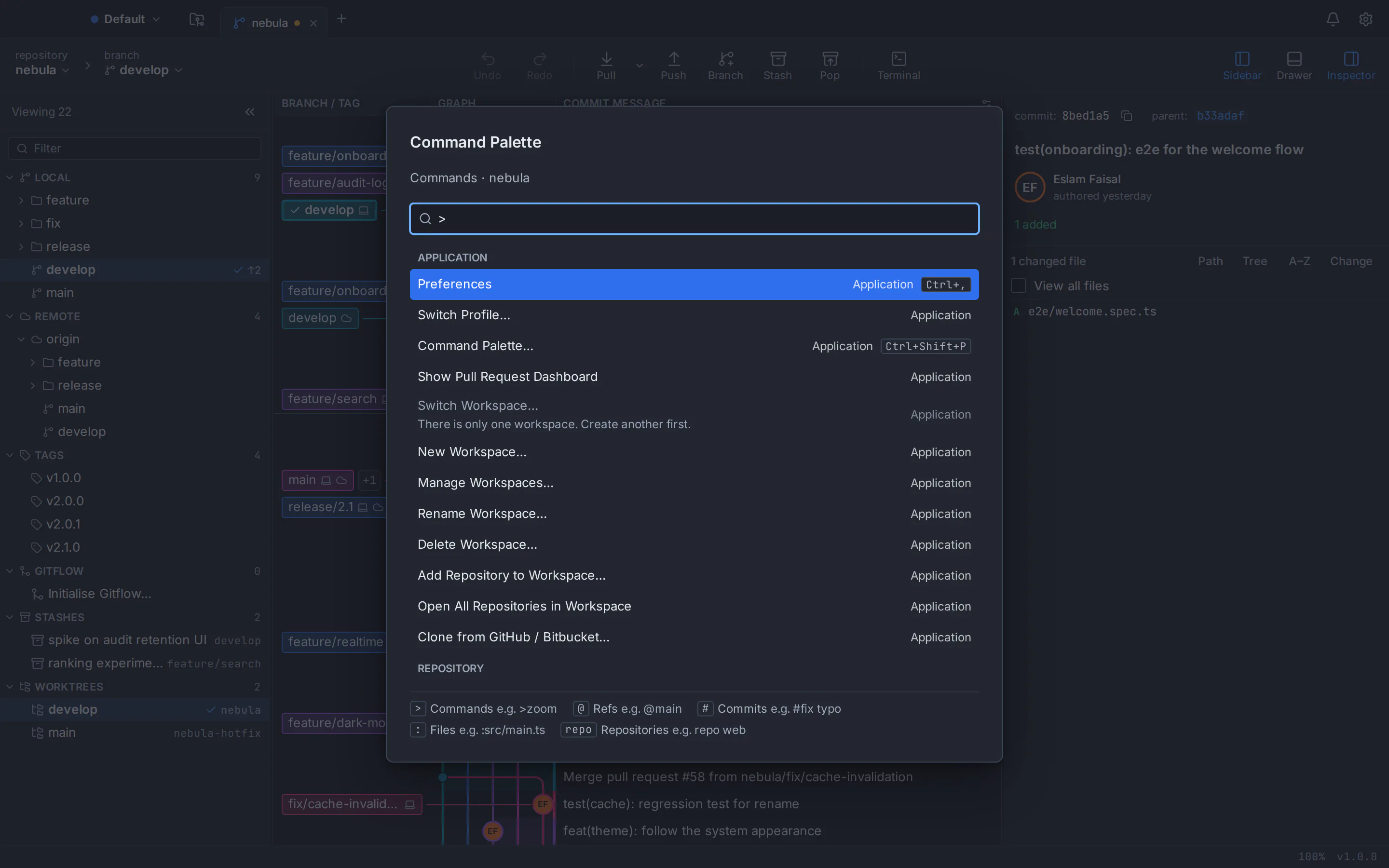
| Command palette and shortcuts | GitTreeIncluded: About 300 commands with Ctrl/⌘+Shift+P, rebindable shortcuts and custom commands | GitHub DesktopNot available: Fixed keyboard shortcuts; no palette in its documentation |
| Hosting, pull requests and AI | ||
| GitHub and GitHub Enterprise | GitTreeIncluded: GitHub accounts, with newer support for GitHub Enterprise Server | GitHub DesktopIncluded: Deep integration with GitHub.com and GitHub Enterprise Server and Cloud |
| GitLab, Bitbucket and Azure DevOps | GitTreeIncluded: Bitbucket Cloud, with newer support for GitLab (including self-managed), Azure DevOps and Bitbucket Data Center | GitHub DesktopPartly, or with limits: Plain Git remotes only, signed in with Git Credential Manager or a token; no pull requests |
| Pull requests | GitTreeIncluded: List, create, review, comment on and merge in the app, with CI checks and a dashboard | GitHub DesktopPartly, or with limits: List, check out and preview, with checks and notifications; creating, commenting and merging happen on GitHub |
| Issues | GitTreePartly, or with limits: GitHub and GitLab issues; no Jira integration | GitHub DesktopPartly, or with limits: “Create Issue on GitHub” opens the browser |
| AI commit messages | GitTreePartly, or with limits: Optional drafts through your own Claude Code, Codex or Antigravity CLI; no built-in model or credits | GitHub DesktopIncluded: Copilot drafts them; Copilot Free has a limited allowance, and custom providers still need Copilot access |
| Work and personal identities | GitTreeIncluded: Profiles keep them apart without editing ~/.gitconfig | GitHub DesktopPartly, or with limits: One GitHub.com account at a time; the multi-account request is open |
| Interface, privacy and maturity | ||
| Interface languages | GitTreeIncluded: English and Arabic, with a full right-to-left layout | GitHub DesktopPartly, or with limits: English only |
| Themes and accessibility | GitTreeIncluded: Dark, light, two high-contrast themes, imported themes and zoom from 50 to 300% | GitHub DesktopIncluded: Light, dark or system theme, an accessibility settings pane and zoom |
| Telemetry | GitTreeIncluded: No telemetry, analytics or crash upload | GitHub DesktopPartly, or with limits: Pseudonymous usage metrics on by default (you can opt out); errors reported to GitHub |
| Maturity and documentation | GitTreePartly, or with limits: New (version 1.2.9) from an independent developer, in active development | GitHub DesktopIncluded: Since 2016, frequent releases with a public beta and extensive official documentation |
This table compares the current public products, not every setting. GitHub Desktop changes often (3.6.6 was the stable version when this page was checked), so the official sources below are the reference. GitTree is in active development; check its features page before moving a critical workflow.
GitHub Desktop pricing vs GitTree
Price does not separate these two: both apps are free as of October 2026. The only paid part on either side is GitHub Copilot, which GitHub Desktop uses for its AI features.
GitTree
$0everything the app does today
- Private, public and local repositories
- Commit graph, interactive rebase, conflict editor, undo and every other feature
- Builds for macOS, Windows and Linux
- AI drafts through the coding CLI you already use, with no AI credits
GitHub Desktop
$0free and open source, as of October 2026
- No paid plan, seats or trial; MIT licence
- AI features need GitHub Copilot; Copilot Free costs $0 with a limited allowance
- As of October 2026, paid Copilot plans include Pro at $10 a month and Business at $19 per seat a month
- Apps for macOS and 64-bit Windows, no Linux version
GitHub publishes no price for GitHub Desktop because it is free; downloading it means accepting GitHub’s Open Source Applications Terms. Copilot plans and prices change: see GitHub’s Copilot plans page for current figures. If GitTree adds paid team plans, they will be announced in your account before anything changes.
A GitHub Desktop alternative for Mac, Windows and Linux
The same GitTree on macOS, Windows and Linux, running the Git 2.39 or newer that you already have installed. Linux is where GitHub Desktop has no official build at all.
GitHub Desktop alternative for Mac
One universal app, about 20.7 MB, that runs natively on Apple silicon and Intel Macs with macOS 13 Ventura or later. It is signed and notarized by Apple and uses the Git on your Mac, version 2.39 or newer.
GitHub Desktop alternative for Windows
An installer of about 7.5 MB for 64-bit Windows 10 (22H2) and Windows 11. Install Git for Windows first; the installer asks for admin approval and is not code-signed yet, so SmartScreen may ask you to confirm.
GitHub Desktop alternative for Linux
What GitHub Desktop does not offer officially: a .deb package or a portable AppImage for 64-bit Ubuntu 22.04+ and Debian 12+. Derivatives such as Linux Mint 21+ can run GitTree too, though they are untested. On Ubuntu 22.04 and Linux Mint 21, add the git-core PPA for a newer Git first.
Read the Linux install guide
Which one should you choose?
Both are free, so choose by the systems you use and the Git work you do, then try the other one on a noncritical repository first.
Choose GitTree if…
- Your team mixes macOS, Windows and Linux, or you work on Linux alone
- You want to see your branches as a graph, not a list
- You rewrite history with interactive rebase and want undo and a reflog behind you
- You resolve conflicts hunk by hunk inside the app
- Your repositories live on GitLab, Bitbucket or Azure DevOps as well as GitHub
- You want no telemetry, or a Git GUI in Arabic
Consider GitHub Desktop if…
- You want an open-source client you can read and build yourself
- You are new to Git and want the simplest possible app
- You work only on GitHub and want its notifications, checks and ruleset warnings in the app
- You need Git bundled with the app, or want to start without any account
- You roll out to many Windows PCs with an MSI, need installs without admin rights, or use Windows on Arm
- You want Copilot to resolve conflicts, or you still use macOS 12, which GitTree does not support
How to switch from GitHub Desktop to GitTree
Switching takes only a few steps. Your repositories are standard Git, so GitHub Desktop and GitTree can open the same folders side by side while you decide.
Check your Git version
GitHub Desktop uses the Git bundled with it, while GitTree uses the Git installed on your system. Run git --version and install or upgrade to Git 2.39 or newer: Git for Windows on Windows, the git-core PPA on Ubuntu 22.04 and Linux Mint 21.
Download GitTree
Get the free installer for macOS, Windows or Linux from the download page and install it.
Sign in with a free account
Create a free GitTree account on this website with GitHub, GitLab, Bitbucket or Azure DevOps, then sign in from the app.
Open your GitHub Desktop repositories
Choose Open and select each repository folder, or scan the parent folder to add them all at once. History, branches, remotes and stashes live in the repository itself, so there is nothing to import.
Connect GitHub and your other hosts
Connect your GitHub account in Preferences to browse, clone and review pull requests, and add GitLab, Bitbucket or Azure DevOps if you use them. Then set your signing key, external tools, theme and shortcuts.
Try it on a test branch
Create a branch, stage a few lines, commit and push, then explore the graph, try an interactive rebase and press undo before you move daily work.
GitHub Desktop alternative: frequently asked questions
What is the best GitHub Desktop alternative?
GitTree is built for people who like GitHub Desktop’s simplicity but want more: a free desktop Git client for macOS, Windows and Linux with a commit graph, full interactive rebase and a built-in conflict editor. Try it on one repository next to GitHub Desktop and compare.
Is GitHub Desktop available for Linux?
Not officially. GitHub builds GitHub Desktop for macOS and 64-bit Windows, with no Linux version; its README says Linux is not officially supported and points to a community fork. As of October 2026 that fork’s newest release is based on 3.4.13 from February 2025, while the official app is at 3.6.6. GitTree is a free alternative with an official .deb and AppImage for Ubuntu 22.04+ and Debian 12+.
Can I install GitHub Desktop on Ubuntu?
Only through unofficial community builds: GitHub publishes no GitHub Desktop package for Ubuntu or Debian. GitTree installs on Ubuntu with apt from its .deb file. On Ubuntu 22.04, add the git-core PPA first, because the system Git (2.34) is older than the 2.39 that GitTree needs.
Is GitHub Desktop free?
Yes. As of October 2026 GitHub Desktop is free and open source under the MIT licence, with no paid plan, seats or trial. Only its AI features can cost money: they need GitHub Copilot, which has a free plan with a limited allowance and paid plans from $10 a month.
Is GitHub Desktop free for commercial use?
Yes. The MIT licence allows commercial use, and downloading the app means accepting GitHub’s Open Source Applications Terms, which your organization should review. GitTree is also free today for individuals and organizations, company and private repositories included.
Is GitHub Desktop open source, and is GitTree?
GitHub Desktop is open source under the MIT licence and developed in public on GitHub. GitTree is not: it is free today for individuals and organizations, but closed source, and its public repository hosts releases only.
Does GitHub Desktop have a commit graph or tree view?
No. GitHub Desktop’s History tab is a linear list of the commits on the selected branch, and the request for a history graph is still open on its repository. GitTree draws a colour-coded commit graph with branch and tag labels, search and the option to hide, solo or pin branches, and it stays smooth past 100,000 commits.
Does GitHub Desktop support interactive rebase?
Partly. You can reorder and squash commits by drag and drop, cherry-pick, and amend or undo the last commit, but you cannot reword an older commit, fixup, drop or stop to edit, and in June 2026 the maintainers decided against a generic interactive-rebase interface. GitTree has full interactive rebase: pick, reword, edit, squash, fixup and drop, with autosquash and update-refs.
Can GitHub Desktop resolve merge conflicts?
It lists the conflicted files and lets you take our or their version, open a file in your editor or, since version 3.6, ask Copilot to propose a resolution. It has no built-in three-way editor. GitTree has a full-window three-way editor with choices per hunk or per line and rerere, but no AI conflict resolution.
Does GitHub Desktop work with GitLab, Bitbucket or Azure DevOps?
Only as plain Git remotes: you can clone, pull and push with Git Credential Manager or a personal access token, but pull requests, checks and notifications are for GitHub.com and GitHub Enterprise only. GitTree handles pull requests on GitHub and Bitbucket, with newer support for GitLab, including self-managed, and Azure DevOps.
Does GitHub Desktop support worktrees?
Yes, since version 3.6.0 in June 2026: you can create, switch, rename and delete worktrees. GitTree manages worktrees too, and can also move, lock, prune and repair them.
Does GitHub Desktop show blame or file history?
Not as of October 2026: it has no blame view and no history for a single file, and users are still asking for them on its repository. GitTree shows blame that follows renames and the full history of any file.
Can GitHub Desktop sign commits with GPG or SSH?
It has no signing setup of its own: GitHub Desktop offers an option to add a Signed-off-by trailer, and the request to set up GPG signing in the app has been open on its repository since 2016. GitTree sets up GPG, SSH or X.509 signing in its preferences and shows signature badges in the commit graph.
Can I open my GitHub Desktop repositories in GitTree?
Yes. Both apps work on ordinary Git repositories, so there is nothing to export or import. Open the same folder in GitTree and its branches, remotes, stashes and history are already there, and you can keep using both while you decide.
Do I need an account for GitHub Desktop or for GitTree?
GitHub Desktop lets you skip sign-in and work on local repositories; its GitHub features need a GitHub.com or GitHub Enterprise account, one GitHub.com account at a time. GitTree needs a free GitTree account, created with GitHub, GitLab, Bitbucket or Azure DevOps; the app needs the network at first launch, then works offline for up to 7 days between checks.
Can GitHub Desktop use multiple GitHub accounts?
Only one GitHub.com account at a time. The request to manage multiple accounts has been open on its repository since January 2018 with almost 1,000 thumbs-up. GitTree connects your GitHub, GitLab, Bitbucket and Azure DevOps accounts side by side, and its profiles keep work and personal identities apart without editing ~/.gitconfig.
Does GitHub Desktop have AI features, and does GitTree?
GitHub Desktop uses GitHub Copilot to draft commit messages and, since 3.6, to propose merge-conflict resolutions; custom model providers still need Copilot access. GitTree drafts commit messages and pull request descriptions through your own Claude Code, Codex or Antigravity CLI, only when you click Generate, with no AI credits and no key stored by GitTree.
Does GitHub Desktop collect usage data, and does GitTree?
GitHub Desktop sends pseudonymous usage metrics by default, which you can turn off in its settings, and reports errors to GitHub. GitTree has no telemetry, analytics or crash upload; it talks only to your remotes, the accounts you connect, the GitTree account service for sign-in and an update check you can switch off.
Is GitTree a good GitHub Desktop alternative for Mac?
Yes. GitTree is one universal app that runs natively on Apple silicon (M1 to M4) and Intel Macs with macOS 13 Ventura or later, signed and notarized by Apple. GitHub Desktop offers separate Apple silicon and Intel downloads and, in its current stable release, still runs on macOS 12.
Is GitTree a good GitHub Desktop alternative for Windows?
Yes, on 64-bit Windows 10 (22H2) and Windows 11. GitTree uses Git for Windows, which you install first; its installer asks for admin approval and is not code-signed yet, so SmartScreen may ask you to confirm. GitHub Desktop bundles Git and offers a per-user installer and an MSI.
Do I need Git installed to use GitTree?
Yes. Unlike GitHub Desktop, which bundles Git, GitTree runs the Git installed on your computer, version 2.39 or newer, so every action matches what the command line would do. If Git is missing, the app explains how to install it.
How this comparison was checked
GitHub Desktop’s features, systems and price were reviewed on 5 October 2026 against GitHub’s official pages: the GitHub Desktop website and download page, GitHub Docs, the open-source repository with its README, changelog and issues, and GitHub’s Copilot plans. The stable version at the time was 3.6.6. Products change; the vendor’s current pages are the source of truth.
- GitHub Desktop website
- GitHub Desktop download page
- Supported operating systems
- GitHub Desktop repository and README
- GitHub Desktop for Linux request
- Viewing the branch history
- Options for managing commits
- Interactive rebase decision (June 2026)
- Stashing changes
- Viewing a pull request
- Configuring Copilot in GitHub Desktop
- GitHub Copilot plans
- GitHub Desktop usage data
- What GitHub Desktop is (design notes)
- Setting up GitHub Desktop (bundled Git)
- Managing worktrees
- Multiple accounts request
- GPG signing setup request
- Interface languages reply (April 2026)
- GitTree features
GitTree is an independent product and is not affiliated with or endorsed by GitHub, Inc., the owner of GitHub Desktop. GitHub Desktop is a trademark of its owner.
Compare Git clients
Switching from another Git client?
Honest, sourced comparisons with the Git GUIs developers use most, including what each one does better.
GitKraken alternative
Private repositories, deep undo and AI drafts with your own CLI at no cost, compared row by row with GitKraken Desktop.
Sourcetree alternative
Runs on Linux too, with a built-in conflict editor, undo and in-app pull requests, compared row by row with Sourcetree.
Fork alternative
A Linux build, no licence to buy, undo and pull requests in the app, compared row by row with Fork.
Tower alternative
No subscription, a Linux build and a line-level conflict editor, compared row by row with Tower.
SmartGit alternative
Free for commercial use with no licence application, plus a docked terminal, undo and AI drafts, compared row by row with SmartGit.
Sublime Merge alternative
No licence to buy, plus pull requests, a drag-and-drop rebase plan and undo, compared row by row with Sublime Merge.
Try the GitHub Desktop alternative on your own repository
Download GitTree, open a repository you already use in GitHub Desktop and compare the graph, interactive rebase and the conflict editor for yourself, on macOS, Windows or Linux.