Git on Linux
GitHub Desktop for Linux: is it available, and what to use on Ubuntu instead
GitHub Desktop has no official Linux build, and GitHub has no immediate plans for one. Here is what GitHub’s own pages say, what the community fork offers, and how to set up a free, native Git GUI with your GitHub account on Ubuntu or Debian.
Disclosure: GitTree’s maker wrote this article, so we have a stake in GitTree. We describe every product, ours included, from its official pages and our own use, and say where another tool is the better fit.
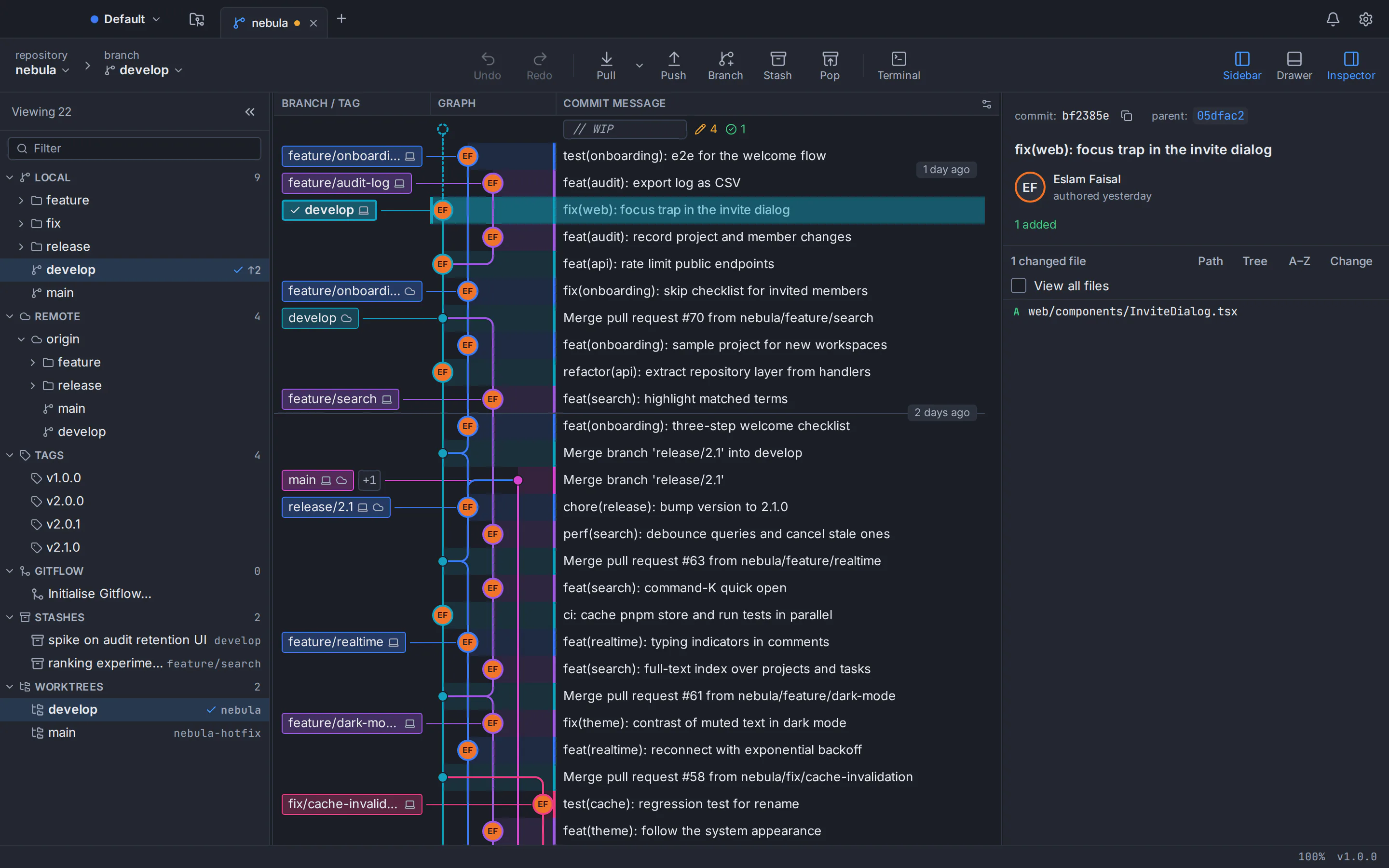
No, there is no official GitHub Desktop for Linux. GitHub’s installation guide says “Linux is not yet supported”, and the team’s pinned answer on the request for a Linux version, open since 2017, is that it has no immediate plans for one. A community fork packages GitHub Desktop for Ubuntu, but GitHub does not support it and it lags well behind. For a native app released for Linux by its own developer, our pick, with an obvious bias, is GitTree: a free Git GUI with a .deb for Ubuntu and Debian, a commit graph, and GitHub pull requests you can review and merge without leaving the app.
A quick note: GitTree’s maker wrote this post, so weigh our recommendation accordingly. Every claim about GitHub Desktop below comes from GitHub’s own documentation, repository and issue tracker, listed in the sources at the end.
Is GitHub Desktop available for Linux? What GitHub’s own pages say
GitHub Desktop is actively developed: version 3.6.6 shipped on 21 September 2026, one of 14 stable releases between March and September. All of them target macOS and Windows only, with no Linux build. Evidence, as of October 2026:
- The documentation. GitHub’s supported operating systems page lists macOS 12.0 or later and 64-bit Windows 10 or later, and nothing for Linux. The installation guide says “Linux is not yet supported”.
- The repository. The desktop/desktop README says “Linux is not officially supported” and points Linux users to a community fork.
- The issue tracker. “GitHub Desktop for Linux?” (#1525) has been open since May 2017 with more than 3,000 thumbs-up. The pinned team reply: “no immediate plans to support an official Linux version”.
| Platform | Official build | What you download |
|---|---|---|
| macOS | Yes: 3.6.6, macOS 12.0 or later | A .zip with the app, for Apple silicon or Intel |
| Windows | Yes: 3.6.6, 64-bit Windows 10 or later | A per-user .exe (no admin rights) or a machine-wide .msi |
| Linux | No | Nothing official; only community builds from a fork |
GitHub Desktop on Ubuntu: what the community fork is
The fork GitHub’s README points to is shiftkey/desktop, a community project rather than a GitHub product. It adapts GitHub Desktop’s open-source code for Linux and publishes .deb, .rpm and AppImage packages, plus community package feeds. Ubuntu install guides generally use it. Know what you are getting:
- It trails GitHub. Its latest release, 3.4.13-linux1, came out on 9 February 2025, about 19 months before GitHub’s 3.6.6, so it lacks newer features such as worktrees and Copilot conflict resolution (both new in 3.6.0).
- GitHub does not support it. Linux problems go to the fork’s own issue tracker, and GitHub’s documentation does not cover it.
- You choose whom to trust. Install it only from the fork’s GitHub releases or the feeds its README lists, and compare the published SHA-256 checksums.
If you need GitHub Desktop’s exact workflow and can live with the lag, the fork is the closest you will get.
What GitHub Desktop does, and what you would be replacing
GitHub Desktop is GitHub’s free Git client, open source under the MIT licence and built with Electron. Its design document says that when it must choose between advanced and beginner workflows, it prioritizes beginners. It covers the everyday loop well:
- Clone from your GitHub.com or GitHub Enterprise account, or work locally without signing in.
- Commit whole files or selected lines; branch, merge, and reorder, squash or cherry-pick commits by dragging.
- List pull requests, check them out and re-run failed checks; creating one opens GitHub in the browser.
- Draft commit messages and merge conflict resolutions with GitHub Copilot, which needs Copilot access (a free tier exists; paid plans start at $10 a month as of October 2026).
- Manage Git worktrees (new in 3.6.0), with Git and Git LFS bundled, so there is nothing else to install.
Where GitHub Desktop stops
- No commit graph. History is a linear list for the selected branch; a graph request is still open.
- No full interactive rebase. No reword of older commits, fixup or drop; in June 2026 a maintainer said the team decided against a generic interactive rebase interface.
- No three-way conflict editor. You take our or their version of a file, use your editor, or ask Copilot.
- One stash at a time, of all changes, and no blame view.
- GitHub first. Pull requests cover GitHub only, you cannot comment on one from the app, and only one GitHub.com account can be signed in at a time.
- English only. In April 2026 a maintainer said the team has no bandwidth for more languages.
GitHub Desktop alternatives for Linux that run natively on Ubuntu and Debian
A good replacement installs like any other Ubuntu program and keeps GitHub close at hand. Here are the options, starting with ours.
GitTree
Best for: GitHub Desktop users on Ubuntu and Debian who want a native app with GitHub pull requests, a commit graph and interactive rebase.
GitTree is a free desktop Git client for macOS, Windows and Linux, shipped on Linux as a .deb for Ubuntu 22.04+ and Debian 12+ and as a portable AppImage. It covers what GitHub Desktop users rely on and adds a commit graph, full interactive rebase, a three-way conflict editor, undo and redo, multiple stashes, blame and a built-in terminal.
Strengths
- A native .deb installed with apt, plus a portable AppImage
- GitHub pull requests in the app: create, review, comment on and merge them, and re-run GitHub Actions checks
- Commit graph, interactive rebase (pick, reword, edit, squash, fixup, drop) and a three-way conflict editor
- Undo and redo for commits, resets, rebases and more, plus a reflog view
- GitLab, Bitbucket and Azure DevOps too (GitLab and Azure DevOps support is new); no telemetry
Watch out for
- Needs a free GitTree account; after the first online sign-in it works offline for up to 7 days between checks
- Needs Git 2.39 or newer installed (Ubuntu 22.04 and Linux Mint 21 need the git-core PPA first)
- Closed source, and new (version 1.2.9) next to GitHub Desktop’s long track record
- No AI conflict resolution; AI drafts need your own Claude Code, Codex or Antigravity CLI
- Linux builds are x86_64 only and unsigned; verify them with SHA256SUMS.txt
- Platforms
- macOS: available
- Windows: available
- Linux: available
- Price
- Free today, private repositories included (no paid plan)
Git’s own tools: gitk and git gui
Git ships two small Tcl/Tk tools: gitk browses history and git gui stages and commits. They look dated and have no pull requests or interactive rebase, but they are free and in the Ubuntu and Debian archives:
sudo apt install gitk git-guiMore options, compared
Our best Git GUI for Linux round-up compares clients with Linux builds, Sourcetree for Linux covers Atlassian’s app, and GitKraken vs Sourcetree vs GitHub Desktop puts the best-known names side by side. Torn between a GUI and the terminal? Read Git GUI vs command line.
GitHub Desktop vs GitTree: how your workflow maps over
If you used GitHub Desktop on a Mac or a Windows PC and now work on Linux, most habits carry over. Our full GitHub Desktop alternative comparison goes feature by feature; here are the main ones.
| Task | GitHub Desktop | GitTree |
|---|---|---|
| Linux | Unofficial community fork only | Official .deb and AppImage |
| History | Linear list of commits | Commit graph with coloured branch lanes and search |
| Rewriting commits | Drag to reorder or squash; amend the last commit | Full interactive rebase with autosquash |
| Merge conflicts | Our or their file, your editor, or Copilot | Built-in three-way editor, per hunk or per line |
| Undo | Last unpushed commit; 15 seconds after a squash or reorder | Undo and redo across many operations, plus a reflog view |
| Pull requests | GitHub only; create and comment in the browser | GitHub, GitLab, Bitbucket and Azure DevOps, in the app |
| AI | GitHub Copilot | Your own Claude Code, Codex or Antigravity CLI |
| Git itself | Bundles Git and Git LFS | Uses your Git 2.39 or newer |
| Account | Optional for local work | Free GitTree account required |
| Languages | English | English and Arabic (right to left) |
| Licence and price | Open source (MIT), free (October 2026) | Closed source, free today |
Where GitHub Desktop is still ahead
- Open source and account-free. MIT-licensed, and local work needs no sign-in. GitTree is closed source and needs a free account.
- Bundled Git. A clean machine just works; GitTree needs Git 2.39 or newer installed.
- Maturity. Developed since 2016, with a public beta channel and extensive docs. GitTree is at version 1.2.9.
- Deep GitHub ties. Review and check notifications, ruleset warnings, and Copilot conflict resolution.
- Simplicity. Fewer features, fewer decisions, which suits beginners.
On a Mac or a Windows PC, those strengths can make GitHub Desktop the right choice. On Linux they only count if you accept an unofficial, older build.
Install GitTree on Ubuntu and connect GitHub
Check your Git version
Run
git --version. GitTree needs 2.39 or newer, which Ubuntu 24.04 and Debian 12 have. Ubuntu 22.04 and Linux Mint 21 ship 2.34, so first runsudo add-apt-repository ppa:git-core/ppa, thensudo apt updateandsudo apt install git.Download and install the .deb
Get the Linux .deb (about 11 MB, x86_64) from the GitTree download page and check it against SHA256SUMS.txt. Then run
sudo apt install ./Git-Tree-Linux.debwith the file name you saved (for exampleGit-Tree_<version>_amd64.deb); apt installs Git, WebKitGTK and GTK as dependencies and adds GitTree to your applications menu.Start GitTree and sign in
Open GitTree from the menu or run
gittree, then sign in once with a free GitTree account, which you can create on gittree.app with GitHub. The browser hands you back to the app.Connect your GitHub account
In Preferences, Integrations, choose Connect GitHub… and sign in with your browser or a personal access token. This is separate from your GitTree sign-in, and the token stays in the system keyring.
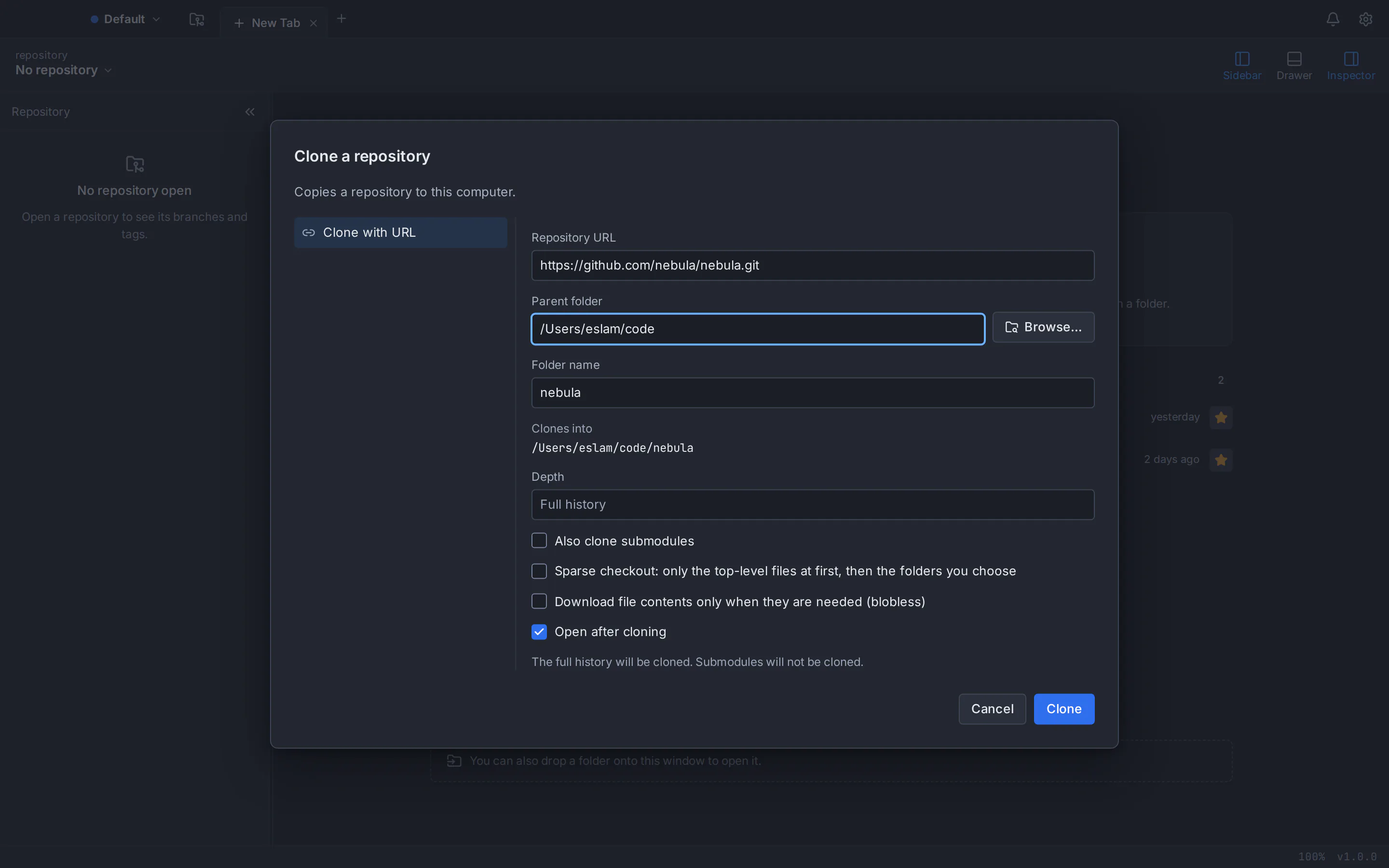
Clone or open your repositories
Clone with a repository’s HTTPS or SSH address, open folders you already have, or scan a folder such as
~/projects. For a project not yet on GitHub, Publish Repository… creates it and pushes your branch.Work with pull requests
Create, review, comment on and merge GitHub pull requests in GitTree, follow or re-run their GitHub Actions checks, and see them across repositories on the pull request dashboard.
On Ubuntu 24.04 or Debian 12, the install fits in four commands (swap in the .deb file name you saved):
git --version
cd ~/Downloads
sudo apt install ./Git-Tree-Linux.deb
gittree
Prefer no system-wide install? The GitTree for Linux guide covers the portable AppImage, the keyring and uninstalling. If your Git prints 2.34, our guide to upgrading Git on Ubuntu 22.04 walks through the PPA.
Bring your GitHub Desktop setup with you
- Repositories are ordinary Git folders: copy them or clone them again, and their branches, tags and history come along.
- Identity lives in
~/.gitconfig. GitTree profiles keep work and personal identities apart without editing it. - SSH keys: copy
~/.ssh, or generate a key in GitTree and upload it to GitHub from the app. - Copilot commit messages become GitTree’s Generate commit message, run through your own AI CLI: see AI commit messages with Claude Code and Codex.
GitTree is free today, private repositories included, and the same app runs on Mac, Windows and Linux. See every capability on the GitTree features page, or, if you are new to Git, learn how to push a project to GitHub without the command line. Stuck? The GitTree support page lists every way to reach us, and every installer is on the download page.
Frequently asked questions
Is GitHub Desktop available for Linux?
No. GitHub publishes GitHub Desktop for macOS 12.0 or later and 64-bit Windows 10 or later, with no Linux version. Its installation guide says Linux is not yet supported, and the team’s pinned answer on the Linux request, open since 2017, is that there are no immediate plans. Only unofficial community builds exist.
Can I install GitHub Desktop on Ubuntu?
Only through an unofficial community fork, shiftkey/desktop, which GitHub’s README points to. It offers .deb, .rpm and AppImage packages, but GitHub does not support it, and its latest release, 3.4.13-linux1 from February 2025, trails GitHub’s 3.6.6 by about 19 months, without worktrees or Copilot conflict resolution.
Will GitHub release an official Linux version of GitHub Desktop?
Nothing has been announced. Issue #1525, open since May 2017 with more than 3,000 thumbs-up, carries a pinned team statement, last updated in early 2021, that there are no immediate plans for an official Linux version, though the team continues to evaluate it alongside its other priorities. Until that changes, Linux users need the community fork or another Git client.
What is the best GitHub Desktop alternative for Linux?
We make GitTree, so we are biased, but it targets this case: a free Git GUI with a .deb for Ubuntu and Debian, GitHub pull requests you can review and merge in the app, a commit graph, interactive rebase and a three-way conflict editor. For basic commits, Git’s own gitk and git gui are free.
Can I use my GitHub account with GitTree on Linux?
Yes. After signing in to GitTree, connect GitHub under Preferences, Integrations with your browser or a personal access token, stored in the system keyring. You can then clone and publish repositories, create, review, comment on and merge pull requests, and re-run GitHub Actions checks. Any repository also works over plain HTTPS or SSH.
Is GitTree free like GitHub Desktop?
Yes. GitTree is free today for individuals and organizations, private repositories included, with no paid plan. Unlike GitHub Desktop, which is open source under the MIT licence, GitTree is closed source, and it needs a free GitTree account that checks in at least every 7 days, while GitHub Desktop works with local repositories without signing in.
Do I need to install Git before GitTree on Ubuntu?
Not by hand on Ubuntu 24.04 or Debian 12: the GitTree .deb depends on Git, so apt installs it if it is missing, and both ship a new enough version. GitTree uses your system’s Git, 2.39 or newer, rather than bundling its own as GitHub Desktop does. On Ubuntu 22.04 and Linux Mint 21, add ppa:git-core/ppa first, because their Git 2.34 is too old.
Sources
Claims about other products were checked against their official pages on October 6, 2026. Prices and features change; the vendors’ pages are the source of truth.
- GitHub Desktop: official page
- GitHub Desktop: download page
- GitHub Docs: Supported operating systems for GitHub Desktop
- GitHub Docs: Installing GitHub Desktop
- GitHub Docs: Setting up GitHub Desktop (bundled Git)
- GitHub Desktop repository and README
- GitHub Desktop releases
- GitHub Desktop issue #1525: “GitHub Desktop for Linux?”
- Community fork shiftkey/desktop: releases
- GitHub Desktop: What is GitHub Desktop? (design document)
- GitHub Desktop issue #9452: history graph request
- GitHub Docs: Viewing the branch history in GitHub Desktop
- GitHub Docs: Options for managing commits in GitHub Desktop
- GitHub Desktop issue #12354: maintainer comment on interactive rebase (June 2026)
- GitHub Docs: Syncing your branch in GitHub Desktop (merge conflicts)
- GitHub Docs: Stashing changes in GitHub Desktop
- GitHub Docs: Managing worktrees in GitHub Desktop
- GitHub Docs: Viewing a pull request in GitHub Desktop
- GitHub Docs: Configuring Copilot in GitHub Desktop
- GitHub Docs: Plans for GitHub Copilot
- GitHub Desktop issue #2310: blame view request
- GitHub Desktop issue #3707: multiple accounts
- GitHub Desktop issue #21943: interface languages
- Git documentation: gitk
- Git documentation: git gui
- Ubuntu Packages: gitk in Ubuntu 24.04 (noble)
All product names are trademarks of their respective owners. GitTree is independent and not affiliated with or endorsed by any of them.