Git on Linux
The best Git GUI for Linux in 2026: Ubuntu 24.04, Debian and Linux Mint
Seven Git clients that really run on Linux, compared for Ubuntu 24.04, Debian and Linux Mint on price, packaging and features. Plus four popular clients with no Linux version.
Disclosure: GitTree’s maker wrote this article, so we have a stake in GitTree. We describe every product, ours included, from its official pages and our own use, and say where another tool is the better fit.
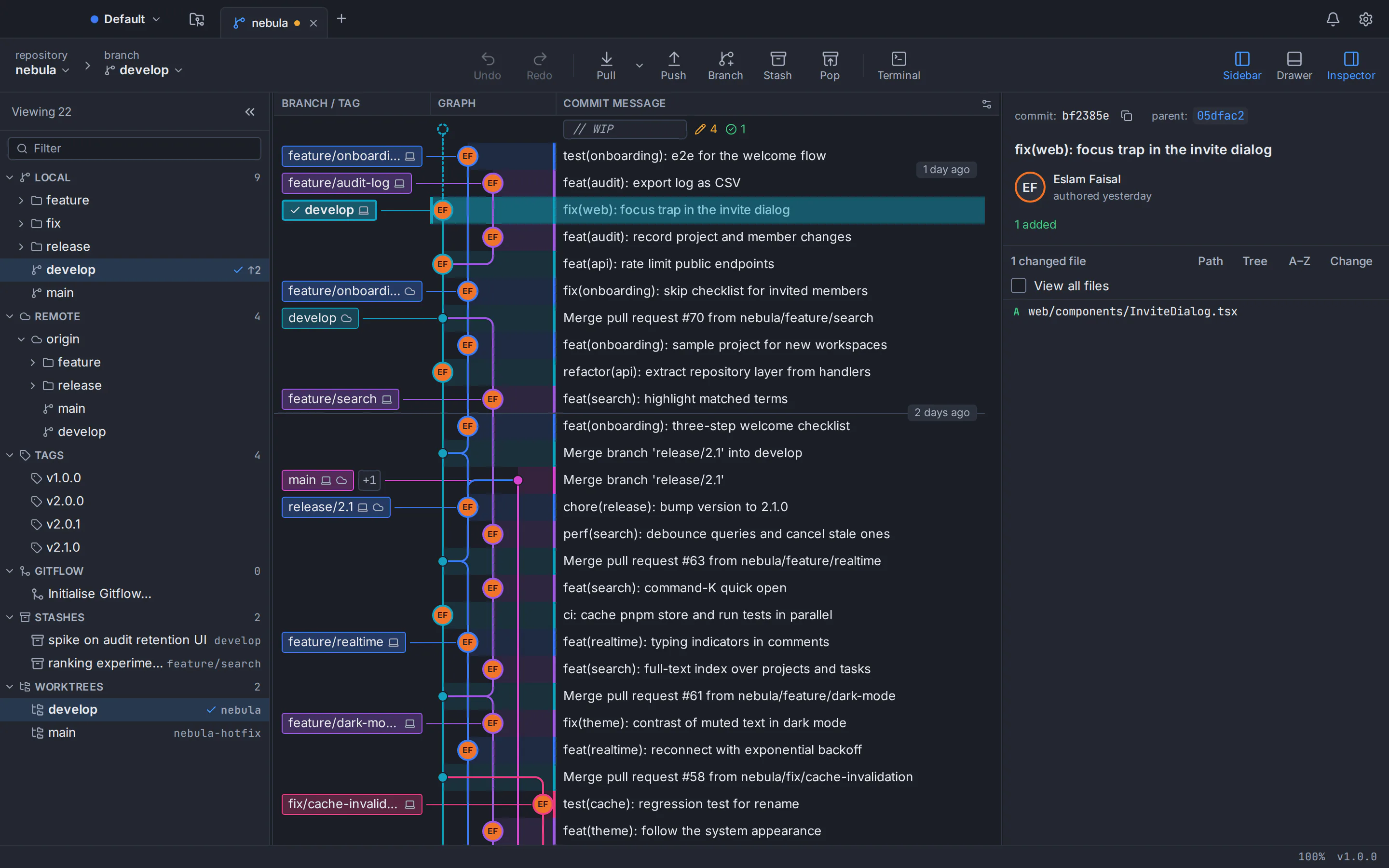
The best Git GUI for Linux in 2026 depends on your budget and workflow. For a free, full-featured client on Ubuntu 24.04, Debian or Linux Mint, our pick, with an obvious bias, is GitTree: a native .deb with a commit graph, line staging, interactive rebase and a three-way conflict editor, free today. GitKraken Desktop, Sublime Merge and SmartGit are mature commercial options; gitg, git-cola and lazygit are the best-known open-source ones.
GitTree’s maker wrote this post, so weigh our first pick accordingly. Claims about other clients come from their developers’ own pages, checked in October 2026 and listed in the sources at the end.
Git GUI clients for Linux compared at a glance
| Client | Price | Linux packages | Open source |
|---|---|---|---|
| GitTree | Free today | .deb and AppImage (x86_64) | No (free, closed source) |
| GitKraken Desktop | Free for local and public repositories; Pro $10 per seat per month, billed annually | .deb, .rpm, .tar.gz and Snap | No |
| Sublime Merge | US$99 personal; US$75 per user per year for business | x86_64 and ARM packages, signed repositories | No |
| SmartGit | Free for non-commercial use; from $5 per user per month | tar.gz, .deb and Flathub (x86_64) | No |
| gitg | Free | Ubuntu and Debian archives | Yes (GPL-2.0) |
| git-cola | Free | Ubuntu and Debian archives | Yes (GPL-2.0) |
| lazygit (terminal UI) | Free | Release binary; apt on newer releases | Yes (MIT) |
What to look for in a Git GUI on Ubuntu and Debian
On Linux, four questions matter more than they do on a Mac:
- A real Linux build from the developer, not Windows software under Wine.
- Packaging: a .deb or signed apt repository fits apt; a tarball sits outside it.
- Git itself: some clients bundle it; others run your system
git, which is too old on Ubuntu 22.04 for some. - Price for work: some clients are free only for personal use or public repositories.
Full-featured Git clients with official Linux builds
These four ship their own Linux packages and cover the whole daily loop. We start with ours.
GitTree
Best for: A full-featured Git GUI on Ubuntu, Debian or Linux Mint that is free for work.
GitTree is a free desktop Git client for macOS, Windows and Linux, built with Rust and Tauri. On Linux it ships as a .deb for Ubuntu 22.04+ and Debian 12+ and as a portable AppImage, and it runs on your installed Git.
Strengths
- Free today, private repositories and commercial use included
- An 11 MB .deb installed with apt, or a portable AppImage that installs nothing
- Commit graph, line staging, interactive rebase, a three-way conflict editor, and undo and redo
- Pull requests and CI checks for GitHub, GitLab, Bitbucket and Azure DevOps (GitLab and Azure DevOps support is new)
Watch out for
- Needs a free account; works offline for up to 7 days between checks
- Needs Git 2.39 or newer (Ubuntu 22.04 and Linux Mint 21 need the git-core PPA)
- x86_64 only; Linux packages are unsigned, so verify them with SHA256SUMS.txt
- Closed source and new (version 1.2.9), with no team features or SSO
- Platforms
- macOS: available
- Windows: available
- Linux: available
- Price
- Free today, private repositories included (no paid plan)
GitKraken Desktop
Best for: Teams that want a mature client with cloud and team features and will pay for private repositories.
GitKraken Desktop is a proprietary Electron app with a wide choice of Linux packages: a .deb for Ubuntu 18.04+ and Debian 10+, an .rpm for RHEL 8+ and Fedora 39+, a .tar.gz and a Snap package, with ARM builds in preview. It bundles its own Git.
Strengths
- Official .deb, .rpm, .tar.gz and Snap packages
- Bundled Git, so it works on a fresh install
- Mature, with a minor release roughly every month
- Integrations with GitHub, GitLab, Bitbucket, Azure DevOps, Jira and Trello (some need a paid plan)
Watch out for
- The free plan covers only local repositories and public remotes
- On the free plan, interactive rebase, undo and the conflict tool work on public repositories only
- Asks you to create or sign in to a GitKraken account
- About 234 MB for the Linux .tar.gz (version 12.6.0)
- Platforms
- macOS: available
- Windows: available
- Linux: available
- Price
- Free plan; Pro from $10 per seat per month, billed annually (October 2026)
Sublime Merge
Best for: Keyboard-driven developers who want speed, an official apt repository and a one-off licence.
Sublime Merge comes from Sublime HQ, the makers of Sublime Text, and reads repositories with its own high-performance Git library. On Linux it offers x86_64 and ARM packages and signed repositories for apt, pacman, yum, dnf and zypper, so updates arrive with your system.
Strengths
- Signed official repositories for apt, pacman, yum, dnf and zypper
- Strong commit editing, line staging, a three-column merge tool and blame
- No account; it works offline with a licence key
- A command palette, with key bindings and commands you edit as JSON
Watch out for
- Evaluation is free, but continued use needs a licence
- No pull requests or hosting integration (requested since 2018)
- No built-in terminal, reflog view or AI features
- Platforms
- macOS: available
- Windows: available
- Linux: available
- Price
- US$99 personal licence with 3 years of updates; US$75 per user per year for business (October 2026)
SmartGit
Best for: Power users who want deep Git features and a perpetual licence, and who qualify for a free licence or will buy one.
SmartGit, made by syntevo in Germany since 2009, is a Java app with a bundled runtime. On Linux the recommended download is a tar.gz that includes Git, beside a .deb the vendor marks “not recommended” and a Flathub package. Builds are x86_64 only.
Strengths
- Bundles Git and Git LFS
- Deep Git coverage: Index Editor, split commits, subtrees, Git Notes and SVN cloning
- Inline pull request review comments inside the app
- No account; a perpetual licence works fully offline
Watch out for
- Free licences are for non-commercial use only and are reviewed by hand
- Self-hosted GitLab, GitHub Enterprise and other server integrations need a commercial licence
- No built-in terminal or command palette documented, and a 124.2 MB tar.gz
- Platforms
- macOS: available
- Windows: available
- Linux: available
- Price
- Free for approved non-commercial use; commercial from $5 per user per month (October 2026)
Free, open-source Git GUIs for Ubuntu and Debian
The Ubuntu and Debian archives already carry several open-source Git GUIs, including Git’s own gitk for history and git gui for commits. One command installs them with gitg and git-cola:
sudo apt install gitk git-gui gitg git-colaArchive versions trail upstream, sometimes by years, but they update with the rest of your system.
gitg
Best for: GNOME users who want a light history viewer with simple staging and commits.
gitg is GNOME’s Git client, which its developers describe as a small, fast tool for visualizing repository history, with utilities to manage a repository and commit your work. Version 50, released in July 2026, added a full push action and custom actions.
Strengths
- Free and open source (GPL-2.0)
- One apt command on Ubuntu and Debian
- A history view, a staging area, commit signing and remote management
Watch out for
- Linux only
- No interactive rebase editor or pull requests in its release notes
- Ubuntu 24.04 ships version 44, from 2023
- Platforms
- macOS: not available
- Windows: not available
- Linux: available
- Price
- Free, open source (GPL-2.0)
git-cola
Best for: Careful staging, committing and interactive rebase in an open-source GUI.
git-cola is a free Git GUI written in Python and Qt, under GPL-2.0. You stage selected lines or hunks, commit, stash and run an interactive rebase in its own editor, with a separate DAG window for history. Version 4.19.0 came out in July 2026.
Strengths
- Free and open source (GPL-2.0)
- In the Ubuntu and Debian archives
- Line and hunk staging with fast keyboard shortcuts
- Runs on macOS (through Homebrew), Windows and Linux
Watch out for
- Archive versions lag: 4.6.1 in Ubuntu 24.04 and 3.12.0 in Debian 12
- History lives in a separate window
- No pull request or hosting features documented
- Platforms
- macOS: available
- Windows: available
- Linux: available
- Price
- Free, open source (GPL-2.0)
lazygit
Best for: Terminal users, including on servers over SSH.
lazygit is a terminal UI for Git rather than a windowed app, open source under the MIT licence. It covers line staging, interactive rebase (squash, fixup, drop, edit and reordering), cherry-pick, worktrees, bisect and undo through the reflog.
Strengths
- Free and open source (MIT)
- Works in any terminal, even over SSH
- A fast keyboard workflow for staging, rebasing and cherry-picking
- Release builds for macOS, Windows and Linux
Watch out for
- Shortcuts to learn, and no desktop window
- Not in the Ubuntu 24.04 or Debian 12 archives (apt installs it from Debian 13 and Ubuntu 25.10 onward)
- Its undo cannot reverse working-tree or stash changes
- Platforms
- macOS: available
- Windows: available
- Linux: available
- Price
- Free, open source (MIT)
Git GUI on Ubuntu 24.04, Debian 12 and Linux Mint: check your Git first
Clients that run your system git depend on your distribution’s version, and GitTree needs 2.39 or newer. GitKraken Desktop and SmartGit’s recommended download bundle their own Git.
| Distribution | Git in the archive | Git new enough for GitTree? |
|---|---|---|
| Ubuntu 26.04 LTS | 2.53.0 | Yes |
| Ubuntu 24.04 LTS | 2.43.0 | Yes |
| Debian 13 (Trixie) | 2.47.3 | Yes |
| Debian 12 (Bookworm) | 2.39.5 | Yes |
| Linux Mint 22.x (built on Ubuntu 24.04) | 2.43.0 | Yes |
| Ubuntu 22.04 LTS | 2.34.1 | No: add the git-core PPA first |
| Linux Mint 21.x (built on Ubuntu 22.04) | 2.34.1 | No: add the git-core PPA first |
Ubuntu 22.04 and Linux Mint 21: add the Git PPA first
Ubuntu 22.04 and Linux Mint 21 ship Git 2.34.1. The git-core PPA brings the newest stable Git, and later versions then arrive with your system updates:
sudo add-apt-repository ppa:git-core/ppa
sudo apt update
sudo apt install git
git --version
Our guide to upgrading Git on Ubuntu 22.04 explains each step, whether to trust the PPA, and how to undo it.
Linux Mint, Pop!_OS and other derivatives
Linux Mint 22 is built on Ubuntu 24.04 and Linux Mint 21 on Ubuntu 22.04, so Ubuntu packages install on them. GitTree can run on derivatives with WebKitGTK 4.1, such as Linux Mint 21+ and Pop!_OS 22.04+, though only Ubuntu and Debian are tested. It keeps tokens in the system keyring, so GNOME Keyring or KeePassXC’s Secret Service must be available.
How to install GitTree on Ubuntu 24.04, Debian or Linux Mint
Check your Git version
Run
git --version. You need 2.39 or newer, which Ubuntu 24.04, Debian 12, Linux Mint 22 and later releases have; on Ubuntu 22.04 or Linux Mint 21, add the git-core PPA first.Download the .deb
Get the .deb (about 11 MB, for x86_64) from the GitTree download page. The Linux packages are unsigned, so check it against SHA256SUMS.txt with
sha256sum.Install it with apt
Run
sudo apt install ./Git-Tree-Linux.debwith the file name you saved. apt pulls in Git, WebKitGTK and GTK and adds GitTree to your applications menu.Start GitTree and sign in
Run
gittreeor open it from the menu, then sign in once with a free GitTree account, made on gittree.app with GitHub, GitLab, Bitbucket or Azure DevOps.Open your repositories
Open a repository folder, scan one such as
~/projects, or clone over HTTPS or SSH. Connect your hosting account in Preferences for pull requests.
On Ubuntu 24.04 or Debian 12, the whole install fits in four commands (use the file name you saved):
git --version
cd ~/Downloads
sudo apt install ./Git-Tree-Linux.deb
gittree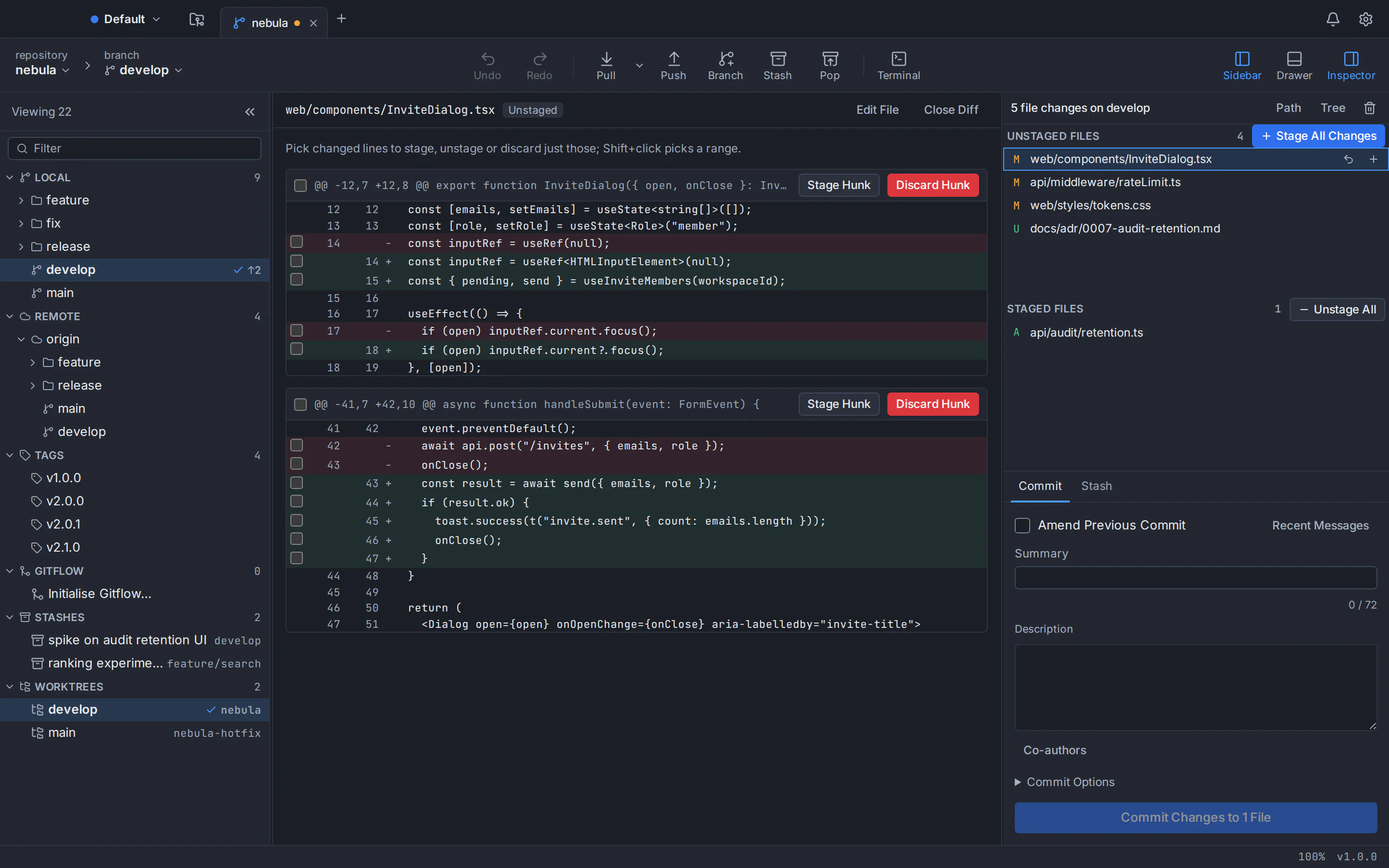
Clients that do not run on Linux: Sourcetree, GitHub Desktop, Fork and Tower
Four well-known clients are built for macOS and Windows only, with no official Linux version, as of October 2026:
- Sourcetree (free): Atlassian’s main Linux request (437 votes) is closed, and a newer one is marked Future Consideration. See Sourcetree for Linux and our Sourcetree alternative comparison.
- GitHub Desktop (free, open source): GitHub’s docs say “Linux is not yet supported”; a community fork trails by about 19 months. See GitHub Desktop for Linux and the GitHub Desktop alternative page.
- Fork ($59.99 once): its Linux request has been open since 2017. Compare it on the Fork alternative page.
- Tower ($69 to $149 per user per year): its official pages list no Linux build. See the Tower alternative page.
Guides that install these on Ubuntu rely on Wine or unofficial builds, which no developer supports.
How to choose the best Git GUI for Linux
- Full-featured and free for work: GitTree. See also our list of free Git GUIs for commercial use.
- Team and enterprise features: GitKraken Desktop on a paid plan; compare it on the GitKraken alternative page.
- Speed and a signed apt repository: Sublime Merge; see the Sublime Merge alternative page.
- A perpetual licence or inline review comments: SmartGit; see the SmartGit alternative page.
- Open source: gitg, git-cola or, in the terminal, lazygit.
Torn between a GUI and commands? Read Git GUI vs command line, or our best Git GUI clients round-up for macOS, Windows and Linux.
GitTree is free today, private repositories included, on Mac, Windows and Linux. The GitTree for Linux guide covers the portable AppImage, the features page lists everything, and the support page helps if something breaks. Every installer is on the download page.
Frequently asked questions
Is there a free Git GUI for Ubuntu?
Yes. GitTree is free today for personal and commercial work, private repositories included, and installs from a .deb. gitg, git-cola, gitk and git gui are open source and install with apt. As of October 2026, GitKraken’s free plan covers only local and public repositories, and SmartGit is free only for non-commercial use.
Which Git GUI works on Ubuntu 24.04?
All seven clients here run on Ubuntu 24.04. GitTree, GitKraken Desktop, Sublime Merge and SmartGit ship their own Linux packages, gitg and git-cola are in the Ubuntu archive, and lazygit installs from its release binary. Ubuntu 24.04’s Git 2.43 is new enough for GitTree.
What is the best Git GUI for Debian?
Debian 12 ships Git 2.39.5 and Debian 13 ships 2.47.3, so every client here works without upgrading Git. We make GitTree, so we are biased, but its free .deb is tested on Debian 12 and later. Sublime Merge offers an official apt repository, and gitg and git-cola come from the Debian archive in older versions.
What is a good Git client for Linux Mint?
Linux Mint 22 is built on Ubuntu 24.04 and Mint 21 on Ubuntu 22.04, so Ubuntu packages work. GitTree’s .deb can run on Mint 21 and later, though only Ubuntu and Debian are tested; on Mint 21, add the git-core PPA first. gitg and git-cola install with apt.
Does GitKraken work on Linux, and is it free there?
Yes: GitKraken Desktop has official .deb, .rpm, .tar.gz and Snap packages for Linux. As of October 2026, its free Community plan covers only local repositories and public remotes; private remotes need a paid plan, starting with Pro at $10 per seat per month, billed annually.
Can I use Sourcetree or GitHub Desktop on Linux?
Not officially. Atlassian builds Sourcetree for macOS and Windows only, with no Linux version, and GitHub Desktop has no official Linux build either. A community fork packages GitHub Desktop for Ubuntu but lags far behind, and guides for running Sourcetree on Linux rely on Wine, which Atlassian does not support. A client with an official Linux build is the safer choice.
Why does my Git GUI say Git is too old on Ubuntu 22.04?
Ubuntu 22.04 and Linux Mint 21 ship Git 2.34.1, and some clients, GitTree included, need 2.39 or newer. Run sudo add-apt-repository ppa:git-core/ppa, then sudo apt update and sudo apt install git. Afterwards, newer Git versions arrive with your normal system updates.
Sources
Claims about other products were checked against their official pages on October 6, 2026. Prices and features change; the vendors’ pages are the source of truth.
- GitKraken: download page
- GitKraken Help: how to install GitKraken Desktop
- GitKraken: pricing
- GitKraken Desktop release notes
- Sublime Merge: official website
- Sublime Merge: download and changelog
- Sublime Merge docs: Linux package manager repositories
- Sublime HQ store: Sublime Merge licences
- Sublime Merge issue #267: GitHub pull request support
- Sublime Merge issue #201: built-in terminal
- Sublime Merge issue #21: reflog view
- SmartGit: download page
- SmartGit: pricing
- SmartGit: a European Git client (company history)
- SmartGit docs: commercial-only features
- SmartGit docs: pull request comments
- gitg on GNOME GitLab
- gitg release notes (NEWS)
- git-cola: official website
- git-cola repository and README
- git-cola documentation
- lazygit repository and README
- Git documentation: gitk
- Git documentation: git gui
- Ubuntu Packages: git in Ubuntu 26.04 (resolute)
- Ubuntu Packages: git in Ubuntu 24.04 (noble)
- Ubuntu Packages: git in Ubuntu 22.04 (jammy)
- Ubuntu Packages: gitg in Ubuntu 24.04 (noble)
- Ubuntu Packages: git-cola in Ubuntu 24.04 (noble)
- Debian Packages: git in Debian 13 (trixie)
- Debian Packages: git in Debian 12 (bookworm)
- Debian Packages: git-cola in Debian 12 (bookworm)
- Linux Mint: all releases and their Ubuntu bases
- Launchpad: git-core stable PPA
- Sourcetree: official website
- Atlassian Jira: SRCTREE-2991 “SourceTree linux desktop”
- Atlassian Jira: SRCTREE-8143 “SourceTree Linux App”
- GitHub Docs: installing GitHub Desktop
- GitHub Desktop issue #1525: “GitHub Desktop for Linux?”
- Community fork shiftkey/desktop: releases
- Fork: official website
- Fork: buy a licence
- Fork tracker issue #153: Linux version
- Tower: pricing
All product names are trademarks of their respective owners. GitTree is independent and not affiliated with or endorsed by any of them.