Git guides
Free Git GUI for University Students: GitTree Pro for 2 Years
Learn Git with a visual client, collaborate on university projects, and understand GitTree’s one-time student offer: full individual Pro for 24 months, automatic academic-email signup, then Free unless you choose to subscribe.
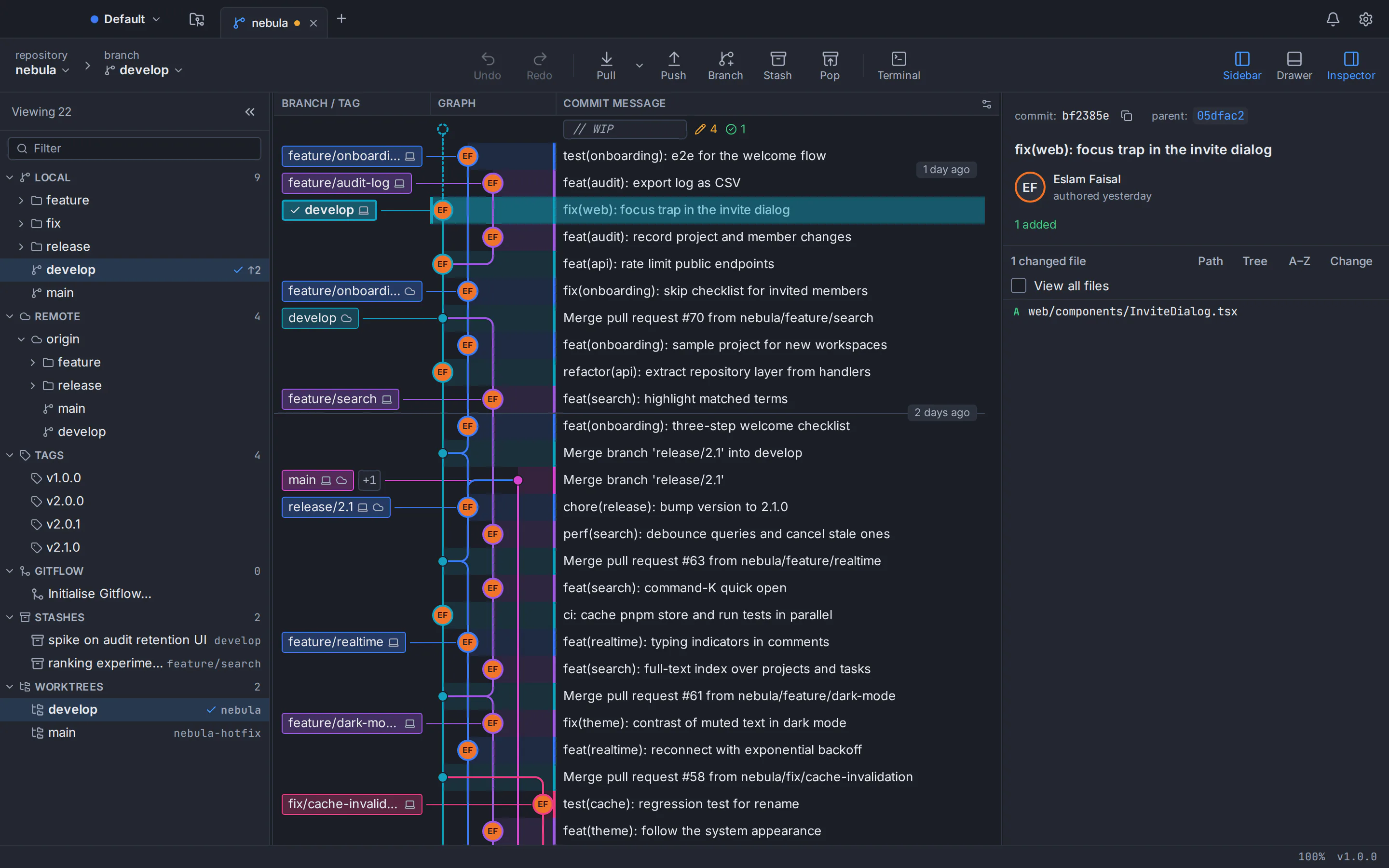
A free Git GUI for university students should help you understand your project’s history, make clear commits and collaborate without guessing what a command will do. GitTree provides a visual Git client for macOS, Windows and Linux. Its Free plan covers every local Git feature; its student offer adds all individual Pro capabilities for one fixed 24-calendar-month term to eligible academic identities.
This guide explains who qualifies, how automatic signup works, what you can do with the app for coursework, and exactly what happens when the offer ends. GitTree’s maker wrote this article. Check the student offer page for current availability before registering; if new awards are paused, ordinary GitTree Free remains available.
What is the GitTree Student offer?
GitTree Student is a one-time award of individual Pro. You do not enter card details or buy a discounted recurring subscription to receive it. The backend recognizes an eligible academic email during ordinary signup or login, records the award once, and shows the exact start and end dates on your Subscription page. Logging in again does not move those dates.
| Capability | GitTree Free | Student award |
|---|---|---|
| Local Git, commit graph, staging, branches and conflicts | Included | Included |
| Private repositories and commercial use | Included | Included |
| GitHub, GitLab, Bitbucket and Azure DevOps integrations | Requires Pro | Individual Pro included during the award |
| Nour and AI drafting using your own coding-agent CLI | Requires Pro | Individual Pro included during the award |
| Organization creation | Requires Pro | Included; organization seats are separate |
| After the student term | Free remains available | Free unless other Pro access remains or you subscribe |
The award includes Pro capabilities such as Repo Insights, alongside hosting integrations, Nour and AI commit or pull-request drafting. Your hosting service still controls repository permissions. Nour runs a supported coding-agent CLI that you supply: an external AI provider’s paid plan, API usage or credits are separate from the GitTree award.
Which universities and student emails qualify?
This offer is restricted to explicit university domain entries from the original leereilly/swot dataset, whose author documents its historical use in GitHub Education student verification. The pinned domain data was last updated in August 2019. This is not a copy of GitHub’s current private eligibility list, and it is not an offer for every university worldwide. A domain is not accepted merely because it looks academic, ends in .edu, or belongs to an institution that uses GitHub.
An email login proves mailbox ownership through the normal sign-in code. A provider login can also qualify when its API supplies verified academic-email evidence. Your typed display name, an unverified profile email or a claim in your biography cannot grant Pro. There is no additional student verification form, document upload or second email code after a qualifying sign-in.
If your institution is missing, contact GitTree support with the institution name, official website and academic email domain. GitTree reviews each request and can add the institution’s own email domain beside the original dataset; appearing in a generic university directory does not add eligibility automatically. After the domain is added, sign in again with that email to receive the award. Your existing Free account remains usable while a request is reviewed.
How to get student Pro automatically
Check the student offer
Open the GitTree Students page and check that new awards are available. Use the signup link, or sign in if you already have an account.
Sign in with your academic identity
Use your university email and the normal email OTP code, or a supported provider that supplies a verified email on an approved institution domain. GitHub can supply a verified secondary academic email too.
Read your account dates
Student Pro is awarded automatically when the identity qualifies and has not redeemed the offer before. Your Subscription page shows the institution, status, start date and exact expiration date.
Download and sign in to the app
Install the appropriate GitTree build and use the same GitTree account in the desktop app. The backend’s normal Pro entitlement unlocks the included capabilities.
Use the same account identity for the website and desktop. Signing in through another provider does not automatically merge two accounts, and it cannot reset a previously claimed student benefit. If your provider supplies no verified academic email, use the existing university-email OTP signup or login option. New awards remain unavailable whenever the approved institution source or the offer itself is unavailable.
Why use a Git GUI for university coursework?
A Git GUI makes the state of a repository visible. You can inspect changed files before a commit, see which branch you are using and compare the changes you intend to share. That helps when your project includes experiments, assignment deadlines and several contributors who are still learning the same workflow.
- Coursework: make one clear commit for each finished change rather than saving folders named final, final2 and final-really.
- Group projects: use a branch per change and inspect the diff before requesting a review. Agree on who reviews and merges shared work.
- Graduation projects: keep your application, documentation and reproducible setup instructions together in version control. Avoid committing credentials or private research data.
- Learning: pair each visual action with its matching Git command. A GUI helps explain Git; it does not prevent you from learning the terminal.
A practical first-project workflow
Clone or create your repository
Open a course repository you are authorized to use, or create a local one for your project. Read the course policy before making assignment material public.
Create a branch for one change
Use a short, descriptive branch name and keep one task on that branch. Check the current branch before editing or committing.
Review and stage the intended files
Inspect the diff and stage only the changes belonging to this task. Leave generated files, secrets and unrelated work out of the commit.
Commit, then share for review
Write a message explaining the change. Push when you are ready to share, and use your hosting platform’s review process before merging shared work.
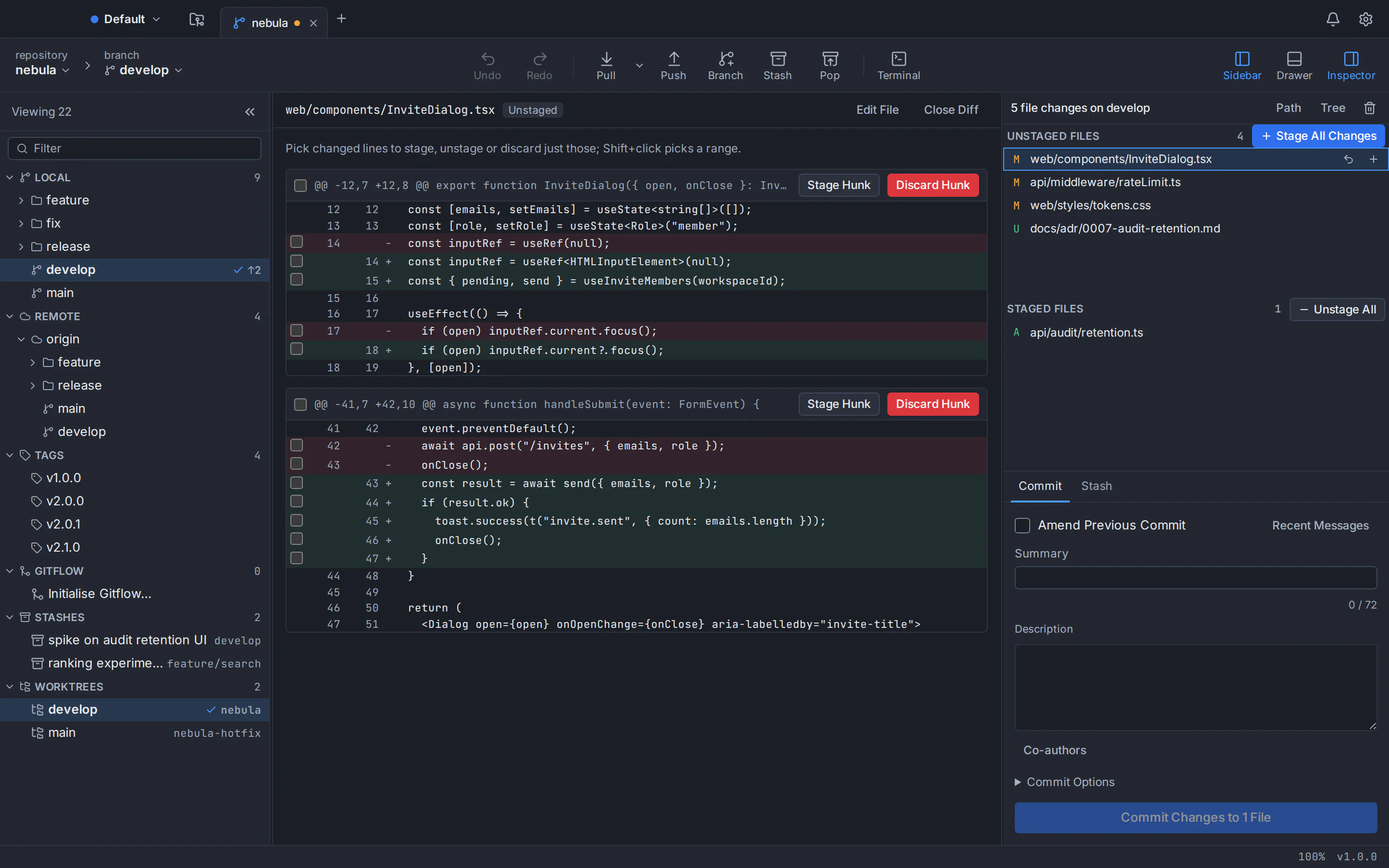
Start with Git for beginners and the free Git tutorials. Then learn how to resolve merge conflicts and how to undo a reset, rebase or commit. These skills remain useful in the ordinary Free plan after the student award ends.
Is this part of GitHub Student Developer Pack?
No. The GitTree award is independent. GitHub Student Developer Pack is GitHub’s own student program, with its own application, verification and partner offers. GitTree uses a pinned historical domain dataset documented as having powered GitHub Education, but it does not reproduce GitHub’s current eligibility decisions. Signing in to GitTree is not an application for GitHub Education.
You can read GitHub’s student application requirements and browse the official Student Developer Pack separately. A school appearing in a GitHub classroom story or Campus partnership list should not be treated as proof of identical Student Developer Pack eligibility.
What if you already have Pro or belong to an organization?
Existing committed personal Pro periods are preserved before the student term begins. A free trial by itself does not delay the student award. If an existing payment is still being reconciled, the account shows pending activation rather than overwriting the purchase or silently overlapping the award.
Your individual student award does not give your classmates free organization seats. Organization creation is a Pro capability, but the organization’s members still need seats under its own subscription. If you also have Pro through an organization, that access follows the organization’s terms and is evaluated separately from your fixed student deadline.
What happens after exactly 24 months?
The student award ends. If it is your only Pro entitlement, your account returns to Free. Local Git operations and your repositories remain available. Pro-only integrations, Nour and other paid capabilities require a new, valid Pro entitlement. The app does not delete your local repositories when the student offer expires.
To continue with Pro, choose Subscribe to Pro from your account and complete the normal subscription process. The Pricing page shows current catalog prices in your region. Student signup stores no card for future charges, the award does not auto-renew, and another login, provider or recreated account does not produce another 24 months.
For installation instructions, see the macOS, Windows and Linux pages. When the offer is available and your academic identity qualifies, start with the student signup options. Otherwise, the Free plan is still a practical way to learn Git and work on your project.
Frequently asked questions
Is GitTree Pro really free for students for 24 months?
Yes. Eligible academic-email identities receive one 24-calendar-month award of individual Pro, with no payment card and no automatic renewal. The exact dates appear in your account.
Do I need to verify my email again after signing in?
No. The code in ordinary email OTP sign-in, or verified academic-email evidence from a supported provider, is sufficient. There is no separate student verification step.
What happens when the 24 months finish?
The student benefit ends. If you have no other active Pro entitlement, your account returns to Free. You can subscribe to Pro manually; GitTree does not charge you automatically.
Does signing in with GitHub qualify?
Yes, when GitHub supplies a verified email on a recognized academic domain, including a verified secondary academic email. A personal or unverified email does not qualify by itself.
What if my university is missing or my provider does not supply a verified academic email?
For a missing institution, contact GitTree support with the institution name, official website and academic email domain. After GitTree reviews and adds the domain, sign in again with that email to receive the award. If your provider supplies no verified academic email, use ordinary email OTP signup or login with that mailbox.
Can I renew the student offer or use it for my whole team?
The student award is one-time and cannot be renewed or reset. It includes individual Pro, not free organization seats. Your own coding-agent provider may also require a separate subscription.
Sources
Claims about other products were checked against their official pages on October 24, 2026. Prices and features change; the vendors’ pages are the source of truth.