Comparisons
Best Git client for Mac in 2026: 8 Git GUIs for Apple silicon and Intel
Eight Git GUIs for macOS, compared on what Mac users check first: Apple silicon builds, the minimum macOS, price, accounts, bundled Git and the features you use every day.
Disclosure: GitTree’s maker wrote this article, so we have a stake in GitTree. We describe every product, ours included, from its official pages and our own use, and say where another tool is the better fit.
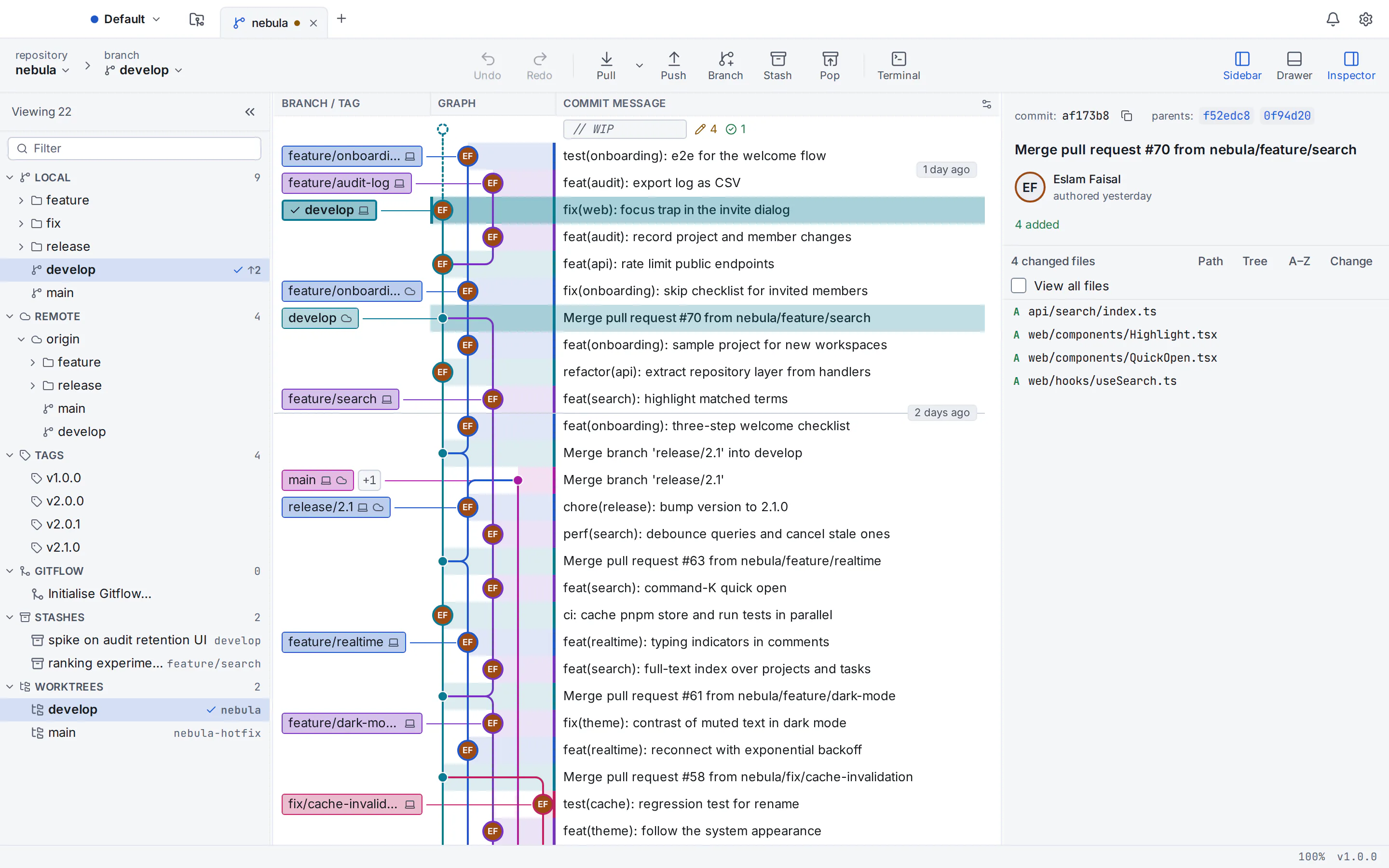
The best Git client for Mac depends on your budget and how deep you go into Git. For a free Git GUI for Mac, GitTree (our app), Sourcetree and GitHub Desktop cost nothing, and of those only GitTree adds a built-in three-way conflict editor. Fork and Tower are polished paid native apps (as of October 2026, $59.99 once and from $69 a year), GitKraken Desktop suits teams that pay for integrations, Sublime Merge suits keyboard-driven developers, and SmartGit suits companies that want perpetual licences. All eight run natively on Apple silicon and Intel Macs.
GitTree’s maker wrote this guide, so weigh our pick accordingly. Every claim about the other seven apps comes from their official websites, documentation and release notes, checked in October 2026 and listed in the sources. Prices change, so confirm them before you buy.
Best Git GUI for Mac: quick picks
- Best free Git GUI for Mac overall (our pick): GitTree for Mac, free today for individuals and organizations, private repositories included.
- Best free graph client with no account: Sourcetree, which needs no sign-in on the Mac.
- Best for beginners on GitHub: GitHub Desktop, the only open-source app on this list.
- Best one-time purchase: Fork, $59.99 for personal and commercial use.
- Best for teams that pay per seat: Tower or GitKraken Desktop.
- Best for keyboard-driven developers: Sublime Merge.
- Best for enterprise licensing: SmartGit.
Best Git client for Mac: Apple silicon, price and account compared
| Client | Apple silicon | Minimum macOS | Price (October 2026) | Account | Bundles Git | Other systems |
|---|---|---|---|---|---|---|
| GitTree | One universal app | 13 Ventura | Free today | Free GitTree account | No: needs Git 2.39+ | Windows and Linux |
| Fork | Native since 2.1 (2020) | 10.11, per Fork’s site | $59.99 once | None (licence key) | Yes | Windows; no Linux version |
| Tower | Apple silicon and Intel | 14 (Tower 17.1+) | From $69 per user per year | None (licence key and email) | Yes | Windows; no Linux version |
| GitKraken Desktop | Separate downloads | 12 | Free for local and public repos; Pro $120 per seat per year | GitKraken account | Yes | Windows and Linux |
| Sourcetree | Native since 4.1.6 (2022) | 10.15 | Free | None on the Mac | Yes | Windows; no Linux version |
| GitHub Desktop | Separate downloads | 12 (its beta needs 13) | Free and open source (MIT) | Optional | Yes | Windows; no official Linux build |
| Sublime Merge | Native since Build 2054 (2021) | Not published | $99 personal; $75 per user per year for business | None (licence key) | Yes | Windows and Linux |
| SmartGit | Separate downloads | 11 (Apple silicon), 10.14 (Intel) | Free non-commercial; commercial from $5 per user per month | None (licence file) | Yes | Windows and Linux |
What makes a good Git GUI for macOS
Native on Apple silicon, and the macOS version you run
All eight clients have native Apple silicon builds, so none needs Rosetta. Sizes vary: GitTree’s universal .dmg is about 21 MB because it uses the web view built into macOS and your own Git, against roughly 32 MB for Fork, 68 MB for Sourcetree, 86 MB for Tower, 91 MB for SmartGit and 220 MB for GitKraken Desktop, each bundling its own Git.
On an older Intel Mac, the minimum macOS decides: Tower 17.1+ needs macOS 14, GitTree macOS 13, and GitHub Desktop’s beta has dropped macOS 12. Sourcetree (10.15) and SmartGit (10.14 on Intel) reach further back, and Fork’s site still says OS X 10.11.
Signed, notarized and downloaded from the maker
An app from outside the Mac App Store opens cleanly when it is signed with an Apple Developer ID and notarized by Apple, a check Gatekeeper looks for at first launch. None of the eight lists a Mac App Store version, so download each from its maker. GitTree 1.2.9 is signed and notarized. No vendor here lists Homebrew as an official install method; casks you find there are community-maintained.
Bundled Git or your own
A fresh Mac has no ready-to-use Git: typing git in Terminal offers to install Apple’s Command Line Tools. Seven of the eight clients bundle their own Git. GitTree uses the Git you install (2.39 or newer), so the app and Terminal always agree. Check your version, then install Apple’s tools or, if you use Homebrew, a current Git:
git --version
xcode-select --install
brew install git
Everyday features worth comparing
- A readable commit graph. Every app here draws one except GitHub Desktop. Our guide to Git tree visualizers explains what a good graph shows.
- Interactive rebase in one editor, with reword, squash, fixup and drop: see interactive rebase in a Git GUI.
- A built-in conflict editor, so you need no external merge tool.
- Licence terms at work: free for individuals isn’t always free for companies. See free Git GUIs for commercial use.
The 8 best Git clients for Mac, reviewed
Strengths, trade-offs and prices as of October 2026, starting with our own app.
GitTree
Best for: A free, full-featured Git GUI with private repositories, and one app on macOS, Windows and Linux.
Our app: one universal build for Apple silicon and Intel on macOS 13 or later, Developer ID-signed and notarized by Apple. Built with Rust and Tauri, it runs your own Git from a .dmg of about 21 MB.
Strengths
- Free today for individuals and organizations, private repositories included
- Commit graph with
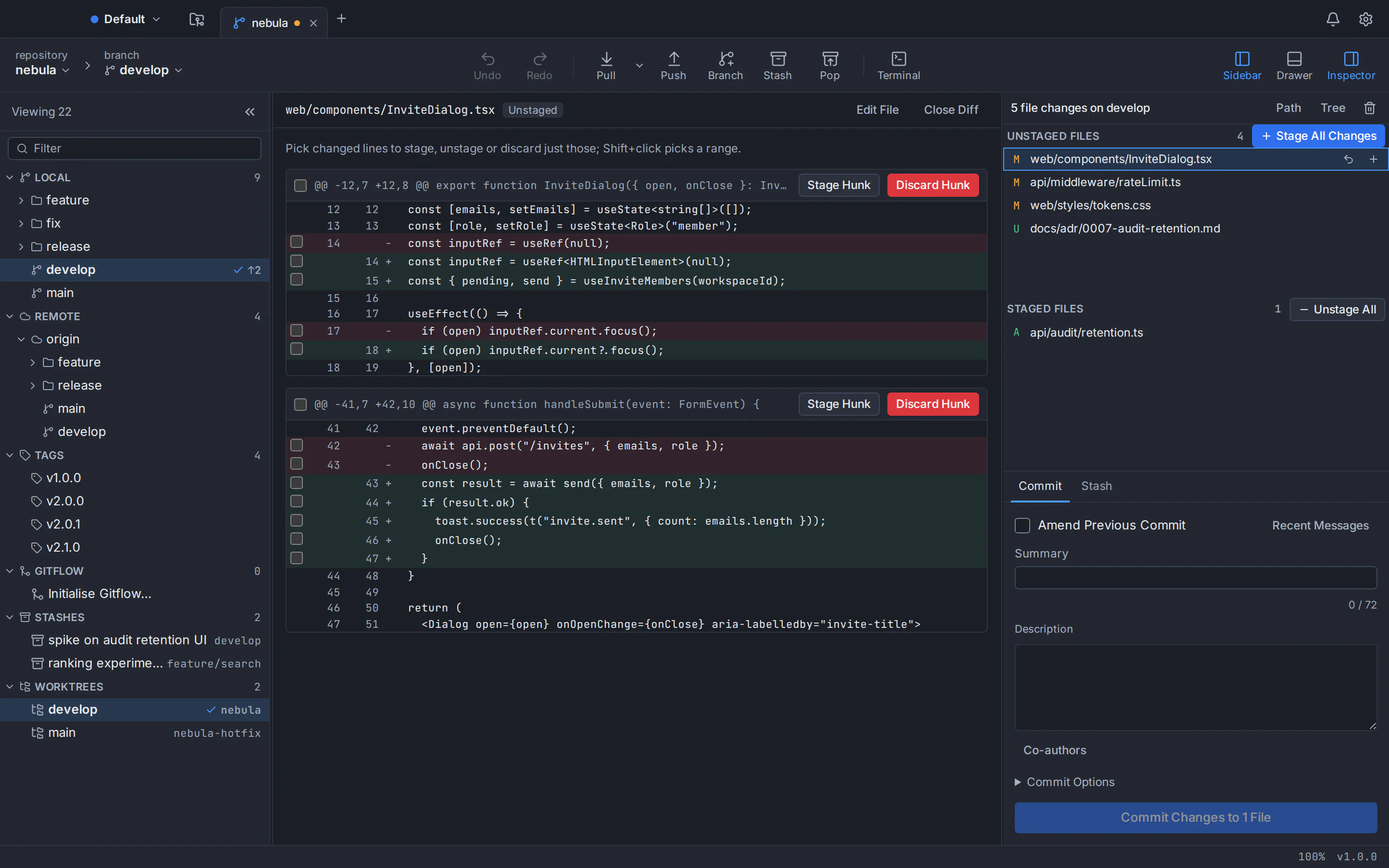
author:,file:andchange:search, line staging, interactive rebase with fixup, and a three-way conflict editor - Undo and redo for commits, resets and rebases, a reflog view, a command palette and a built-in terminal
- Optional AI drafts through your own Claude Code, Codex or Antigravity CLI; no telemetry
Watch out for
- Needs a free account: online at first launch, then offline for up to 7 days between checks
- Doesn’t bundle Git (it needs 2.39 or newer) and requires macOS 13
- Closed source and new (version 1.2.9), with no Jira, SSO or team features
- Platforms
- macOS: available
- Windows: available
- Linux: available
- Price
- Free today, private repositories included (no paid plan)
Fork
Best for: A native Mac app you pay for once.
A native Swift and Cocoa app from a two-person team, developed since 2016 and updated about monthly (Fork 2.70 for Mac, September 2026). There is a Windows version, but no Linux version.
Strengths
- $59.99 once for personal and commercial use, one user on up to three machines
- Interactive rebase with fixup, a built-in conflict resolver, worktrees, blame, a reflog view and image diffs
- Bundled Git and Git LFS, no account, and AI commit messages through your own Claude Code, Codex or Cursor
Watch out for
- Paid after a free evaluation whose length isn’t stated
- No general undo, no built-in terminal, and shortcuts can’t be rebound
- Platforms
- macOS: available
- Windows: available
- Linux: not available
- Price
- $59.99 one-time per user (as of October 2026)
Tower
Best for: Teams that want a polished native app with workflow tools and support.
Made since 2010; its maker says it has over 100,000 users. Tower 17.3 for Mac (September 2026) needs macOS 14 or later. There is a Windows version, but no Linux version.
Strengths
- Undo (⌘Z) and redo (⇧⌘Z) for commits, merges, rebases, stashes and more
- Drag-and-drop interactive rebase with fixup and autosquash; stacked branches and SAML SSO on higher plans
- Bundled Git, no user account, and AI commit messages through your own Claude Code or Codex
Watch out for
- No free plan, and the app stops working when the subscription ends
- The Conflict Wizard keeps one whole-file version; line-level merging needs an external tool
- Platforms
- macOS: available
- Windows: available
- Linux: not available
- Price
- $69, $129 or $149 per user per year (as of October 2026); free for students, teachers and non-profits
GitKraken Desktop
Best for: Paying teams that want pull requests, issue trackers and AI in one app.
An Electron app at version 12.6 with roughly monthly releases. It needs macOS 12 or later, with separate Apple silicon and Intel downloads (about 220 MB for Apple silicon), and also runs on Windows and Linux.
Strengths
- Create, view and merge pull requests in the app on GitHub, GitLab, Bitbucket and Azure DevOps
- Built-in terminal and command palette; GitKraken AI, SSO and write access to Jira and Trello on paid plans
Watch out for
- The free plan covers only local repositories and public remotes
- Free-plan interactive rebase, undo, worktrees and merge tool work on public repositories only; an account is required
- Platforms
- macOS: available
- Windows: available
- Linux: available
- Price
- Free for local and public repositories; Pro $120 per seat per year (as of October 2026)
Sourcetree
Best for: A free graph client with no account on the Mac, especially with Bitbucket or Jira.
Atlassian’s client is at 4.2.19 for Mac (July 2026), supports macOS 10.15 or later and has run natively on Apple silicon since 4.1.6. Its Windows version is a separate app; there is no Linux version.
Strengths
- Free, with no account needed on the Mac
- Branch graph, line staging, interactive rebase, Git Flow, Git LFS, submodules and Mercurial
- Turns Jira issue keys in commit messages into links
Watch out for
- No built-in three-way merge editor: mine or theirs per file, or an external tool
- No reflog view, worktree management, built-in terminal or pull request review in the app
- Platforms
- macOS: available
- Windows: available
- Linux: not available
- Price
- Free (as of October 2026)
GitHub Desktop
Best for: Beginners on GitHub who want the shortest path to a pull request.
GitHub’s open-source client (MIT) is at 3.6.6, with separate Apple silicon and Intel downloads and support for macOS 12 or later (its beta has dropped 12). It also runs on Windows; Linux is not officially supported.
Strengths
- Free, open source, and usable without signing in for local repositories
- Commit selected lines, image diffs, worktrees and pull request checks you can re-run
- Copilot commit messages and conflict resolution
Watch out for
- No commit graph, no full interactive rebase editor, and no blame or file history
- Built around GitHub, with usage metrics on by default (you can opt out)
- Platforms
- macOS: available
- Windows: available
- Linux: not available
- Price
- Free (open source); AI features need GitHub Copilot
Sublime Merge
Best for: Keyboard-driven developers who want speed and deep customisation.
From the makers of Sublime Text, built on a custom high-performance Git reading library. Build 2132 (September 2026) is one Mac download for Apple silicon and Intel, with official builds for Windows and Linux too.
Strengths
- Instant search as you type, side-by-side diffs and a built-in three-column merge tool
- Command palette, key bindings and custom commands defined in JSON, plus the
smergecommand-line tool - No account, and Git is bundled on the Mac
Watch out for
- No pull requests, hosting integrations, AI features or reflog view
- Needs a licence for continued use, although the evaluation has no enforced time limit
- Platforms
- macOS: available
- Windows: available
- Linux: available
- Price
- $99 personal licence with 3 years of updates; $75 per user per year for business (as of October 2026)
SmartGit
Best for: Companies that want perpetual licences and inline pull request review.
syntevo’s Java-based client has shipped since 2009 and is at 26.1. On the Mac it has separate DMGs for Apple silicon (macOS 11+) and Intel (10.14+), about 91 MB each, and it also runs on Windows and Linux.
Strengths
- Inline pull request comments, a three-way Conflict Solver, and interactive rebase that can split commits
- Perpetual licences, an on-premise licence server with LDAP, and no user account
- AI commit messages with your own API key, including local models through Ollama
Watch out for
- Paid work needs a commercial licence; free licences are reviewed by hand and cover recent versions only
- No built-in terminal or command palette, and the trial stops after 31 days
- Platforms
- macOS: available
- Windows: available
- Linux: available
- Price
- Free for non-commercial use; commercial from $5 per user per month, or perpetual (as of October 2026)
If your team also uses Windows or Linux
Four of the eight have official Linux builds: GitTree, GitKraken Desktop, Sublime Merge and SmartGit. Fork, Tower, Sourcetree and GitHub Desktop have none, so a team with Ubuntu or Debian machines can’t standardise on them. See the best Git GUI for Windows, the best Git GUI for Linux and our round-up of the best Git GUI clients.
The GitTree for Mac page covers requirements and troubleshooting, and every GitTree feature is on one page. Compare in detail: GitTree vs Fork, GitTree vs Tower, GitTree vs GitKraken, GitTree vs Sourcetree and GitTree vs GitHub Desktop. Every installer is on the GitTree download page.
Frequently asked questions
What is the best free Git client for Mac?
GitTree, Sourcetree and GitHub Desktop are all free as of October 2026. GitTree, made by the author of this guide, includes private repositories, a commit graph, interactive rebase and a three-way conflict editor, but needs a free account. Sourcetree needs no account on the Mac, and GitHub Desktop is open source but has no commit graph.
Which Git GUIs run natively on Apple silicon Macs?
All eight in this guide: GitTree, Fork, Tower, GitKraken Desktop, Sourcetree, GitHub Desktop, Sublime Merge and SmartGit. GitTree ships one universal app for Apple silicon and Intel. GitKraken Desktop, GitHub Desktop and SmartGit offer separate Apple silicon and Intel downloads, so check About This Mac and choose the one that matches your chip.
Does a Mac come with Git installed?
Not ready to use. On a fresh Mac, typing git in Terminal offers to install Apple’s Command Line Tools, which include Git; you can also install Git with Homebrew (brew install git). Most Git GUIs for Mac bundle their own copy, while GitTree uses the Git you install and needs version 2.39 or newer, so check it with git --version.
Is Sourcetree or GitHub Desktop better on a Mac?
GitHub Desktop is simpler and suits beginners on GitHub: it is open source, works without an account for local repositories and makes pull requests easy, but it shows history as a linear list. Sourcetree draws a full branch graph, adds interactive rebase, Git Flow and Mercurial, and needs no account on the Mac. Both are free and bundle Git.
Are Tower and Fork worth paying for on a Mac?
Both are mature native Mac apps with years of regular releases. As of October 2026, Fork costs $59.99 once for personal and commercial use on up to three machines. Tower is a subscription from $69 per user per year that stops working when it ends, with workflow tools and SSO on higher plans. If price matters, try the free clients on your own repositories first.
Can I use a free Git GUI on a Mac for work?
Yes, with some of them. As of October 2026, GitTree is free for organizations, private repositories included; Sourcetree is free with no paid tier; and GitHub Desktop is open source under the MIT licence. GitKraken’s free plan excludes private remote repositories, SmartGit’s free licences exclude paid work, and Fork and Sublime Merge need a licence for continued use.
Sources
Claims about other products were checked against their official pages on October 6, 2026. Prices and features change; the vendors’ pages are the source of truth.
- Fork: official website
- Fork: buy a licence
- Fork: licence agreement
- Fork: about the developers
- Fork: release notes for Mac
- Fork tracker: issue #62, configurable keyboard shortcuts
- Tower: pricing
- Tower: all features and requirements
- Tower: undo
- Tower: release notes
- Tower: AI product overview
- Tower Help: merge conflicts on Mac
- Tower Help: account overview
- Tower: end user licence agreement
- GitKraken Desktop: product page
- GitKraken: pricing
- GitKraken: download
- GitKraken Help: how to install GitKraken Desktop
- GitKraken Help: release notes
- GitKraken Help: pull requests
- GitKraken Help: terminal
- GitKraken Help: GitKraken AI
- Sourcetree: official website
- Sourcetree for Mac release notes (4.2.19)
- Atlassian blog: interactive rebase in Sourcetree
- Atlassian blog: Jira integration and external project links in Sourcetree
- Atlassian Jira: SRCTREE-1670, merge conflict resolution
- Atlassian Jira: SRCTREE-1364, reflog support
- Atlassian Jira: SRCTREE-3204, worktree commands
- Atlassian Jira: SRCTREE-1284, embedded terminal
- Atlassian Jira: SRCTREE-7101, pull requests in the app
- GitHub Desktop: product page
- GitHub Desktop: download
- GitHub Docs: supported operating systems for GitHub Desktop
- GitHub Docs: committing and reviewing changes in GitHub Desktop
- GitHub Docs: viewing the branch history in GitHub Desktop
- GitHub Docs: managing worktrees in GitHub Desktop
- GitHub Docs: viewing a pull request in GitHub Desktop
- GitHub Docs: configuring Copilot in GitHub Desktop
- GitHub Docs: GitHub Copilot plans
- GitHub Desktop repository: releases
- GitHub Desktop repository: changelog
- GitHub Desktop repository: MIT licence
- GitHub Desktop repository: what GitHub Desktop is (design document)
- GitHub Desktop repository: usage data
- GitHub Desktop repository: issue #12354, interactive rebase
- GitHub Desktop repository: issue #3754, file history
- Sublime Merge: official website
- Sublime Merge: download and changelog
- Sublime HQ: Sublime Merge store
- Sublime HQ: sales FAQ
- Sublime Merge docs: FAQ
- Sublime Merge docs: command palette
- Sublime Merge docs: command line
- Sublime Merge issue tracker: #267, GitHub pull request support
- Sublime Merge issue tracker: #21, reflog view
- SmartGit: official website
- SmartGit: download
- SmartGit: pricing
- SmartGit: non-commercial licence registration
- SmartGit: licence agreement
- SmartGit: a European Git client
- SmartGit docs: pull request comments
- SmartGit docs: interactive rebase
- SmartGit docs: Conflict Solver
- SmartGit docs: AI commit messages
- SmartGit docs: on-premise licence server
- SmartGit docs: Tools preferences
- Apple Support: Mac computers with Apple silicon
- Apple Developer: notarizing macOS software before distribution
All product names are trademarks of their respective owners. GitTree is independent and not affiliated with or endorsed by any of them.