TortoiseGit for Mac: is there one, and what to use instead
There is no macOS version of TortoiseGit, because it is built into Explorer on Windows, with no Linux version either. Here is what to expect from a Mac client, and which ones come closest to how you work now.
Written by Kodmora
The software house behind GitTree
- Git GUI clients
- Comparisons
- macOS
Disclosure: GitTree’s maker wrote this article, so we have a stake in GitTree. We describe every product, ours included, from its official pages and our own use, and say where another tool is the better fit.
On this page
No, there is no TortoiseGit for Mac, and there cannot easily be one. It runs only inside Explorer on Windows, and it has no Linux version either. On a Mac, you use a standalone Git client instead. Our pick, with an obvious bias, is GitTree: one universal app for Apple silicon and Intel, with every Git feature on the Free plan.
GitTree’s maker wrote this post, so weigh our recommendation accordingly. Claims about other products come from their official pages, listed in the sources below, and from our TortoiseGit comparison.
Why is TortoiseGit only on Windows?
TortoiseGit’s own pages describe it as a Windows shell interface to Git, based on TortoiseSVN. It adds a context menu and overlay icons to Explorer, and installers for Windows are all it ships. It has no Linux version either. The project’s work is tied to Explorer, so there is no window of its own that could move to another system.
What changes when you move from TortoiseGit to a Mac?
| In TortoiseGit | In a client like GitTree |
|---|---|
| Right-click a folder in Explorer | Open the repository once, then work from its tab |
| Overlay icons on files | A changes panel lists every changed file; there are no Finder badges |
| Show Log | The commit graph is the main view |
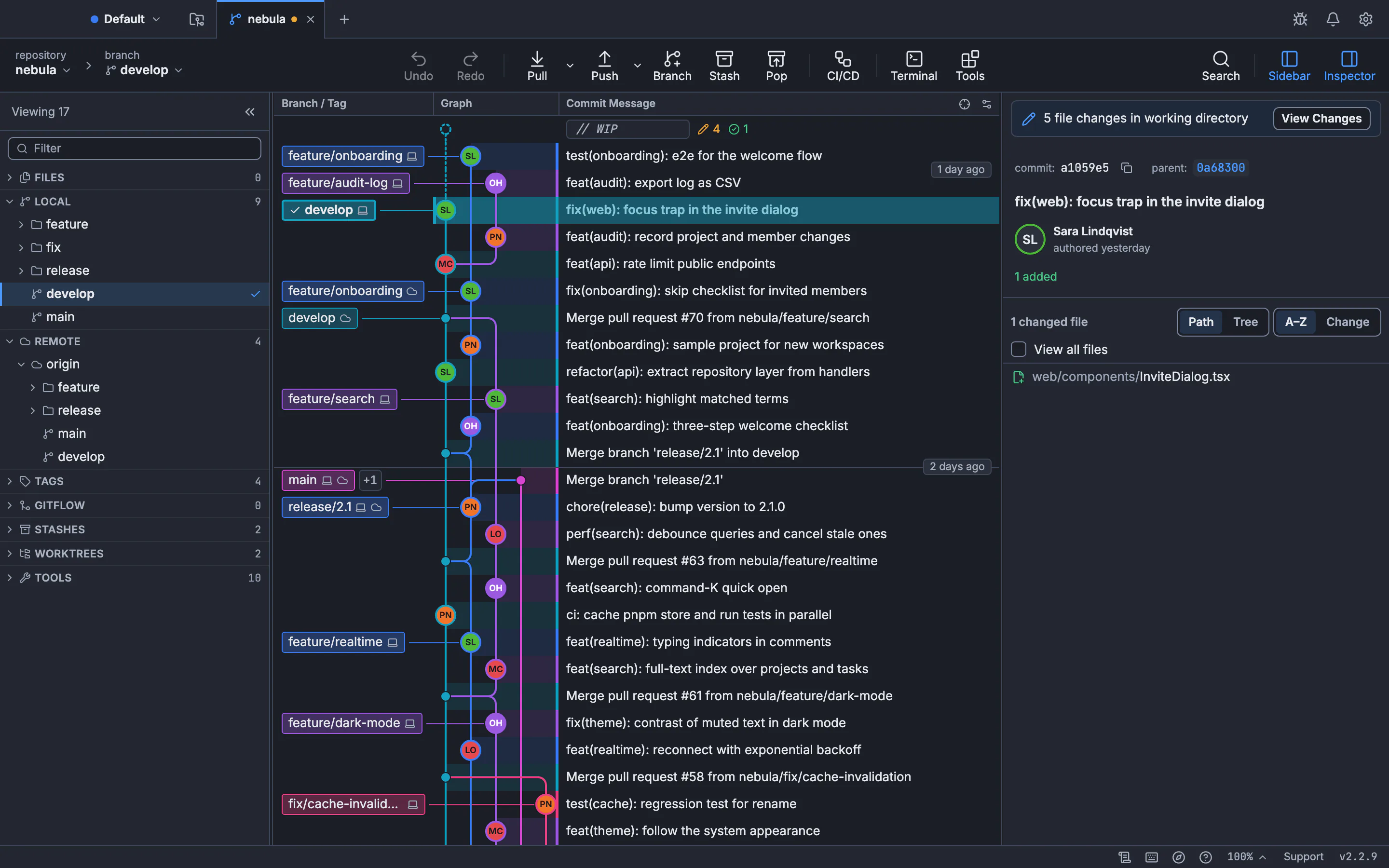
| A dialog for each command | One window: graph, staging and commit details side by side |
| TortoiseGitMerge | A built-in three-way conflict editor |
| Commit dialog | A commit form with file, hunk and line staging |
What is the best TortoiseGit alternative on Mac?
| Client | Also runs on | Cost | Good for |
|---|---|---|---|
| GitTree | Windows, Linux | Free plan; Pro for hosting integrations and Nour | One app across systems, with undo |
| Fork | Windows | One-time purchase | A fast native app, paid once |
| Sourcetree | Windows | Free | A free graph client, especially with Bitbucket |
| GitHub Desktop | Windows | Free, open source | Beginners on GitHub |
| Tower | Windows | Paid subscription | Teams that want polish and support |
| GitKraken Desktop | Windows, Linux | Free for local and public repositories; paid for private | Teams with issue trackers and AI |
| Sublime Merge | Windows, Linux | Paid licence | Keyboard-driven speed |
The full round-up, with pros and cons, is in the best Git client for Mac.
How do I move my repositories to a Mac?
Push everything from your old PC, then clone it on the Mac. A copied .git folder also works, but cloning is cleaner. Check two settings afterwards, because they do not move with the repository:
# keep LF line endings in the repository on macOS
git config --global core.autocrlf input

# set your identity on the new machine
git config --global user.name "Your Name"
git config --global user.email "you@example.com"
Any credentials saved on your old PC stay there, so sign in again on the Mac, or add an SSH key. If you work with others, the Git for commercial use guide covers licence rules for each client.
How to start with GitTree on a Mac
Install Git if needed
Run
git --versionin Terminal. macOS offers to install the Command Line Tools if Git is missing.Download GitTree
Get the universal app from the Mac page and drag it to Applications. It needs macOS 13 or later.
Start without an account
Choose Continue with local Git (no account). The Free plan covers every Git feature, private repositories included.
Open a repository
Choose a folder or clone from a remote. The commit graph takes the place of TortoiseGit’s Show Log.
Frequently asked questions
Is there a TortoiseGit equivalent for Mac?
Not one built into Finder. Mac Git clients are standalone apps. GitTree, Fork and Sourcetree are common choices for people who like working visually.
Can I run TortoiseGit on a Mac with a virtual machine?
Yes, inside a virtual machine, but it then works on files inside that machine. A native Mac client is simpler for daily work.
Is there a TortoiseGit for Linux?
No. It is Windows only. See the best Git GUI for Linux for the options there.
Is there a free TortoiseGit alternative for Mac?
Yes. GitTree has a Free plan that covers every Git feature, and Sourcetree and GitHub Desktop are free too.
Do I lose my history when I move from TortoiseGit?
No. TortoiseGit works on normal Git repositories, so the history lives in the repository and moves with it.
Sources
Claims about other products were checked against their official pages on November 7, 2026. Prices and features change; the vendors’ pages are the source of truth.
- TortoiseGit home and release news
- About TortoiseGit and its features
- TortoiseGit download
- TortoiseGit FAQ and system prerequisites
- Fork
- Sourcetree
- GitHub Desktop
- Tower
- GitKraken Desktop
- Sublime Merge
All product names are trademarks of their respective owners. GitTree is independent and not affiliated with or endorsed by any of them.