How to run GitHub Actions and GitLab CI locally before you push
Stop pushing “fix ci” commits to see whether a workflow passes. Run the same jobs on your own computer in Docker with act or gitlab-ci-local, in minutes, then push once. Includes a ready-to-run sample and a visual walkthrough.
Written by Kodmora
The software house behind GitTree
- CI/CD
- GitHub
On this page
You can run GitHub Actions on your own computer with `act`, and GitLab CI with gitlab-ci-local: both read your pipeline file and start each job in a Docker container. Install Docker, install the runner, then run act -j test or gitlab-ci-local test from the repository’s folder. A failing job now fails in seconds on your machine instead of after a push and a wait for a hosted runner.
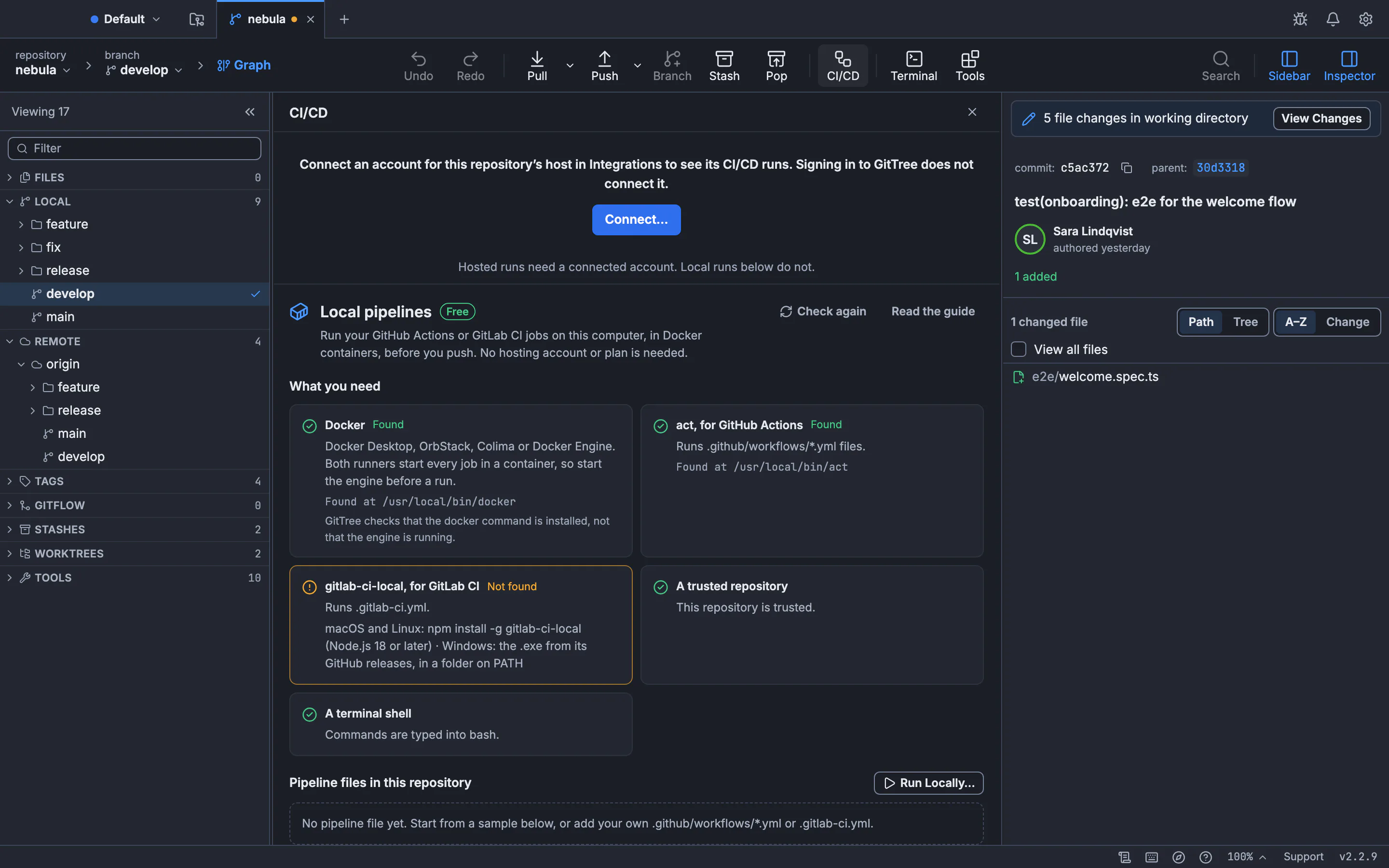
This guide covers what to install on macOS, Windows and Linux, the commands for both runners, a sample workflow you can copy, the limits of local runs and the errors people hit first. The walkthrough uses GitTree, the Git client we make: its Local pipelines page checks what you have installed, writes a sample file and prepares the exact command for you. Local pipelines are part of GitTree’s Free plan and need no hosting account.
Why run CI pipelines locally?
Every change to a workflow file is code you cannot test until it runs. Without a local runner the loop is: edit the YAML, commit, push, wait for a runner, read the log, repeat. Each round costs minutes and leaves a trail of commits like “try again”. A local run shortens the loop to seconds and keeps the history clean.
| Push and wait | Run locally | |
|---|---|---|
| Feedback time | Minutes per try, plus queue time | Seconds once the image is pulled |
| Commits needed | One per attempt | None until it passes |
| Uses hosted CI minutes | Yes | No |
| Same environment as production CI | Yes | Close, not identical (containers, no hosted secrets) |
| Works offline | No | Yes, after the first image pull |
What you need: Docker plus one runner
Both runners start every job in a container, so a Docker engine must be installed and running: Docker Desktop, OrbStack or Colima on macOS, Docker Desktop on Windows, Docker Engine or Docker Desktop on Linux. Then install the runner for your file.
| Runner | Pipeline file | macOS | Windows | Linux |
|---|---|---|---|---|
act | .github/workflows/*.yml | brew install act | winget install nektos.act | The install script on nektosact.com |
| gitlab-ci-local | .gitlab-ci.yml | npm install -g gitlab-ci-local | The .exe from its GitHub releases, on PATH | npm install -g gitlab-ci-local |
gitlab-ci-local needs Node.js 18 or later when you install it with npm. Check the setup with docker info, act --version and gitlab-ci-local --version: if docker info fails, start the engine before anything else.
Run GitHub Actions locally with act
Run act from the repository’s root folder. List the jobs first, then run the one you are working on. By default act simulates a push event, so jobs that only run on other events need the event name.
# list workflows and jobs
act -l

# run one job from one workflow file
act -W .github/workflows/ci.yml -j test

# simulate a pull request instead of a push
act pull_request -j test

# pass a secret the job needs
act -j deploy -s NPM_TOKEN="$NPM_TOKEN"

# Apple silicon: run x86_64 images
act -j test --container-architecture linux/amd64
The first run asks which runner image to use. Medium suits most projects; the small images miss tools that hosted runners include, and the full image is very large. If a step fails with “command not found”, choose a bigger image with -P ubuntu-latest=<image> or install the tool in a step.
Run GitLab CI locally with gitlab-ci-local
gitlab-ci-local reads .gitlab-ci.yml from the current folder. With no arguments it runs the whole pipeline; give it a job name to run one job. --list shows the jobs without running them, a quick way to check that the YAML parses.
# list jobs and stages
gitlab-ci-local --list

# run one job
gitlab-ci-local test

# pass a CI/CD variable
gitlab-ci-local test --variable API_URL=http://localhost:8080Run a pipeline locally from GitTree, step by step
Open CI/CD
Open your repository and press CI/CD in the toolbar. Without a connected account or Pro, the view opens on Local pipelines; with one, Run Locally… is in its header. You can also use Tools → Prepare local pipeline.
Check what you need
What you need shows Docker,
actand gitlab-ci-local as Found with their paths or Not found with the install command for your system, plus repository trust and your terminal shell. Install what is missing and press Check again.Add a sample, or use your file
Pipeline files in this repository lists your workflows with Ready to run or the reason they cannot run. With none, Add GitHub Actions sample or Add GitLab CI sample writes a commented starter file and opens it; GitTree never writes over an existing file.
Prepare and run
Press Run Locally…, choose the file, a job and your shell, then Prepare command. Type in new terminal types the exact command into a new terminal without pressing Enter: read it, then press Enter yourself.
A sample workflow to start from
This is the shape of GitTree’s GitHub Actions sample: two jobs, build then test, that work the same with act and on GitHub. Replace the commands with your own.
name: GitTree local check

on:
  push:
  pull_request:
  workflow_dispatch:

jobs:
  build:
    runs-on: ubuntu-latest
    steps:
      - uses: actions/checkout@v4
      - name: Build
        run: npm ci && npm run build

  test:
    runs-on: ubuntu-latest
    needs: build
    steps:
      - uses: actions/checkout@v4
      - name: Test
        run: npm test
How a local run differs from hosted CI
- Secrets and variables configured on GitHub or GitLab are not available; pass the ones a job needs.
- Containers, not virtual machines: services that need systemd, or a full virtual machine, do not run the same way.
- Images differ from hosted runners; a missing tool is a missing package, not a broken workflow.
- Events are simulated:
actdefaults topush; reusable workflows, includes and templates are resolved by the runner, not by your editor. - A passing local run is not a hosted result: it shortens the loop; your host still has the final word.
Common errors and fixes
| Error | Cause | Fix |
|---|---|---|
| Cannot connect to the Docker daemon | The engine is not running | Start Docker Desktop, OrbStack, Colima or the Docker service |
| command not found inside a step | The runner image lacks the tool | Use a bigger image with -P, or install it in a step |
A job never runs with act | act simulates push; the job listens to another event | Pass the event, for example act pull_request |
| exec format error on Apple silicon | An x86_64 image on an arm64 Mac | Add --container-architecture linux/amd64 |
| A secret is empty | Hosted secrets are not local | Pass it with -s or --secret-file (act), --variable (gitlab-ci-local) |
Before you push: predict conflicts, check for secrets, preview the push
A local pipeline run answers one question: will the jobs pass. Three other checks catch what CI reports late or not at all, and each of them also runs on your computer before anything is sent.
- Predict the merge.
git merge-tree --write-tree --name-only HEAD origin/mainmerges in memory and lists the files that would conflict, without touching your working tree. GitTree makes the same kind of check and warns before a merge that would conflict; see how to resolve Git merge conflicts. - Check for secrets. Before a commit or a push, GitTree scans the change locally for likely tokens, passwords and private keys and stops with a dialog if it finds one. A secret that reaches the remote has to be rotated, so the cheapest moment to catch one is before the push. A warning is not a guarantee, so still review what you send.
- Preview the push. Ship Preview lists the commits and files the push would send and, for each workflow file it can read, whether a pipeline Will run, May run or Won’t run on this push, with the reason.
Then run the job locally and push once. The secret warnings guide and the Ship Preview guide cover both dialogs in detail.
What about Bitbucket Pipelines and Azure Pipelines?
There is no maintained local runner for bitbucket-pipelines.yml or azure-pipelines.yml that matches act or gitlab-ci-local. A practical approach is to keep your build and test commands in scripts, call them from your hosted pipeline, and add a small GitHub Actions or GitLab CI file only for local runs. GitTree marks those files No local runner and offers the samples for exactly this.
Next steps: the Run pipelines locally guide documents every button, CI/CD runs covers hosted runs, re-runs and approvals, and the Tools launcher lists GitTree’s other built-in tools.
Frequently asked questions
Can I run GitHub Actions locally?
Yes. act reads your workflow files and runs each job in a Docker container on your computer. Install Docker and act, then run act -j <job> from the repository folder.
Does act need Docker?
act need Docker?Yes. act starts every job in a Docker container, so a Docker engine such as Docker Desktop, OrbStack, Colima or Docker Engine must be installed and running.
How do I test GitLab CI locally?
Install gitlab-ci-local, start Docker, then run gitlab-ci-local --list to check the jobs and gitlab-ci-local <job> to run one. Give each job an image: so it runs in a container.
How do I pass secrets to act?
act?Use -s NAME=value for one secret or --secret-file for a file of them. Keep that file out of the repository with .gitignore.
Is a local run the same as GitHub’s runner?
Close, not identical. Local runs use containers and your own images and secrets, so some steps behave differently. Use them to shorten the feedback loop, and let your host make the final call.
Do I need GitTree Pro to run pipelines locally?
No. Local pipelines are part of GitTree’s Free plan and need no hosting account. Hosted CI/CD runs, re-runs and approvals are part of Pro.
Sources
Claims about other products were checked against their official pages on November 11, 2026. Prices and features change; the vendors’ pages are the source of truth.