How to recover a dropped Git stash, a deleted branch or lost commits
A dropped stash or a deleted branch is rarely gone for good: Git keeps the commits until garbage collection removes them. Find them with the reflog or git fsck, check what they hold, and put them back on a branch before it is too late.
Written by Kodmora
The software house behind GitTree
- Stash
- Undo and recovery
On this page
When you drop a stash or delete a branch, Git removes the name, not the commits. The commits stay in the repository as unreachable objects until garbage collection prunes them, usually after two weeks or more. Find a deleted branch’s last commit in the reflog with git reflog, find a dropped stash with git fsck --unreachable, check it with git show, then keep it with git branch rescue <sha>.
This guide covers each case with the exact commands, explains how long Git keeps lost work and what cannot be recovered, and shows the same recovery in GitTree’s Lost & Found, which searches every source at once and never checks out or resets anything. Lost & Found is part of GitTree’s Free plan. To undo a reset, a rebase or an amend, read how to undo git reset, rebase and commit instead.
Where “lost” Git work actually lives
A commit is reachable when a branch, a tag, the stash or HEAD leads to it. Deleting a branch or dropping a stash makes its commits unreachable, but they remain in .git/objects. Two records help you find them: the reflog, where each branch and HEAD pointed before, and the object database itself, which git fsck can search.
| What you lost | Where to look | Command |
|---|---|---|
| A deleted branch you had checked out | HEAD’s reflog | git reflog |
| A deleted branch you never checked out | Unreachable commits | git fsck --unreachable |
| A dropped or cleared stash | Unreachable merge-shaped commits | git fsck --unreachable | grep commit |
| Commits lost after a reset or rebase | The branch’s reflog | git reflog show <branch> |
| Changes never committed or stashed | Nowhere in Git | Not recoverable from Git |
Recover a deleted branch
Git prints the branch’s last commit when you delete it (Deleted branch feature/login (was 3f2a9c1)). If that message is gone, search HEAD’s reflog for the last time you were on the branch, then recreate the branch at that commit.
# find the last commit of the branch
git reflog | grep "feature/login"

# check what it holds
git show 3f2a9c1 --stat

# put the branch back
git branch feature/login 3f2a9c1
Recover a dropped stash
A stash has no reflog of its own once it is dropped, so search the unreachable commits. A stash is a merge-shaped commit whose message starts with WIP on or On <branch>:, which makes it easy to filter. This is the method Git’s own stash documentation describes.
# list unreachable stash-like commits, newest first
git fsck --unreachable | grep commit | cut -d" " -f3 \
  | xargs git log --merges --no-walk --grep=WIP --format="%h %cr %s"

# inspect a candidate
git stash show -p 7c1e0b4

# restore it into your working tree, or keep it on a branch
git stash apply 7c1e0b4
git branch rescue-stash 7c1e0b4Find every dangling commit with git fsck --lost-found
git fsck --lost-found lists the dangling commits and writes a copy of each into .git/lost-found/commit/, named by its id. Use it when you do not know what you are looking for: list them with their dates and messages, then branch from the one you want.
git fsck --lost-found
ls .git/lost-found/commit | xargs git log --no-walk --format="%h %cr %s"
git branch rescue 9d44b0e
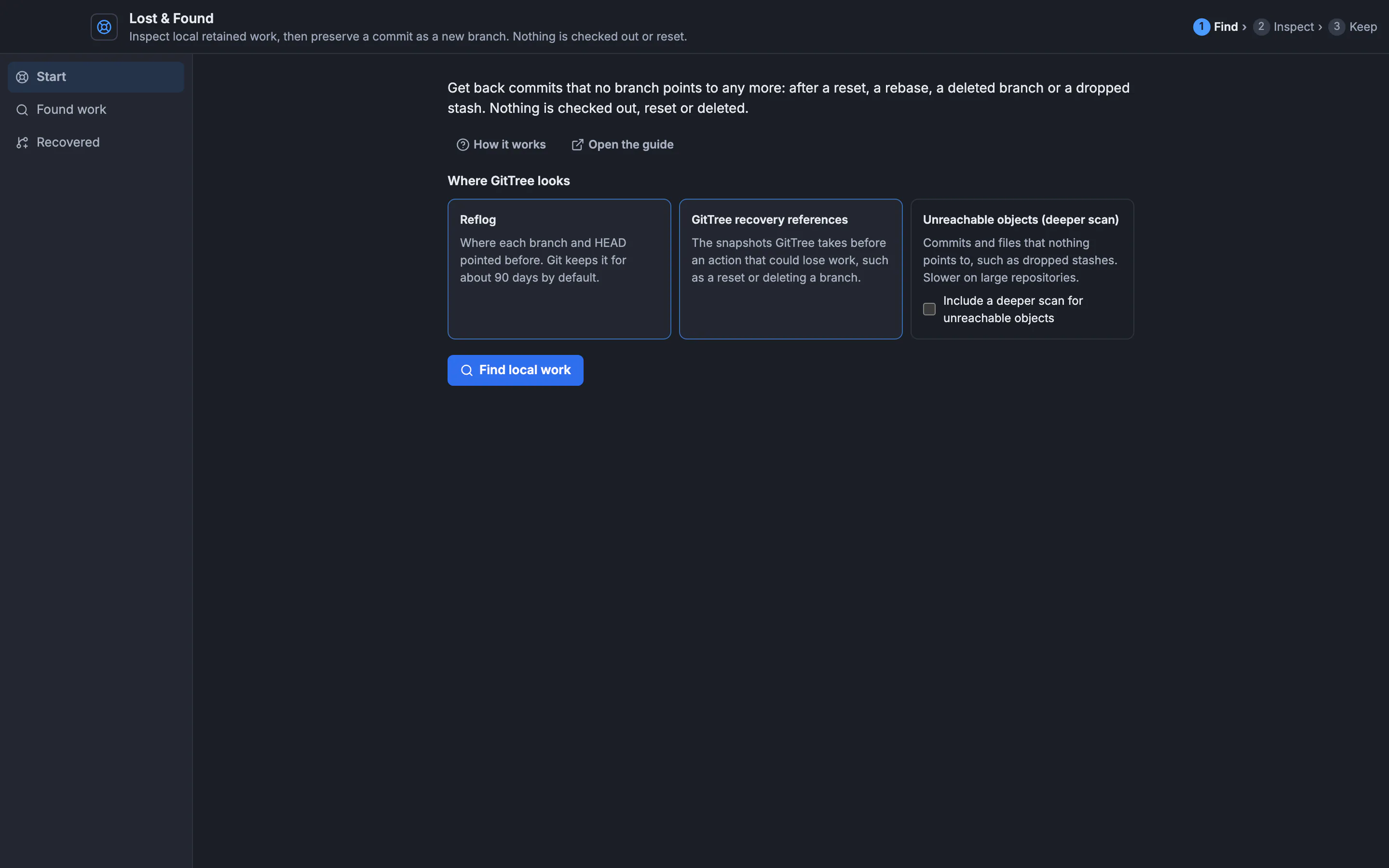
Recover lost work with GitTree’s Lost & Found
Open Lost & Found
Choose Tools → Lost & Found, or press
Alt+Shift+D. It opens as a full window on its Start page, which explains the three sources it searches: the reflog, GitTree’s recovery references and unreachable objects.Find local work
Tick Include a deeper scan for unreachable objects to look for dropped stashes too, then press Find local work. Found work lists each result with its source and when it was seen; Filter by commit, message or source narrows the list.
Inspect before you keep
Select a result: Why this object appears shows its evidence, its message and files appear beside it, and each file opens its content. Nothing is checked out or applied.
Keep it on a branch
Under Keep this commit, type a New branch name and press Create recovery branch. Recovered lists the branch; Show in graph jumps to it. Your checkout and working files do not change.
How long Git keeps lost commits
| Setting | Default | What it controls |
|---|---|---|
gc.reflogExpire | 90 days | Reflog entries for commits still reachable |
gc.reflogExpireUnreachable | 30 days | Reflog entries for commits no longer reachable |
gc.pruneExpire | 2 weeks | Unreachable objects with no reflog entry, such as a dropped stash |
Garbage collection runs on its own after some commands, so these are windows, not promises. The sooner you look, the more you find. A copy elsewhere, such as a teammate’s clone or a pushed branch, is the other safety net: lost work only on your computer exists only there.
What cannot be recovered
- Changes that were never committed or stashed, such as edits thrown away with
git checkout -- <file>orgit restore. - Untracked files that were not in a stash made with
-u. - Commits that garbage collection has already pruned.
- Work that only ever existed on another person’s computer.
Next steps: the Lost & Found guide documents every page and button, find previous branch tips covers the reflog view, and the git stash guide explains apply, pop and untracked files so you need recovery less often.
Frequently asked questions
Can I recover a dropped git stash?
Usually, yes. A dropped stash becomes an unreachable commit until garbage collection prunes it. Find it with git fsck --unreachable, inspect it with git stash show -p <sha>, then git stash apply <sha> or git branch <name> <sha>.
How do I recover a deleted branch in Git?
Find the branch’s last commit in git reflog (or the “was <sha>” message Git printed when you deleted it), then run git branch <name> <sha> to put the branch back.
What is a dangling commit?
A commit that no branch, tag, stash or reflog entry points to. git fsck --lost-found lists them and copies them into .git/lost-found/commit/ so you can inspect them.
Does git gc delete lost commits?
Yes, once they are older than the expiry settings: by default unreachable objects without a reflog entry are pruned after two weeks. Avoid git gc and git prune until you have recovered your work.
Can I recover changes I never committed?
Not from Git. Only committed or stashed work is in the object database. Your editor’s local history or a backup is the place to look.
Is GitTree’s Lost & Found free?
Yes. Lost & Found is part of GitTree’s Free plan. It only reads your local repository, and the only change it makes is the recovery branch you ask for.
Sources
Claims about other products were checked against their official pages on November 5, 2026. Prices and features change; the vendors’ pages are the source of truth.