Run pipelines locally
GitTree prepares the exact act or gitlab-ci-local command for a workflow file or one job, and types it into a new terminal for you to run. Jobs run in Docker containers on your computer, before you push. Local pipelines are part of the Free plan and need no hosting account.
Works in GitTree Free: every local Git feature, with no account needed.
On this page
Before you start
- Docker, running: Docker Desktop, OrbStack, Colima or Docker Engine. Both runners start every job in a container.
- The runner for your file: act for GitHub Actions (
.github/workflows/*.yml), gitlab-ci-local for GitLab CI (.gitlab-ci.yml). Install it outside the repository, in a folder on PATH. - A trusted repository (repository trust): a local run executes the repository’s code.
- A supported terminal shell: bash, zsh, sh or fish on macOS; PowerShell on Windows; bash, zsh, sh or fish on Linux.
Where to find it
- The CI/CD button in the toolbar: without a connected account or Pro, the view opens on Local pipelines.
- The TOOLS section of the left panel: Prepare local pipeline.
- Tools in the toolbar (beside Terminal) or the repository tab’s menu: Prepare local pipeline…, also in the command palette or with
Alt+Shift+L.
| Action | macOS | Windows and Linux |
|---|---|---|
| The command palette, then Prepare local pipeline… | ⌘⇧P | Ctrl+Shift+P |
| Show CI/CD | ⌥P | Alt+P |
Steps
Check what you need
Open CI/CD. Local pipelines lists What you need: Docker, act and gitlab-ci-local with Found or Not found and where each was found, the repository’s trust and the terminal shell. A missing program shows how to install it; install it, then press Check again. Ask Nour to Set Up the Local Runner is part of Pro, which everyone has at no cost right now. Preparing and running the command locally does not.
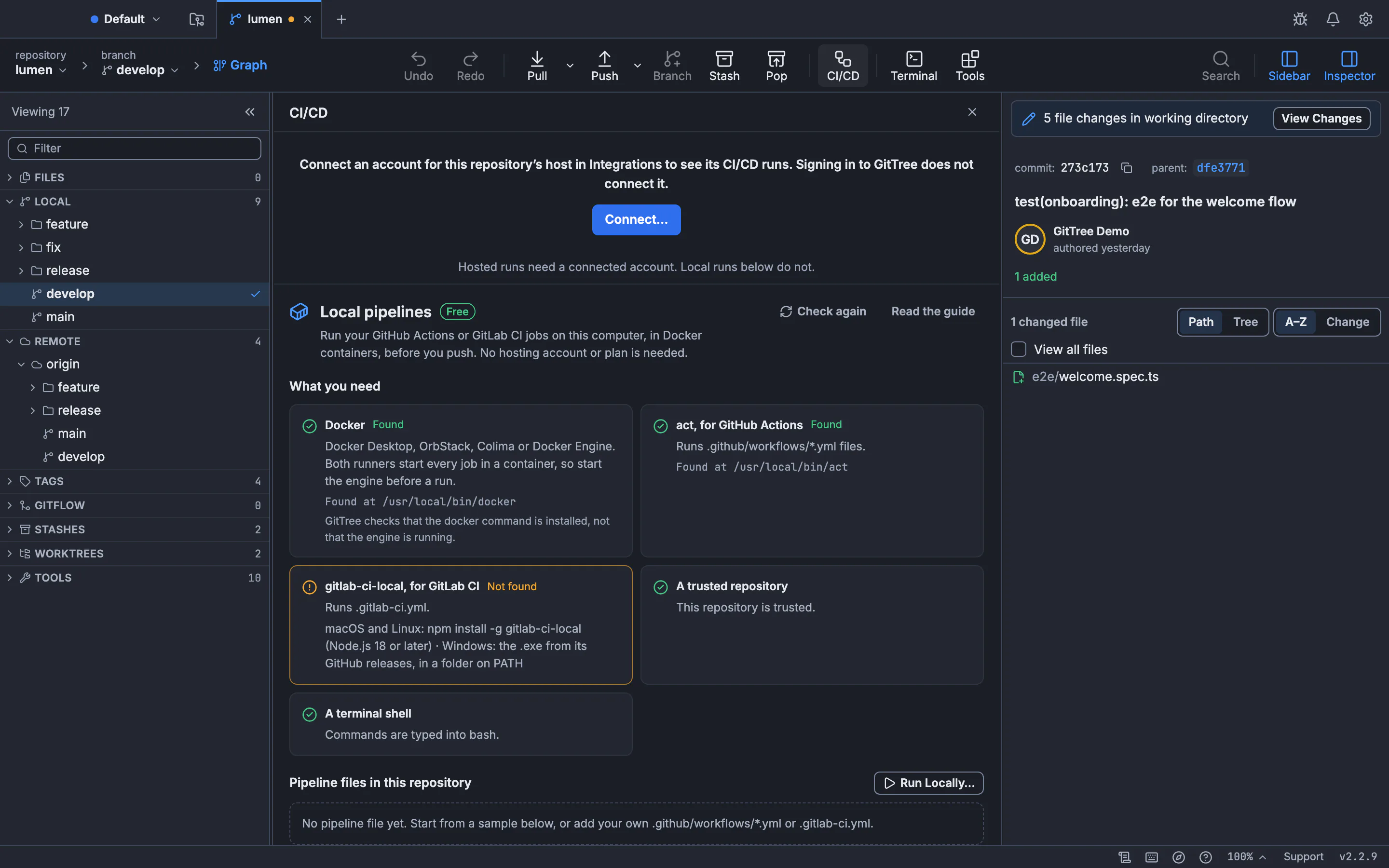
Local pipelines are marked Free. Hosted runs above them still need a connected account.GitTree interface with a demonstration repository. Add a pipeline file, or use yours
Pipeline files in this repository lists each file with Ready to run or the reason it cannot run. With no file yet, Add GitHub Actions sample writes
.github/workflows/gittree-local.ymland Add GitLab CI sample writes.gitlab-ci.yml, each with two commented jobs. GitTree never writes over an existing file. The file opens in the editor: put your build and test commands in it.Prepare the command
Press Run Locally…. In Prepare local pipeline, choose the Pipeline config, a Job or Runner default jobs, and the Terminal shell, then Prepare command. Nothing runs yet.
Run it in the terminal
Read the Prepared command, then Type in new terminal. GitTree types it into a new terminal and never presses Enter: review it and press Enter yourself. The job’s output appears in the terminal.
Expected result
The runner pulls the job’s image the first time, then runs each step in a container and prints its result in the terminal. Your repository’s files are used as they are on disk, committed or not.
Install Docker and the runners
| Program | macOS | Windows | Linux |
|---|---|---|---|
| Docker | Docker Desktop, OrbStack or Colima | Docker Desktop | Docker Engine or Docker Desktop |
| act (GitHub Actions) | brew install act | winget install nektos.act | The install script on nektosact.com |
| gitlab-ci-local (GitLab CI) | npm install -g gitlab-ci-local | The .exe from its GitHub releases, in a folder on PATH | npm install -g gitlab-ci-local |
gitlab-ci-local needs Node.js 18 or later when installed with npm. GitTree only looks for the programs on PATH; it never runs them to check, so it cannot tell whether the Docker engine is started.
The sample files
The GitHub Actions sample runs a build job, then a test job on ubuntu-latest. On its first run act asks which runner image to use; Medium suits most projects. The GitLab CI sample runs the same two jobs in alpine containers. Replace the echo lines with your own commands, then commit the file when it is ready. If the repository is on GitHub or GitLab, that host also runs the file.
jobs:
  build:
    runs-on: ubuntu-latest
    steps:
      - uses: actions/checkout@v4
      - name: Build
        run: npm ci && npm run build
  test:
    runs-on: ubuntu-latest
    needs: build
    steps:
      - uses: actions/checkout@v4
      - name: Test
run: npm testBitbucket Pipelines and Azure Pipelines
There is no supported local runner for bitbucket-pipelines.yml or azure-pipelines.yml, so those files show No local runner. To run the same steps on your computer, add the GitHub Actions or GitLab CI sample and copy your commands into it. The hosted pipeline keeps running from its own file.
How a local run differs from your host
- Secrets and variables set on the host are not available; pass the ones a job needs to the runner yourself.
- act runs push-triggered jobs by default. Choose a Job to run one regardless of its trigger.
- Includes, templates and reusable workflows are not resolved when GitTree lists jobs; the runner resolves them when it runs.
- Containers can reach your network and use the credentials you give them.
If something goes wrong
“No safe native runner was found on PATH. Install it outside the repository, then refresh.”
Install act or gitlab-ci-local in a folder on PATH that is not inside the repository, then press Check again or Refresh. On macOS, quit and reopen GitTree if you changed PATH in your shell profile.
“This provider config has no supported local runner.”
The file is a Bitbucket or Azure pipeline. Add a GitHub Actions or GitLab CI sample and copy the steps into it.
“Trust this repository before preparing a local pipeline command.”
Trust the repository first (repository trust), then prepare the command again.
The terminal says it cannot connect to the Docker daemon.
Start Docker Desktop, OrbStack, Colima or the Docker service, wait until it is running, then press Enter on the command again.
Questions
Do local pipelines need GitTree Pro or a hosting account?
No. Local pipelines are part of the Free plan and read only your repository’s files. Hosted CI/CD runs, re-runs and approvals are part of Pro.
Does GitTree run the pipeline for me?
No. GitTree prepares the command and types it into a terminal; you press Enter. Nothing runs before you do.