Prepare a command GitTree already ran
The Activity log can record Git commands GitTree ran. Prepare in terminal… opens Prepare a recorded command. You review the command, choose a shell, and Type in new terminal. GitTree types the command and does not press Enter. Your shell can still produce a different result.
Works in GitTree Free: every local Git feature, with no account needed.
On this page
Before you start
- Recorded commands are part of the Free plan. The command is a local read that GitTree is willing to type again. It is not every action in the log.
- A supported shell exists. On macOS it is bash, zsh, sh or fish. On Windows that is PowerShell. On Linux it is bash, zsh, sh or fish, the same families the local-pipeline dialog names when it looks for a shell.
Where to find it
- The Activity log: Prepare in terminal… on a recorded command.
- Tools, when the command is offered from the tools that prepare a terminal.
- The ship log is a different list. It records pushes and runs you started from GitTree, not every Git invocation.
| Action | macOS | Windows and Linux |
|---|---|---|
| The command palette | ⌘⇧P | Ctrl+Shift+P |
Steps
Open the Activity log
Open the repository, then the activity list. A row that recorded commands shows the command and a count. Choose Prepare in terminal…. The dialog title is Prepare a recorded command.
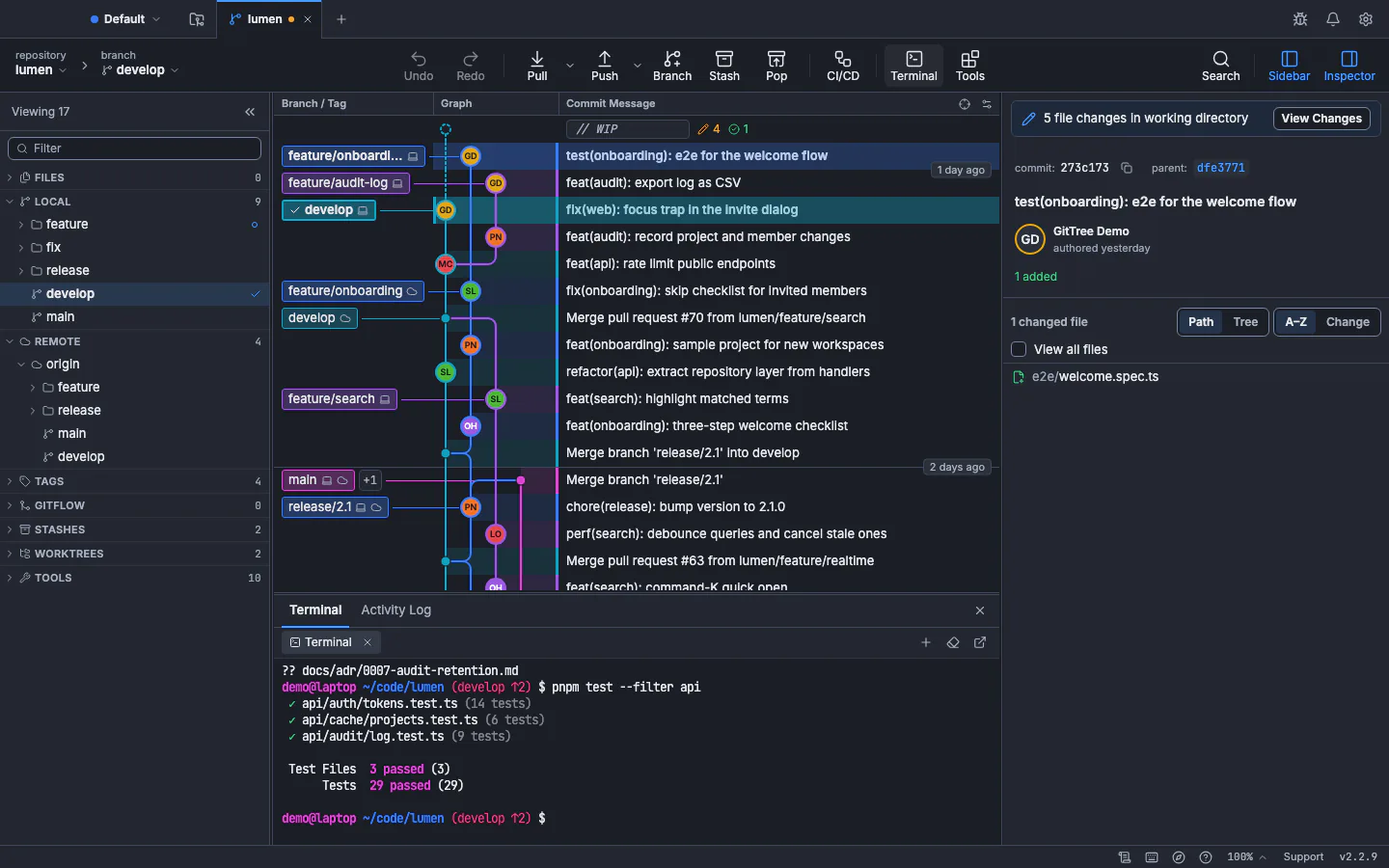
Type in new terminal writes into a terminal like this one. You press Enter after you have read the line.GitTree interface with a demonstration repository. Review the command
The note says to review the local read command, then type it into a new terminal. You decide when to press Enter. Recorded invocation is the text. Review command confirms you have read it. Terminal shell lists the shells GitTree found. Finding installed shells… means the list is still loading.
Type it into a new terminal
Press Type in new terminal. GitTree checks the original checkout again before typing. When it finishes, Command typed in a new terminal. Press Enter when ready. Do not press Enter until the line matches what you reviewed.
Run it yourself
Press Enter in that terminal if you still want the command. Close the dialog with Close if you do not. If the preparation changed, the dialog says to review the updated command before typing. If the terminal or checkout changed, Nothing was typed.
Expected result
The command is sitting in a new terminal, or nothing was typed. The repository changes only if you press Enter and the command writes. Read git status after a command that can change the index or HEAD.
Which commands can be prepared
The note calls the text a local read command. A button that is missing on a row means that action was not recorded as a command GitTree will type again. The ship log and the activity list are different. Activity is the list. Ship log is pushes, manual runs, approvals and re-runs kept on this computer.
git status --porcelain
git rev-parse --abbrev-ref HEAD
Run those after you press Enter, in the same checkout, so you can see whether HEAD or the index moved. The terminal article is the in-app shell. The tutorial shows the same Git commands without GitTree.
Shells and a changed checkout
| Message | What happened |
|---|---|
| Finding installed shells… | The list is still loading |
| No supported terminal profile is available | Nothing can be typed |
| The preparation changed. Review the updated command before typing it. | The text changed after you opened the dialog |
| The terminal or checkout changed. Nothing was typed. | GitTree refused to type |
| Command typed in a new terminal. Press Enter when ready. | The line is typed and not run |
Your terminal environment may produce different results. A different Git on PATH, a different working directory, or a hook you have since enabled can change the outcome. The dialog does not promise the typed command matches a future run byte for byte after you edit the shell.
You press Enter
Typing is not running. The same rule is used for local pipelines: GitTree types, and you press Enter. Close the dialog and read the terminal before you run a command that commits, resets or pushes.
If something goes wrong
“No supported terminal profile is available.”
Install a shell GitTree can launch, then open the dialog again. On macOS use bash, zsh, sh or fish. On Windows use PowerShell. On Linux use bash, zsh, sh or fish.
“The preparation changed. Review the updated command before typing it.”
Read the new text. The command you first saw is not the one that will be typed until you review the update.
“The terminal or checkout changed. Nothing was typed.”
The folder or the terminal moved. Nothing was written. Review the command and try again from the current checkout.
The typed command is not the one you remember from the log.
The dialog types the recorded invocation it just checked. If the checkout changed, it refuses. Read the line in the terminal before Enter.
Questions
Does Prepare in terminal run the command?
No. It types the command into a new terminal. You press Enter. Until then the command has not run.
Will the result match the original run?
Not necessarily. The note says your terminal environment may produce different results. PATH, hooks and the working directory can differ.
Are these the same as the ship log?
No. The ship log is pushes, manual runs, approvals and re-runs from GitTree, kept on this computer. Recorded commands are Git invocations the activity log can prepare.
Does GitTree send the command anywhere?
No. The review and the checkout check happen on this computer. Typing uses a local terminal.
What if I cannot find Prepare in terminal?
That row has no recorded command GitTree will type again. Other activity rows are still listed. They are not all replayable.