Use Git hooks to check your work before it leaves your computer
A Git hook is a script Git runs by itself at a fixed moment, such as just before a commit or a push. In Preferences › Hooks, GitTree shows what runs when, lets you add hooks from ready-made templates, edit and test-run them, switch them off and on, and share them with your team through the repository.
Works in GitTree Free: every local Git feature, with no account needed.
On this page
Before you start
- A repository is open: hooks belong to one repository.
- The repository is trusted. In restricted mode Git runs none of its hooks; you can still read and edit them (repository trust).
- Hooks are shell scripts. The templates use plain
sh, which macOS, Windows (through Git for Windows) and Linux all provide.
Where to find it
- The commit box: under the commit button, May run: … lists the hooks a commit runs. Manage Hooks opens the page.
- Tools in the toolbar, or the TOOLS section of the left panel: Git hooks.
- The repository tab’s menu, or the command palette: Manage Git Hooks…, or
Alt+Shift+H. - Preferences (
Mod+,) › Hooks. Searching Preferences for “hooks”, “pre-commit” or “husky” finds it too.
| Action | macOS | Windows and Linux |
|---|---|---|
| Manage Git hooks | ⌥⇧H | Alt+Shift+H |
| Open Preferences | ⌘, | Ctrl+, |
Steps
Open the Hooks page
Use Manage Hooks under the commit button or
Alt+Shift+H. With several repositories open, choose one in Repository. The page starts with what hooks are, a three-step How it works guide and a link to this article.Read what runs when
What runs when shows the commit flow (pre-commit, prepare-commit-msg, commit-msg, post-commit) and the push flow (pre-push). Each step says Runs, Off, Not executable or No hook, and whether it Can stop the action or only reports.
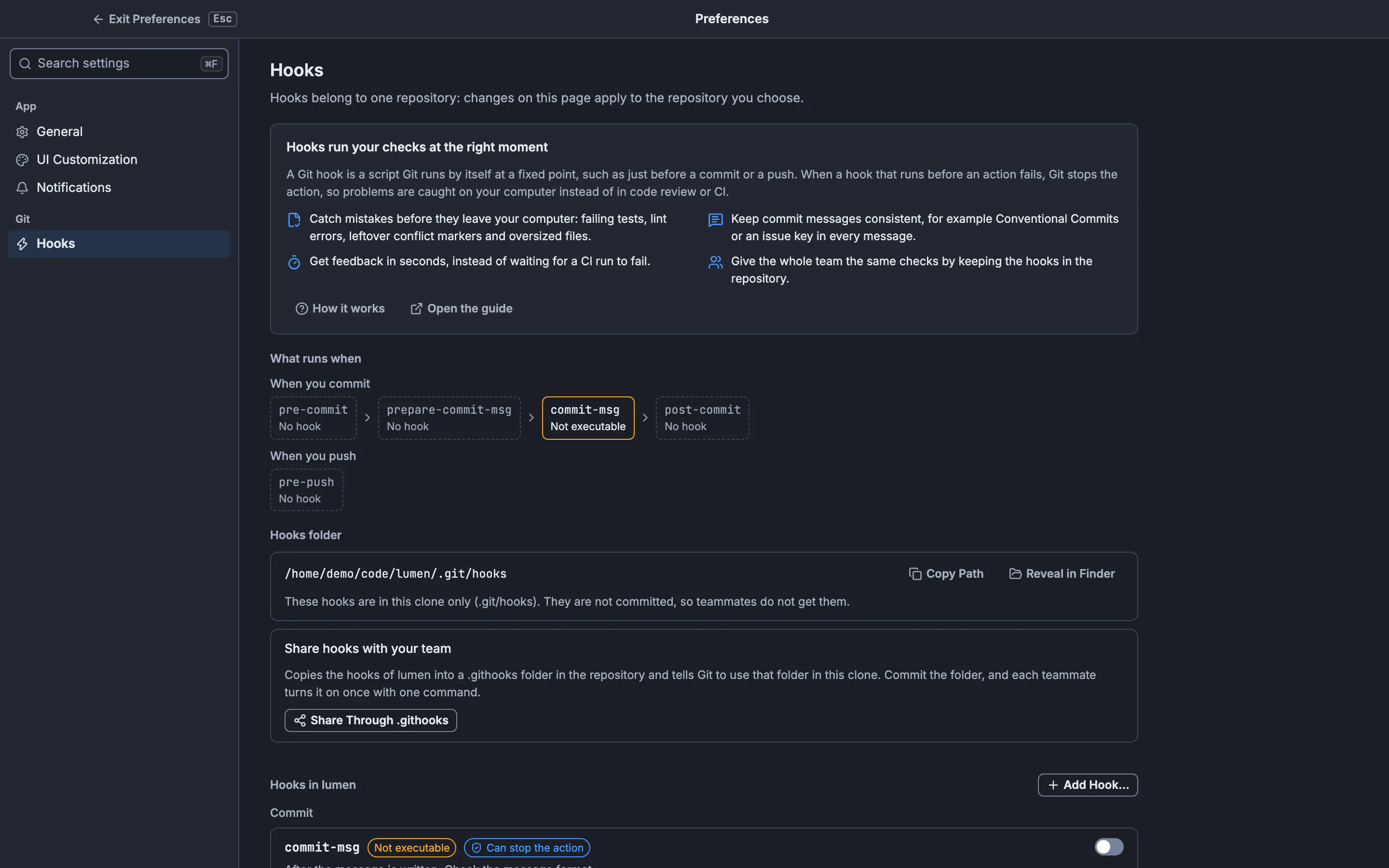
The page names the hooks Git may run on commit and on push, and offers Share Through .githooks.GitTree interface with a demonstration repository. Add a hook
Press Add Hook…. Under When it runs, pick the hook; under Start from, pick a template, Git’s sample or Empty script. The Script preview shows exactly what will be written. Create Hook writes the file, ready to run, and opens it in the editor.
Edit the script
Edit opens the script with line numbers. Change it and press Save (or
Mod+S). If the file changed on disk since you opened it, GitTree refuses to overwrite it and keeps your text, so you can reopen and compare.Test-run it
Test Run runs the hook now, the way Git would, without making a commit or a push. For commit-msg and prepare-commit-msg, type a message to check. The output streams in, and the result says what Git would do: Passed with exit code 0: Git would continue. or Failed with exit code 1: Git would stop here. Stop ends a long run.
Switch a hook off or share them
The switch beside a hook turns it off by renaming it to
<name>.disabled, and on again; nothing is deleted. Share Through .githooks puts the hooks in the repository for your team (see below).
Expected result
From the next commit or push, Git runs the hooks marked Runs. The commit box’s May run: … line names them, and a hook’s output appears under Hook output when it prints something or stops the commit.
What hooks are, and why use them
Git looks for executable files with fixed names in the hooks folder (.git/hooks unless core.hooksPath says otherwise) and runs them at matching moments. A hook that runs before an action, such as pre-commit or pre-push, can stop it by exiting with a non-zero status. A hook that runs after it, such as post-commit or post-merge, can only report.
- Catch mistakes before they leave your computer: failing tests, lint errors, leftover conflict markers and oversized files.
- Keep commit messages consistent, for example Conventional Commits or an issue key in every message.
- Get feedback in seconds, instead of waiting for a CI run to fail.
- Give the whole team the same checks by keeping the hooks in the repository.
The hooks you will use most
| Hook | When Git runs it | Typical use |
|---|---|---|
| pre-commit | Before the commit is created | Lint and quick tests on what is staged; block commits on main |
| prepare-commit-msg | Before the message is written | Put the issue key from the branch name in the message |
| commit-msg | After the message is written | Check the message format, such as Conventional Commits |
| post-commit | After the commit is created | Notify or log; cannot undo the commit |
| pre-push | Before anything is sent to the remote | Run the full test suite; refuse pushes to protected branches |
| post-merge | After a merge or pull | Say when a lockfile changed, so dependencies get reinstalled |
| post-checkout | After switching branches | Clean build output or refresh generated files |
Server hooks such as pre-receive and update run only on a server that receives pushes. GitTree lists them when they are present but never test-runs them.
Ready-made templates
| Template | Hook | What it does |
|---|---|---|
| Protect main branches | pre-commit | Stops commits made directly on main or master |
| Catch conflict markers and whitespace | pre-commit | Stops a commit that adds leftover conflict markers or trailing whitespace (git diff --cached --check) |
| Block large files | pre-commit | Stops a commit that adds a file larger than 5 MB |
| Add the issue key | prepare-commit-msg | Starts each message with the issue key in the branch name, such as ABC-123 |
| Conventional Commits | commit-msg | Requires summaries such as feat(parser): accept empty lines |
| Run tests before push | pre-push | Runs npm test, cargo test, go test, pytest or make test, and stops the push when they fail |
| Protect remote branches | pre-push | Stops pushes straight to main or master on the remote |
| Dependency reminder | post-merge | Says when a lockfile changed after a pull or merge |
Each template is an ordinary script with its settings at the top, such as PROTECTED="main master" or TEST_COMMAND="". Change them in the editor to fit your project.
What a test run does
GitTree runs the hook through git hook run, so Git finds and starts it exactly as it would during the real action, including core.hooksPath. The hook gets made-up input:
- pre-commit, pre-merge-commit, post-commit and pre-auto-gc: no arguments.
- commit-msg and prepare-commit-msg: a temporary file with the message you typed, removed afterwards.
- pre-push: your push remote’s name and URL, with no branches on its input.
- post-merge:
0, as after a normal merge.
Share hooks with your team
Hooks in .git/hooks are never committed, so each clone has its own. Share Through .githooks copies them into a .githooks folder in the repository and sets core.hooksPath to it in this repository’s config. Commit the folder; each teammate then runs this once after cloning:
git config core.hooksPath .githooksUse This Clone’s Own Hooks removes that setting again. The .githooks folder and your hooks in .git/hooks stay where they are.
Skip hooks for one commit
Open Commit Options in the commit box and turn on Skip Hooks (--no-verify). Git then skips pre-commit and commit-msg for that commit; prepare-commit-msg and post-commit still run, and the line under the commit button says so. To stop a hook for longer, switch it off on the Hooks page.
If something goes wrong
A hook shows Not executable and never runs.
On macOS and Linux Git skips a hook file without the execute permission. Press Make Executable; GitTree adds it only where the file is readable.
“The hook changed on disk since it was opened; reopen it to see the new content.”
Another program or a hook manager rewrote the file. Close the editor, open it again, and apply your change to the new content.
“This hook is a link. GitTree never writes through a link; edit the file it points to.”
The hook is a symbolic link, often created by a hook manager. Edit the file it points to, or that tool’s configuration.
The script works on macOS but fails on Linux with “bad interpreter” or \r errors.
The file has Windows line endings (CRLF). The editor warns about them; save the script with LF line endings.
Test Run is greyed out.
Its reason is next to the button: trust the repository, turn the hook on, make it executable, or note that this hook only receives input during the real Git operation.
Questions
Are hooks part of the Free plan?
Yes. Managing, editing, test-running and sharing hooks is local Git and needs no hosting account.
Does GitTree delete a hook when I switch it off?
No. Switching off renames the file to <name>.disabled; switching on renames it back. GitTree never deletes a hook.
Will a hook I create be committed?
Not while it is in .git/hooks. Use Share Through .githooks to keep hooks in the repository, where they are committed like any other file.
Can a hook be written in Node.js or Python?
Yes. Git runs the file with the program in its first line, such as #!/usr/bin/env node; the editor shows that program as Runs with node. The program must be installed on every computer that runs the hook.