Use Nour in the checkout where you started
A Nour chat belongs to the checkout where it started. Each turn can list the commands and checks that were recorded, and Undo this turn restores files from the snapshot taken before the turn. Restoring files does not reverse commands or external effects. Setup commands run only after you approve that checkout and that command.
Part of GitTree Pro, which everyone has at no cost right now; Free keeps every local Git feature. Compare the plans.
On this page
Before you start
- GitTree Pro, which everyone has at no cost right now. Nour runs a coding-agent CLI you install. GitTree stores no AI key and sells no credits. Plans is where Pro is described.
- The repository is trusted. In restricted mode Nour does not run an agent in that repository. You can still ask about GitTree in general.
Where to find it
- The Nour panel in the checkout you have open. Resume worktree on a worktree card reopens the file and the chat saved for that folder.
- Session setup and overlap when a turn offers a setup command.
| Action | macOS | Windows and Linux |
|---|---|---|
| Show or hide Nour | ⌘⇧Space | Ctrl+Shift+Space |
Steps
Open the checkout’s chat
Open the worktree you want the agent to edit, then open Nour. The chat is that checkout’s chat. Another folder’s chat stays with that folder. Resume worktree returns to the file and the chat you left open.
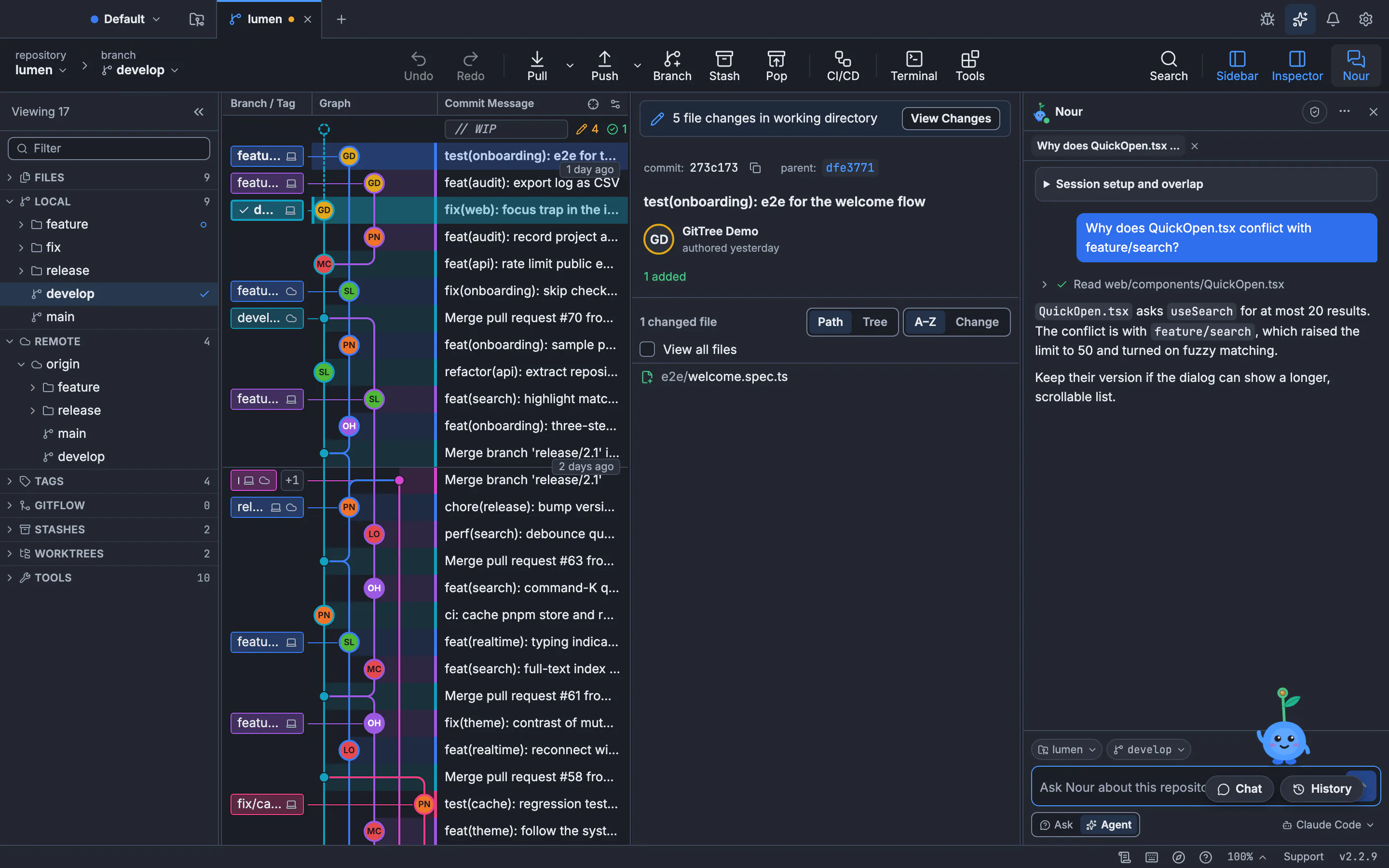
The chat in this panel belongs to the checkout that is open. The still shows the panel.GitTree interface with a demonstration repository. Read the turn after it finishes
Changes from this turn lists files that changed. The note says manual edits may be included. Commands and check output opens recorded commands. Checks remain unverified and Results are reported by the agent runtime mean a successful reply does not prove the files passed your tests. No command results were recorded for this turn means there is no output to read.
Restore the turn only if the preview allows it
Undo this turn asks Undo Nour’s turn in this repository? The description says GitTree preserves the current target files in a recovery checkpoint first. Restoring files does not reverse commands or external effects. Keep current files cancels. The confirm button is Restore with the file count. Later edits block restoration at the first conflicting path, and current files stay as they are.
Approve setup before it runs
Session setup and overlap asks you to choose a saved Custom Command. Setup runs only after you review and approve this exact checkout and command. Run reviewed setup starts it. Closing the view does not stop a setup that is already running. Stop owned setup stops processes GitTree owns. Unrelated servers are left running. Stopping a process does not undo its effects.
Expected result
The chat, the recorded commands and the snapshot belong to that checkout. After a restore, the work tree matches the snapshot for the files that could be restored, and anything the agent did outside those files is still done. Check the other worktrees if you expected them to change. They did not, unless the turn listed them.
What a turn records
| Line | What it means |
|---|---|
| Commands and check output | Commands the runtime reported, with output when it was kept |
| Checks remain unverified | A reply is not a test result |
| Reported exit code | The code the runtime reported, not a code GitTree re-ran |
| The recorded result is incomplete | Text or output was cut |
| Output was not recorded | There is nothing to show for that command |
| Unverified: a successful reply does not prove tests passed | Read the diff yourself |
The command checkout is unknown for a nested or multi-repository tool when the runtime does not say which folder a command used. Compare the current worktree separately when Recorded content is unavailable, partial or expired. Nour setup is where you choose the agent. Sessions covers stopping a turn.
What restore does not do
The snapshot note says Nour saved a snapshot of the work tree before the turn, and that it does not cover pushes or files outside the repository. The work tree is back as it was before this turn is the success line when the restore finishes. These turns cannot be undone: the snapshot was deleted, the branch moved, later edits cannot take the snapshot, the turn was already undone, no snapshot was saved, or the turn stopped partway.
git status --porcelain
git worktree list
git diff
Run those in the checkout whose chat you restored. A push the agent made, a comment it posted, or a process it started is still there. The tutorial does not run Nour. It teaches the Git operations the agent is allowed to ask for.
Setup commands
Definitions come from Preferences → Actions: an absolute executable path and literal arguments. Only the {repo} token is supported in that panel. No compatible setup definitions means none match. Setup can access shared databases and inherited credentials. Local ports do not isolate machines. The port is checked again before launch, and another program may still claim it. GitTree never stops that program.
If something goes wrong
“Later edits block restoration” at a path.
That path changed after the turn. Current files are unchanged. Review the path, or keep current files. The dialog names the first blocking path. Others may exist.
“This turn cannot be undone: no snapshot was saved for it.”
There is nothing to restore. Read Changes from this turn and revert files yourself if you need to. Do not expect Undo to invent a snapshot.
“This repository is in restricted mode, so Nour does not run an agent in it.”
Review trust if you want an agent in this checkout. The panel does not change trust for you. Until then you can ask about GitTree in general.
“No compatible setup definitions.”
Add a Custom Command in Preferences → Actions with an absolute executable and literal arguments. Only {repo} is expanded here.
Questions
Does each worktree have its own Nour chat?
Yes. The chat belongs to the checkout where it was started. Resume worktree reopens the file and the chat saved for that folder.
Does Undo this turn undo a push or a shell command?
No. Restoring files does not reverse commands or external effects. The snapshot does not cover pushes or files outside the repository.
Do recorded checks mean the tests passed?
No. Results are reported by the agent runtime. They do not prove that the final files passed checks. Checks remain unverified until you run them.
When does a setup command run?
Only after you review and approve that exact checkout and command, then press Run reviewed setup. Prepare setup does not launch it.
Which plan includes Nour?
Nour is part of GitTree Pro, which everyone has at no cost right now. The agent is one you install. GitTree does not sell credits for it.