See what a push will ship
Ship Preview reads what the next push would send: commits, files, pipeline hints and, when they can be read, environment and branch-rule facts. Nothing to push means the remote already has the commits. Provider rows can be missing. GitTree only shows the rules it read. The provider enforces them.
Works in GitTree Free: every local Git feature, with no account needed.
On this page
Before you start
- Opening Ship Preview is part of the Free plan. The line Pro shows environment protection, reviewers and branch rules means those provider facts need GitTree Pro, which everyone has at no cost right now, plus a connected account.
- The branch has an upstream, or you are about to publish it. A shallow clone hides some commits. The preview says Some commits are hidden by a shallow clone.
Where to find it
- The Push control’s menu: Ship Preview…, or Open Ship Preview when a push is held.
Alt+Shift+U.- Ship log lists pushes, manual runs, approvals and re-runs done from GitTree in this repository. It is kept on this computer.
| Action | macOS | Windows and Linux |
|---|---|---|
| Ship Preview | ⌥⇧U | Alt+Shift+U |
Steps
Open Ship Preview
Before you push, choose Ship Preview… or press
Alt+Shift+U. The title is Ship Preview. Reading what this push ships… means the read is still going. Wait for the sections, or close it. Opening the preview does not push.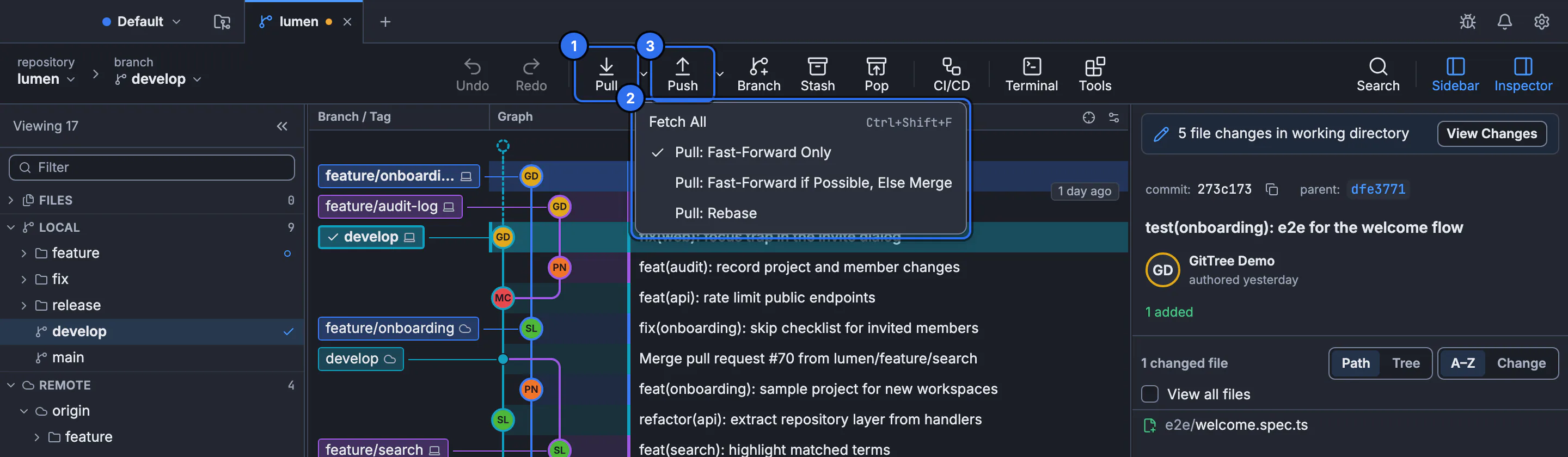
Ship Preview opens from the Push control on this toolbar. The still shows the sync controls.GitTree interface with a demonstration repository. Read the summary
The summary can name a deploy or say May deploy, then counts of commits and files, and how many were made by Nour. Nothing to push means there is no unpublished commit for this remote. Sections are Commits, Files, Pipelines, Environments and Branch rules.
Read pipeline and rule rows
A pipeline is Will run, May run with a reason, or Won’t run with a reason. Reasons include a condition GitTree does not evaluate, a branch that is excluded, or a workflow that is started by hand only. No pipeline starts on this push means none of the files that were read declare a push trigger for this branch. Branch rules are sentences such as a branch that accepts changes only through a pull request. No rules read means none were read, not that the host has no rules.
Refresh, then push yourself
Refresh reads provider facts again. A row can say Provider facts not read and a reason: needs GitTree Pro, no connected account, the provider cannot be reached, the provider asked to wait, or not read yet. When the preview matches what you want to send, use the normal push. A push that carries commits Nour made stays held until you confirm a Ship Preview that lists them.
Expected result
You know which commits and files the push would send, which pipelines look as if they will run, and which provider facts were not read. The push has not happened until you push. The ship log records pushes you later make from GitTree, on this computer only.
What GitTree shows, and what it does not decide
File rows use Git’s letters: Added, Modified, Deleted, Renamed, Copied, Type changed, Unmerged and Changed when the kind is unknown. Filter files narrows the list. No code owner means no owner was read from CODEOWNERS for that file. Code owners are a hint for reviewers. They are not an approval.
May run reasons include an expression GitTree does not evaluate, an include of other files, a template, a trigger it does not know, a workflow that runs only for an open pull request, rules it reads only in part, too many files to compare paths, or a file that could not be read. Treat May run as unknown. The host decides at push time. Fetch, pull and push is the push itself.
Commits Nour made
A commit can be marked Made by Nour, With Nour’s help, From a suggestion or From a patch. Changed by Nour and not committed yet is a file, not a commit. Nour cannot push commits it made until you have confirmed a Ship Preview that lists them. Forget What Nour Made… stops marking those commits in this repository and stops holding their push. The commits stay. The dialog says this cannot be undone.
Ship log
Ship log is Pushes, manual runs, approvals and re-runs done from GitTree in this repository. Kept on this computer only. Save Ship Log… writes CSV or JSON. Nothing shipped from GitTree yet means this repository has no such entry. A push you made in a terminal is not in this log. The activity list is activity. The changelog is the product’s release notes, not this log.
If something goes wrong
“Nothing to push.”
The upstream already has these commits, or there is no commit to send. Fetch if you expected the remote to be behind. The preview will not invent commits.
“Some commits are hidden by a shallow clone.”
The count is incomplete. Fetch the rest of the history, or unshallow, then open Ship Preview again. See shallow history.
“Provider facts not read: needs GitTree Pro.”
The local commit list can still be there. Environment protection, reviewers and branch rules are the Pro rows. Plans are on the Pricing page.
“No rules read for this branch.”
GitTree did not read rules. The host may still reject a direct push. Check the host’s branch settings, or connect the account and refresh.
Questions
Does Ship Preview push?
No. It reads the commits and the facts it can. You push with the push control after you have read the preview.
Does a green preview mean the host will accept the push?
No. GitTree only shows rules it could read. The provider enforces pull-request rules, required checks and protection. A row that was not read is not an approval.
Why is a push held?
A push that carries commits Nour made stays held until you confirm a Ship Preview that lists them. The hold is a review step. It is not a failed network push.
Where is the ship log stored?
On this computer, for this repository. Save Ship Log writes a file you choose. It is not uploaded by that save.
What does May run mean?
GitTree could not decide. The reason names the gap, such as a condition it does not evaluate. The workflow may still run on the host.