Compare commits before and after a rewrite
What Changed… compares the patches in two commit series, the branch before a rewrite and the branch after it. Merge commits are omitted. Pairs are marked Same, Changed, Dropped or Added. The comparison does not move refs or change files. Pairing is not proof that two commits mean the same thing.
Works in GitTree Free: every local Git feature, with no account needed.
On this page
Before you start
- What Changed is part of the Free plan. Git on your PATH must provide
git range-diff. If it does not, GitTree says this Git cannot compare rewritten series. - You still have both tips. After a rebase, the old tip is often in the reflog. Lost & Found can find a commit no branch points to.
Where to find it
- A commit’s Compare menu: What Changed….
- The notice after a force push.
Alt+D, or the command palette.
| Action | macOS | Windows and Linux |
|---|---|---|
| What Changed… | ⌥D | Alt+D |
| The command palette | ⌘⇧P | Ctrl+Shift+P |
Steps
Open What Changed
Select the commit you rewrote, open Compare, and choose What Changed…, or press
Alt+D. The dialog title is What Changed…. The note says it compares the patches in two commit series and that merge commits are omitted.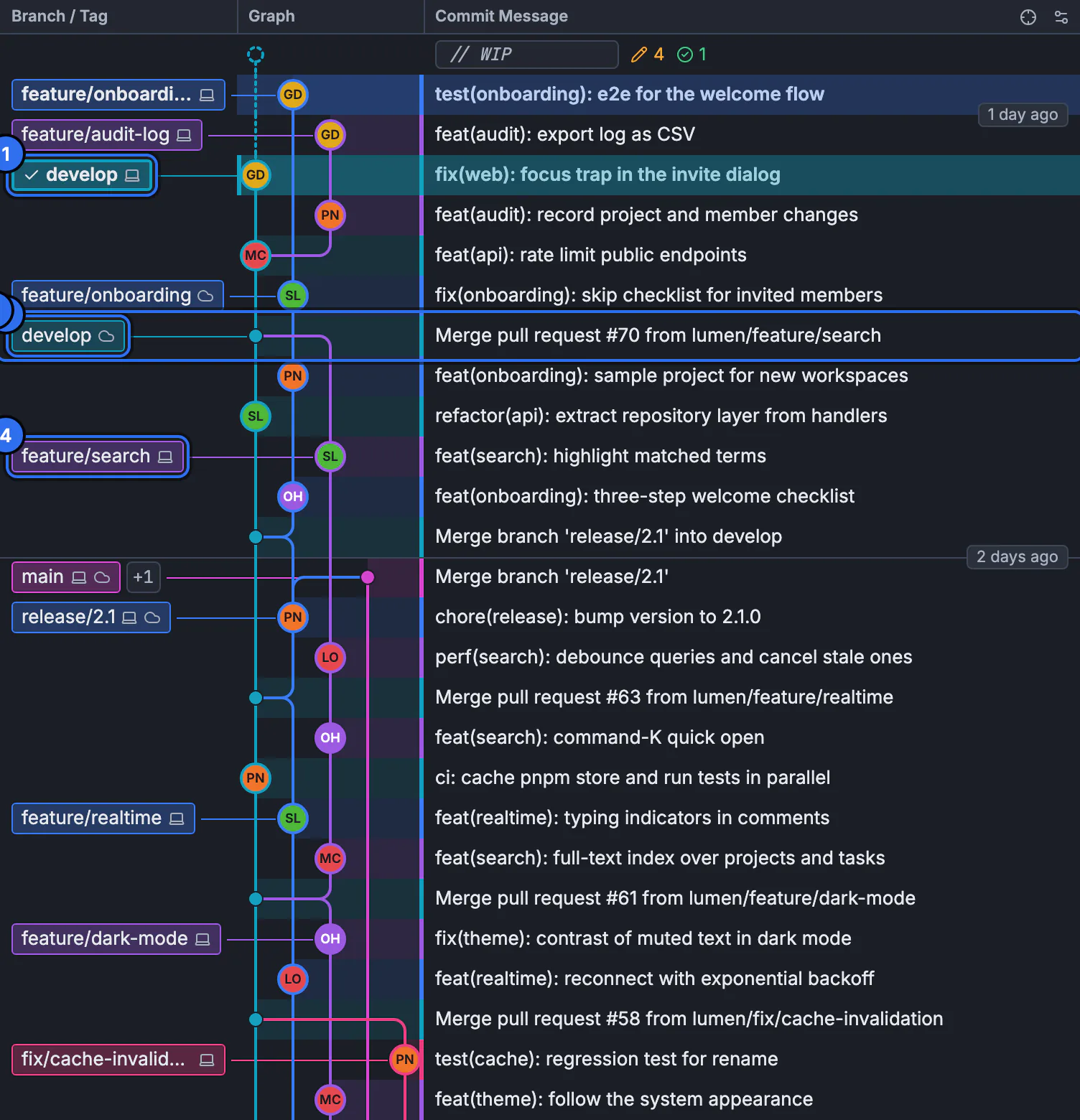
What Changed opens from a commit’s Compare menu on this graph. The still is the graph, not the comparison dialog.GitTree interface with a demonstration repository. Choose the two tips
Set Before rewrite to the old tip and After rewrite to the new tip. Choose both tips if either side is empty. Under Advanced: excluded bases, Old base and New base limit the range. Leave a base empty to use the tips’ common ancestor.
Compare
Press Compare. Stop asks the read to finish the current step. The result is Rewrite comparison. Each pair is Same, Changed, Dropped or Added. Inspect patch difference opens one pair. No patches differ in these ranges means the series match.
Review before you publish
The note says to review changed patches before publishing. A Changed pair is the same patch slot with a different diff. Dropped was in the old series only. Added is only in the new series. Nothing is pushed by this dialog. When you are ready, use the normal push, or force push with lease if the remote still has the old tip.
Expected result
You can name which patches survived the rewrite, which were edited, and which appeared or disappeared. The branch, the index and the working tree are as they were. Check a changed pair’s patch before you ask anyone else to use the new history.
The Git command
GitTree runs git range-diff on the two ranges. You can run the same comparison in a terminal. oldtip...newtip uses the merge base. Passing four revisions sets both bases yourself, which is what the advanced fields do.
git range-diff oldtip...newtip
git range-diff oldbase..oldtip newbase..newtip
git reflog show feature
git reflog show feature lists the tips the branch had before the rebase, so you can paste the old tip into Before rewrite. Range-diff compares patches. It does not decide that two commit messages describe the same work. Rebase and interactive rebase are how the rewrite happens. The tutorial lesson on rebase shows the command-line form.
What each pair state means
| State | Meaning |
|---|---|
| Same | The patch matches in both series |
| Changed | The pair is matched, and the patch differs |
| Dropped | The patch is only in the old series |
| Added | The patch is only in the new series |
Merge commits are omitted, so a merge you expected to see is not a dropped pair. Partial comparison: output reached its limit means the ranges are too wide. Narrow the bases. Git output format was not recognized means the text Git printed could not be parsed. Inspect that text before you trust the list.
When the comparison cannot run
If Git has no range-diff, GitTree says This Git cannot compare rewritten series. Update Git, or use Compare in the command palette to inspect the two revisions. That ordinary compare is a diff of two trees, not a patch series. Update Git from the setup screen or from Git setup, then open What Changed again.
If something goes wrong
“This Git cannot compare rewritten series.”
The installed Git has no range-diff. Update Git, then try again. Until then, compare the two revisions from the command palette. That view is a tree diff, not a series of patches.
“Choose both tips.”
Before rewrite or After rewrite is empty. Pick the old tip from the reflog or from Lost & Found, and the new tip from the branch.
“Partial comparison: output reached its limit. Narrow the ranges.”
Set Old base and New base so each side is only the rewritten stretch, then press Compare again.
“No patches differ in these ranges.”
The series match, or the bases exclude the commits you care about. Clear a base to use the common ancestor, and check that you did not pick the same tip twice.
Questions
Does What Changed change my branch?
No. It reads two commit series and shows pair states. Refs and files stay where they are.
Is a Changed pair the same commit id?
No. A rebase writes new commit ids. Changed means the patches were paired and their diffs are not identical. It is not a statement that the two messages describe the same intention.
Why are merge commits missing?
The dialog says merge commits are omitted. Range-diff compares the patches on each side of the rewrite, not the merge nodes.
Where is the old tip after a rebase?
It is usually in the reflog until the entry expires. Lost & Found can search that reflog and GitTree’s recovery references if no branch points at it.
Does this replace git diff?
No. git diff compares two trees. git range-diff compares two series of patches. Use What Changed after a rewrite. Use an ordinary compare when you want the tree difference.