Read the commit graph
The commit graph shows the repository’s history as rows, newest first, with lanes that split where branches start and join where they merge. Labels on the rows show branches and tags; a check mark shows the branch you are on.
Works in GitTree Free: every local Git feature, once you are signed in.
On this page
Before you start
- Open a repository: its tab shows the graph in the middle.
Where to find it
- The graph is the middle of a repository tab. Graph in the toolbar brings it back when a file or diff is open.
- Right-click the column headers, or use the sliders button at their end, for the Graph columns menu: show Author, Date and SHA, or use compact rows.
| Action | macOS | Windows and Linux |
|---|---|---|
| Jump to HEAD | ⌘⇧H | Ctrl+Shift+H |
| Focus on Current Branch | ⌘⇧B | Ctrl+Shift+B |
| Search the history | ⌘F | Ctrl+F |
Steps
Read a row
Each row is one commit: the author’s initials on its lane, then its message. Rows run from the newest at the top to the oldest; a divider such as “2 days ago” marks the passing of time.
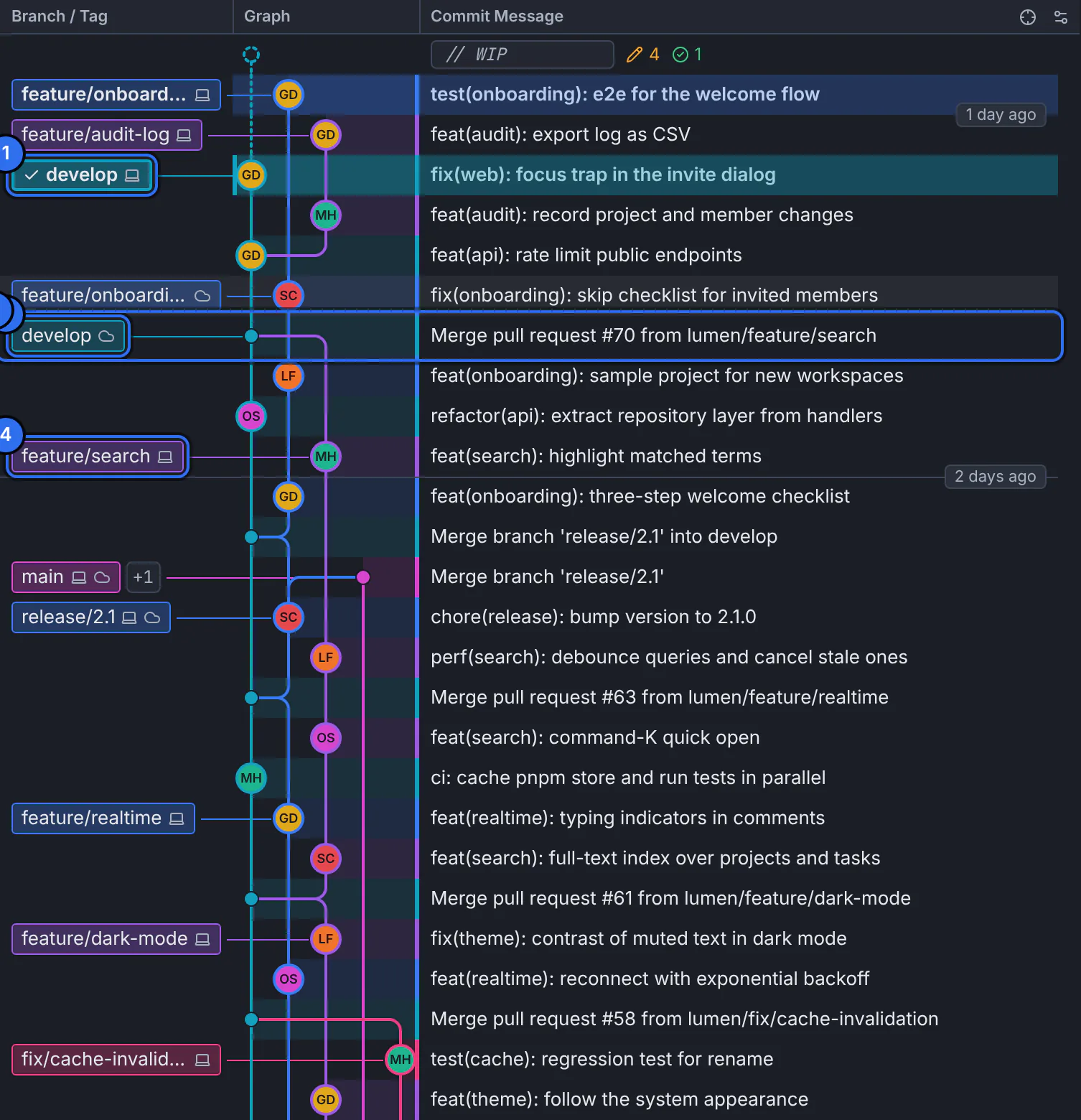
1 the checked-out branch, 2 the same branch on the remote, 3 a merge commit, 4 another local branch.GitTree interface with a demonstration repository. Find the branches and tags
Labels in the Branch / Tag column sit on the commit each branch or tag points to. A ✓ marks the checked-out branch. A laptop icon means a local branch, a cloud icon a remote branch, both icons a local branch that is level with its remote. +1 means more labels share the row.
Follow the lanes
A lane is one line of development. Where a lane branches off, a new branch began; where two lanes join in one commit, that commit is a merge with two parents. Colours only tell lanes apart.
Spot your uncommitted work
The
// WIProw at the top stands for changes you have not committed yet, with how many are staged and unstaged. Select it to open them.
Expected result
Select any row to see its full details in the inspector: its SHA, parents, author and changed files (inspect a commit).
Focus on part of the history
- Focus on Current Branch shows the checked-out branch, its upstream and its base branch only, with how many commits it has since the base.
- Right-click a branch label for Show Only This Branch or Focus on This Branch.
- Filter Graph keeps only the commits of an author, a date range or a path; the bar above the graph says what is filtered, and clearing it brings every row back. Filtering never deletes history.
If something goes wrong
A branch I expect is not in the graph
It may be hidden, outside an active filter or focus, or only on the remote and not fetched yet. Clear the filter bar, then fetch (fetch, pull and push).
The history stops with “history continues on the remote”
The repository is a shallow clone. Use Fetch More History or Fetch Full History from that row’s menu.
Questions
Why are there two labels with the same branch name?
One is your local branch and the other the branch on the remote (such as origin/develop). They differ when one has commits the other has not; when they are level, GitTree shows one label with both icons.