Write a commit message and commit
The commit form sits under your staged files: a Summary line, an optional Description, and Commit Options for co-authors, sign-off, hooks and pushing afterwards. GitTree points out common message mistakes before you commit.
Works in GitTree Free: every local Git feature, once you are signed in.
On this page
Before you start
- Changes are staged in the Working Changes panel (stage files, hunks and lines).
Where to find it
- The bottom of the Working Changes panel, opened from the
// WIProw in the graph.
| Action | macOS | Windows and Linux |
|---|---|---|
| Commit | ⌘Enter | Ctrl+Enter |
| Stage the selected files | S | S |
Steps
Type the summary
One line in Summary that says what the commit does. The counter shows its length; GitTree warns over 72 characters, because other tools often cut long summaries off.
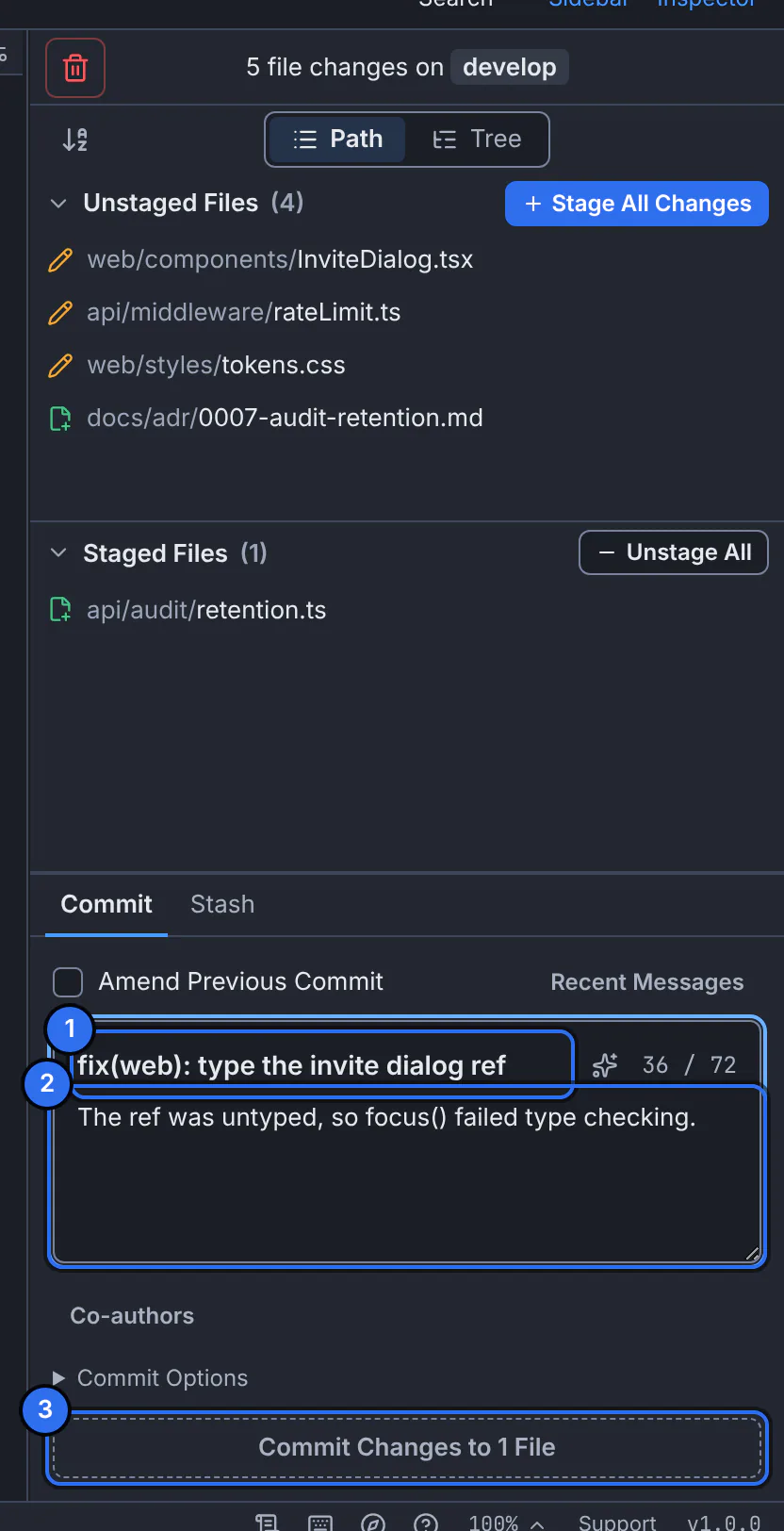
1 the summary, 2 the description, 3 the commit button with the number of files.GitTree interface with a demonstration repository. Explain why, if it helps
Add the reasons, a ticket link or notes for reviewers in Description. GitTree puts the blank line between the summary and the description for you.
Check the suggestions
Under Message suggestions, GitTree flags a summary that ends with a period, that looks like work in progress, or, with Check Conventional Commits on in Preferences, that does not start with a type such as
feat:. They are hints: you can commit anyway.Commit
Press Commit Changes to 1 File (the number follows what is staged), or press the shortcut. The form clears and says Committed with the new short SHA.
Expected result
The commit is the new top row of your branch in the graph. It stays on your computer until you push.
Commit options
| Option | What it does |
|---|---|
| Co-authors | Adds Co-authored-by lines for people who worked on it with you, suggested from recent authors. |
| Add Signed-off-by | Adds your Signed-off-by line, for projects that ask for a developer certificate. |
| Skip Hooks (--no-verify) | The pre-commit and commit-msg hooks do not run for this commit. |
| Different Author | Records another name and e-mail as the author, while you stay the committer. |
| Push After Commit | Pushes the branch to its upstream once the commit is made; the first push sets the upstream. |
| Allow Empty Commit | Lets the next commit record no file changes. It turns off again after that commit. |
Let an AI agent draft the message
With GitTree Pro or a running trial, the sparkle button beside Summary asks a coding-agent CLI you have installed and signed in to (Claude Code, Codex or the Antigravity CLI) to draft a message from the staged changes. The draft lands in the form; nothing is committed until you press the button.
If something goes wrong
“The commit was not created. Your message and staged changes are unchanged.”
Usually a hook refused the commit. Open Hook output to read why, fix it, and commit again; your message is still there.
GitTree asks for your name and e-mail
Git needs an identity for every commit. Fill in Set up your Git identity once; it is saved where you choose.
Questions
Can I change the message after committing?
Yes, for the last commit: amend it. For older commits, reword them with an interactive rebase.