Create and switch branches
A branch is a movable name for a line of work. In GitTree, Branch in the toolbar creates one at the commit you are on; right-click any commit to create one there. Double-click a branch label to switch to it.
Works in GitTree Free: every local Git feature, once you are signed in.
On this page
Before you start
- A repository is open.
Where to find it
- Branch in the toolbar, for a branch at the current commit.
- Right-click a commit or a branch label: Create Branch Here….
- Double-click a branch label in the graph, or right-click it and choose Checkout, to switch.
| Action | macOS | Windows and Linux |
|---|---|---|
| The command palette, then Create Branch… | ⌘⇧P | Ctrl+Shift+P |
Steps
Start the branch
Select Branch in the toolbar. The dialog says Create a branch at the commit it starts from.
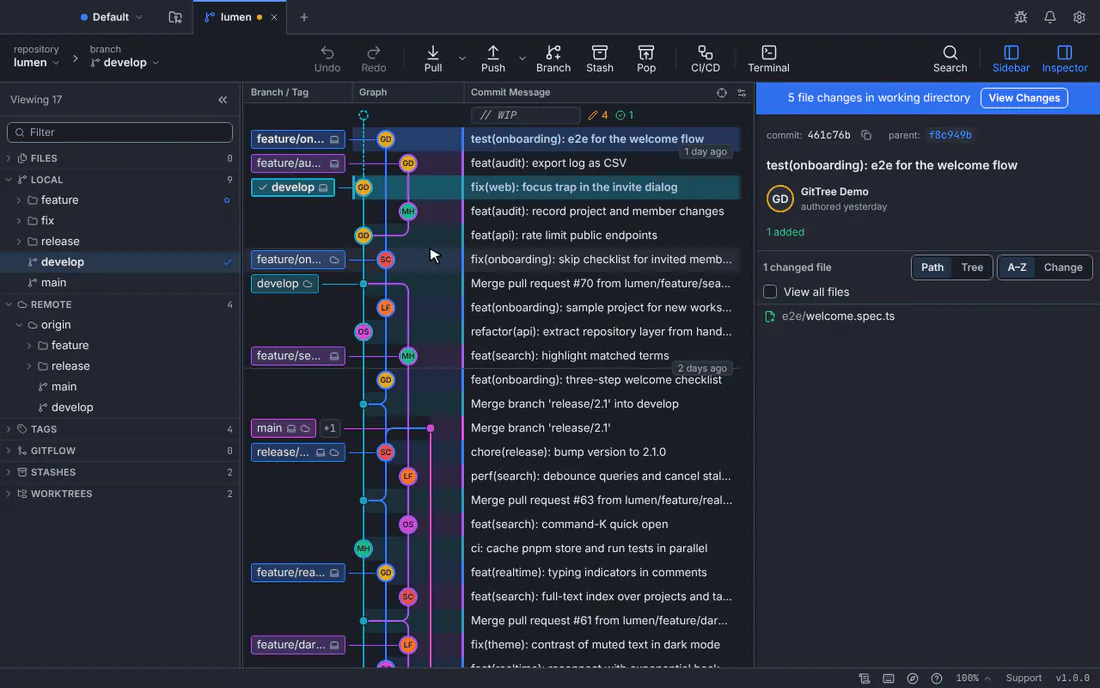
A new branch, feature/settings-copy, created at the current commit and checked out.GitTree interface with a demonstration repository. Name it
Type the name in Branch name, such as
feature/settings-copy. GitTree refuses names Git does not accept, and warns when a name differs from another only in case.Create it
Keep Check out the new branch on to start working on it right away, and press Create Branch.
Expected result
The branch label appears on its commit in the graph, with a ✓ when it is checked out. New commits now go on it.
Switch to another branch
Double-click a branch label, or right-click it and choose Checkout. For a remote branch such as origin/feature/search, GitTree checks out a local branch that tracks it.
If changes in your working folder would be overwritten, GitTree stops and offers:
| Choice | What happens |
|---|---|
| Stash and Switch | Your changes go into a stash, and you can apply them again on the other branch (stash pop). |
| Discard and Switch | Your changes are discarded after a copy is saved under refs/ogt/trash; Undo brings them back. |
| Commit First | Returns to the commit form so you commit before switching. |
A branch with no history
Create Orphan Branch… (command palette) starts a new, empty history, for example for a gh-pages site. Commit or stash your changes first; the commit you leave is kept, and Undo switches back while the new branch has no commit.
If something goes wrong
“Enter a name Git accepts.”
Branch names cannot contain spaces, .., ~, ^, : or end with .lock. Use letters, numbers, -, _ and /.
“A local branch named … already exists”
Checking out a remote branch found a local one with the same name. Choose to make it track the remote branch, check it out as it is, or create a new branch with another name.
Questions
Does creating a branch copy my files?
No. A branch is only a name that points to a commit, so creating one is instant. To work on two branches side by side in separate folders, use worktrees.