Find a commit
Press Ctrl+F (⌘F on a Mac) in the graph and type part of a commit message, an author, a SHA, a branch or a tag. GitTree highlights the matches and moves between them; Filter Graph narrows the history itself.
Works in GitTree Free: every local Git feature, once you are signed in.
On this page
Before you start
- A repository is open and its graph is showing.
Where to find it
- Search in the toolbar, or the shortcut below, opens the search bar above the graph.
- The command palette: Search Loaded History or Filter Graph….
| Action | macOS | Windows and Linux |
|---|---|---|
| Search Loaded History | ⌘F | Ctrl+F |
| Jump to HEAD | ⌘⇧H | Ctrl+Shift+H |
Steps
Open the search
Press Ctrl+F (⌘F on a Mac) or select Search in the toolbar. The field reads Message, author, sha, branch or tag.
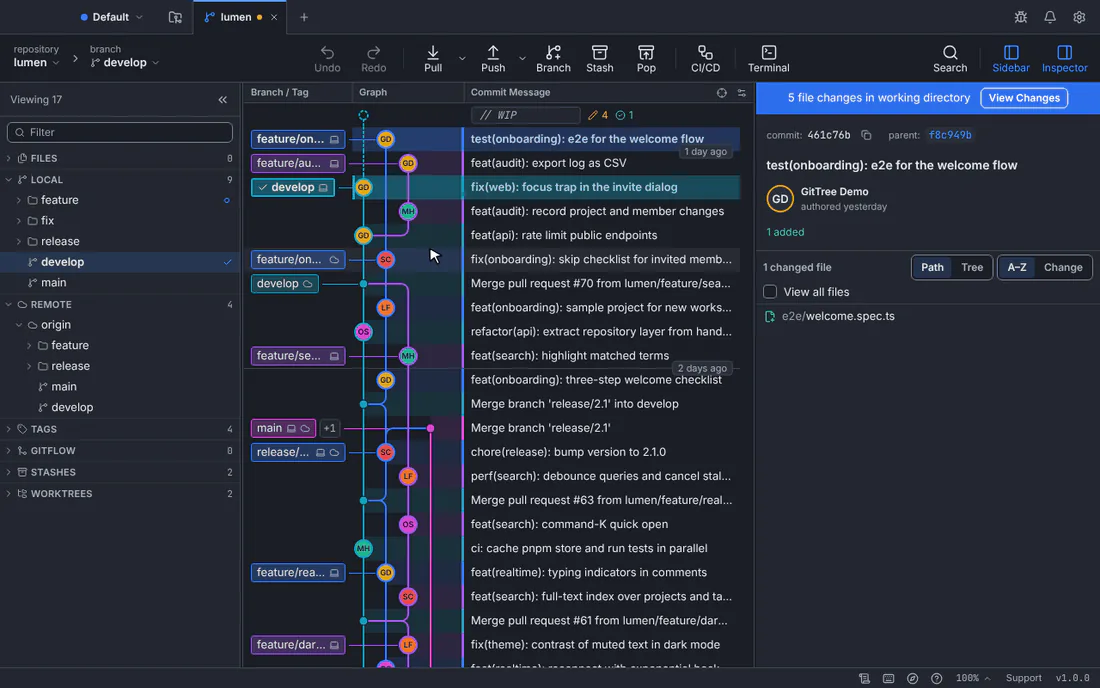
Typing “search” finds every commit that mentions it; Enter moves to the next one.GitTree interface with a demonstration repository. Type what you remember
A word of the message, an author’s name or e-mail, the start of a SHA, or a branch or tag name. The counter says how many commits match in the loaded history.
Move between matches
Press Enter, or use Next Match and Previous Match. The graph scrolls to each one and selects it, so its details appear in the inspector.
Close the search
Press Escape or Close Search. The selected commit stays selected.
Expected result
The commit you were looking for is selected in the graph, with its files and message in the inspector.
Filter the graph instead
Search highlights matches among all the rows. Filter Graph… (palette, or the graph header) keeps only the commits that match, until you clear it:
| Field | Keeps the commits that |
|---|---|
| Author name or email contains | were written by someone, such as lina@example.com. |
| From and To | were made between two dates. |
| Touches path | changed a file or folder, such as src/ or README.md. |
| Start from | are on all branches, the current branch with its upstream and base, or only the branches you chose. |
If something goes wrong
“No matches in loaded history.”
Check the spelling, or search a shorter part of the message. The commit may also be on a branch that is hidden or outside an active filter: clear the filter bar and search again.
“That commit is further down than the history read so far.”
GitTree is still reading a long history. Try again when reading finishes.
Questions
Can I search the contents of files?
The graph search looks at commit messages, authors, SHAs and reference names. To find a file by name, use the command palette with :; to see who changed a line, use file history and blame.