Clone a repository
Cloning copies a repository from GitHub, GitLab, Bitbucket, Azure DevOps or any Git server to your computer, with its history. In GitTree you paste the URL, choose where it goes and press Clone; it opens in a new tab when it is done.
Works in GitTree Free: every local Git feature, once you are signed in.
On this page
Before you start
- The repository’s URL, from its page on the host:
https://…orgit@…(SSH). - For a private repository, a way to sign in: an SSH key known to the host, or a password or token that Git asks for when it needs it.
Where to find it
- The Clone card on the New Tab page.
- The command palette: Clone Repository….
- With a connected GitHub or Bitbucket account (GitTree Pro), Clone from GitHub / Bitbucket… on the New Tab page lists your repositories to pick from.
| Action | macOS | Windows and Linux |
|---|---|---|
| Command palette, then Clone Repository… | ⌘⇧P | Ctrl+Shift+P |
Steps
Open the Clone dialog
Select Clone on the New Tab page. The dialog Clone a repository opens on Clone with URL.
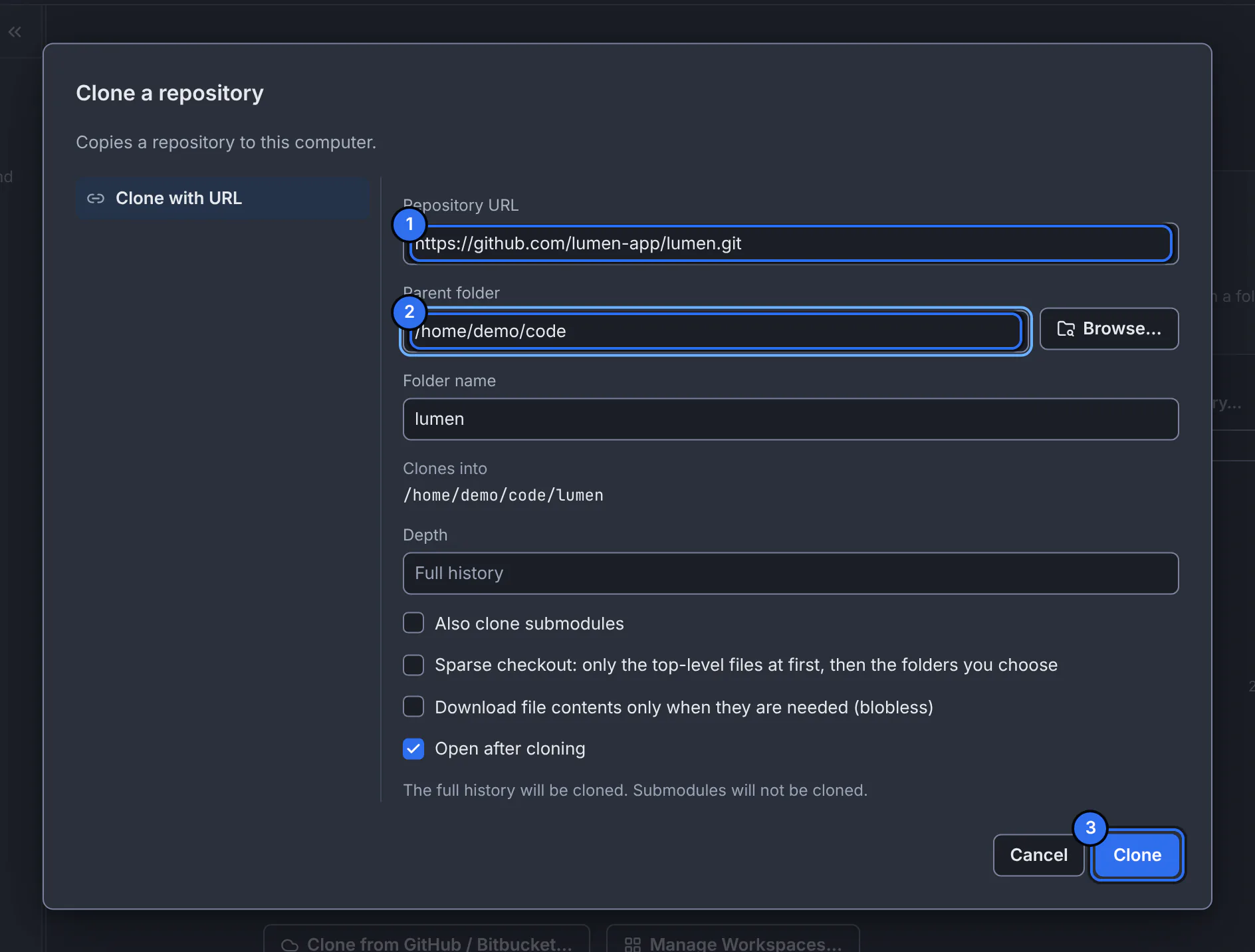
1 the repository’s URL, 2 the folder the clone goes into, 3 the button that starts it.GitTree interface with a demonstration repository. Paste the repository URL
Paste it into Repository URL. GitTree fills Folder name from it; change it if you want another name.
Choose where it goes
Type a Parent folder or use Browse…. Clones into shows the exact folder that will be created; it must be new or empty.
Set the options you need, then Clone
Leave Depth empty for the full history, or enter a number of commits for a shallow clone. Tick Also clone submodules if the project uses them. Keep Open after cloning on, then press Clone.
Expected result
A progress bar names each phase (receiving objects, resolving deltas, checking out files). When it finishes, the repository opens in a new tab and appears under Recent.
You can stop with Cancel Clone: GitTree removes what the clone wrote, and never deletes a folder that existed before.
Clone options
| Option | What it does |
|---|---|
| Depth | Only the latest commits are downloaded (a shallow clone). Empty means the full history. You can fetch more history later. |
| Also clone submodules | Clones the repositories the project includes as submodules too. |
| Sparse checkout | Checks out only the top-level files at first, then the folders you choose: useful for very large repositories. |
| Download file contents only when they are needed (blobless) | Downloads the history but fetches file contents on demand. |
| Open after cloning | Opens the new repository in a tab when the clone finishes. |
If something goes wrong
“Couldn’t clone the repository”
Read Git’s output in the dialog: it names the cause (wrong URL, no access, network). Choose Edit and Try Again to correct the URL or folder.
“This folder is not empty”
The destination already has files. Choose another Parent folder or Folder name.
Authentication failed for a private repository
Use an SSH URL with a key the host knows, or an HTTPS URL and a personal access token when Git asks for a password. GitHub and GitLab no longer accept account passwords over HTTPS.
Questions
Can I clone without connecting a hosting account?
Yes. Cloning with a URL is part of GitTree Free and uses your own Git credentials. Browsing your provider’s repository list needs a connected account, which is part of Pro.