Review working changes
The Working Changes panel is GitTree’s git status: it lists every file you changed since the last commit, split into Unstaged Files and Staged Files, and shows the diff of the file you select.
Works in GitTree Free: every local Git feature, once you are signed in.
On this page
Before you start
- A repository is open and you have changed at least one file.
Where to find it
- The
// WIProw at the top of the graph, with how many files are staged and unstaged. - View Changes in the blue bar above the commit details.
| Action | macOS | Windows and Linux |
|---|---|---|
| Stage the selected files | S | S |
| Unstage the selected files | U | U |
Steps
Open the changes
Select the
// WIProw or View Changes. The panel lists Unstaged Files and Staged Files with a count each.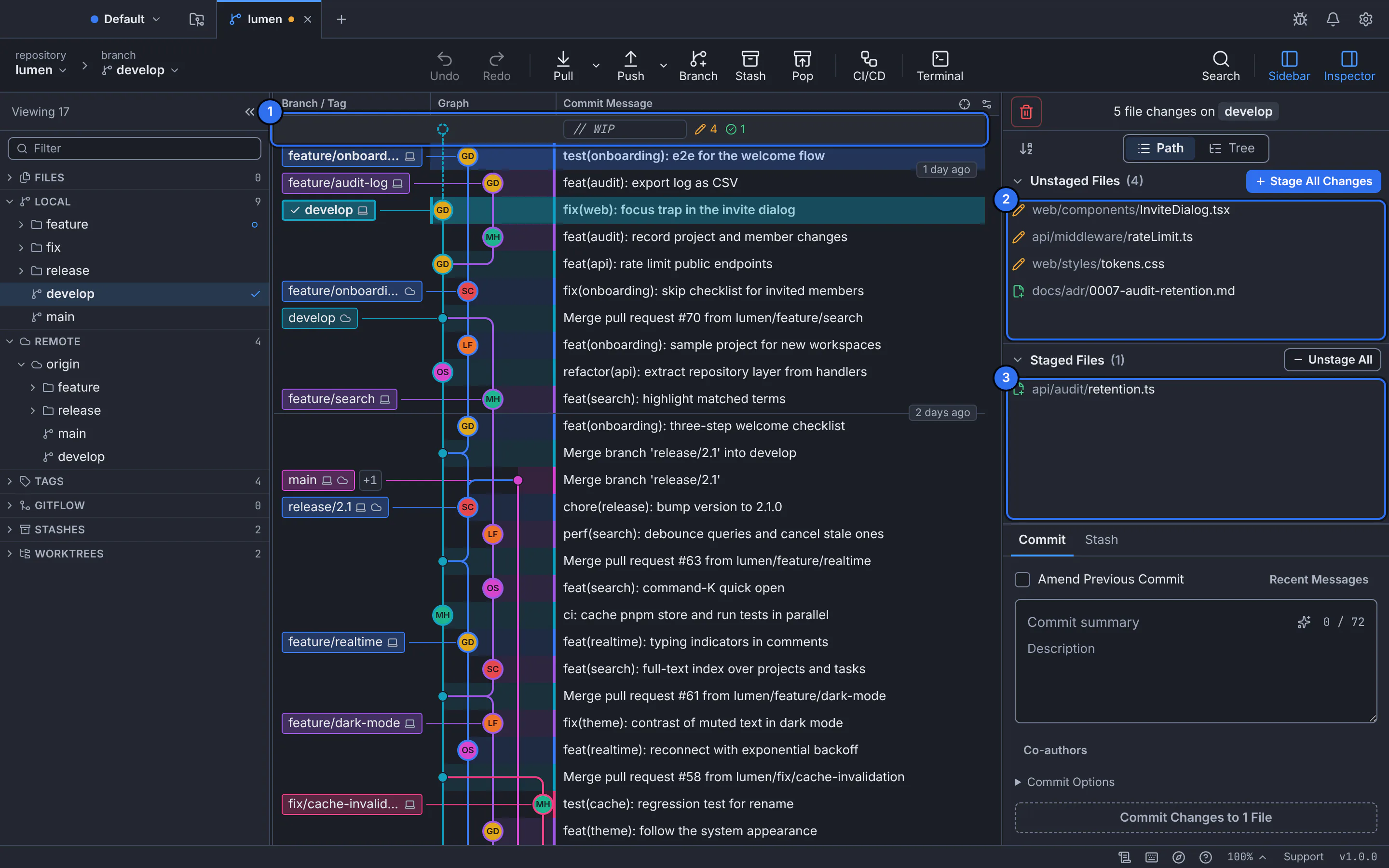
1 the WIP row, 2 the unstaged files, 3 the staged files.GitTree interface with a demonstration repository. Read each file’s state
Every file has a mark for how it changed: modified, added, deleted, renamed or new and untracked. Switch the list between Path and Tree.
Look at the diff
Select a file to see its diff in the middle, with what you added and removed.
Expected result
You know exactly what you changed, and you are ready to stage and commit it.
Actions on a file
- Stage File and Unstage File when you hover a row.
- Discard Changes to File…, saved first so Undo brings it back.
- Right-click for File History, File Blame, Ignore and Copy File Path.
If something goes wrong
“Too many new files to list one by one; folders are shown instead.”
A folder full of new files, often build output, is shown as one row. Ignore it if it should not be committed.
A change made in another program does not appear
GitTree refreshes when its window regains focus. If the tab says changes are not detected automatically, choose Refresh Now.
Questions
What does the WIP row mean?
It stands for work in progress: your uncommitted changes, shown above the newest commit so you can see where they will go.