Fetch, pull and push
Fetch downloads what is new on your remotes without changing your work. Pull brings your branch’s upstream into it. Push sends your commits to the remote. All three are in the toolbar, with their options in the arrow menus beside them.
Works in GitTree Free: every local Git feature, once you are signed in.
On this page
Before you start
- The repository has a remote, such as
origin(cloned repositories have one). - The remote accepts your sign-in: HTTPS with a token or credential helper, or an SSH key.
Where to find it
- Pull and Push in the toolbar; the arrow beside Pull holds Fetch All and the pull modes.
- Right-click a branch label for Push, Pull (fast-forward only) and Upstream.
| Action | macOS | Windows and Linux |
|---|---|---|
| Fetch All | ⌘⇧F | Ctrl+Shift+F |
| Pull | ⌘⇧L | Ctrl+Shift+L |
| Push | ⌘⇧U | Ctrl+Shift+U |
Steps
Fetch first
Choose Fetch All from the arrow beside Pull. GitTree says Fetched every remote. and the graph shows the remote branches where they are now; your own branches and files do not change.
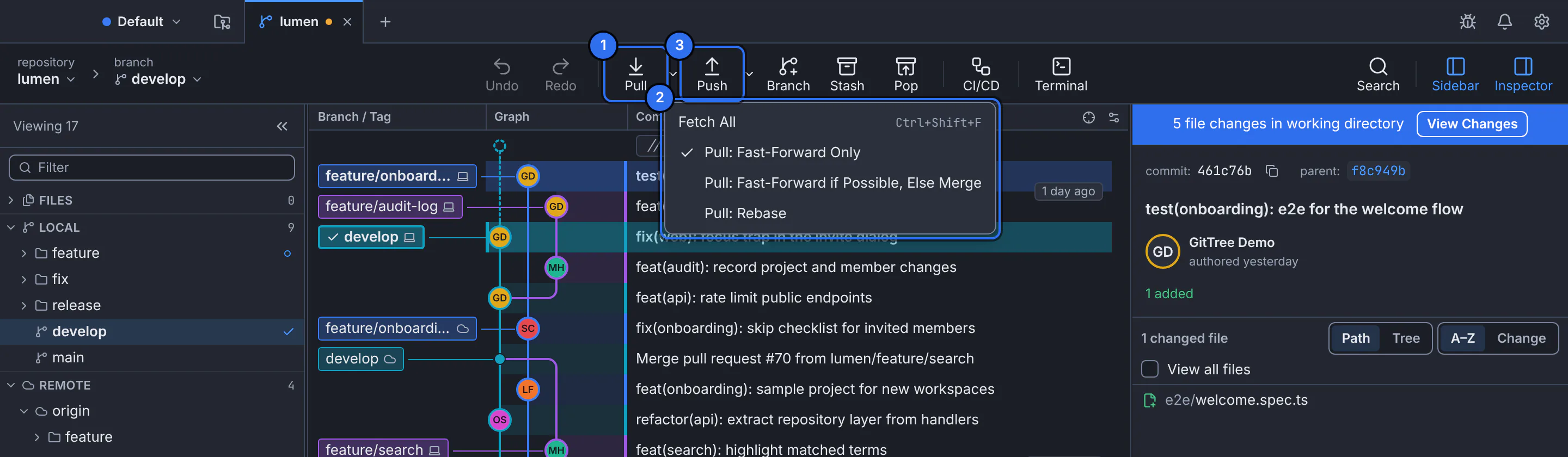
1 Pull, 2 Fetch All and the pull modes, 3 Push.GitTree interface with a demonstration repository. Pull the upstream into your branch
Press Pull. The mode with a ✓ in the arrow menu is used: Pull: Fast-Forward Only, Pull: Fast-Forward if Possible, Else Merge, or Pull: Rebase. The message says whether the branch was fast-forwarded, merged or rebased.
Push your commits
Press Push. A branch with no upstream yet gets one on its first push. GitTree says Pushed. and the local and remote labels in the graph meet again.
Expected result
Your branch and its remote branch point at the same commit: the graph shows one label with both icons.
Fetch, pull or push?
| Action | Changes | Never changes |
|---|---|---|
| Fetch All | The remote branches you see (origin/…). | Your branches, your files. |
| Pull | Your current branch, by bringing its upstream in. | Other branches. |
| Push | The branch on the remote. | Your local work. |
When a push is refused
If the remote has commits your branch lacks, GitTree shows The remote refused your branch and offers Fetch Only, Merge and Push or Rebase and Push. Pick one to bring the work together, and the push follows.
If something goes wrong
“… cannot fast-forward”
Your branch and its upstream both have new commits. Nothing was changed. Choose Resolve… to merge, rebase or reset, or pick Pull: Rebase or the merge mode and pull again.
“Pull stopped on conflicts.”
Resolve the conflicted files, then continue or abort from the banner (resolve merge conflicts).
Authentication failed
Check the remote URL and your credentials: for HTTPS a token or your credential helper, for SSH that your key is loaded. With GitTree Pro or a running trial, an account under Connected accounts in Preferences can also sign in for Git.
Questions
Are tags pushed with my commits?
No. Push one tag with Push Tag on its label, or use Push with Follow Tags… or Push All Tags… from the command palette (tags).