How to install and use git gui and gitk on Ubuntu, Debian, Fedora and Arch
git gui is the commit tool that comes with Git, and gitk is its history viewer. On Linux both live in separate packages. Here are the install commands for each distribution, a tour of both windows, the errors you will meet and what the tools cannot do.
Written by Kodmora
The software house behind GitTree
- Linux
- Git GUI clients
- Git basics
On this page
git gui is the graphical commit tool that ships with Git itself, and gitk is the history viewer that goes with it. Both are small Tcl/Tk programs: git gui stages changes, writes commits, creates branches, merges and pushes; gitk draws the commit graph. On Ubuntu, Debian and Linux Mint they are not part of the git package, so typing git gui right after installing Git prints git: 'gui' is not a git command. Install them first, then start git gui from inside a repository:
sudo apt install git-gui gitk
cd ~/code/my-project
git guiWhat git gui and gitk are, and how they split the work
The Git manual describes git gui as a tool focused on letting you change a repository by making new commits, amending existing ones, creating branches, performing local merges, and fetching and pushing. It deliberately does not show history: that is gitk’s job, and git gui opens gitk from its Repository menu. Both run on macOS, Windows and Linux; on Linux they look like what they are, Tk applications, with their own fonts and no dark theme to match your desktop.
| Tool | What it is for | Start it with | What it does not do |
|---|---|---|---|
| git gui | Staging files, hunks and lines; writing, amending and signing off commits; branches; local merges; fetch and push | git gui in a repository | Show history, pull in one step, stash, rebase |
| gitk | Browsing the commit graph, searching commits, viewing each commit’s diff | gitk or gitk --all | Commit, stage or push |
| git citool | Making one commit, then closing | git citool (or git citool --amend) | Anything after the commit |
| git gui blame | Annotating a file line by line, with the commit behind each line | git gui blame <file> | Editing the file |
| git gui browser | Browsing the files of a branch or commit | git gui browser <branch> | Changing files |
Install git gui and gitk on Ubuntu, Debian, Mint, Fedora and Arch
Distributions split Git into a command-line package and separate GUI packages, so a plain Git install leaves the windows out. The package versions follow your Git: Ubuntu 24.04 installs git-gui 1:2.43.0 next to Git 2.43.0. These are the commands, checked against each distribution’s own package pages:
| Distribution | Command | Notes |
|---|---|---|
| Ubuntu 22.04 and 24.04, Linux Mint, Pop!_OS | sudo apt install git-gui gitk | Pulls in tk automatically |
| Debian 12 and later | sudo apt install git-gui gitk | Same packages as Ubuntu |
| Fedora | sudo dnf install git-gui gitk | Both are subpackages of Fedora’s git |
| Arch Linux and Manjaro | sudo pacman -S git tk | The git package contains both tools; tk is only an optional dependency |
Once installed, git gui version prints the git-gui release (0.21 on Ubuntu 24.04). If Git itself is too old for other tools you use, our guide to upgrading Git on Ubuntu 22.04 adds the git-core PPA; reinstalling git-gui afterwards keeps the two in step.
How to open git gui in a repository, step by step
Open a terminal in your project folder
Use
cdto go to the repository, or right-click the folder in your file manager and choose to open a terminal there.Run git gui
Type
git guiand press Enter. The window opens on that repository, with Unstaged Changes at the top left, Staged Changes (Will Commit) below it, the diff on the right and the commit message box at the bottom.Or pick a repository from the start window
Started outside a repository, git gui shows three choices: Create New Repository, Clone Existing Repository and Open Existing Repository, plus your recent repositories.
Add it to your desktop if you use it often
With a repository open, Repository › Create Desktop Icon writes a launcher that opens git gui on that repository with one click.
Make a commit with git gui
- Rescan (F5) refreshes the list after you edit files elsewhere.
- Click a file’s icon in Unstaged Changes to stage it, or use Commit › Stage To Commit (Ctrl+T). Stage Changed stages every tracked file you modified.
- To commit only part of a file, right-click inside the diff and choose Stage Hunk For Commit, or select lines and choose Stage Lines For Commit.
- Type the message in the commit box. Sign Off adds your
Signed-off-byline, and the Amend Last Commit option reopens the previous commit instead of making a new one. - Press Commit (Ctrl+Enter), then Push to send the branch to its remote.
Browse history with gitk
gitk opens a three-pane window: the commit graph with messages, authors and dates at the top, the selected commit’s diff at the bottom left and its changed files at the bottom right. Plain gitk shows the current branch; gitk --all shows every branch and tag. From git gui, Repository › Visualize Current Branch’s History and Visualize All Branch History open the same views. A few commands worth keeping:
gitk --all
gitk -- src/main.c
git gui blame src/main.c
git gui browser main
git citool --amend
In order: every branch, only commits that touched one file, line-by-line blame, a file browser for the main branch, and a one-shot window that amends the last commit. In gitk, the search box below the graph finds commits by message, author or changed path.
Fix the common git gui and gitk errors on Linux
git: 'gui' is not a git command
The git-gui package is missing. Install it with the command for your distribution above. A related surprise: the git-gui program lives in Git’s own folder (/usr/lib/git-core on Ubuntu), not on your PATH, so type git gui with a space.
gitk: exec: wish: not found
gitk is a script for wish, the Tk shell. On Arch Linux and Manjaro the git package installs gitk without Tk, so install tk. On other distributions, reinstalling the gitk package brings Tk back.
no display name and no $DISPLAY environment variable
git gui and gitk need a graphical session. You see this message over plain SSH, in a container or in a terminal without a desktop. Run them on the machine’s own desktop, or connect with ssh -X so the window opens on your screen.
The text is tiny on a high-resolution screen
Open Edit › Options… and raise Main Font and Diff/Console Font. The setting applies to every repository when you change it in the Global (All Repositories) column.
What git gui and gitk cannot do
git gui has not changed much in years, and for the commits it was built for, that is fine. The gaps show up as soon as your day includes more than committing and pushing. Here is the same list of tasks in git gui and gitk and in GitTree, the Git client we make (we are biased, so check each claim yourself):
| Task | git gui and gitk | GitTree |
|---|---|---|
| Stage files, hunks and single lines | Yes | Yes |
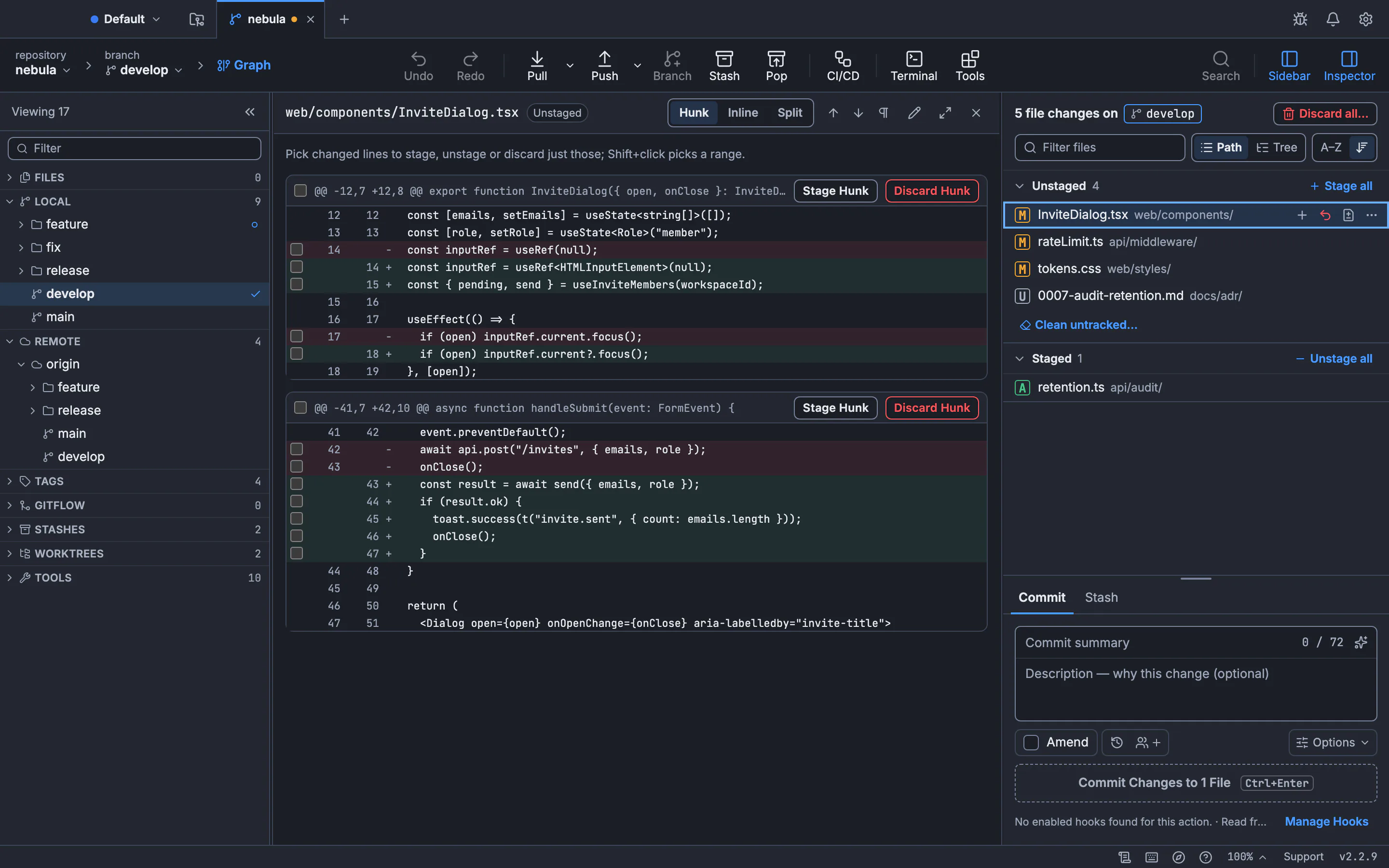
| History and commits in one window | No: history is a separate gitk window | Yes: the commit graph is the main view |
| Pull | Fetch, then a local merge | One button, with fast-forward, merge or rebase |
| Stash | No | Yes, with apply and pop |
| Interactive rebase (reorder, squash, reword) | No | Yes, in an editor |
| Merge conflicts | Choose a whole side, or run an external merge tool | Three-way conflict editor, line by line |
| Undo a reset, rebase or deleted branch | No | Yes: Undo and Redo, and Lost & Found |
| Pull requests and CI/CD runs | No | Yes, with GitTree Pro |
| SSH keys | Help › Show SSH Key shows or generates one key | Preferences › SSH generates keys, picks one for remotes and tests the connection |
A modern alternative on Linux: everything in one window
If you like git gui’s line-by-line staging but miss everything around it, GitTree keeps that habit and adds the rest. It is a desktop Git client for macOS, Windows and Linux that runs on the Git you already have, ships as a .deb for Ubuntu 22.04+ and Debian 12+ and as an AppImage, and puts every Git feature on its Free plan, private repositories and work use included. One command installs it on Ubuntu, Debian or Linux Mint:
curl -fsSL https://gittree.app/install.sh | bash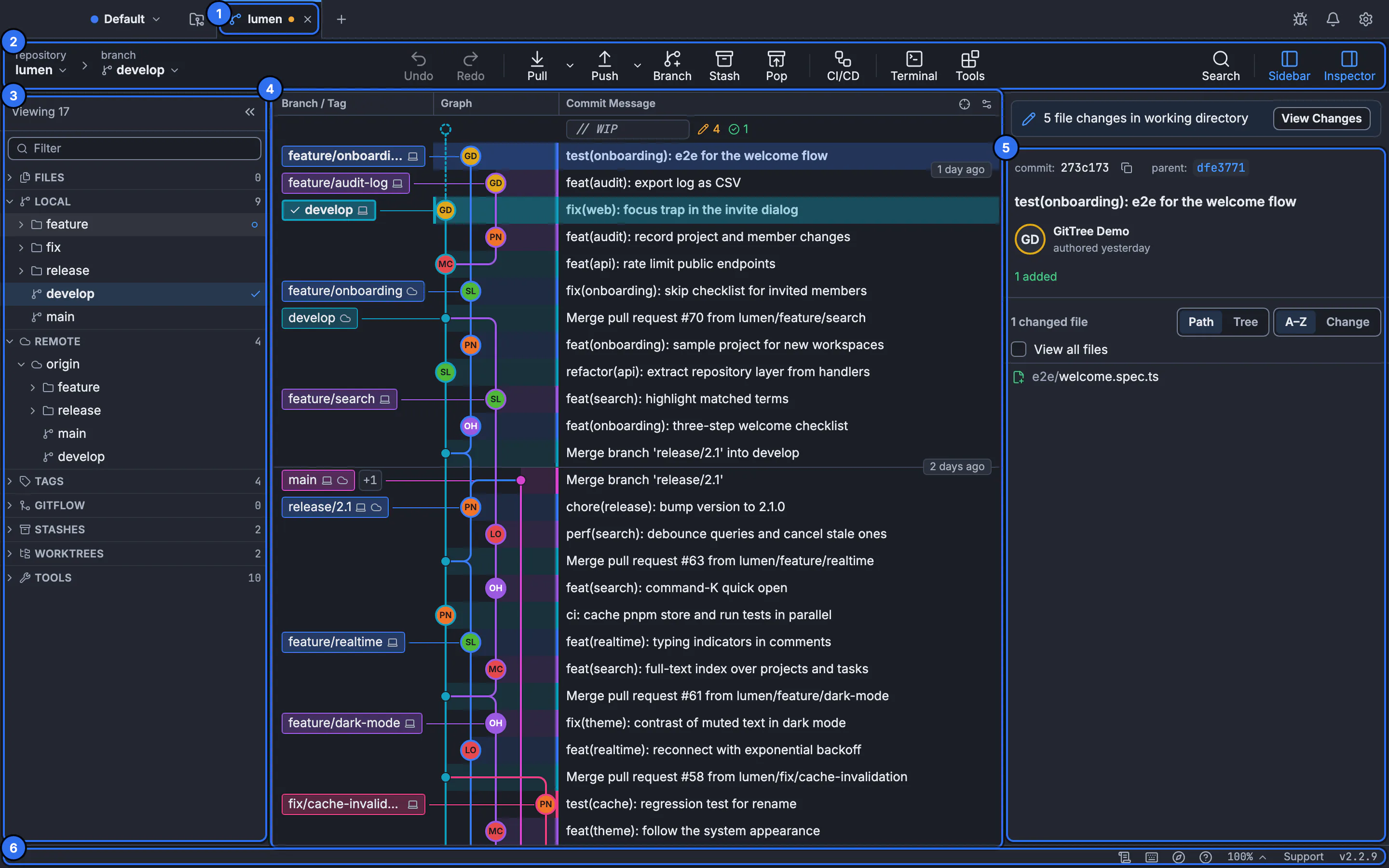
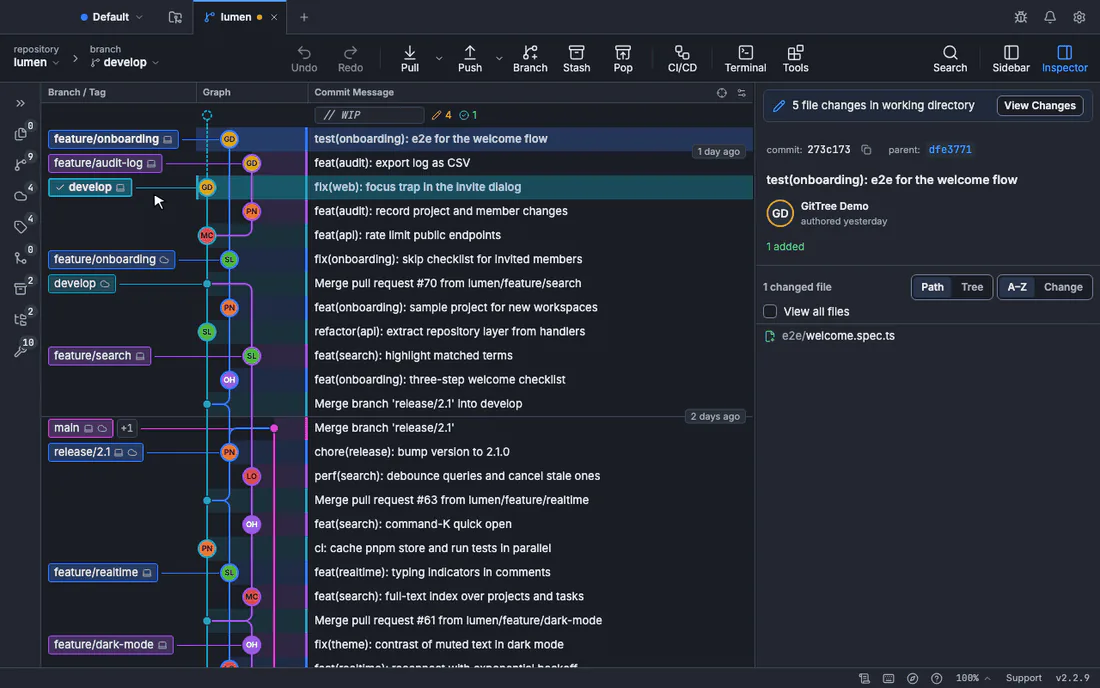
- Graph and commits together. The commit graph is the main view, and the
// WIProw at the top opens your changes, so you never switch to a second window to see where a commit landed. See our Git tree visualizer guide. - Safety net. Before a reset, rebase, discard or branch delete, GitTree takes a snapshot, so Undo reverses it.
- Conflicts in place. A three-way editor shows both sides and the result; see resolving merge conflicts.
- History rewriting. Reorder, squash, reword or drop commits in the interactive rebase editor.
- Your keys, your keyring. SSH keys stay in
~/.ssh, and tokens live only in the Secret Service (GNOME Keyring or KeePassXC).
Comparing more options? Our guide to the best Git GUI for Linux puts seven clients side by side, Git GUI vs command line helps you decide when a window beats the terminal, and the Linux install guide covers the .deb, the AppImage and uninstalling.
Frequently asked questions
Is git gui included with Git on Ubuntu?
No. Ubuntu and Debian ship git gui and gitk in their own packages, git-gui and gitk, so sudo apt install git alone leaves them out. Install them with sudo apt install git-gui gitk; apt adds Tk, which both need.
How do I open git gui?
Open a terminal in your repository and run git gui (with a space). Outside a repository it shows a start window to create, clone or open one. Inside git gui, Repository › Create Desktop Icon adds a launcher for that repository.
What is the difference between git gui and gitk?
git gui is for making commits: staging, writing the message, amending, branching, merging locally, fetching and pushing. gitk is a history browser that draws the commit graph and shows each commit’s diff. git gui opens gitk from its Repository menu.
Why does Linux say gui is not a git command?
The git-gui package is not installed. On Ubuntu, Debian and Mint run sudo apt install git-gui; on Fedora sudo dnf install git-gui; on Arch the git package includes it, but you need sudo pacman -S tk for it to start.
Can git gui stash, rebase or undo?
No. git gui has no stash, no rebase or interactive rebase, and no general undo; its Undo Last Revert only restores the most recent hunk or line you reverted. Use the command line for those, or a client such as GitTree that has them in the window.
Does gitk work on Wayland?
Yes, through XWayland, the X11 compatibility layer that GNOME and KDE Plasma start for older apps. Tk draws its windows as an X11 client, so they look a little different from native apps. To enlarge the text, use Edit › Preferences in gitk and Edit › Options… in git gui.
What is a better Git GUI for Linux than git gui?
It depends on what you miss. GitTree keeps line staging and adds the graph, stash, interactive rebase, a conflict editor and undo, with every Git feature on its Free plan. Our best Git GUI for Linux guide compares seven clients, open-source ones included.
Sources
Claims about other products were checked against their official pages on November 19, 2026. Prices and features change; the vendors’ pages are the source of truth.
- Git documentation: git-gui
- Git documentation: gitk
- git-gui source repository
- Ubuntu Packages: git-gui in Ubuntu 24.04 (noble)
- Ubuntu Packages: gitk in Ubuntu 24.04 (noble)
- Debian Packages: git-gui in Debian 12 (bookworm)
- Fedora Packages: git-gui
- Fedora Packages: gitk
- Arch Linux Packages: git (optional dependency tk)
- GitTree for Linux: requirements, .deb and AppImage