Git Tower for Linux: is there one, and what to use instead
Tower has no Linux version. Here is what its official pages list, what Tower users tend to miss on Linux, and which Git clients cover the same ground on Ubuntu, Debian and other distributions.
Written by Kodmora
The software house behind GitTree
- Git GUI clients
- Comparisons
- Linux
Disclosure: GitTree’s maker wrote this article, so we have a stake in GitTree. We describe every product, ours included, from its official pages and our own use, and say where another tool is the better fit.
On this page
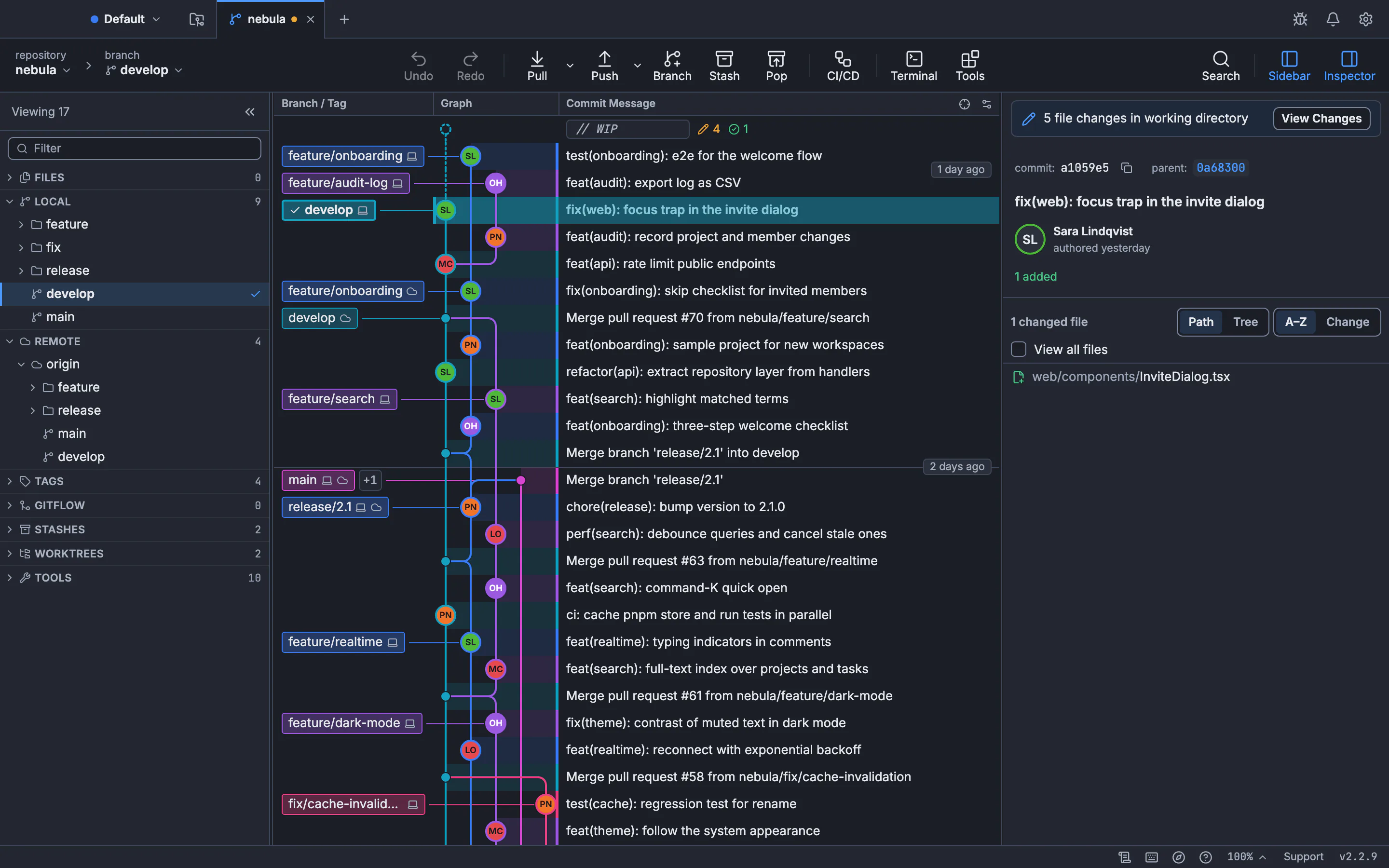
No. Tower is a paid desktop client for macOS and Windows only, no Linux version, and it does not list one as planned. On Linux, the closest replacements are GUI clients with a commit graph, line staging and undo. Our pick, with an obvious bias, is GitTree: a .deb for Ubuntu and Debian and an AppImage, with every Git feature on the Free plan.
GitTree’s maker wrote this post, so weigh our recommendation accordingly. Every claim about Tower comes from its official pages, checked on the date of our Tower comparison, and they are listed in the sources below.
Does Tower run on Linux?
- Tower’s website offers macOS and Windows downloads only, no Linux version, and one licence covers both editions.
- Its requirements list Apple silicon and Intel Macs, then Windows 10 or newer, and nothing for Linux.
- No official package exists in any form: no .deb, no .rpm, no AppImage, no Flatpak.
We have not tested Tower’s Windows edition under Wine or a similar layer. Tower does not support that setup, so a client built for Linux is the practical answer.
Which Git clients run on Linux?
| Client | Linux packages | Private repositories | Good for |
|---|---|---|---|
| GitTree | .deb and AppImage (x86_64, Ubuntu 22.04+, Debian 12+) | Included on the Free plan | A full GUI with undo and a conflict editor |
| GitKraken Desktop | .deb, .rpm, .tar.gz and Snap | Paid plan | Teams that want cloud and team features |
| Sublime Merge | Signed apt, pacman, yum, dnf and zypper repositories | Licence needed to keep using it | Keyboard-driven speed |
| SmartGit | tar.gz, .deb and Flathub | Commercial licence for work use | Deep Git features, perpetual licences |
| Lazygit | Release builds, a terminal app | Free and open source | Terminal users, also over SSH |
The full comparison, with pros and cons for each, is in the best Git GUI for Linux.
What do Tower users miss on Linux?
| In Tower | In GitTree on Linux |
|---|---|
| Undo with Cmd/Ctrl+Z | Undo and redo for commits, resets, rebases, discards and branch changes, plus a reflog view |
| Drag to reorder or squash commits | One interactive rebase plan with drag or keyboard reordering, and autosquash |
| Conflict Wizard, which picks one version of a file | A built-in three-way editor with per-hunk and per-line choices |
| Hunk and line staging | File, hunk and line staging, with discard the same way |
| Pull requests in the app | Pull requests in the app with GitTree Pro |
| Git Flow | Git Flow for feature, release and hotfix branches |
Where Tower stays ahead
- Tower bundles Git and Git LFS. GitTree uses your installed Git 2.39 or newer.
- Tower has stacked branches, custom workflows, SAML single sign-on and git-svn. GitTree does not.
- Tower has been around since 2010, and GitTree is new.
How do I move from Tower to a Linux client?
Your repositories are plain Git, so nothing needs converting: open the same folders in the new client. Your commits, branches, remotes and stashes are all still there. If you move between systems, clone from your remote on the Linux machine.
How to install GitTree on Ubuntu or Debian
Check your Git version
Run
git --version. GitTree needs 2.39 or newer. Ubuntu 22.04 and Linux Mint 21 ship 2.34, so upgrade Git on Ubuntu first.Download the installer
Get the .deb or the AppImage from the Linux page.
Install it
Run
sudo apt install ./Git-Tree-Linux.deb, or make the AppImage executable and run it.Open a repository
Choose Continue with local Git (no account), then open a folder you already use. The Free plan covers every Git feature.
For the same question about other clients, see Sourcetree for Linux and GitHub Desktop for Linux.
Frequently asked questions
Is Git Tower available on Ubuntu?
No. Tower has no Linux build for Ubuntu or any other distribution. GitTree, GitKraken Desktop, Sublime Merge and SmartGit all have official Linux packages.
Will Tower add a Linux version?
Its official pages do not announce one. Check Tower’s website for the current status.
What is the best Tower alternative on Linux?
It depends on what you want. GitTree covers private repositories and undo on its Free plan, Sublime Merge suits keyboard users, and GitKraken Desktop suits teams. Our Tower alternative page compares it row by row.
Can I use my Tower licence on Linux?
No. A Tower licence covers its Mac and Windows editions, and there is no Linux edition to activate.
Do I need to convert my repositories to leave Tower?
No. Tower works on normal Git repositories, and any other Git client can open them as they are.
Sources
Claims about other products were checked against their official pages on November 7, 2026. Prices and features change; the vendors’ pages are the source of truth.
- Tower overview
- Tower: all features and requirements
- Tower pricing and plans
- Tower undo
- GitKraken Desktop downloads
- Sublime Merge: Linux package manager repositories
- SmartGit downloads
- Lazygit
All product names are trademarks of their respective owners. GitTree is independent and not affiliated with or endorsed by any of them.