How to set an upstream branch in Git
An upstream is the remote branch your local branch pushes to and pulls from. Here is how to set, check, change and remove one, how to fix the “no upstream branch” error, and what upstream means on a fork.
Written by Kodmora
The software house behind GitTree
- Branches
- Remotes and push
On this page
To push a new branch and set its upstream, run `git push -u origin my-branch`. If the branch already exists on the remote, run git branch -u origin/my-branch instead. After that, plain git push and git pull know where to go. -u is short for --set-upstream.
What is an upstream branch in Git?
The upstream, also called the tracking branch, is the remote branch linked to your local one. Git uses that link for three things: where git pull and git push go without arguments, what the ahead and behind counts in git status compare against, and what the shorthand @{u} means.
How do I set the upstream for a new branch?
git switch -c feature/search
git push -u origin feature/search
This creates the branch on the remote and links the two. You only need -u on the first push. The create and switch branches guide covers the step before this one.
How do I set the upstream for an existing branch?
When the remote branch already exists, link it without pushing:
# the branch you are on
git branch -u origin/feature/search

# any other branch
git branch -u origin/main main
The long form is git branch --set-upstream-to=origin/main. If Git says the remote branch does not exist, run git fetch first.
How do I fix “The current branch has no upstream branch”?
Git prints this when you run git push on a branch that has never been pushed:
fatal: The current branch feature/search has no upstream branch.
To push the current branch and set the remote as upstream, use

    git push --set-upstream origin feature/search
Run the command it suggests. To stop seeing the error, have Git do this on every first push (Git 2.37 or later):
git config --global push.autoSetupRemote trueThe related message “There is no tracking information for the current branch” comes from git pull. The fix is the same: git branch -u origin/my-branch.
How do I see what a branch tracks?
# every branch, with its upstream and ahead/behind
git branch -vv

# only the current branch
git rev-parse --abbrev-ref @{u}

# commits you have not pushed
git log @{u}..

# commits you have not pulled
git log ..@{u}
How do I change or remove an upstream?
# point the branch somewhere else
git branch -u origin/develop

# stop tracking anything
git branch --unset-upstream
Neither command changes any commits. They only edit the branch’s settings in .git/config.
What does upstream mean on a fork?
The word has a second meaning. On a fork, upstream is by convention the name of a remote: the original project you forked from, while origin is your own copy. That is what “git remote add upstream” is about:
git remote add upstream https://github.com/original/project.git
git fetch upstream
git switch main
git merge upstream/main
git push origin main| Upstream branch | Upstream remote | |
|---|---|---|
| What it is | The remote branch one local branch tracks | A remote named upstream, usually the original of a fork |
| Set with | git push -u or git branch -u | git remote add upstream <url> |
| Check with | git branch -vv | git remote -v |
How to set an upstream in GitTree
Publish a new branch
With the branch checked out, press Push. GitTree says the branch does not track a remote branch yet and asks for the Remote.
Choose the remote
Pick
originand press Push to origin. The branch is created there and tracks it from then on.Change what it tracks
Right-click the branch label and open Upstream, then Set Upstream…. Pick the Upstream branch and press Track, or choose Unset Upstream.
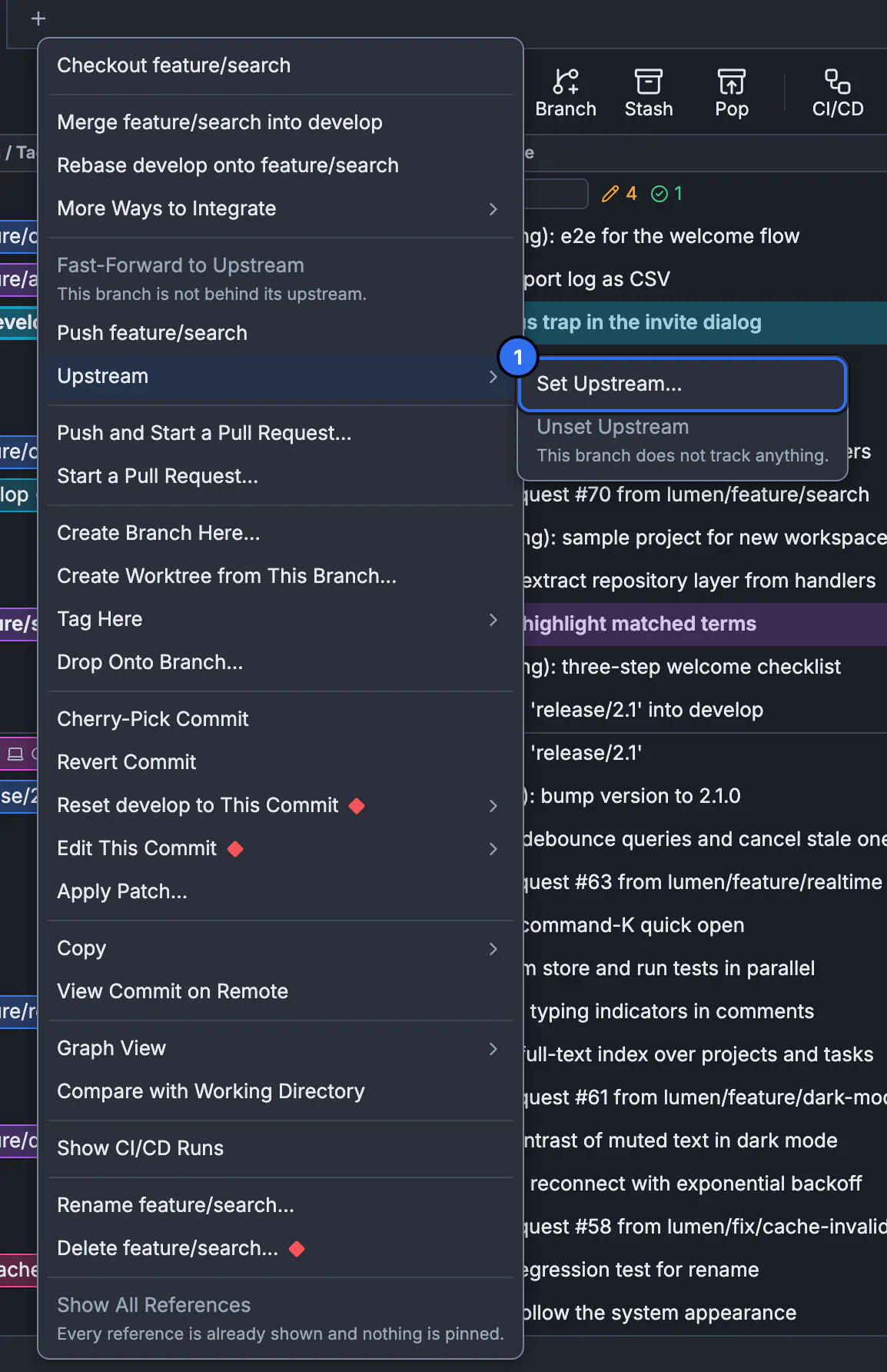
See set tracking and publish a branch for the details, and the remotes and upstreams lesson to practise.
Frequently asked questions
What does git push -u do?
It pushes the branch and records the remote branch as its upstream, so later git push and git pull need no arguments.
Do I need -u on every push?
No, only once per branch. The setting stays in .git/config until you change it.
What is the difference between origin and upstream?
origin is the default name for the remote you cloned from. upstream is either the branch a local branch tracks, or by convention a second remote pointing at the project you forked.
What does @{u} mean?
It is shorthand for the current branch’s upstream, so git diff @{u} compares your branch with the remote branch it tracks. @{upstream} is the long form.
Why does my branch push to the wrong remote branch?
Its upstream points there, often after a rename. Run git branch -vv to see it, then git branch -u origin/correct-name to fix it.
Sources
Claims about other products were checked against their official pages on November 7, 2026. Prices and features change; the vendors’ pages are the source of truth.