How to revert a merge commit in Git without rewriting history
A merge commit has two parents, so Git needs to know which side to keep. Here is how to pick the parent, undo the merge safely on a shared branch, and bring the work back later.
Written by Kodmora
The software house behind GitTree
- Merge
- Undo and recovery
- Commit history
On this page
To revert a merge commit, run `git revert -m 1 <merge-commit>`. The -m 1 tells Git to keep the first parent, which is the branch you merged into, and to undo everything the merge brought in. Git adds a new commit, so history stays intact and the fix is safe to push to a shared branch.
How do I revert a merge commit?
Find the merge commit first. The graph shows it as a commit with two parents:
git log --oneline --graph -10Then confirm its parents. The first hash printed after the commit is parent 1, the second is parent 2:
git log -1 --format="%h parents: %p" <merge-commit>Revert it, keeping parent 1, and push the new commit like any other:
git revert -m 1 <merge-commit>
git push
Nothing is rewritten, so nobody needs to reset or force-pull. If the revert conflicts, fix the files, stage them and run git revert --continue. To back out, run git revert --abort.
Why does Git say “commit is a merge but no -m option was given”?
A normal commit has one parent, so its diff is obvious. A merge commit has two, so git revert <merge-commit> cannot tell which side you want to return to. Git stops with this error and changes nothing:
error: commit 4f2a9c1 is a merge but no -m option was given.
fatal: revert failed
Add -m with a parent number and run it again.
Should I use -m 1 or -m 2?
| Option | Keeps | Use it when |
|---|---|---|
-m 1 | The branch you merged into, such as main | A feature was merged and should be taken out. This is the usual case. |
-m 2 | The branch that was merged in | You pulled main into your feature branch and want to remove what came from main. |
How do I merge the same branch again after a revert?
This is the trap. As the Git documentation puts it, reverting a merge “declares that you will never want the tree changes brought in by the merge”. The branch’s commits are still ancestors of main, so a second git merge only brings commits made after the revert.
To bring the original work back, revert the revert first, then merge the fixed branch:
git revert <revert-commit>
git merge feature/search
What if the merge is not pushed yet?
You can drop the merge instead of adding a revert. Git records the commit before the merge in ORIG_HEAD, and --merge refuses to touch unrelated local edits that the reset would overwrite:
git reset --merge ORIG_HEADIf the merge is still in progress and has conflicts, there is no merge commit yet, so use git merge --abort. Read how to undo a reset, rebase or commit if you go too far, and the lesson on revert versus reset on shared history for the rule behind this choice.
How to revert a merge commit in GitTree
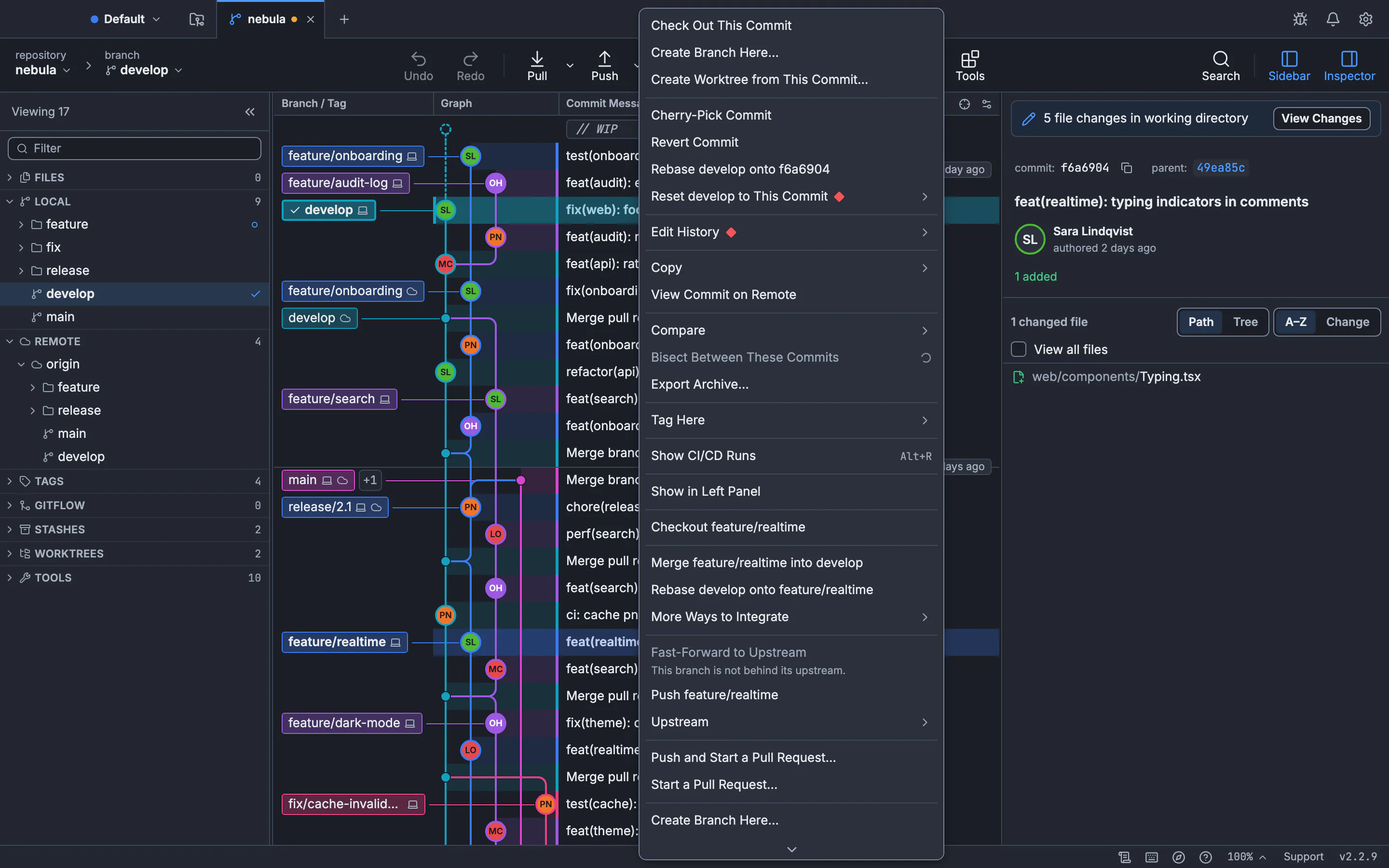
Open the commit’s menu
Find the merge in the commit graph and right-click it.
Choose Revert Commit
A merge has two parents, so GitTree asks which one to measure against: First parent (the branch merged into) is the usual choice, and Second parent (the branch merged in) is the other.
Check the result
GitTree says Reverted. and the new commit is the top row of your branch. If it conflicts, resolve the files and press Continue, or Abort… to go back.
See cherry-pick and revert in GitTree for the full guide, including several commits at once.
Frequently asked questions
Does git revert delete the merge commit?
No. The merge stays in history. Git adds a new commit that undoes its changes, which is why it is safe on a shared branch.
What does -m 1 mean in git revert?
It names the mainline parent to keep. Parent 1 is the branch you were on when you ran the merge, so -m 1 removes what the other branch brought in.
Can I revert a merge that is already pushed?
Yes, and it is the right tool for that. Reverting adds a commit, so you push normally and nobody has to rewrite anything.
Why did my second merge bring nothing back?
The reverted branch’s commits are already in the history, so Git treats them as merged. Revert the revert commit, then merge again.
How do I undo a merge that is still in progress?
Run git merge --abort. It stops the merge and returns the files to how they were before you started it.
Sources
Claims about other products were checked against their official pages on November 7, 2026. Prices and features change; the vendors’ pages are the source of truth.