How to abort a Git merge or rebase
A merge stopped on conflicts and you want out. git merge --abort takes you back to where you started. Here is the right command for every stopped operation, what each one keeps, and what to do once it has already finished.
Written by Kodmora
The software house behind GitTree
- Merge
- Rebase
- Undo and recovery
- Merge conflicts
On this page
To cancel a merge in progress, run `git merge --abort`. To cancel a rebase, run git rebase --abort. Both put your branch back exactly where it was before you started. They only work while the operation is stopped. Once a merge is committed there is nothing to abort, and you need git reset or git revert instead.
Which command aborts which operation?
Run git status first. Its first lines name what is in progress, and that tells you which command you need:
| What is in progress | Cancel it | Keep going |
|---|---|---|
| Merge | git merge --abort | git commit or git merge --continue |
| Rebase | git rebase --abort | git rebase --continue or --skip |
| Cherry-pick | git cherry-pick --abort | git cherry-pick --continue |
| Revert | git revert --abort | git revert --continue |
Patch from git am | git am --abort | git am --continue |
How do I abort a merge?
git status
# You have unmerged paths.

git merge --abort
git status
# nothing to commit, working tree clean
This also works after a git pull that stopped on a conflict, because a pull is a fetch followed by a merge. If your pull is set to rebase, use git rebase --abort instead.
How do I abort a rebase?
git rebase --abortThe branch returns to where it was before the rebase started, even if some commits had already been replayed. To stop but keep the commits replayed so far on a detached HEAD, use git rebase --quit, then decide what to keep. If a commit is simply no longer needed, git rebase --skip drops it and carries on.
Why does Git say “There is no merge to abort”?
fatal: There is no merge to abort (MERGE_HEAD missing).- The merge already finished. Read
git log -3. If the merge commit is there, undo it as shown below. - It is a rebase or cherry-pick.
git statusnames the real operation. Use its abort from the table. - Conflicts came from `git stash pop`. That is not a merge. Run
git reset --mergeto clear them. The stash is kept, so nothing is lost.
How do I undo a merge that already finished?
If you have not pushed it, move the branch back. Git saves the pre-merge position in ORIG_HEAD:
git reset --hard ORIG_HEADThat command discards uncommitted changes, so check git status first. If you have pushed it, keep history intact with a revert commit, as explained in how to revert a merge commit:
git revert -m 1 <merge-sha>How do I undo a rebase that already finished?
Find the commit from before the rebase in the reflog and reset to it:
git reflog
# 7c1d9ab HEAD@{4}: rebase (start): checkout main
# 3e52f10 HEAD@{5}: commit: add search box

git reset --hard HEAD@{5}
Pick the entry just before the line that says rebase (start). Undoing a reset, rebase or commit walks through this in more detail.
Should I abort or resolve the conflicts?
Abort when you merged the wrong branch, had uncommitted work, or want to rethink the approach. Aborting costs nothing, and you can start again whenever you like. Resolve when the conflicts are few and you understand both sides. How to resolve merge conflicts shows how to read the markers.
How to abort a merge or rebase in GitTree
Read the banner
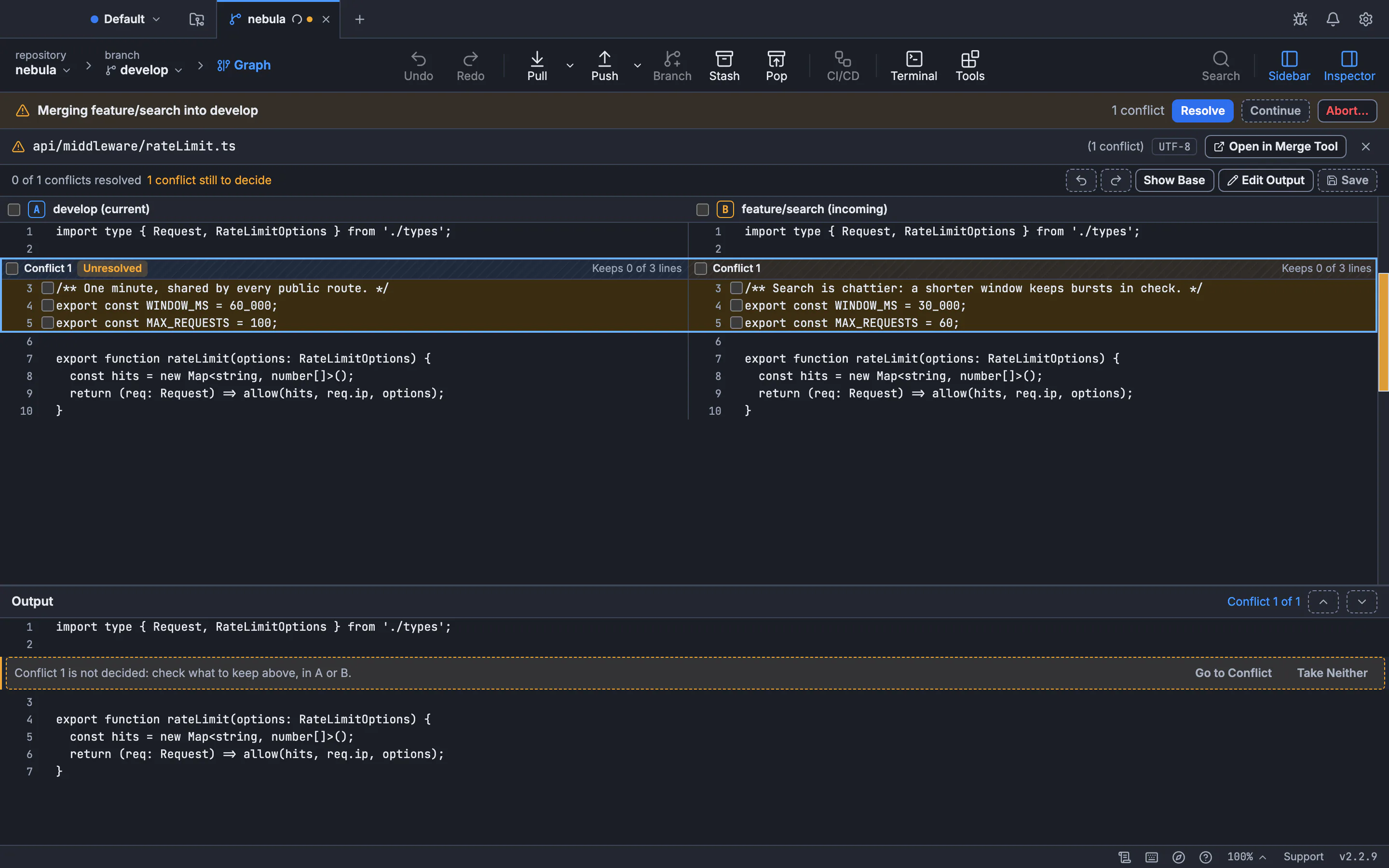
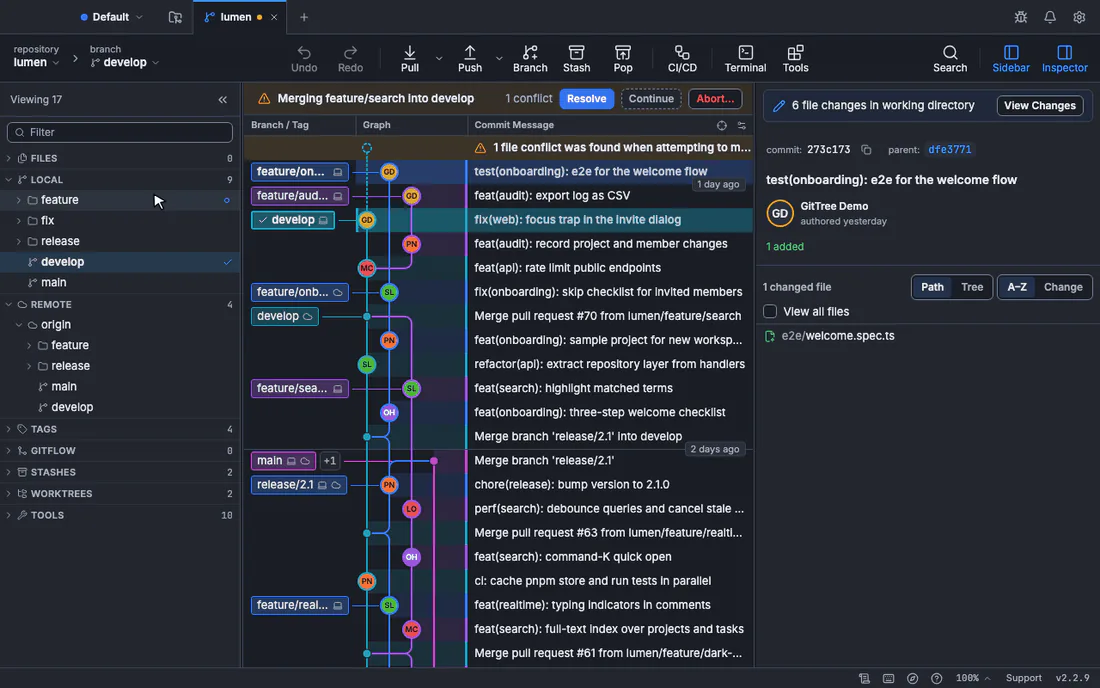
A banner above the graph names the operation, such as Merging feature/search into develop, and how many conflicts remain.
Choose Abort
Press Abort… in the banner. Resolve and Continue sit beside it if you change your mind.
Confirm
The dialog Abort the operation? says what it drops. Press Abort. GitTree saves what it drops in recovery snapshots first, so Undo can bring it back.
See continue, skip or abort an operation for every case, and the continue, skip and abort lesson to practise it.
Frequently asked questions
Does git merge --abort delete my changes?
It removes the merge’s changes and any conflict resolutions you made so far. Work you committed before the merge is safe. Uncommitted changes from before the merge may not come back cleanly, so commit or stash before merging.
What is the difference between git merge --abort and git reset --merge?
git merge --abort is the normal way out of a merge, and it runs git reset --merge for you when a merge is in progress. Use git reset --merge directly when conflicts came from something else, such as git stash pop.
How do I abort a git pull?
A pull that stopped on conflicts is a merge or a rebase. Run git status to see which, then use git merge --abort or git rebase --abort.
Can I abort a merge after resolving some conflicts?
Yes, until you commit. git merge --abort throws away the resolutions as well, so you start from scratch if you merge again. Turning on git rerere makes Git remember them.
What does git rebase --quit do?
It stops the rebase without moving HEAD back, leaving you on the commits replayed so far. git rebase --abort is what you want in nearly every case.
Sources
Claims about other products were checked against their official pages on November 7, 2026. Prices and features change; the vendors’ pages are the source of truth.