Git rebase branch: how to rebase safely, step by step
Rebasing takes one command. Doing it safely takes a few more: save the old tip, handle each conflict, compare the result, and push without overwriting a teammate. Here is the whole sequence.
Written by Kodmora
The software house behind GitTree
- Rebase
- Branches
- Merge conflicts
- Remotes and push
On this page
To rebase a branch, fetch, switch to it and replay it onto the new base: `git fetch origin`, `git switch topic`, `git rebase origin/main`. Git sets your branch’s own commits aside, moves the branch to the tip of origin/main, then reapplies the commits one at a time. The history stays a straight line with no merge commit. Every replayed commit gets a new hash, so a branch you already pushed needs git push --force-with-lease afterwards.
What does git rebase do to a branch?
Say topic has two commits of its own, and main has gained three since the branch started. Rebasing updates that starting point without merging main into your branch:
# before
A---B---C---D---E   origin/main
     \
      F---G         topic

# after git rebase origin/main
A---B---C---D---E   origin/main
                 \
                  F'---G'   topic
F' and G' hold the same changes and messages as F and G, but they are new commits with new hashes, because their parents changed. A merge from the same starting point would keep both lines and add one commit with two parents. The lesson on merge versus rebase shows both on one graph.
How do I rebase a branch safely, step by step?
Inspect first, keep the old tip, replay, then test. The first three commands rewrite nothing:
# 1. update origin/main, your files stay as they are
git fetch origin

# 2. list the commits Git will replay
git log --oneline origin/main..topic

# 3. keep a name on the old tip
git branch topic-backup topic

# 4. replay
git switch topic
git rebase origin/main
Stop at step 2 if the list has a commit you do not recognise, because it means the branch did not start where you thought. When the rebase ends, run git status to confirm it finished, then run your tests. A rebase with no conflicts can still break behaviour.
Name the base every time. A bare git rebase uses the branch’s upstream, which is often origin/topic and not main. To move a branch that started from another feature branch, name the old base too: git rebase --onto main old-base topic. The lesson on rebasing unpublished work practises this on a real graph.
How do I fix conflicts during a rebase?
Git applies your commits one at a time, so it can stop more than once, even in the same lines. Fix only the commit Git stopped on, since the later ones have not been applied yet:
# edit the file and remove the conflict markers, then
git add path/to/file
git rebase --continue| Command | What it does | Use it when |
|---|---|---|
git rebase --continue | Records the staged result and moves to the next commit. | The conflict is resolved and staged. |
git rebase --skip | Drops the commit being replayed. | You have confirmed the change is already upstream. |
git rebase --abort | Stops and returns the branch to where it was. | You picked the wrong base or branch, or the clash needs more thought. |
If you replay the same conflict often, git config rerere.enabled true records your resolution and reuses it. Check each reused result, because yesterday’s answer can be wrong in today’s code. The lesson on continue, skip and abort goes through each case, and how to resolve merge conflicts covers reading the markers.
How do I check a rebase before pushing?
Compare the old series with the new one before anyone else sees it:
# old and new commits, matched pair by pair
git range-diff origin/main topic-backup topic

# everything the branch adds to main, as one diff
git diff origin/main...topic

# the shape of the history
git log --graph --oneline --decorate origin/main topic
git range-diff shows when a conflict resolution changed a patch, or when a commit went missing. Code that compiles can still hide a dropped test or a changed condition, and this is where you catch it.
How do I undo a rebase?
While it is running, use git rebase --abort. Once it has finished, move the branch back to the old tip. Check git status first, because --hard discards uncommitted changes:
git reset --hard topic-backup

# no backup? find the old tip in the reflog
git reflog show topic
git reset --hard <old-tip-hash>
The guide to undoing a reset, rebase or commit covers the reflog in more depth.
How do I push a rebased branch?
A normal push is refused, because the remote branch still holds the old commits and Git sees a non-fast-forward update. Check what you are about to replace, then push with a lease:
git fetch origin
git log --oneline topic..origin/topic
git push --force-with-lease origin topic
That git log should list only your old commits. Anything else is a teammate’s work, so stop and bring it in first. --force-with-lease replaces the remote branch only if it is still where your last fetch saw it, and plain --force has no such check. Background fetches update that value, so scripts can name the commit they expect: git push --force-with-lease=topic:<expected-hash> origin topic.
Should I rebase or merge this branch?
| Situation | Use | Why |
|---|---|---|
| Your own short-lived topic branch | Rebase | A straight history that reads commit by commit. |
| A branch others have fetched or built on | Merge | It rewrites nothing, so nobody has to repair their work. |
| A long-lived integration branch | Merge | It keeps the record of both lines of development. |
| A branch under review | Rebase, once reviewers agree | Comments may point at commits that are about to change. |
How to rebase a branch in GitTree
Choose the new base
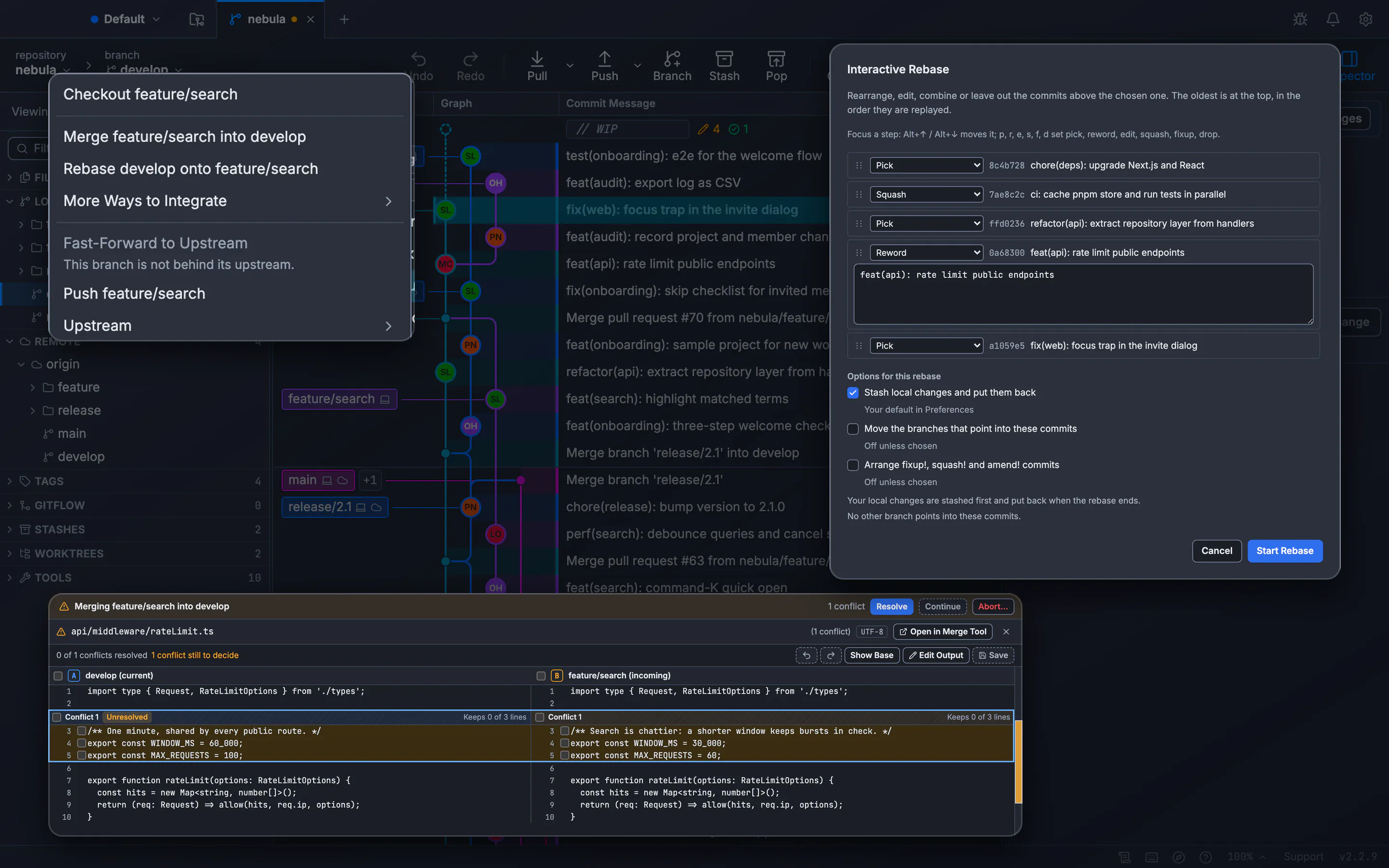
Check out your branch, right-click the branch you want your work on top of, such as
develop, and choose Rebase … onto ….Check the options
The confirmation says each commit is replayed with a new id and the old branch is kept. You can also stash local changes and put them back.
Follow each step
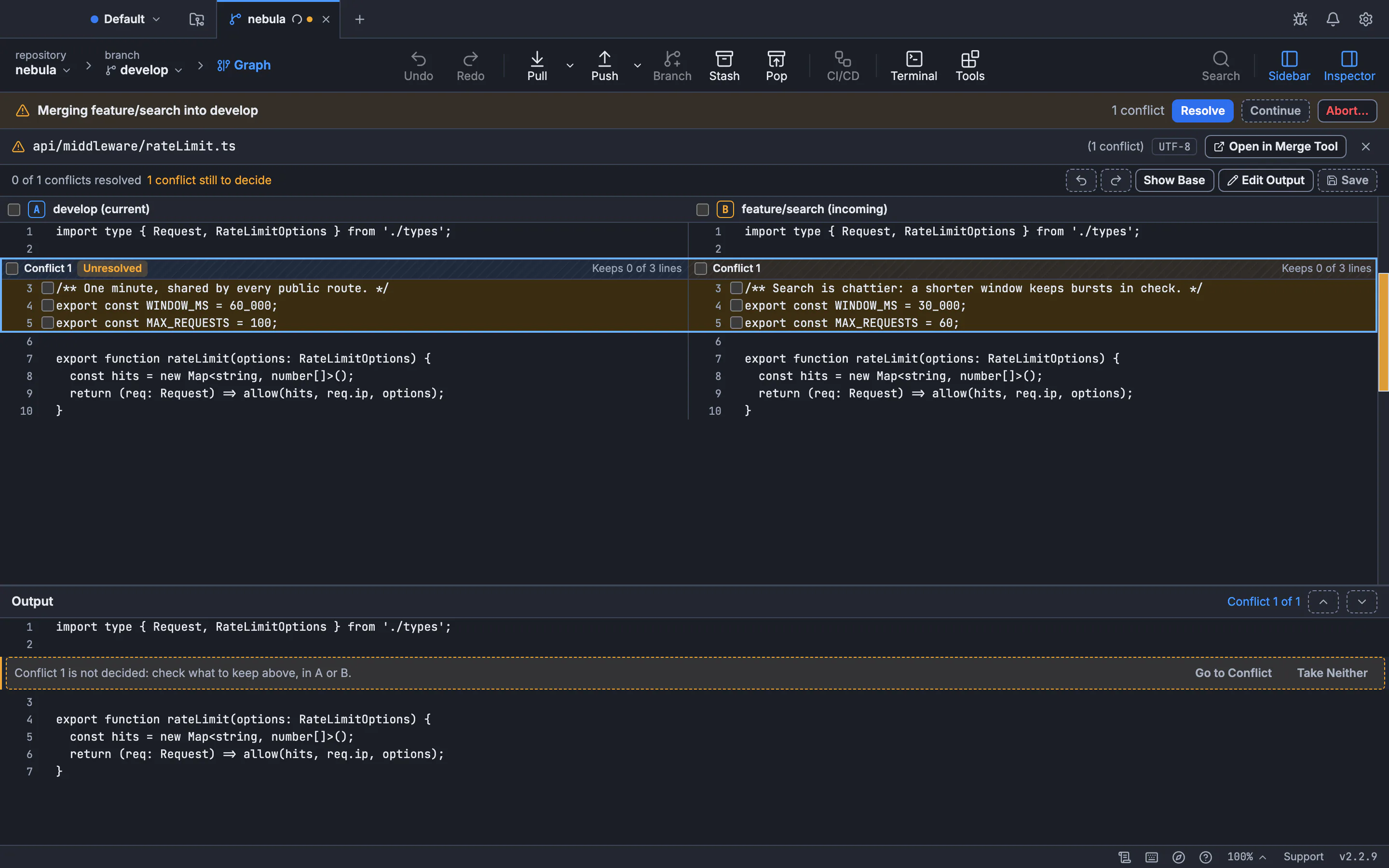
A banner shows Rebasing … onto …, step … of …. If a step conflicts, Resolve opens the files, Continue goes on, Skip drops that commit and Abort… puts the branch back as it was.
Review what changed
What Changed… (
Alt+D) compares the commits before and after the rebase, pair by pair, likegit range-diff.Push, or undo
Use Force Push (With Lease)… for a branch already on the remote. Undo returns the branch to where it was, and the old commits are kept under
refs/ogt/trash.
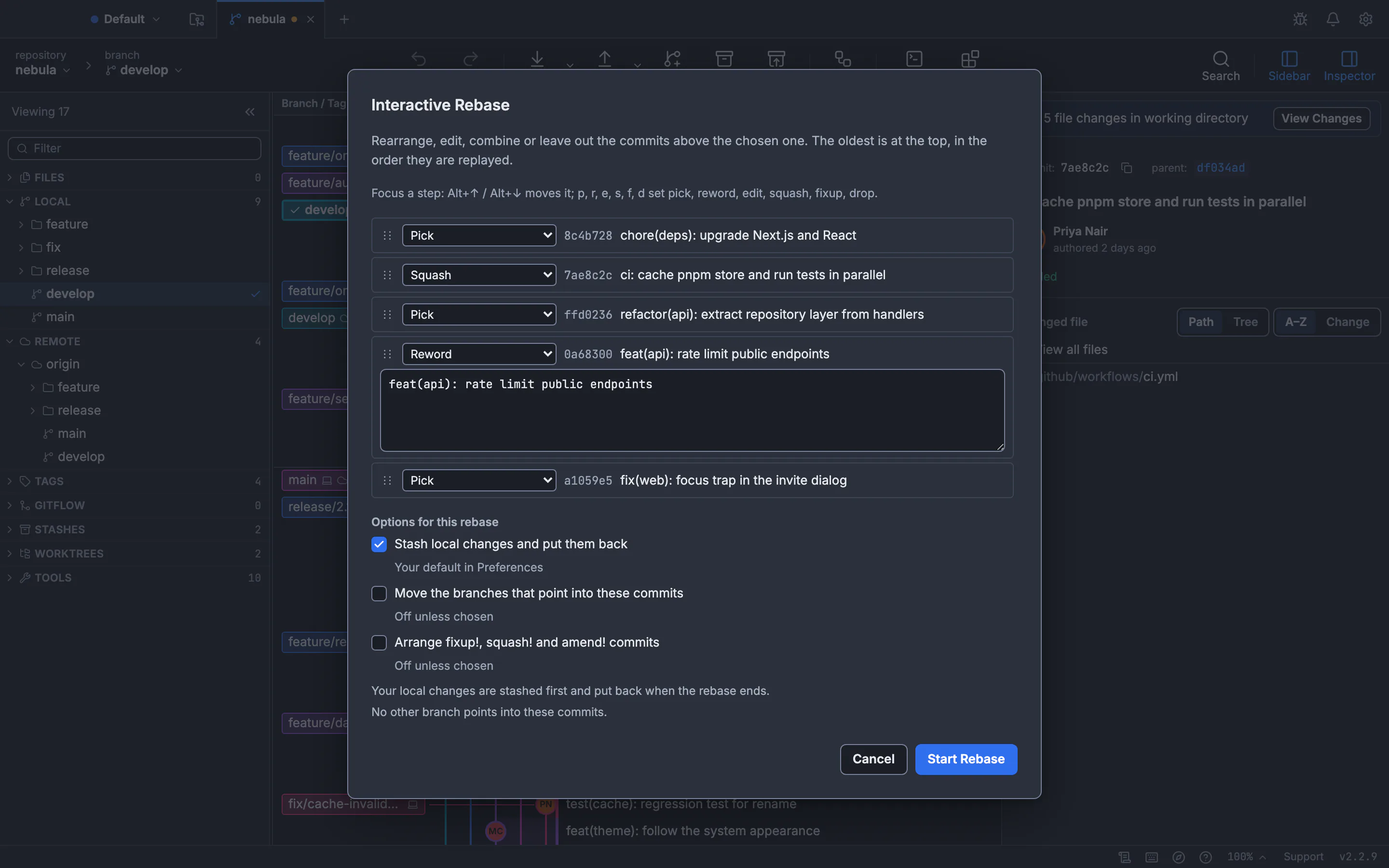
The guide to rebasing a branch has every option, and force push with lease covers the push. To squash, reword or reorder along the way, read interactive rebase in a GUI.
Frequently asked questions
Does git rebase lose changes?
Not by itself. Git replays your changes into new commits. Work disappears when you drop a commit, run git rebase --skip, or resolve a conflict the wrong way. Git also leaves out commits whose changes are already upstream.
What is the difference between git rebase --abort and the reflog?
git rebase --abort works only while a rebase is in progress. After it finishes, the reflog holds the branch’s earlier tips, so you can reset to one of them.
Can I rebase a branch that contains merge commits?
Yes. git rebase --rebase-merges origin/main keeps them. Without that option Git flattens the branch and leaves merge commits out.
Why does git push fail after a rebase?
The remote branch still has the old commits, which your rewritten branch does not contain. Check them, then use git push --force-with-lease origin topic.
Should I rebase onto main or origin/main?
Use origin/main after git fetch origin. It is the latest published state, and you do not have to update your local main first.
Sources
Claims about other products were checked against their official pages on November 7, 2026. Prices and features change; the vendors’ pages are the source of truth.