How to delete a Git branch, locally and on the remote
A local branch and its remote copy are two separate things. Here is how to delete each one, what the common errors mean, how to clean up stale refs, and how to recover a branch you deleted by mistake.
Written by Kodmora
The software house behind GitTree
- Branches
- Remotes and push
- Undo and recovery
On this page
To delete a local branch, run `git branch -d branch-name`. To delete it on the remote, run `git push origin --delete branch-name`. They are separate actions: deleting one leaves the other in place. Git refuses the first command if the branch has commits that are not merged, which protects your work.
| Goal | Command |
|---|---|
| Delete a merged local branch | git branch -d feature/search |
| Force-delete an unmerged local branch | git branch -D feature/search |
| Delete the branch on the remote | git push origin --delete feature/search |
| Remove stale remote-tracking refs | git fetch --prune |
How do I delete a local Git branch?
Switch away first, because Git will not delete the branch you are on. Then delete it:
git switch main
git branch -d feature/search
Git prints the last commit of the branch. Keep that hash for a moment, because it is the easiest way back:
Deleted branch feature/search (was 4f2a9c1).How do I delete a remote branch?
git push origin --delete feature/searchThis removes the branch for everyone using that remote, so check that nobody still needs it and that its pull request is closed. Your local copy stays until you delete it too.
What do the delete errors mean?
| Message | Meaning | Fix |
|---|---|---|
not fully merged | The branch has commits that are not in its upstream or in HEAD. | Merge it, or use -D if you are sure you do not need them. |
cannot delete branch … used by worktree | You are on it, here or in another worktree. | Run git switch main, or remove the other worktree. |
remote ref does not exist | The branch is already gone from the remote. | Run git fetch --prune to clear your stale copy. |
What does git remote prune origin do?
When someone deletes a branch on the remote, your repository keeps its origin/feature/search ref until you remove it. Pruning deletes those stale refs. It never touches your local branches:
git fetch --prune
# or, without fetching anything new
git remote prune origin
To see which local branches lost their remote copy, look for gone in the verbose list:
git branch -vvHow do I get a deleted branch back?
A branch is only a name for a commit, so deleting it does not delete the commits straight away. Create the name again from the hash Git printed, or find it in the reflog:
git branch feature/search 4f2a9c1

# no hash? search the reflog
git reflog
Do this soon: unreachable commits are cleaned up by garbage collection eventually. The post on recovering a dropped stash or deleted branch covers the harder cases, and the lesson on branches and switching explains why a branch is so cheap.
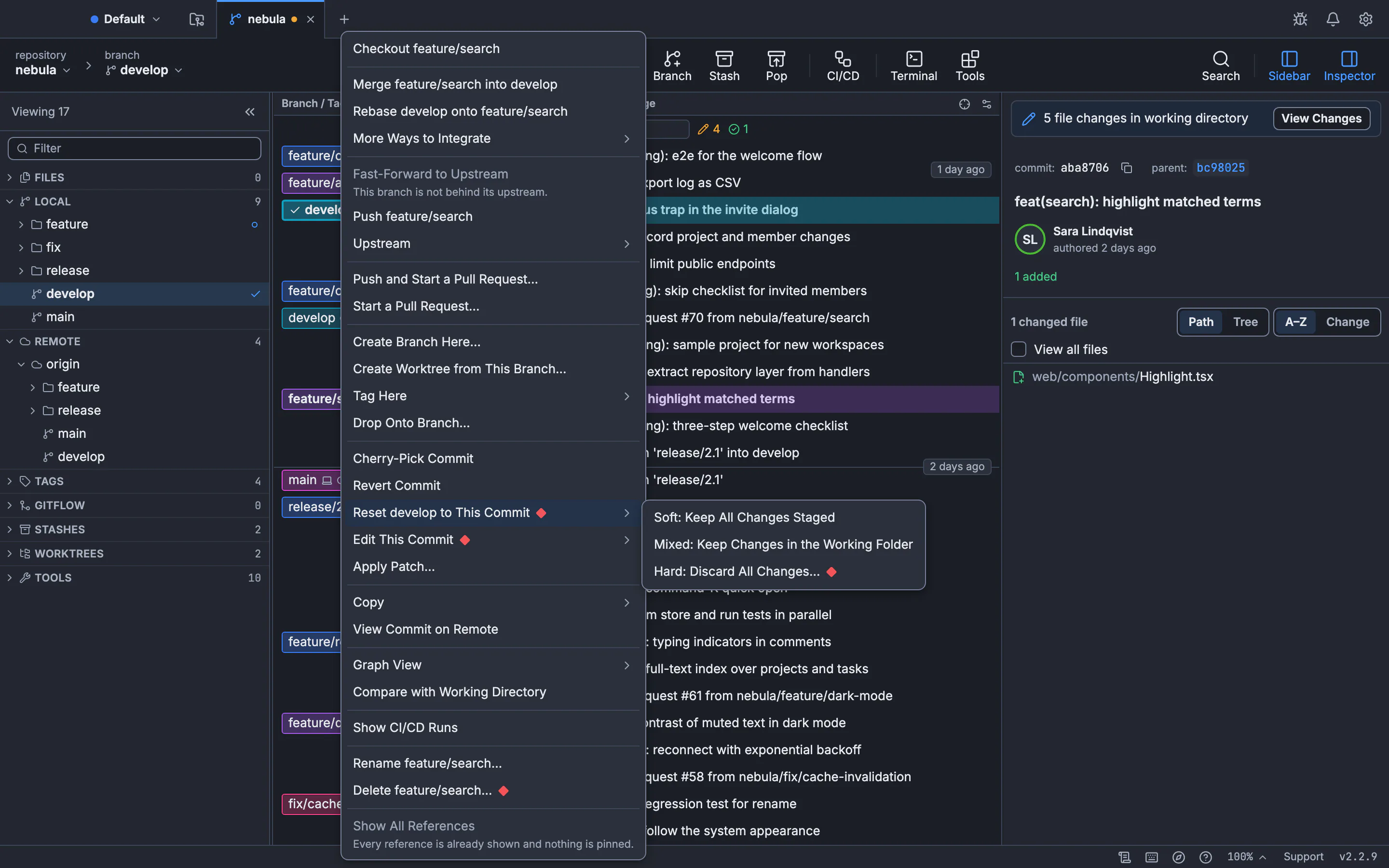
How to delete a branch in GitTree
Open the branch’s menu
Right-click the branch label in the graph. The menu names the branch in each action.
Choose Delete
GitTree says what is removed and that the last commit is saved under
refs/ogt/trash. Cancel is the default, so press Delete feature/search to confirm.Delete the remote copy too
Delete … and origin/… removes both, confirmed with Delete Both. A branch deleted on the remote cannot be brought back from GitTree.
Changed your mind?
Press Undo in the toolbar right after a local delete to bring the branch back.
The guide to renaming and deleting branches has the details, and how to rename a branch covers changing a name instead.
Frequently asked questions
Does deleting a branch delete its commits?
Not right away. Commits on other branches stay. Commits only on that branch become unreachable and can be recovered until garbage collection removes them.
What is the difference between git branch -d and -D?
-d refuses to delete a branch with unmerged commits. -D deletes it anyway, so use it only when you are sure.
Does deleting a local branch delete the remote one?
No. They are separate. Use git push origin --delete branch-name for the remote.
Why does a deleted remote branch still show up?
Your repository still has the remote-tracking ref. Run git fetch --prune to remove it.
Can I delete several branches at once?
Yes. git branch -d one two three deletes each name you list, and git push origin --delete one two does the same on the remote.
Sources
Claims about other products were checked against their official pages on November 7, 2026. Prices and features change; the vendors’ pages are the source of truth.